1. Entwodiksyon
This manual provides detailed instructions for the installation, operation, and maintenance of your VSTARCAM C622 Outdoor PT Network Security Camera. Designed for outdoor surveillance, this camera features 1080P resolution, Pan & Tilt functionality, color night vision, motion detection, two-way audio, and multiple storage options to enhance your home security.
2. Ki sa ki nan bwat la
- Kò Kamera
- Manyèl itilizatè
- Pake Vis
- Pwovizyon pou pouvwa
- Waterproof Set
3. Gid Enstalasyon
3.1 Enstalasyon Fizik
The VSTARCAM C622 camera is designed for wall mounting. Ensure the mounting location provides a clear field of view and is within reach of a power source. The camera is IP66 waterproof, suitable for various weather conditions.

Figure 1: VSTARCAM C622 camera mounted on an exterior wall.
Use the provided screws and bracket to securely attach the camera to the desired surface. The power cable should be routed to an indoor power outlet. The camera requires a corded electric power source.
3.2 App Installation and Network Connection
To operate your VSTARCAM C622 camera, download the "O-KAM Pro" application on your smartphone (Android or iOS).
- Download the "O-KAM Pro" app from your device's App Store or Google Play and register an account.
- Plug the camera into a power source.
- Long press the Reset Button on the camera body for 5 seconds until you hear a voice prompt.
- In the app, tap the "+" icon on the top right corner to add a new device. Scan the QR code on the camera body.
- Follow the in-app prompts to configure the 2.4GHz Wi-Fi connection. Remak: Kamera a pa sipòte rezo Wi-Fi 5GHz. Bluetooth connection is also available for faster setup.
- Once connected, you can start using your camera.
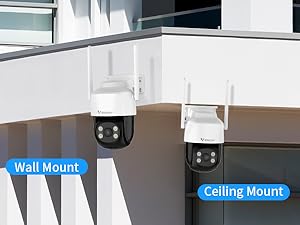
Figure 2: Quick and easy connection steps via the O-KAM Pro app.
Video 1: General setup and app connection process for a similar security camera. (Source: ARCCTV 24/7 Security Camera Outdoor Wifi)
4. Operasyon Enstriksyon
4.1 Kontwòl Panoramik ak Enklinasyon
The camera features Pan & Tilt functionality, allowing you to remotely adjust the viewing angle through the mobile app. It supports 270° horizontal rotation and 90° vertical tilt, covering a wide area without blind spots. When a human figure is detected, the camera can automatically rotate and track the movement.

Figure 3: Pan and Tilt functionality for comprehensive area coverage.
4.2 Mòd Vizyon Lannwit
The camera offers three night vision modes for clear imaging in low-light conditions:
- Vizyon lannwit enfrawouj: Presents clear black and white images.
- Vizyon lannwit tout koulè: Utilizes built-in floodlights to present color images.
- Vizyon lannwit entelijan: Automatically switches to full-color mode when motion is detected in the monitoring area.

Figure 4: Visual representation of the three available night vision modes.
4.3 Deteksyon Mouvman ak Suivi Otomatik
Equipped with advanced AI algorithms, the camera can smartly identify human figures, automatically track their movement, record the entire process, and send alarm information to your mobile app.

Figure 5: The camera's AI-powered motion detection and auto-tracking feature.
4.4 Odyo De-fason
The built-in microphone and speaker enable smooth two-way communication. You can clearly hear and talk with family members or visitors through the app, or deter intruders with a voice alarm.

Figure 6: Demonstrating the two-way audio capability of the camera.
4.5 Light & Siren Alarm
Activate the motion-activated spotlight to light your way or deter unwanted visitors. A loud siren alarm can also be triggered for added security.

Figure 7: The camera's light and siren alarm functionality.
4.6 Customizing Activity Zones
Within the O-KAM Pro app, you can define specific activity zones. This allows you to focus detection on critical areas and reduce false alarms from irrelevant movements outside these zones.

Figure 8: Setting up custom activity zones in the app.
4.7 Intelligent App Settings
The O-KAM Pro app provides various intelligent settings, including scheduling motion detection, adjusting recording duration, and setting detection sensitivity to optimize monitoring and minimize unnecessary alerts.

Figi 9: Plis paseview of intelligent settings available in the O-KAM Pro app.
4.8 Flexible Storage & 24/7 Recording
The camera supports two storage methods for continuous 24/7 recording:
- Depo lokal: Save pictures and videos directly to a TF card (up to 256GB, not included).
- Sèvis Cloud: A 7-day trial is provided for cloud storage, allowing convenient playback from anywhere.

Figure 10: Illustration of local TF card and cloud storage options.
4.9 One App Controls Multiple Cameras
The O-KAM Pro app allows you to easily manage and monitor multiple VSTARCAM security cameras simultaneously from various devices, including Android, iOS, and PC.

Figure 11: The O-KAM Pro app interface showing multiple camera feeds.
5. Antretyen
The VSTARCAM C622 camera is designed with IP66 waterproof and dust-proof rating, ensuring reliable operation in various weather conditions. Regularly check the camera lens for dirt or debris and clean it gently with a soft cloth to maintain optimal image clarity. Ensure all cable connections are secure and protected from environmental elements.

Figure 12: The camera's durability in various weather conditions.
NAN. Depanaj
- Pwoblèm koneksyon WiFi: Ensure your router is broadcasting a 2.4GHz Wi-Fi signal. The camera does not support 5GHz networks. Verify the Wi-Fi password is correct.
- Fo Alam: Utilize the "Customizing Activity Zones" feature in the O-KAM Pro app to define specific areas for motion detection, reducing alerts from irrelevant movements like pets or swaying branches. Adjust motion detection sensitivity in the app settings.
- Loud Voice Prompts During Setup: The camera emits voice prompts during setup. These are normal and indicate progress. If they are too loud, you may temporarily move the camera further away during initial setup.
- Longè kab pouvwa: The included power cable has a limited length. For outdoor installations requiring longer distances to a power outlet, consider using an appropriate outdoor-rated extension cord or consulting an electrician for a dedicated outdoor power solution.
7. Espesifikasyon
| Karakteristik | Detay |
|---|---|
| Itilizasyon Andedan kay la / Deyò | Deyò |
| Aparèy konpatib | Smartphone |
| Sous pouvwa | Fil elektrik |
| Pwotokòl Koneksyon | Wi-Fi |
| Kalite kontwolè | Android |
| Kalite aliye | Mi mòn |
| Rezolisyon Capture Videyo | 1080p |
| Koulè | Blan |
| Konpozan ki enkli | Camera body, user manual, pack of screws, power supply, waterproof set |
| Teknoloji kominikasyon san fil | Wi-Fi |
| Materyèl | Plastik |
| Dimansyon atik L x W x H | 5.6 x 4.5 x 6.6 pous |
| Nivo rezistans dlo | Ki enpèmeyab (IP66) |
| Batri obligatwa? | Non |
| Fòma Capture Videyo | MPEG-4 |
| Metòd kontwòl | App |
| Pwa atik | 1.28 liv |
| Nimewo Modèl Atik | C622 |
| Manifakti | VSTARCAM |
| Itilizasyon Rekòmande | Deyò Sekirite |
| Karakteristik espesyal | 2-Way Audio |
8. Garanti ak sipò
For warranty information and technical support, please refer to the documentation included with your product or visit the official VSTARCAM websit. Kenbe resi acha ou pou reklamasyon garanti.


