1. Entwodiksyon
The SINGER M1000 Mending Machine is designed for light to medium weight fabrics, offering portability and ease of use for basic mending and garment repairs. This manual provides essential information to help you operate and maintain your machine effectively.
2. Enfòmasyon enpòtan sou sekirite
Toujou swiv prekosyon sekirite debaz yo lè w ap itilize aparèy elektrik pou diminye risk dife, chòk elektrik, oswa blesi pou moun.
- Li tout enstriksyon yo anvan ou sèvi ak machin nan.
- Keep the machine away from water or wet surfaces.
- Unplug the machine from the electrical outlet when not in use, when servicing, or when changing accessories.
- Pa kite timoun yo opere machin nan san sipèvizyon.
- Use the machine only for its intended purpose as described in this manual.
- Pa janm sèvi ak machin nan si fil la oswa ploge a domaje, si li pa fonksyone byen, oswa si li tonbe oswa si li domaje.
3. Pake kontni
Verifye ke tout atik yo prezan nan pakè ou a:
- SINGER M1000 Mending Machine
- All-Purpose Foot
- Transparent Class 15 Bobbins
- Extra Needle
- Manyèl Zegwi Threader
- Kòd pouvwa

Image: The SINGER M1000 Mending Machine in blue, shown with its power cord, foot pedal, bobbins, and other accessories.
4. Machin souview
Familiarize yourself with the main components of your SINGER M1000 Mending Machine.

Image: This image highlights key features: the Easy Stitch Selection dial, a visual representation of 32 stitch applications, and the Reverse Lever for securing stitches.
- Stitch Selection Dial: Located on the front of the machine, used to choose desired stitch patterns.
- Reverse Lever: Engages reverse stitching to secure seams.
- Bobin anlè ki ka antre a: Provides easy access for bobbin insertion and monitoring thread supply.
- Bra lib: Accessible by removing the accessory compartment, ideal for sewing cuffs and hems.
- Limyè ki ap dirije: Eklere zòn koud la pou pi bon vizibilite.
5. Enstalasyon
5.1 Koneksyon pouvwa
Connect the power cord to the machine and then to a suitable electrical outlet. Ensure the foot pedal is also connected.
5.2 Bobinaj la
- Place an empty Class 15 transparent bobbin onto the bobbin winder spindle.
- Follow the threading guides for bobbin winding, typically indicated by dashed lines or numbers on the machine.
- Engage the bobbin winder and press the foot pedal to start winding.
- Stop when the bobbin is full and trim the thread.
5.3 Mete fil nan machin nan
Bon anfilaj enpòtan anpil pou fòmasyon pwen yo kòrèk. Swiv gid anfilaj nimewote yo sou machin nan ak anpil atansyon.
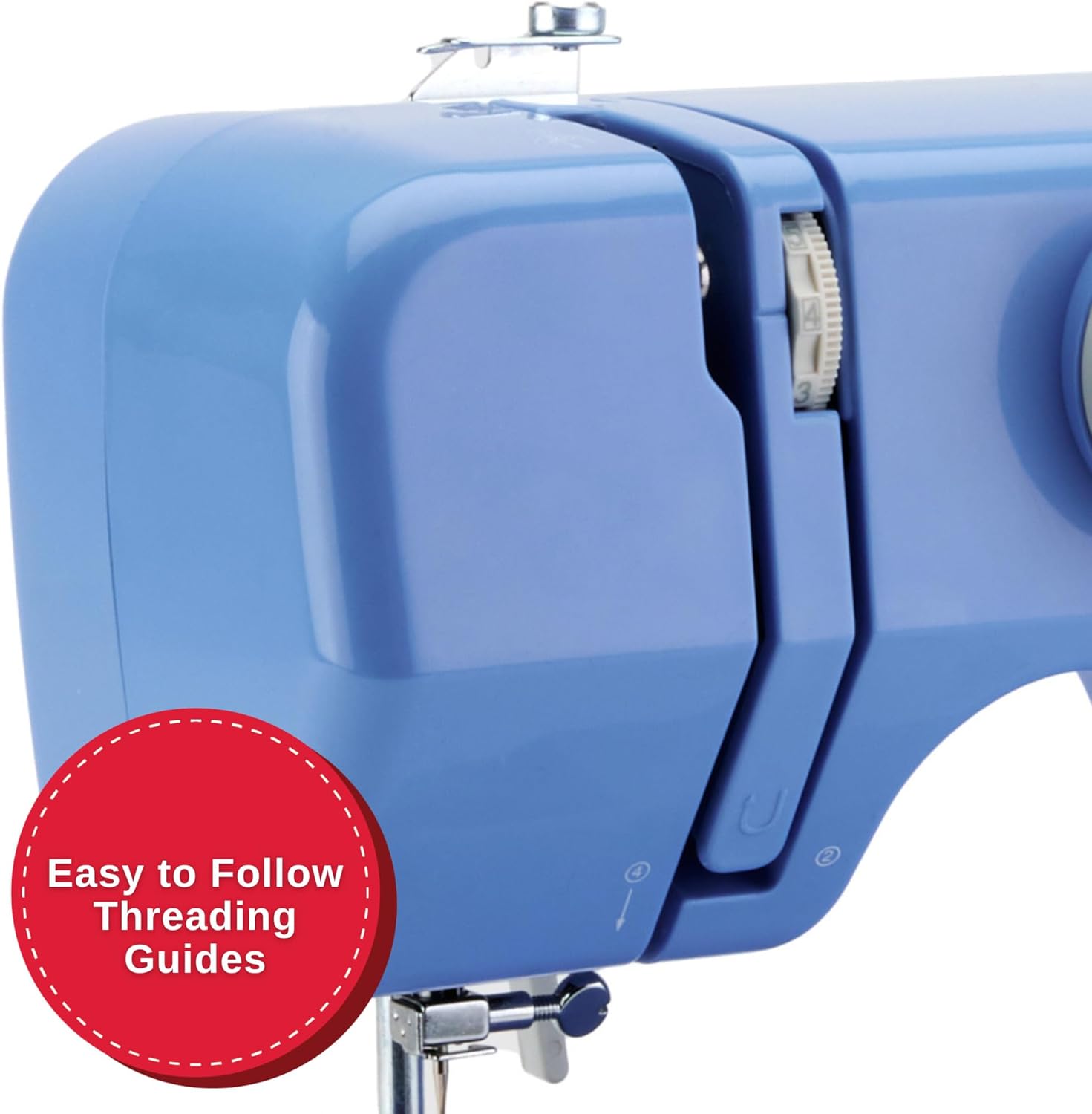
Imaj: Yon imaj detaye view of the machine's side, illustrating the clear, numbered threading guides to ensure correct upper thread path.
- Leve pye pye a.
- Mete yon bobin fil sou pin bobin la.
- Guide the thread through the upper threading path, following the numbered steps or arrows.
- Fil zegwi a soti devan dèyè.
- Insert the wound bobbin into the top drop-in bobbin case.
- Pull the bobbin thread up through the needle plate opening.

Image: A close-up showing the transparent cover of the top drop-in bobbin, indicating easy access and visibility of the bobbin thread supply.
6. Operasyon Enstriksyon
6.1 Seleksyon pwen
Turn the Stitch Selection Dial to choose one of the 32 available stitch applications. The machine automatically sets the optimal stitch width and length for the selected stitch.
- Dwat Stitch: Pou kouti debaz ak pwen depafini.
- Pwen Zigzag: For finishing raw edges, appliqué, and decorative purposes.
- Multi-step Zigzag: Suitable for elastic insertion and seam finishing.
- Pwen woulèt avèg: For creating invisible hems.
6.2 Kòmanse Koud
- Mete twal ou anba pye presser la.
- Bese pye presser la.
- Gently press the foot pedal to begin sewing. The machine operates at a single speed.
6.3 Using the Reverse Lever
To secure the beginning and end of a seam, press and hold the Reverse Lever while sewing. Release the lever to continue sewing forward.
6.4 Koud ak bra lib
Remove the accessory compartment to expose the free arm. This feature is useful for sewing small, tubular items such as cuffs, pant hems, and necklines.
6.5 Adjustable Thread Tension
The machine's tension control allows you to adjust the balance between the upper and bobbin threads. Proper tension ensures a smooth, even stitch. Adjust as needed based on fabric type and thread thickness.
7. Antretyen
Regular maintenance ensures optimal performance and longevity of your sewing machine.
- Netwayaj: Periodically clean lint and dust from the bobbin area and feed dogs using a small brush. Always unplug the machine before cleaning.
- Ranplasman zegwi: Replace needles regularly, especially if they become bent or dull, to prevent skipped stitches and fabric damage.
- Kalite bobin: Use only SINGER Class 15 Transparent bobbins for best results.
NAN. Depanaj
This section addresses common issues you might encounter. For more complex problems, refer to the official SINGER support resources.
| Pwoblèm | Kòz posib | Solisyon |
|---|---|---|
| Sote pwen | Incorrectly threaded needle, bent needle, wrong needle size for fabric. | Re-thread the machine, replace the needle, use appropriate needle for fabric type. |
| Kase Fil | Tansyon ki pa kòrèk, fil ki pa bon kalite, bobin ki mal vlope, bav sou plak zegwi a. | Adjust tension, use good quality thread, re-wind bobbin, check for burrs. |
| Twal pa manje | Presser foot not lowered, feed dogs clogged with lint. | Lower presser foot, clean feed dogs. |
| Machine Runs Slowly / Stops | Overload (too thick fabric), motor issue, internal jam. | Ensure fabric is suitable for the machine (light to medium weight). If problem persists, contact support. |
9. Espesifikasyon
- Modèl: M1000
- Dimansyon: 5.1"D x 11.5"W x 9.4"H
- Pwa: 5.5 liv (2.5 kg)
- Stitch Applications: 32
- Kalite bobin: Class 15 Transparent
- Sewing Space (Needle to Tower): 4.25 pous
- Pouvwa: Enkli kòd pouvwa

Image: The SINGER M1000 Mending Machine, illustrating its compact dimensions of 11.5 inches width and 9.5 inches height, highlighting its portability.
10. Garanti ak sipò
The SINGER M1000 Mending Machine comes with a warranty (1 year / 25 years, as per product description). For detailed warranty information and to register your product, please visit the official SINGER websit.
For additional support, tutorials, and troubleshooting guides, download the free Creativate app:

Image: A mobile phone displaying the Creativate app, which offers a user manual, quick start guide, tutorials, and troubleshooting assistance for SINGER machines.
Telechaje aplikasyon an:
You can also download the PDF user manual directly: SINGER M1000 User Manual PDF


