1. Entwodiksyon
The Hollyland Solidcom SE is a full-duplex wireless intercom headset system designed for seamless team communication in various production environments. This system features advanced Environmental Noise Cancellation (ENC), a 2.4 GHz frequency band for stable connections, and a lightweight, durable design. This manual provides essential information for setting up, operating, maintaining, and troubleshooting your Solidcom SE system.
2. Pake kontni
Verifye ke tout atik ki nan lis anba a yo enkli nan pakè ou a:
- 1 x Solidcom SE Wireless Master Headset (Single-Ear Version)
- 4 x Solidcom SE Wireless Remote Headsets (Single-Ear Version)
- 5 x Li-ion Battery Pack 770
- 1 x 6-Slot Charging Base
- 1 x USB-A pou USB-C kab
- 2 x Number Stickers 01
- 1 x kat garanti
- 1 x manyèl itilizatè

Image: All components included in the Hollyland Solidcom SE 5-Set package.
3. Gid Enstalasyon
3.1 Chaje batri yo
The Solidcom SE headsets use detachable Li-ion batteries. Ensure all batteries are fully charged before use.
- Insert the Li-ion batteries into the provided 6-slot charging base.
- Connect the charging base to a power source using the USB-A to USB-C cable.
- Alternatively, individual headsets can be charged directly via their USB-C port.
- A slowly flashing yellow indicator light on the microphone signifies charging. A solid yellow light indicates a full charge.

Image: A Solidcom SE headset being charged via its USB-C port.
3.2 Pairing Headsets
The Solidcom SE headsets are pre-paired at the factory for immediate use. If you need to add a new headset or re-pair existing ones:
- Ensure both the master and remote headsets are powered on.
- An menm tan peze epi kenbe la Volim + button on both the master and the remote headset for 5 seconds.
- The status indicator light will flash quickly during pairing.
- Once pairing is successful, the indicator light on the mic boom will remain solid green.
4. Operasyon Enstriksyon
4.1 Mete kas ekoutè a
The Solidcom SE headsets are designed for comfort during extended wear. Adjust the headband for a snug fit. The single-ear design allows for situational awareness.

Image: User wearing the lightweight Solidcom SE headset.
4.2 Mute and Talk Functions
The Solidcom SE offers two methods for controlling speech:
- Bouton Pouse-pou-Pale (PTT): Press and hold the mute button to speak. Release to mute.
- Movable Microphone Boom: Rotate the microphone boom upwards to mute. Rotate it downwards to speak.
- A solid green light on the mic boom indicates talking, while a solid red light indicates mute.

Image: Details of the Push-to-Talk button and movable microphone boom on the headset.
4.3 Anilasyon Bri Anviwònmantal (ENC)
The Solidcom SE features advanced dual-mic ENC technology, which is factory-set to ensure clear voice transmission by canceling out environmental noise. This function is always active and does not require manual activation.

Image: Visual representation of the ENC technology providing clear audio.
4.4 Auto Frequency Hopping
The system utilizes auto frequency hopping technology on the 2.4 GHz band. This feature automatically switches frequencies when interference is detected, ensuring a stable and reliable connection without manual intervention.

Image: Illustration of the auto frequency hopping mechanism for stable communication.
5. Antretyen
5.1 Cleaning and Replaceable Parts
To maintain hygiene and optimal performance, the Solidcom SE features replaceable over-ear ear pads and mic cushions. These can be easily swapped out to ensure cleanliness and prevent degradation of audio quality due to wear.
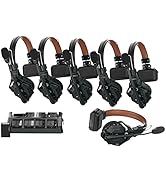
Image: Replaceable ear pads and mic cushions for hygiene and maintenance.
5.2 Water and Wind Resistance
The headsets are designed with water and wind resistance. An advanced algorithm reduces wind noise, and internal protective paint prevents water penetration. While resistant, the headsets are not fully waterproof and should not be submerged.

Image: Headset demonstrating water resistance in a wet environment.
NAN. Depanaj
| Pwoblèm | Kòz posib | Solisyon |
|---|---|---|
| No audio or intermittent connection | Out of range, interference, or headset not properly paired. | Ensure headsets are within 1100ft (350m) line-of-sight. Check for strong interference sources. Re-pair headsets as described in Section 3.2. |
| Mikwofòn pa mache | Microphone muted or not connected. | Check if the mic boom is rotated downwards (talk mode) or if the PTT button is pressed. Ensure the microphone is securely connected. |
| Headset powers off unexpectedly | Batri ki ba. | Charge the headset immediately. A slowly flashing red indicator light means low power. |
| Poor audio clarity / Excessive background noise | High environmental noise, or mic cushions/ear pads need cleaning/replacement. | The ENC is always active. Ensure mic is positioned correctly. Consider replacing worn mic cushions or ear pads. |
7. Espesifikasyon
| Karakteristik | Detay |
|---|---|
| Non modèl | Solidcom SE |
| Koneksyon Teknoloji | San fil |
| Teknoloji kominikasyon san fil | San fil |
| Bann Frekans | 2.4 GHz |
| Transmisyon Range | Up to 1,100ft (350m) Line-of-Sight |
| Kontwòl bri | Anilasyon Bri Aktif (ENC) |
| Battery Life (Remote Headset) | 12 èdtan |
| Battery Life (Master Headset) | 10 èdtan |
| Tan pou chaje | 2.5 èdtan |
| Nivo rezistans dlo | Dlo rezistan |
| Pwa atik | 5.24 liv (pakè total) |
| Manifakti | Hollyland |
| UPC | 191460007569 |
8. Garanti ak sipò
The Hollyland Solidcom SE system comes with a standard warranty. Please refer to the included Warranty Card for detailed terms and conditions. For technical support, service, or further inquiries, please contact Hollyland customer service through their official channels.
Keep your purchase receipt and warranty card in a safe place for future reference.


