Entwodiksyon
Thank you for choosing the LIGE Smart Watch. This device combines elegant design with advanced technology to enhance your daily life. Featuring a vibrant 1.19-inch HD AMOLED display, Bluetooth calling capabilities, comprehensive health monitoring, and over 110 sports modes, this smartwatch is designed to be your ultimate companion. This manual provides detailed instructions on how to set up, operate, and maintain your new smartwatch to ensure optimal performance and longevity.
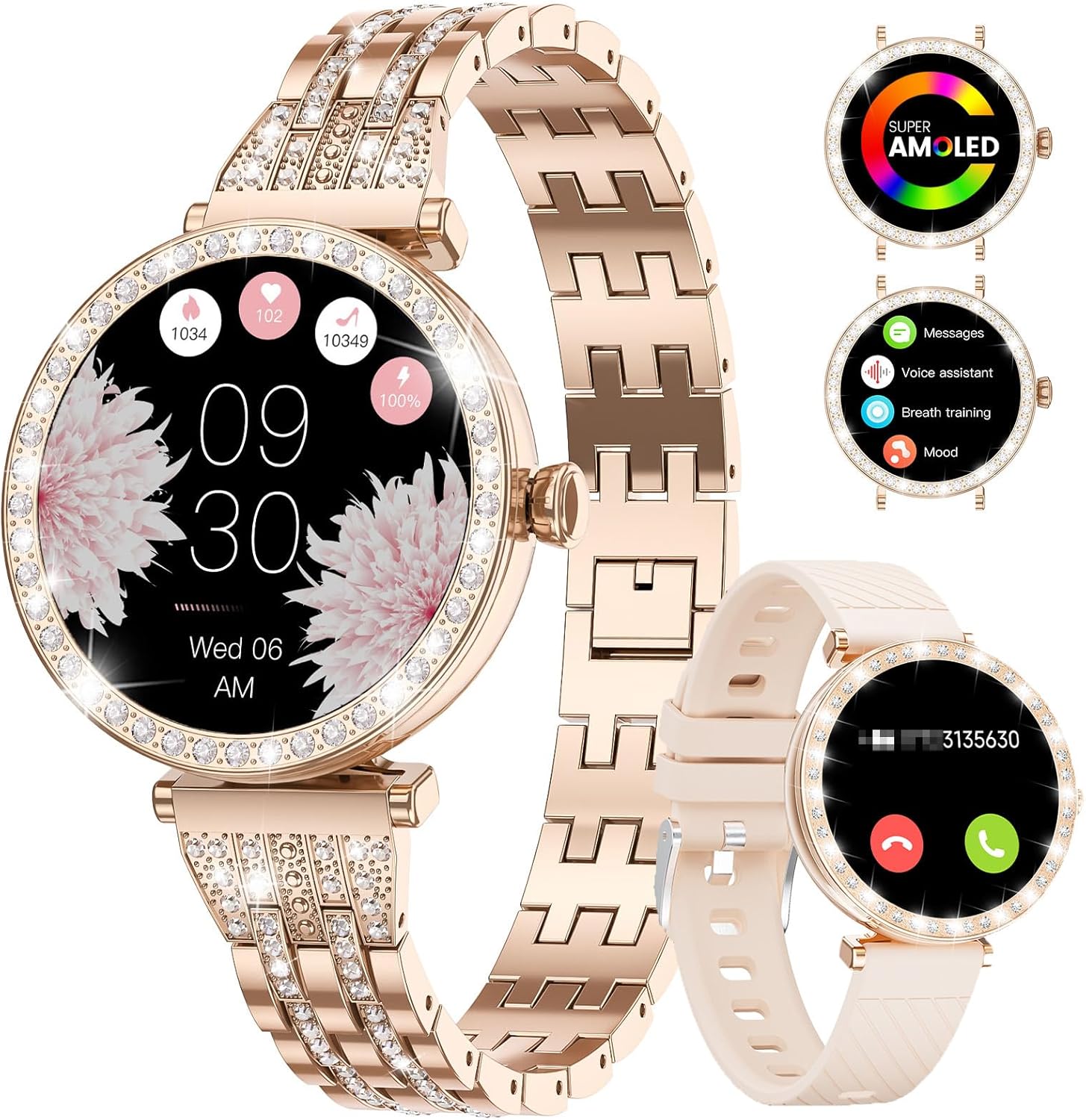
The LIGE Smart Watch, showcasing its elegant rose gold diamond-studded band and an alternative beige silicone band.
Ki sa ki nan bwat la
Upon opening your LIGE Smart Watch package, please ensure all the following items are present:
- LIGE Smartwatch
- Chaje kab
- Watch Strap (Diamond-studded stainless steel band)
- Additional Watch Strap (Silicone band)
- Watch Setting Tools (for adjusting the metal strap)
- Smartwatch Manuals (this document)
Gid Enstalasyon
Follow these steps to set up your LIGE Smart Watch for the first time.
1. Chaje mont entelijan an
Before initial use, fully charge your smartwatch. Connect the magnetic charging cable to the charging points on the back of the watch and plug the USB end into a compatible power adapter (not included) or a computer USB port. A full charge typically takes approximately 2 hours.
2. Downloading the Da Fit App
The LIGE Smart Watch requires the "Da Fit" application for full functionality and synchronization with your smartphone. The app is compatible with Android 5.0 and above, and iOS 9.0 and above.
- Scan the QR code provided in the watch packaging or search for "Da Fit" in your phone's app store (Google Play Store for Android, Apple App Store for iOS).
- Alternatively, you can download the app directly from this link: http://plus.crrepa.com/app-download/dafit
- Install the "Da Fit" app on your smartphone.
3. Konekte ak telefòn entelijan ou
To connect your smartwatch to the "Da Fit" app and enable Bluetooth calling and notifications:
- Asire w ke Bluetooth aktive sou smartphone ou.
- Louvri aplikasyon "Da Fit" la.
- Navigate to the "Device" tab (usually represented by a watch icon).
- Tap "Add Device" or "Bind Device" and select your LIGE Smart Watch from the list of discovered devices. The watch name might appear as "SML16-C-L1" or similar.
- Follow the on-screen prompts to complete the pairing process. You may need to confirm the connection on both your phone and the watch.
- For Bluetooth calling functionality, after the initial pairing, go to your phone's Bluetooth settings and connect to the "Audio_SML16-C-L1" or similar audio device associated with your watch. This separate connection enables call audio.
- Ensure the "Da Fit" app is allowed to run in the background on your phone to maintain a stable connection and receive notifications consistently.

Visual guide for connecting the LIGE Smart Watch to the Da Fit app, including QR code scanning and Bluetooth pairing steps.
Enstriksyon Operasyon
This section details the various functions and features of your LIGE Smart Watch.
Display and Customization
The smartwatch features a 1.19-inch HD AMOLED display, offering vivid colors and clear visuals.
- Montre figi personnalisable: The watch comes with several built-in watch faces. More than 120 additional watch faces are available through the "Da Fit" app. To access them, ensure the app is connected, go to the "Watch Faces" section, swipe left to the last face, and click "FACE GALLERY." You can also create custom DIY dials using your own photos.
- Ekspozisyon Toujou Sou (AOD): This feature allows the time to be displayed continuously without needing to raise your wrist or tap the screen. Note that enabling AOD will consume more battery power.

Examples of customizable watch faces available for the LIGE Smart Watch.

The 1.19-inch AMOLED screen and the DIY dial feature, allowing for personalized watch faces.
Karakteristik kominikasyon
- Rele Bluetooth: Once connected to your phone via Bluetooth (both the app and the audio connection), you can make and receive calls directly from your watch. Use the dial pad, access recent call logs, or sync contacts through the Da Fit app.
- Notifikasyon Smart: Receive alerts for incoming calls, text messages, and notifications from social media apps (e.g., Facebook, Instagram, WhatsApp) directly on your wrist. Note: The watch can display messages but cannot be used to reply to them.
- Asistan vwa: Interact with your phone's voice assistant (e.g., Siri, Google Assistant) through the watch for hands-free commands.

The LIGE Smart Watch displaying Bluetooth call and message reminder functionalities.

Plis paseview of voice assistant, Bluetooth calling, and message notification capabilities of the smartwatch.
Karakteristik Konvenyans
- Kontwòl Mizik: Control music playback on your smartphone directly from your watch (play, pause, skip tracks).
- Kontwòl Kamera Remote: Use your watch as a remote shutter button for your phone's camera.
- Mizajou meteyo: Get real-time weather forecasts displayed on your watch.
- Alam yo: Set multiple alarms to help you stay on schedule.
- Jwenn telefòn: If your phone is misplaced, use this feature on your watch to make it ring.
- Rapèl sedantèr: Receive alerts when you've been inactive for too long, encouraging you to move.
- Drink Reminders: Set reminders to stay hydrated throughout the day.
- Revèy ak kronomèt: Zouti esansyèl pou divès aktivite.
- Kalkilatris: Yon fonksyon kalkilatris debaz disponib sou mont lan.

The LIGE Smart Watch displaying weather forecast, camera control, and music control functionalities.

Plis paseview of additional convenience features including music control, camera control, weather updates, and alarm clock.
Siveyans Sante
The LIGE Smart Watch is equipped with advanced sensors to help you monitor various aspects of your health.
- Siveyans batman kè: Kontinye swiv batman kè ou pandan tout jounen an.
- Siveyans oksijèn nan san (SpO2): Mezire nivo saturation oksijèn nan san ou.
- Siveyans tansyon: Bay lekti tansyon estime.
- Siveyans dòmi: Analyze your sleep patterns, including deep sleep, light sleep, and REM sleep, to help you understand and improve your sleep quality.
- Women's Physiological Cycle Monitoring: Scientifically records and predicts menstrual cycles, including menstrual period, safety period, and ovulation, to support women's health management.
Remak: Fonksyon siveyans sante yo se pou referans sèlman epi yo pa ta dwe itilize pou dyagnostik medikal oswa tretman. Konsilte yon pwofesyonèl swen sante pou nenpòt pwoblèm sante.

The LIGE Smart Watch displaying all-day health monitoring data, including sleep stages.

The women's health management feature on the LIGE Smart Watch, tracking and predicting physiological cycles.

Visual representation of the health monitoring capabilities, including heart rate, blood pressure, and blood oxygen.
Mòd Espò ak Suivi Aktivite
The LIGE Smart Watch supports over 110 sports modes to help you track your workouts and daily activity.
- 110+ mòd espò: Select from a wide range of activities such as running, walking, cycling, yoga, swimming, and more to get specific data for your workout.
- Suivi aktivite: Automatically track daily steps, distance covered, and calories burned.
- GPS atravè Smartphone: For outdoor activities, the watch can utilize your phone's GPS to map your route and provide more accurate distance data.

The LIGE Smart Watch tracking various sports activities and daily metrics like heart rate, steps, distance, and calories.

The 100+ sport mode feature, designed to help users scientifically record sports data.
Antretyen
Proper care and maintenance will extend the life of your LIGE Smart Watch.
- Rezistans dlo: The watch has an IP68 waterproof rating, meaning it is resistant to dust and can withstand immersion in water up to 1.5 meters for 30 minutes. It is suitable for daily use, hand washing, and light rain. Avoid hot water, saunas, or diving, as steam and high pressure can compromise the seal.
- Netwayaj: Regularly clean the watch and straps with a soft, dry cloth. If necessary, use a slightly damp twal ak savon dou, apresa seche byen. Evite pwodui chimik ki agresif oswa materyèl abrazif.
- Swen batri: To preserve battery life, avoid extreme temperatures. Charge the watch fully before long periods of inactivity. The 330mAh battery offers 3-5 days of regular use and up to 20 days in standby mode.
- Depo: Sere mont lan nan yon kote ki fre epi sèk lè w pa ap itilize li.
Depanaj
If you encounter issues with your LIGE Smart Watch, try the following solutions:
- Mont lan pa konekte ak telefòn nan:
- Asire w ke Bluetooth aktive sou telefòn ou.
- Make sure the "Da Fit" app is running and has necessary permissions (location, Bluetooth).
- Rekòmanse telefòn ou ak mont entelijan an.
- Forget the device in your phone's Bluetooth settings and re-pair through the "Da Fit" app.
- Ensure the "Da Fit" app is allowed to run in the background and is not being closed by your phone's power-saving settings.
- Notifikasyon yo pa parèt:
- Check notification permissions for the "Da Fit" app in your phone's settings.
- Ensure notifications are enabled within the "Da Fit" app for specific applications.
- Verifye ke mont lan byen konekte atravè Bluetooth.
- Call audio not working:
- Confirm that the "Audio_SML16-C-L1" (or similar) Bluetooth device is connected in your phone's Bluetooth settings, in addition to the main watch connection.
- Check the volume settings on both your phone and the watch.
- Done sou sante ki pa egzak:
- Asire w ke mont lan byen sere sou ponyèt ou, ni twò sere ni twò lach.
- Netwaye detèktè yo ki sou dèyè mont lan.
- Remember that these are not medical devices and readings are for reference only.
- Kout lavi batri:
- Dezaktive fonksyon tankou Always-On Display si ou pa bezwen li.
- Diminye klète ekran an.
- Limite kantite aplikasyon k ap voye notifikasyon sou mont lan.
Si etap sa yo pa rezoud pwoblèm ou an, tanpri al gade seksyon "Garanti ak Sipò" a pou plis asistans.
Espesifikasyon
| Karakteristik | Detay |
|---|---|
| Nimewo Modèl | SML16-C-L1 |
| Gwosè ekran | 1.19 pous |
| Kalite ekspozisyon | AMOLED |
| Kapasite batri | 330 Miliamp Èdtan (Lityòm Polymè) |
| Lavi batri (itilizasyon tipik) | 3-5 jou |
| Tan sibstiti | Jiska 20 jou |
| Koneksyon | Bluetooth |
| Sistèm operasyon konpatibilite | Android 5.0+ ak iOS 9.0+ |
| Evalyasyon ki enpèmeyab | IP68 |
| Kapasite Depo memwa | 256 MB |
| Pwa atik | 6.4 ons |
| Dimansyon | 8.07 x 3.82 x 0.87 pous (Pakè) |
Garanti ak sipò
LIGE is committed to ensuring your satisfaction with our products.
- Sèvis serye: If you have any questions, concerns, or require assistance with your LIGE Smart Watch, please do not hesitate to contact our customer support team.
- Sipò 24/7: We offer continuous support to help you with any issues you may encounter.
Pou sipò, tanpri al gade enfòmasyon kontak yo bay ak acha ou a oswa vizite sit ofisyèl LIGE a. websit.


