1. Entwodiksyon
Thank you for choosing the itel T11Pro True Wireless Earbuds. This manual provides essential information for setting up, operating, maintaining, and troubleshooting your earbuds to ensure optimal performance and longevity. The itel T11Pro earbuds feature 360° Super Bass, up to 42 hours of playback, Quad Microphones for clear calls, and Active Noise Cancellation for an immersive audio experience.

Image 1.1: itel T11Pro True Wireless Earbuds in their charging case.
2. Enstalasyon
2.1. Ki sa ki nan bwat la
- itel T11Pro True Wireless Earbuds (Left and Right)
- Ka chaje
- Manyèl itilizatè
- Chaje kab (USB tip-C)
- Bouchon zòrèy (divès gwosè)
2.2. Premye Chajman
Before first use, fully charge the earbuds and the charging case. Place the earbuds into the charging case and connect the case to a power source using the provided USB Type-C cable. The indicator lights on the case will show the charging status.
- Ka chaje: Connect the USB-C cable to the charging port on the case and a power adapter.
- Ekouteur: Place the earbuds into the charging slots inside the case. They will charge automatically.
2.3. Pè Bluetooth
- Asire ke ekoutè yo chaje.
- Louvri bwat chaje a. Ekoutè yo ap antre otomatikman nan mòd koneksyon, sa ap endike pa yon limyè LED ki ap flache sou youn oubyen toulede ekoutè yo.
- Sou aparèy ou an (telefòn entelijan, tablèt, elatriye), aktive Bluetooth.
- Chèche pou available Bluetooth devices and select "itel T11Pro" from the list.
- Yon fwa konekte, endikatè LED ki sou ekoutè yo ap sispann flache.
- Ekoutè yo ap konekte otomatikman ak dènye aparèy ki te konekte a lè yo retire yo nan bwat la, si Bluetooth aktive sou aparèy la.
2.4. Mete ekoutè yo
Gently insert the earbuds into your ears and rotate them slightly to find a comfortable and secure fit. Choose the appropriate eartip size for optimal sound quality and noise isolation.
3. Operasyon Enstriksyon
The itel T11Pro earbuds feature touch controls for various functions.
3.1. Power On/Off
- Pouvwa sou: Louvri bwat chaje a, oubyen peze zòn taktil la sou tou de ekoutè yo pandan 3 segonn.
- Pouvwa Off: Mete ekoutè yo tounen nan bwat chaje a epi fèmen kouvèti a, oubyen peze zòn taktil la sou tou de ekoutè yo pandan 5 segonn.
3.2. Kontwòl lèktur mizik
| Aksyon | Fonksyon |
|---|---|
| Single tap (Left/Right earbud) | Jwe/Poz mizik |
| Tape de fwa (Ekoutè dwat) | Pwochen tras |
| Tape de fwa (ekoutè gòch) | Track Previous |
| Long press (Right earbud) | Volim leve |
| Long press (Left earbud) | Volim desann |
3.3. Rele Kontwòl
| Aksyon | Fonksyon |
|---|---|
| Single tap (Left/Right earbud) | Reponn/Fen apèl |
| Long press (Left/Right earbud) | Rejte apèl |

Image 3.1: The Quad Mic ENC (Environmental Noise Cancellation) feature ensures clear voice calls.
3.4. Asistan vwa
Triple tap the touch area on either earbud to activate your device's voice assistant (e.g., Siri, Google Assistant).
3.5. Mòd Latans ki ba
The earbuds support a 45ms low latency mode, ideal for gaming. Refer to the product packaging or specific instructions for activating this mode, typically via a specific touch gesture.

Image 3.2: The 45ms low latency feature provides a synchronized audio experience for gaming.
4. Antretyen
4.1. Netwayaj
- Sèvi ak yon twal mou, sèk, epi ki pa gen pousyè pou netwaye ekoutè yo ak bwat chaje a.
- Pa sèvi ak pwodui netwayaj abrazif, solvan, oswa espre ayewosòl.
- Regularly clean the eartips and mesh grilles to prevent wax buildup, which can affect sound quality.
4.2. Depo
Lè w pa ap itilize ekoutè yo, sere yo nan bwat chaje yo pou pwoteje yo kont pousyè, domaj, epi pou yo kenbe chaje.
4.3. Swen batri
- Evite ekspoze ekoutè yo ak bwat la nan tanperati ekstrèm (cho oswa frèt).
- Chaje aparèy la regilyèman, menm si ou pa itilize li pou yon bon bout tan, pou kenbe batri a an bon eta.
NAN. Depanaj
If you encounter issues with your itel T11Pro earbuds, refer to the following common solutions:
5.1. Ekoutè yo pa konekte
- Asire ke tou de ekoutè yo chaje.
- Etenn epi aktive Bluetooth sou aparèy ou an.
- Mete ekoutè yo tounen nan bwat la, fèmen kouvèti a, tann kèk segond, apresa louvri l pou antre nan mòd koneksyon an ankò.
- Forget "itel T11Pro" from your device's Bluetooth list and attempt to pair again.
5.2. Pa gen son oswa volim ki ba
- Tcheke nivo volim nan tou de aparèy ou an ak ekoutè yo.
- Asire w ke ekoutè yo byen konekte ak aparèy ou an.
- Clean any debris from the earbud mesh grilles.
5.3. Pwoblèm Chaje
- Verifye ke kab chaje a byen konekte ak tou de bwat la ak sous kouran an.
- Eseye yon lòt kab chaje oswa adaptè kouran.
- Asire w ke kontak chaje yo sou ekoutè yo ak anndan bwat la pwòp epi pa gen okenn obstak.
6. Espesifikasyon
| Karakteristik | Detay |
|---|---|
| Non modèl | itel-T11Pro |
| Nimewo Modèl Atik | T11Pro-cr |
| Koneksyon Teknoloji | San fil (Bluetooth) |
| Kontwòl bri | Anile aktif bri |
| Lektur Tan | Jiska 42 èdtan (avèk chaje ka) |
| Mikwofòn | Kwadwilatè Mik ak Anilasyon Bri Anviwònman (ENC) |
| Kalite chofè odyo | Dynamic Driver (13mm Bass Boost Driver) |
| Ba Latansi | 45 ms |
| Metòd kontwòl | Kontwòl taktil, Kontwòl vwa |
| Materyèl | Plastik |
| Pwa atik | 40 gram |
| Dimansyon pwodwi (LxWxH) | 6.5 x 2 x 4.5 cm |
| Kalite batri | Lityòm Polymère (enkli) |
| UPC | 703670562693 |
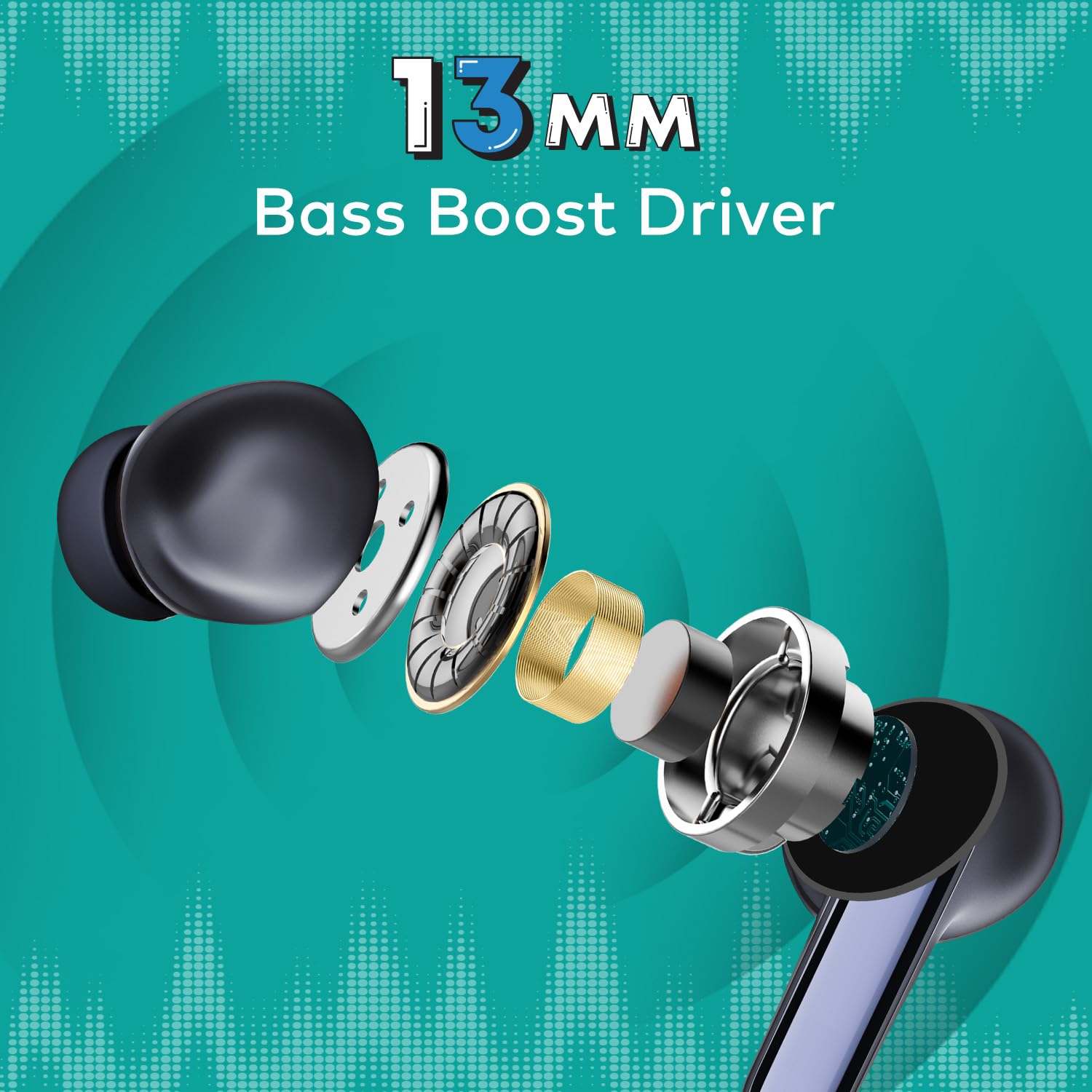
Imaj 6.1: Detaye view of the 13mm Bass Boost Driver components.
7. Garanti ak sipò
7.1. Enfòmasyon sou Garanti
This product is covered by a minimum six-month seller warranty. Please retain your proof of purchase for warranty claims. The warranty covers manufacturing defects and malfunctions under normal use conditions.
7.2. Sipò pou Kliyan
For further assistance, troubleshooting not covered in this manual, or warranty inquiries, please contact the seller or the manufacturer's customer support. Refer to the product packaging or the point of purchase for specific contact details.


