1. Entwodiksyon
The Qanba Q3 Obsidian Silent Arcade Joystick Multifunction Edition is a high-performance fighting stick designed for an immersive gaming experience. It features a silent lever and buttons, multi-platform compatibility, and a customizable art panel. This manual provides essential information for setting up, operating, maintaining, and troubleshooting your device.

The Qanba Q3 Obsidian Silent Arcade Joystick, highlighting its silent multifunction design.
2. Enstalasyon
Follow these steps to set up your Qanba Q3 Obsidian Arcade Joystick:
- Debake: Carefully remove the joystick and all accessories from the packaging.
- Koneksyon kab: Locate the integrated USB cable. The joystick features a practical cable storage compartment to keep the cable neatly stored when not in use. Extend the cable and connect it to your desired device.
- Seleksyon platfòm: Use the compatibility switch on the function panel to select the appropriate input mode: D-antre (for PC), X-Antre (for PC), or Android. Ensure the correct mode is selected for optimal performance.
- Premye pouvwa sou: Once connected, the joystick should power on automatically. Observe the LED indicators on the function panel for status.

The Qanba Q3 Obsidian supports multi-platform one-click switching for versatile compatibility.

The practical cable storage compartment helps keep your gaming area tidy.
3. Operasyon Enstriksyon
The Qanba Q3 Obsidian is equipped with high-quality components for precise control:
- Joysticks: The joystick utilizes a Qanba Gravity Silent lever, providing light-touch feel and durability for accurate directional inputs.
- Bouton: The arcade buttons are Qanba Gravity KS Silent buttons, engineered for a responsive yet quiet operation.
- Panèl Fonksyon: The rich function panel includes buttons for BACK, TURBO, MODE, L3, R3, START, and LED control.
- Chanjman mòd: The MODE switch allows you to toggle between assigning the joystick to a D-pad or a left analog stick, depending on game requirements. Note that in analog mode, the stick provides digital (on/off) input for directions.
- Touchpad Function: A built-in touchpad is available for easy system navigation and interaction, particularly useful on PC.
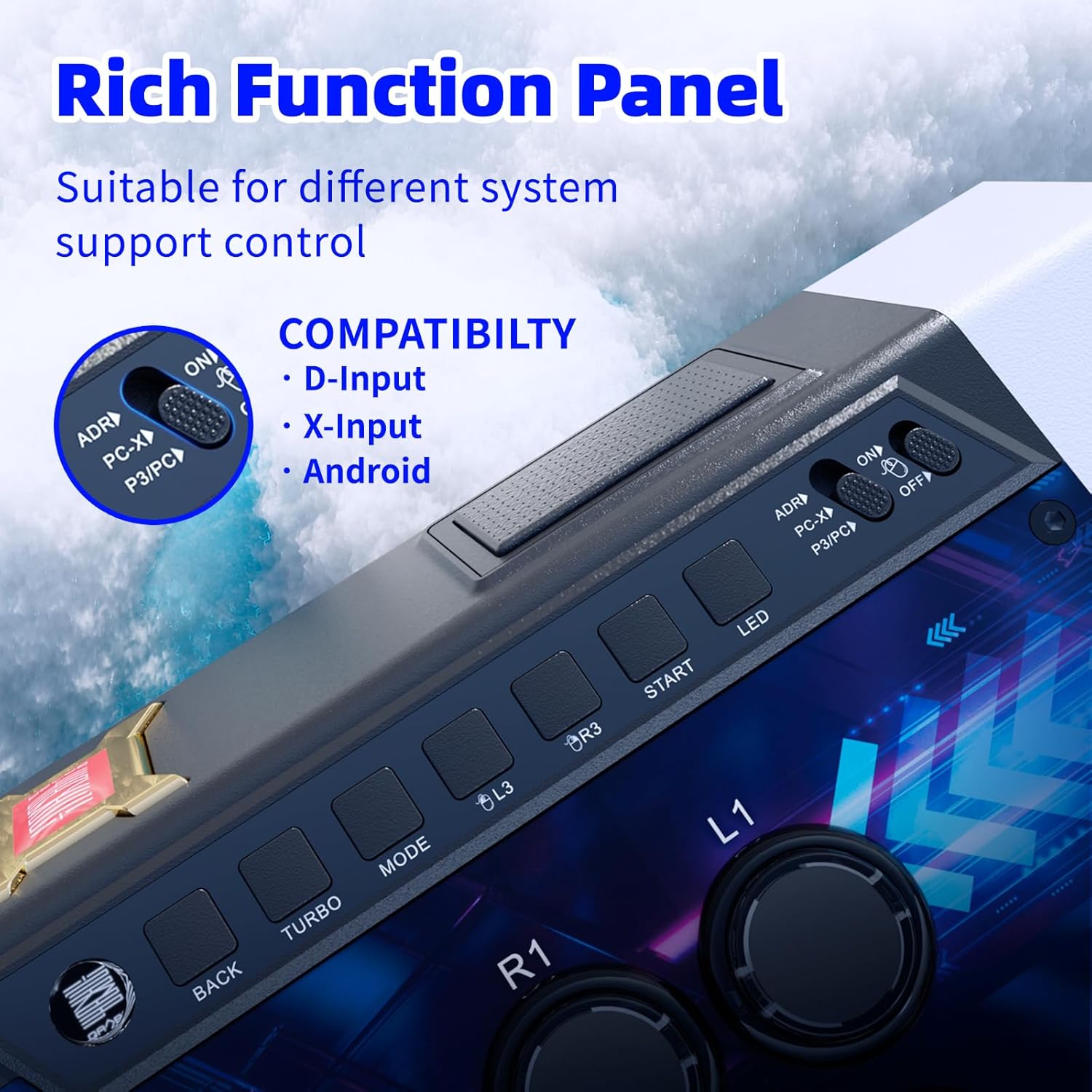
The rich function panel offers various controls and system compatibility options.

Qanba Gravity KS Arcade Buttons provide a light-touch feel, toughness, and durability.

The integrated touchpad function allows for easy maneuvering of systems and interactions.
Pwodwi souview Videyo
Videyo sa a bay yon vizyon souview of the Qanba Q3 Obsidian Silent Arcade Stick Multifunction Edition, demonstrating its features and functionality for PC.
4. Antretyen
Proper maintenance ensures the longevity and performance of your arcade joystick:
- Netwayaj: Regularly wipe the surface of the joystick with a soft, dry cloth to remove dust and fingerprints. For stubborn marks, use a slightly damp cloth and dry immediately. Avoid abrasive cleaners or solvents.
- Art Panel Customization: The Qanba Q3 Obsidian features a DIY art panel design, allowing for easy replacement of the top picture. The optimized screws and layered assembly of transparent acrylic and PVC make modification straightforward.

The DIY art panel design allows for easy picture replacement and customization.
NAN. Depanaj
If you encounter issues with your Qanba Q3 Obsidian, refer to the following common problems and solutions:
| Pwoblèm | Kòz posib | Solisyon |
|---|---|---|
| Joystick not recognized by PC/Android. | Mòd antre ki pa kòrèk la chwazi. | Ensure the compatibility switch is set to the correct mode (D-Input, X-Input, or Android). Try switching modes and reconnecting. |
| Buttons or joystick unresponsive. | Loose connection or driver issue. | Check USB cable connection. For PC, ensure drivers are up-to-date. Try connecting to a different USB port. |
| Ekleraj LED la pa fonksyone. | LED function is off or a minor software glitch. | Press the LED button on the function panel to toggle the lighting. If the issue persists, try reconnecting the device. |
| Trackpad not functioning on PC. | Mòd antre ki pa kòrèk. | The trackpad may only function in D-Input mode (P3/PC). Ensure you are in the correct mode. |
If these solutions do not resolve the issue, please refer to the support section for further assistance.
6. Espesifikasyon
Key specifications for the Qanba Q3 Obsidian Silent Arcade Joystick:
- Nimewo Modèl: Q3MF-GV
- Konpatibilite: PC (D-Input, X-Input), Android
- Joysticks: Qanba Gravity Silent lever
- Bouton: Qanba Gravity KS Silent buttons
- Dimansyon (L x W x H): Approximately 18.11 x 10.63 x 4.72 inches (461mm x 266mm x 121mm)
- Pwa: Apeprè 6.61 liv (3 kg)
- Karakteristik: Customizable art panel, touchpad function, cable storage compartment, ambient lighting.

Detailed product dimensions for the Qanba Q3 Obsidian joystick.
7. Garanti ak sipò
Your Qanba Q3 Obsidian Silent Arcade Joystick is covered by a manufacturer's warranty. For specific warranty details, including duration and coverage, please refer to the warranty card included with your product or visit the official Qanba websit.
For technical support, troubleshooting assistance, or to inquire about replacement parts, please contact Qanba customer service. You can find more information and support resources by visiting the official Qanba Gaming Peripherals Store on Amazon.


