1. Entwodiksyon
The BUSICOM PC-SeaV15c is a 15-inch Windows IoT touch panel PC designed for commercial and industrial applications. This manual provides essential information for the safe and efficient setup, operation, and maintenance of your device. Please read this manual thoroughly before using the product and retain it for future reference.
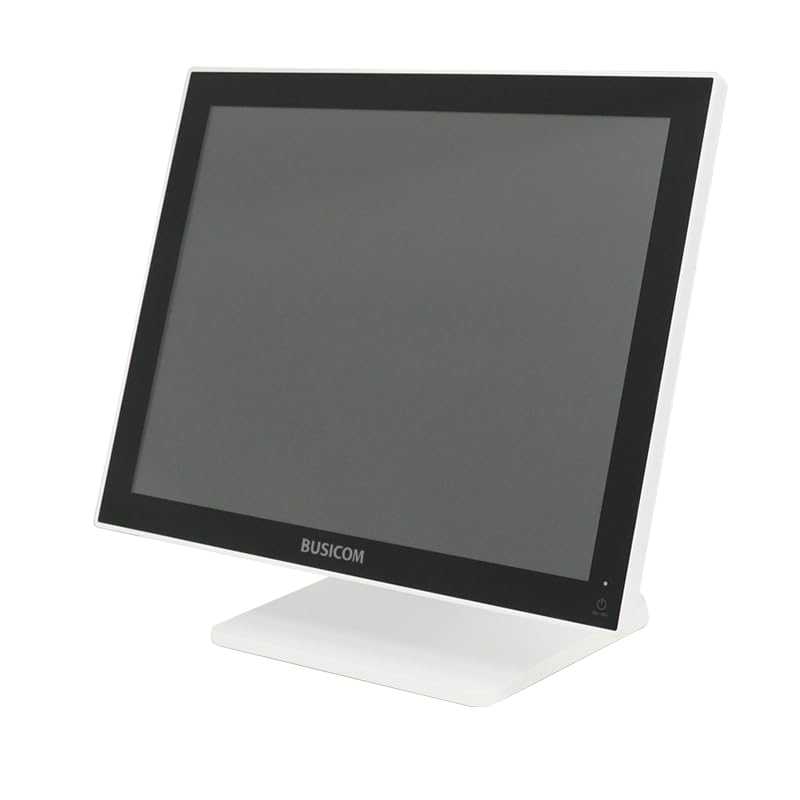
Figi 1: Devan view of the BUSICOM PC-SeaV15c Touch Panel PC.
2. Pwodwi souview
2.1 Karakteristik kle
- Konsepsyon avanse: Features an ultra-thin bezel and a highly durable 7H reinforced display for enhanced aesthetics and protection.
- Pèfòmans siperyè: Equipped with Microsoft Windows 10 IoT Enterprise, ensuring long-term support and reliable operation.
- Intuitive Touch Panel: Utilizes a capacitive touch method, offering a familiar and responsive touch experience similar to smartphones and tablets.
- Fasil antretyen: Designed for simple RAM and SSD replacement, facilitating upgrades and servicing.
- Versatile Interfaces: Provides a wide range of connectivity options to integrate with various peripherals.
- Depo efikas: SSD storage ensures fast processing speeds, quiet operation, and excellent shock resistance.
2.2 Eleman
The package typically includes the BUSICOM PC-SeaV15c unit and a power adapter. Additional accessories may vary.

Figure 2: Front and side profile of the PC-SeaV15c unit.

Figi 3: Dèyè view showing access panels for RAM and SSD components.
3. Enstriksyon Enstalasyon
3.1 Debake
- Carefully remove the PC-SeaV15c from its packaging.
- Check for any visible damage. If damaged, contact your vendor immediately.
- Asire w ke tout konpozan ki nan lis la prezan.
3.2 Konekte periferik
Refer to the interface diagram below for port locations and types.

Figure 4: Detailed diagram of the PC-SeaV15c's rear and bottom interfaces.
- Koneksyon pouvwa: Connect the provided power adapter to the DC In port and then to a power outlet.
- Aparèy USB: Use the USB 2.0 (4 ports) and USB 3.0 (2 ports) for connecting keyboards, mice, printers, and other USB peripherals.
- Rezo Koneksyon: Connect an Ethernet cable to the LAN port for wired network access.
- Sòti odyo: Connect external speakers or headphones to the Audio Out port.
- Serial Ports (RJ45): Utilize COM1, COM2, COM3, and COM6 for connecting specialized POS peripherals such as barcode scanners or receipt printers.
- Cash Drawer (RJ11): Connect a compatible cash drawer to the RJ11 port.
- Ekspozisyon ekstèn: If an external monitor is required, connect it to the Mini DisplayPort.
- USB Kalite-C: Pou aparèy konpatib.
3.3 Limen/Etenyen
- Pouvwa sou: Press the power button located on the upper right side of the display bezel or the power mark on the rear panel.
- Pouvwa Off: To safely shut down the system, use the standard Windows shutdown procedure. Avoid direct power disconnection during operation to prevent data loss.
4. Operasyon Enstriksyon
4.1 Windows 10 IoT Enterprise
The PC-SeaV15c operates on Windows 10 IoT Enterprise 2021. Familiarize yourself with the Windows operating system for basic navigation, application management, and system settings.
4.2 Touch Panel Usage
The capacitive touch screen supports multi-touch gestures.
- Tape: Ekivalan a yon klik sourit.
- Double Tap: Ekivalan a yon doub-klike.
- Peze epi kenbe: Ekivalan a yon klike sou bò dwat la.
- Glise: Pou defile oswa navige.
- Zoom-pou-Zoom: Sèvi ak de dwèt pou agrandi oswa diminye imaj la.
5. Antretyen
5.1 Netwaye Aparèy la
- Toujou etenn epi debranche aparèy la anvan ou netwaye li.
- Sèvi ak yon ti moso twal mou, ki san pèl damplave avèk dlo oswa yon pwodui netwayaj ekran ki pa abrazif.
- Do not spray liquids directly onto the screen or device.
- Evite itilize pwodui chimik ki agresif, solvang, oswa materyèl abrazif.
5.2 RAM and SSD Replacement
The PC-SeaV15c is designed for easy replacement of RAM and SSD components. Refer to Figure 3 for the access panel location. For detailed instructions on component replacement, consult a qualified technician or the BUSICOM support websit.
NAN. Depanaj
Seksyon sa a bay solisyon pou pwoblèm komen ou ka rankontre.
- Aparèy la pa limen:
- Asire w adaptè kouran an byen konekte ak aparèy la ak yon priz kouran ki fonksyone.
- Verifye si priz kouran an fonksyone byen lè w branche yon lòt aparèy.
- Touch screen is unresponsive:
- Rekòmanse aparèy la.
- Asire w ekran an pwòp epi li pa gen okenn obstak.
- Pa gen ekspozisyon:
- Tcheke si aparèy la mache.
- If an external display is connected, ensure the correct input source is selected on the external display.
- Peripheral not detected:
- Ensure the peripheral is correctly connected to the appropriate port (USB, LAN, COM).
- Eseye konekte periferik la nan yon lòt pò.
- Check the peripheral's own power supply, if applicable.
For further assistance, please contact BUSICOM customer support.
7. Espesifikasyon
| Karakteristik | Detay |
|---|---|
| Mak | BUSICOM |
| Non modèl | PC-SeaV15c |
| Koulè | Blan |
| Gwosè ekran | 15 pous |
| Rezolisyon | 1024x768 |
| Sistèm operasyon | Windows 10 IoT Enterprise 2021 |
| Mak CPU | Intel |
| Socket processeur | Intel® N97 |
| CPU vitès | 3.6 GHz |
| Kalite memwa | DDR4 |
| Enstale RAM | 4 GB |
| Kalite Disk Di | SSD |
| Kapasite SSD | 128 GB (dapre tit pwodwi a) |
| Kalite Kat Grafik | Entegre |
| VRAM Type | DDR4 SDRAM |
| VRAM Capacity | 4 GB |
| Pò USB 2.0 | 4 |
| Pò USB 3.0 | 2 |
| Kondwi optik | Okenn |
| Pwa pwodwi | 6 Kilogram |
| Wotè (apeprè) | 307.5 mm (as per dimension diagram) |

Figi 5: Dèyè view of the PC-SeaV15c with approximate height dimension.
8. Garanti ak sipò
For warranty information and technical support, please refer to the warranty card included with your product or visit the official BUSICOM websit la. Kenbe resi acha ou kòm prèv acha pou reklamasyon garanti.
BUSICOM Official Websit: BUSICOM Store on Amazon.co.jp


