1. Entwodiksyon
Mèsi pou acha aasing the TELLUR VOX 95 Bluetooth Headset. This manual provides detailed instructions for the proper use, setup, and maintenance of your new headset. The Vox 95 is designed for seamless communication on the go, offering comfort and convenience with advanced features like Bluetooth 5.3, multipoint connectivity, and Sound+ Voice Enhancement (SVE) technology.

Figi 1.1: Devan view of the TELLUR VOX 95 Bluetooth Headset, showcasing its sleek design and main button.
2. Enfòmasyon sou Sekirite
- Pa ekspoze kas ekoutè a nan tanperati ekstrèm, imidite, oswa sibstans koroziv.
- Evite lage kas ekoutè a oswa soumèt li a gwo enpak.
- Do not attempt to disassemble or modify the headset. This will void the warranty and may cause damage.
- Kenbe kas ekoutè a lwen timoun ak bèt kay.
- Use only the provided USB-A to USB-C cable for charging.
- When driving, prioritize road safety. Use the headset responsibly and in accordance with local laws and regulations.
- Koute mizik pandan lontan ak yon volim ki wo ka lakòz pwoblèm nan zòrèy ou. Ajiste volim nan yon nivo konfòtab.
3. Pake kontni
Tanpri verifye sa ki nan pake a pou asire w tout atik yo la:
- 1 x TELLUR VOX 95 Bluetooth Headset
- 1 x USB-A pou USB-C chaje kab
- 1 x Plastic ear hook
- 1 x Silicone ear hook
- 1 x Ear tip (Size M)
- 1 x Ear tip (Size S)
- 1 x Manyèl Itilizatè (dokiman sa a)
4. Pwodwi souview
Familiarize yourself with the various parts of your TELLUR VOX 95 headset.

Figi 4.1: Dèyè view of the headset showing the ear hook attachment point and ear tip.

Figure 4.2: The headset's USB-C charging port, located at the end of the device, with the charging cable connected.
Konpozan kle:
- Bouton prensipal: For power on/off, answering/ending calls, playing/pausing audio.
- Bouton Volim: For adjusting volume up/down.
- USB-C chaje pò: Pou konekte kab chaje a.
- Endikatè ki ap dirije: Displays status (pairing, charging, low battery).
- Mikwofòn: For voice input during calls.
- Bout zòrèy: Provides in-ear comfort and sound delivery.
- Kwòk zòrèy: Secures the headset over the ear.
5. Enstalasyon
5.1 Chaje kas ekoutè a
Before first use, fully charge the headset. A full charge takes approximately 2 hours.
- Konekte bout USB-A kab chaje a nan yon adaptè kouran USB (pa enkli) oubyen nan yon pò USB òdinatè.
- Connect the USB-C end of the charging cable to the charging port on the headset.
- The LED indicator will show a specific color (refer to the LED indicator section in the manual, if available, or assume red for charging, blue/off for full).
- Yon fwa konplètman chaje, dekonekte kab la chaje.
Figure 5.1: Illustrates connecting the USB-C charging cable to the headset's charging port.
5.2 Mete kas ekoutè a
The VOX 95 is designed for comfortable wear and can be adjusted for either the left or right ear.
- Choose the ear tip (S or M) that provides the best fit and comfort for your ear.
- Attach either the plastic or silicone ear hook to the headset. The 360° adjustable earpiece allows you to rotate the ear hook to fit perfectly in your left or right ear.
- Gently place the ear tip into your ear canal and position the ear hook over your ear for a secure fit.

Figure 5.2: A woman wearing the TELLUR VOX 95 headset, demonstrating its comfortable and discreet fit.

Figure 5.3: The headset being worn by a woman while driving, highlighting its hands-free convenience for safer communication.
5.3 Pairing ak yon Aparèy
The VOX 95 uses Bluetooth 5.3 for a stable connection up to 15 meters.
- Pouvwa sou: Press and hold the Main Button for approximately 3 seconds until the LED indicator flashes blue and red alternately, indicating it's in pairing mode.
- Aktive Bluetooth: Sou telefòn entelijan ou, tablèt ou, oswa òdinatè ou, aktive Bluetooth.
- Chèche pou Aparèy: Nan paramèt Bluetooth aparèy ou an, chèche aparèy ki disponib yo.
- Select "VOX 95": From the list of found devices, select "VOX 95".
- Konfime Koneksyon: Once connected, the LED indicator on the headset will flash blue slowly or turn off, depending on the model's specific behavior. You will also hear a confirmation tone.
Note: The headset supports multipoint connectivity, allowing it to be connected to two devices simultaneously (e.g., a phone and a tablet/laptop).

Figure 5.4: The headset positioned on a smartphone, symbolizing its readiness for Bluetooth pairing and connection.
6. Operasyon Enstriksyon
6.1 Power On/Off
- Pouvwa sou: Press and hold the Main Button for approximately 3 seconds until the LED indicator flashes blue.
- Pouvwa Off: Press and hold the Main Button for approximately 5 seconds until the LED indicator flashes red and then turns off.
6.2 Jesyon Apèl
- Reponn/Fen Apèl: Peze bouton prensipal la yon fwa.
- Rejte apèl: Press and hold the Main Button for 2 seconds.
- Recomposition Dènye Nimewo: Double-press the Main Button.
6.3 Kontwòl Volim
- Volim moute: Peze bouton Ogmante Volim nan (+).
- Volim desann: Peze bouton Diminye Volim nan (-).
6.4 Aktivasyon Asistan Vwa
Access your device's voice assistant (Siri, Google Assistant) with a simple button press.
- Aktive Asistan Vwa: Triple-press the Main Button.
Note: For iOS users, the headset also provides low battery notifications.
6.5 Koneksyon Miltipwen
The VOX 95 can connect to two Bluetooth devices simultaneously, such as a smartphone and a laptop.
- Pair the headset with the first device (e.g., your smartphone) as described in Section 5.3.
- Dezaktive Bluetooth sou premye aparèy la.
- Put the headset back into pairing mode.
- Pair the headset with the second device (e.g., your laptop).
- Once connected to the second device, re-enable Bluetooth on the first device. The headset should automatically reconnect to both devices.
The headset will intelligently switch between devices for calls or audio playback.

Figure 6.1: A user demonstrating multipoint connectivity, with the headset simultaneously linked to a laptop and a smartphone, indicated by blue lines.
6.6 SVE Technology for Voice Clarity
The Sound+ Voice Enhancement (SVE) technology in the VOX 95 is a passive noise reduction feature that uses advanced signal processing to improve the clarity of your voice during calls, especially in noisy environments. It helps distinguish your speech from background noise, ensuring clearer communication for the listener.
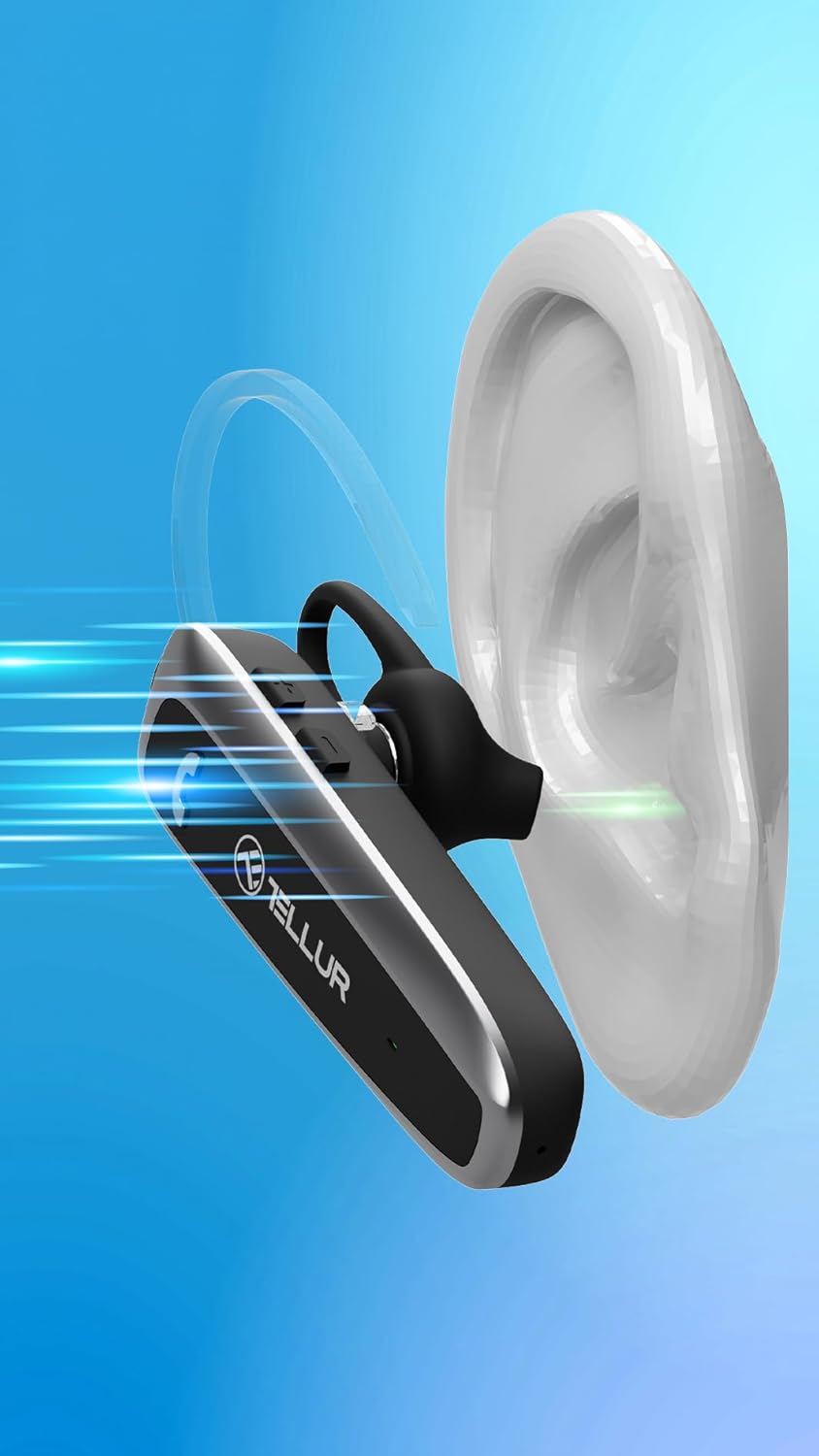
Figure 6.2: Visual representation of Sound+ Voice Enhancement (SVE) technology, showing sound waves being processed for clarity from the ear to the microphone.
7. Antretyen
- Netwayaj: Use a soft, dry, lint-free cloth to clean the headset. Do not use abrasive cleaners, alcohol, or chemical solvents.
- Konsèy zòrèy: The ear tips can be removed and gently cleaned with a damp twal ak savon dou, apresa seche l byen anvan ou tache l ankò.
- Depo: Lè w pa ap itilize kas ekoutè a, sere l nan yon kote ki fre epi sèk, lwen limyè solèy dirèk ak tanperati ekstrèm.
- Swen batri: Pou konsève batri a, chaje kas ekoutè a omwen yon fwa chak twa mwa si w pa itilize li regilyèman.
NAN. Depanaj
| Pwoblèm | Kòz posib | Solisyon |
|---|---|---|
| Kas ekoutè a pa limen. | Batri ap vide. | Chaje kas ekoutè a nèt. |
| Pa ka konekte kas ekoutè a ak yon aparèy. | Headset not in pairing mode; Bluetooth off on device; Device too far. | Ensure headset is in pairing mode (flashing blue/red). Turn on Bluetooth on your device. Move headset closer to the device (within 15m). |
| Pa gen son oswa volim nan ba. | Volume too low; Headset not connected; Audio output not set to headset. | Increase volume on both headset and connected device. Reconnect the headset. Check audio output settings on your device. |
| Kalite apèl la pa bon. | Weak Bluetooth signal; Environmental noise. | Move closer to the connected device. Ensure microphone is not obstructed. SVE technology helps, but extreme noise may still affect quality. |
| Multipoint connection issues. | Incorrect pairing sequence; Device conflict. | Follow the multipoint pairing instructions carefully (Section 6.5). Disconnect and reconnect devices if necessary. |
9. Espesifikasyon
| Karakteristik | Detay |
|---|---|
| Non modèl | Telur Vox 95 |
| Koneksyon Teknoloji | Bluetooth |
| Bluetooth vèsyon | 5.3 |
| Gamme Bluetooth | Jiska 15 mèt (49 pye) |
| Dire batri (tan pou pale) | Jiska 20 èdtan |
| Tan sibstiti | Jiska 30 jou |
| Tan pou chaje | Apeprè 2 èdtan |
| Port chaje | USB-C |
| Pwa | 11.4 gram (0.402 ons) |
| Kontwòl bri | Passive Noise Cancellation (SVE Technology) |
| Fòm ekoutè | Ear Hook (360° adjustable) |
| Aparèy konpatib | Smartphones (iPhone, Android), Tablets (iPad, Android), Laptops, Smart TVs (Bluetooth enabled) |
| Konpozan ki enkli | Headset, USB-A to USB-C cable, Plastic ear hook, Silicone ear hook, Ear tip (M), Ear tip (S), User Manual |
10. Garanti ak sipò
TELLUR products are manufactured to the highest quality standards. For detailed warranty information, please refer to the warranty card included in your package or visit the official TELLUR website. If you encounter any issues or have questions regarding your VOX 95 Bluetooth Headset, please contact TELLUR customer support through the contact information provided on the official websit entènèt la oswa platfòm acha ou a.
Pou plis asistans, ou ka vizite TELLUR Store on Amazon.


