1. Pwodwi souview ak Karakteristik kle yo
The Plugable USBC-PDMON is a 15.6-inch Full HD (1920x1080) IPS portable monitor designed for enhanced productivity on the go. It features 100W Power Delivery pass-through charging and a 3x USB-C 10Gbps hub, making it a versatile solution for expanding your workspace.

Image: The Plugable USBC-PDMON portable monitor in use, showcasing its slim design and the protective case functioning as a stand.
Karakteristik kle:
- 15.6-inch Full HD (1920x1080) IPS Display: Provides crisp, clear visuals with wide viewing angles and up to 300 nits brightness.
- 100W Power Delivery Pass-Through: Allows charging of your laptop, smartphone, or tablet (up to 85W output) while using the monitor.
- Integrated 3x USB-C 10Gbps Hub: Expands connectivity with two 10Gbps USB-C ports for data transfer or connecting peripherals.
- Pòtab ak lejè: Weighing 1.85lbs (with cover), it's ideal for travel and mobile workstations.
- Protective Case/Stand: The included cover protects the screen and conveniently folds into a stand for various viewang ing.
- Inivèsèl konpatibilite: Works with Mac, Windows, Chrome, iPad, iPhone, and Android devices equipped with full-featured USB-C or Thunderbolt ports.
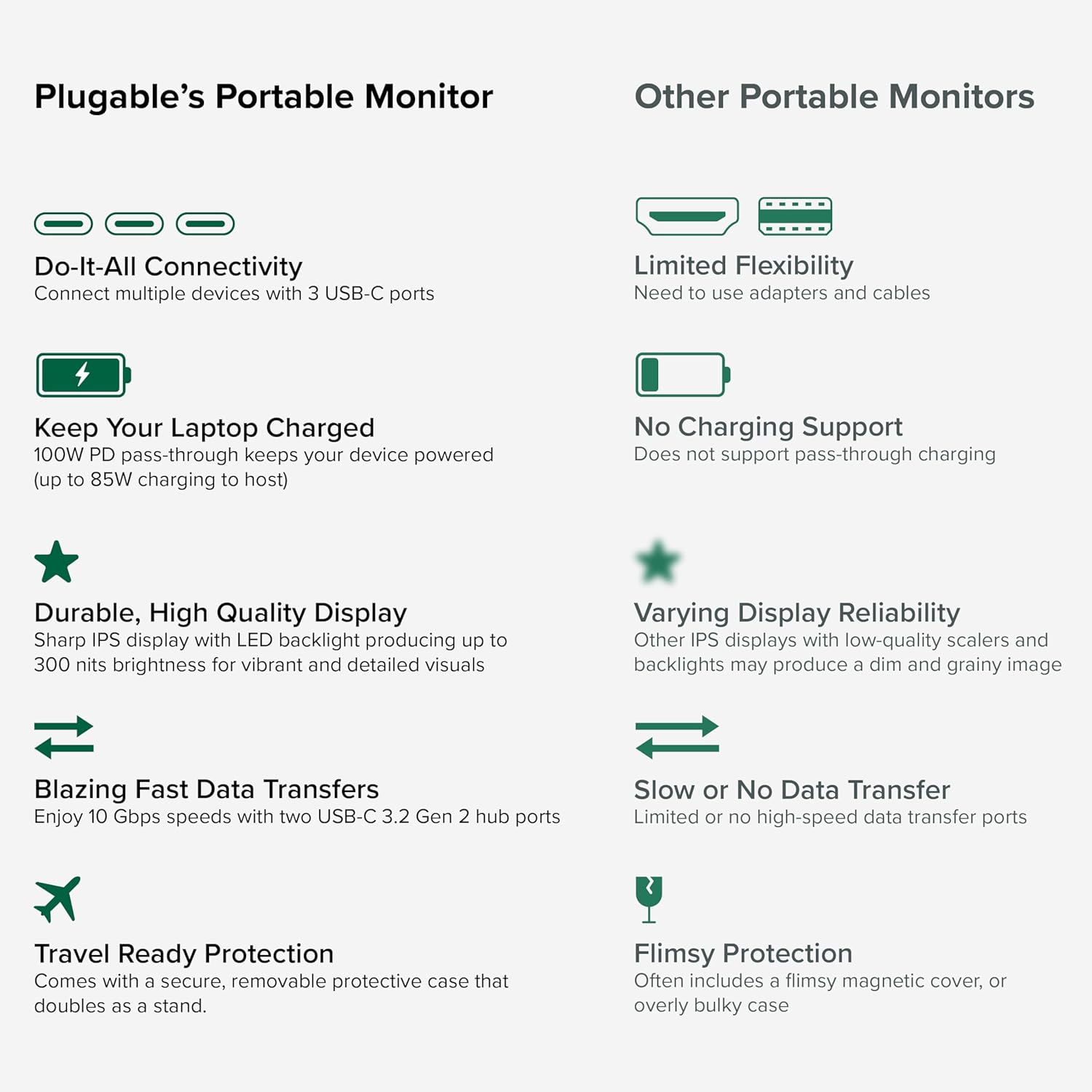
Image: A comparison highlighting the superior connectivity, charging support, display quality, data transfer speeds, and travel-ready protection of the Plugable monitor.
2. Sa ki enkli
Tanpri verifye sa ki nan pake a pou asire w tout atik yo la:
- 1920x1080 IPS Travel Display with Protective Case/Stand
- 1 Meter USB-C Host Cable
- Gid Quick Start
3. Gid Enstalasyon
Follow these steps to set up your Plugable portable monitor:
- Depake monitè a: Carefully remove the monitor and its accessories from the packaging.
- Pozisyon kanpe la: The protective cover doubles as a stand. Fold the cover to create a stable base for the monitor. The built-in magnets will help secure it in place.
- Konekte ak aparèy ou an: Use the included 1-meter USB-C host cable to connect the monitor to your laptop, smartphone, or tablet. Ensure your device has a full-featured USB-C port that supports video output (DisplayPort Alternate Mode) and Power Delivery.
- Power the Monitor (Optional/Recommended): For optimal performance and to utilize the pass-through charging feature, connect a USB-C power adapter (not included) to the monitor's dedicated power input port. This will also allow the monitor to charge your host device (up to 85W).
- Montre konte genyen: Your device should automatically detect the monitor. You may need to adjust display settings (e.g., extend, mirror, resolution) in your operating system's display settings.

Image: Visual instructions on how to correctly fold the protective cover to form a stable stand for the monitor.

Image: An illustration demonstrating the power flow when the monitor is used as a hub, providing 85W charging to the connected laptop from a 100W input.
Konpatibilite:
The monitor is compatible with a wide range of operating systems and devices:
- Platfòm ki sipòte: Mac, Windows, Chrome OS, Android.
- Koneksyon ak lame: USB-C, USB4, Thunderbolt.
- Sistèm konpatib: MacBooks, Dell XPS, Lenovo ThinkPad, Apple iPhone 15/16+, Samsung Galaxy S24, Google Pixel 8, iPads with USB-C, Samsung Galaxy Tab, Lenovo Tab.

Image: A visual guide to the monitor's broad compatibility across different operating systems and popular devices like laptops, phones, and tablets.
4. Operasyon Enstriksyon
Once connected, your Plugable portable monitor is ready for use. Here are some operational tips:
Montre mòd:
- Pwolonje ekspozisyon an: Use this mode to expand your desktop workspace across both your primary device and the portable monitor.
- Ekspozisyon glas: This mode duplicates your primary device's screen onto the portable monitor, useful for presentations or sharing content.
Kontwòl pou kontwole:
The monitor features control buttons on the side for adjustments:
- Brightness Up/Down: Adjust the screen brightness to your preference.
- Mòd koulè: Cycle through preset color modes (Cool, Normal, Warm, sRGB, and User) to optimize visual appearance.
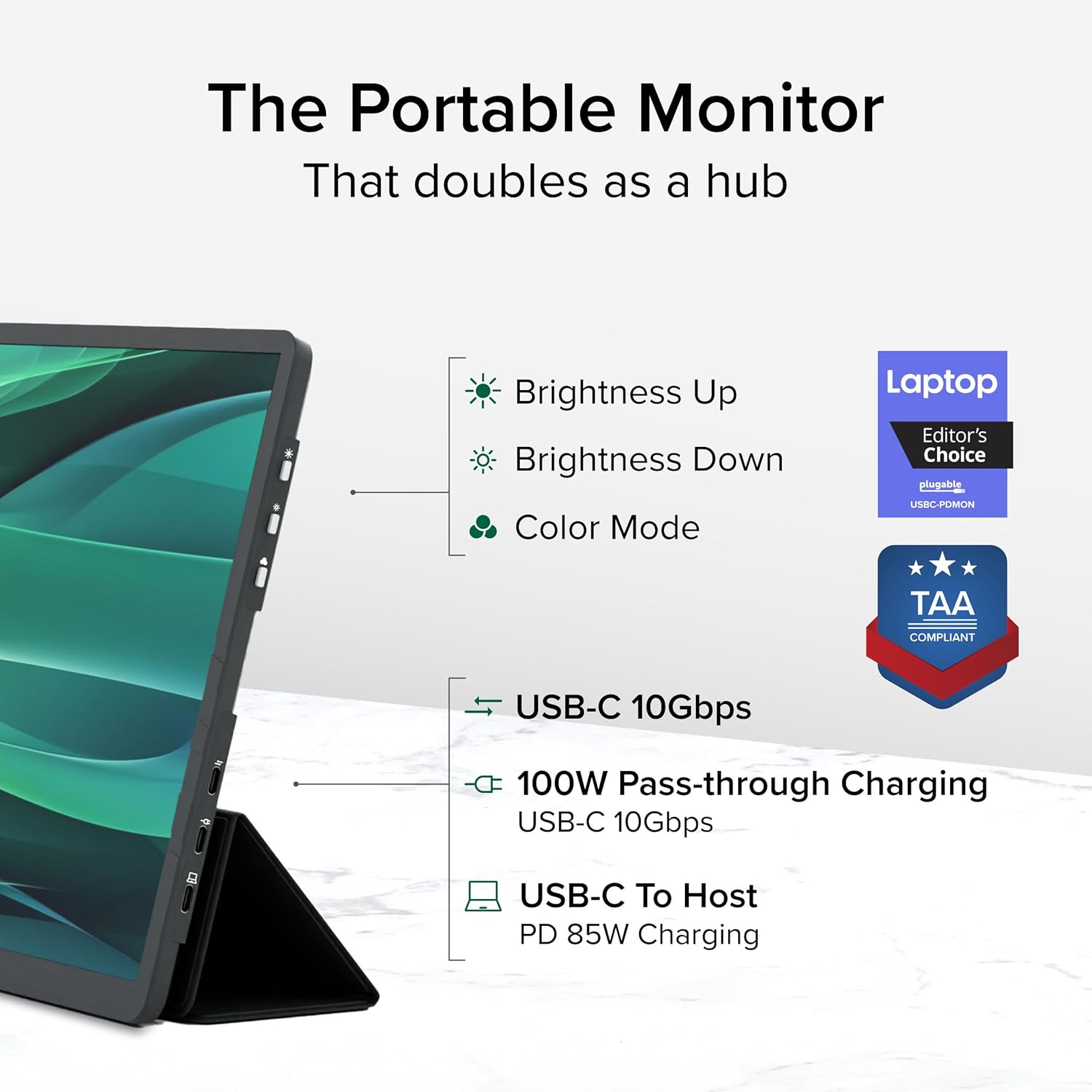
Imaj: Yon imaj detaye view of the monitor's side, indicating the location of the brightness controls, color mode button, and the three USB-C ports for host connection, power delivery, and data hub functionality.
USB-C Hub Functionality:
The monitor acts as a hub, providing additional USB-C ports for your peripherals:
- Connect USB-C devices such as external drives, keyboards, or mice to the available 10Gbps USB-C ports on the monitor.
5. Antretyen
To ensure the longevity and optimal performance of your Plugable portable monitor, follow these maintenance guidelines:
- Netwaye ekran an: Sèvi ak yon moso twal mou, ki san pèl dampened with water or a screen-cleaning solution. Avoid harsh chemicals, abrasive materials, or direct spraying onto the screen.
- Netwaye kò a: Siye deyò monitè a avèk yon twal mou epi sèk.
- Depo: When not in use, always use the protective cover to prevent scratches and damage to the screen. Store in a cool, dry place away from direct sunlight and extreme temperatures.
- Manyen: Handle the monitor with care. Avoid dropping it or subjecting it to strong impacts.
NAN. Depanaj
If you encounter issues with your Plugable portable monitor, refer to the following common problems and solutions:
No Display or "No Signal" Message:
- Tcheke Koneksyon Kab: Ensure the USB-C cable is securely connected to both the monitor and your host device. Try unplugging and re-plugging the cable.
- Verify USB-C Port Capability: Confirm that your device's USB-C port supports video output (DisplayPort Alternate Mode). Not all USB-C ports have this capability.
- Ekstèn pouvwa: If your host device cannot provide sufficient power, connect an external USB-C power adapter to the monitor's power input port.
- Rekòmanse Aparèy: Try restarting your laptop, smartphone, or tablet.
Ekspozisyon ki tranble oswa enstab:
- Pwovizyon pou pouvwa: Ensure the monitor is receiving adequate power. Connect an external USB-C power adapter if not already in use.
- Kalite kab: Use the included high-quality USB-C cable. A different or lower-quality cable might cause instability.
- Mizajou chofè: Ensure your host device's graphics drivers are up to date.
No Charging or Slow Charging:
- Evalyasyon adaptè pouvwa: Ensure the external USB-C power adapter connected to the monitor is rated for at least 100W to provide 85W pass-through charging to your host device.
- Kab konpatibilite: Verify the USB-C cable supports Power Delivery.
If these steps do not resolve your issue, please contact Plugable support for further assistance.
7. Espesifikasyon
Detailed technical specifications for the Plugable USBC-PDMON portable monitor:
| Karakteristik | Spesifikasyon |
|---|---|
| Gwosè ekran | 15.6 pous |
| Rezolisyon | FHD 1080p (1920 x 1080 piksèl) |
| Teknoloji ekspozisyon | IPS |
| Aspè rapò | 16:9 |
| Imaj klète | 300 Kandela (nits) |
| Sifas ekran | Mat |
| Total pò USB | 3 (USB-C) |
| Livrezon pouvwa | 100W Pass-Through (85W to host) |
| Vitès Transfè Done | 10Gbps (USB-C hub ports) |
| Pwa atik | 1.85 liv |
| Dimansyon pwodwi | 0.42 x 14.21 x 8.46 pous |
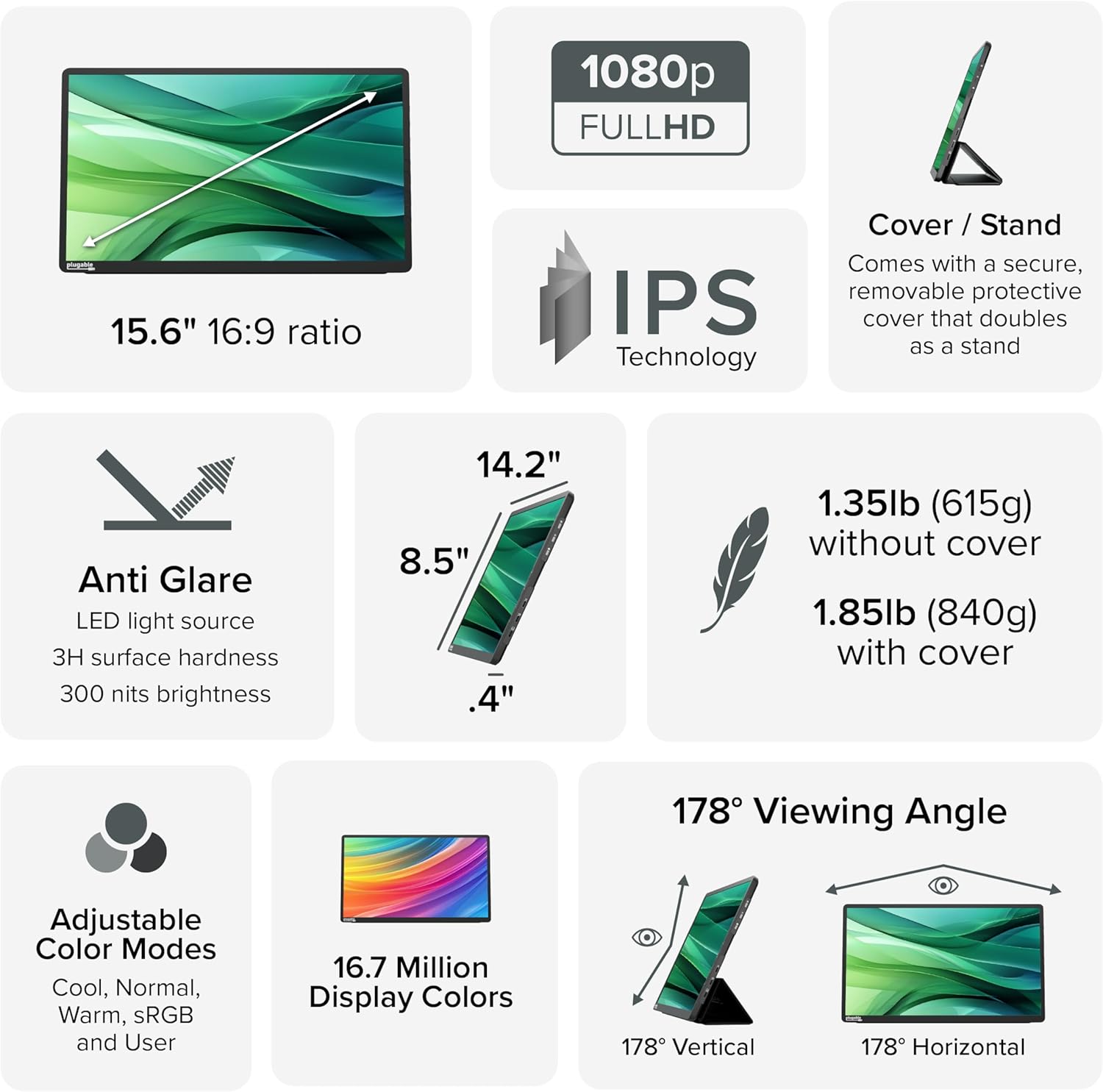
Image: A comprehensive infographic summarizing the monitor's technical specifications, such as screen size, resolution, IPS technology, anti-glare properties, weight, and viewang ing.
8. Garanti ak sipò
The Plugable USBC-PDMON portable monitor is designed with reliability at its core and built to meet the demands of both IT departments and home offices.
- Sipò pou tout lavi: Includes lifetime support from our North American team of connectivity experts.
- Garanti: Akonpaye pa yon garanti 2 an.
For technical assistance or warranty claims, please visit the official Plugable websit la oubyen kontakte ekip sipò yo dirèkteman.


