1. Entwodiksyon
The Parsonver Smartwatch Z139 is designed to enhance your daily life with a variety of intelligent functions. This manual provides detailed instructions for setting up, operating, and maintaining your smartwatch to ensure optimal performance and user experience.
Key features include Bluetooth calling, comprehensive health monitoring (heart rate, blood oxygen, sleep), over 100 sports modes, and smart notifications.
2. Pou kòmanse: Enstalasyon
2.1 Kontni pake a
- Parsonver Smartwatch Z139
- Chaje kab
- Manyèl itilizatè
2.2 Chaje mont entelijan an
Anvan premye itilizasyon an, chaje mont entelijan ou nèt. Konekte kab chaje mayetik la ak kontak chaje yo sou do mont lan epi branche bout USB a nan yon adaptè kouran (pa enkli) oswa nan yon pò USB òdinatè.
2.3 Enstalasyon ak koneksyon aplikasyon an
To unlock the full potential of your Parsonver Smartwatch, download the companion app on your smartphone. The app is compatible with iOS 9.0/Android 6.0 or above.
- Scan the QR code in the manual or search for "Parsonver" in your phone's app store (Google Play Store for Android, Apple App Store for iOS).
- Enstale epi louvri aplikasyon an.
- Follow the on-screen instructions in the app to create an account and pair your smartwatch via Bluetooth. Ensure Bluetooth is enabled on your smartphone.
- During pairing, grant necessary permissions for notifications, location, and health data synchronization.

Image: The Parsonver Smartwatch Z139, showcasing its main display with time, date, and step count.
3. Operasyon Enstriksyon
3.1 Apèl Bluetooth ak Notifikasyon Entelijan
Once connected via Bluetooth, you can manage calls directly from your smartwatch.
- Reponn/Fè Apèl: Use the watch's interface to answer incoming calls or dial numbers. The watch features high-quality speakers and a high-definition microphone for clear communication.
- Notifikasyon: Receive alerts for SMS, WhatsApp, Facebook, emails, and other app notifications directly on your watch. The watch will vibrate to inform you of new messages.
- Asistan vwa: Utilize the integrated voice assistant for hands-free control and information access.
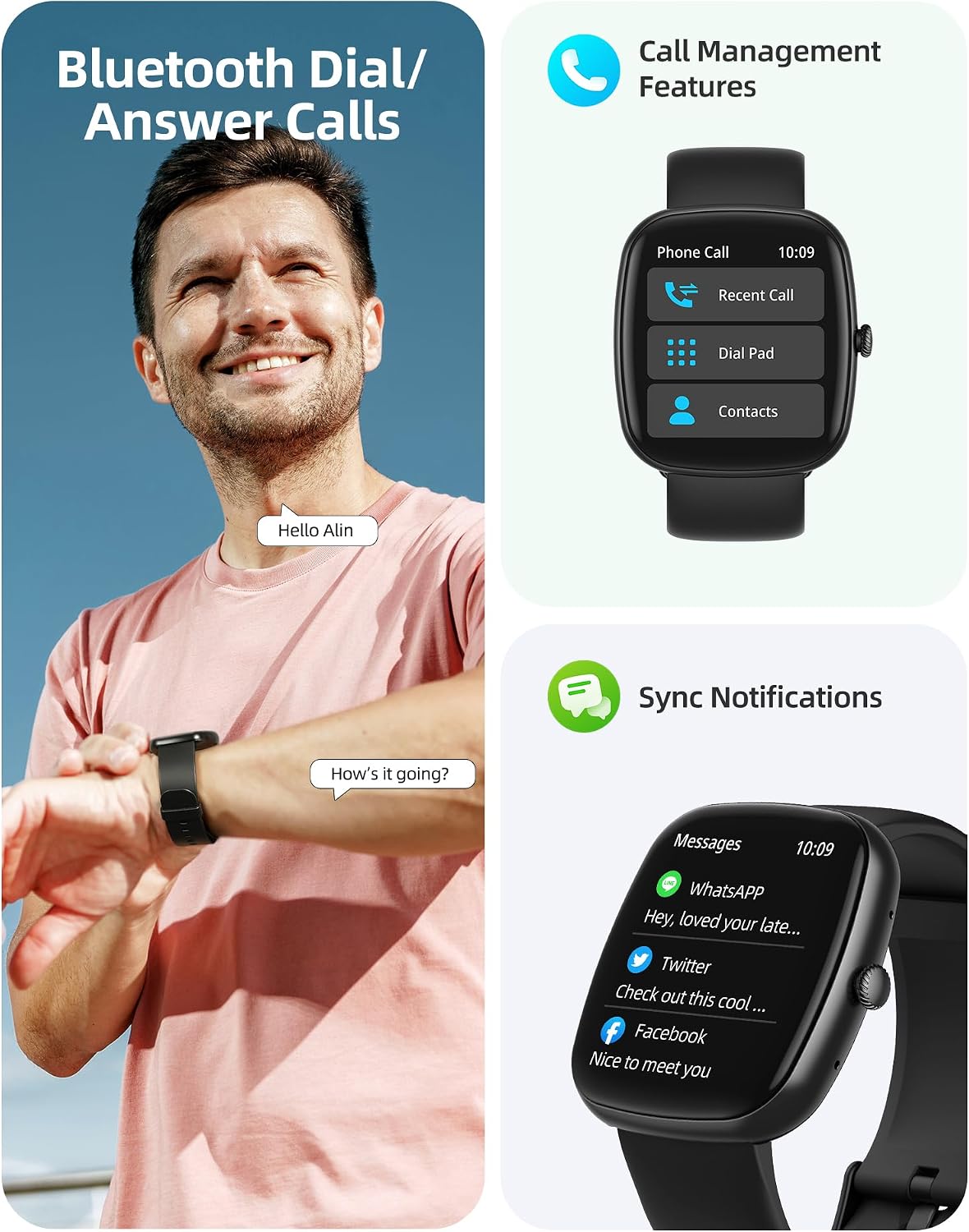
Image: A user interacting with the smartwatch for Bluetooth calls, demonstrating the call management interface.
3.2 Siveyans Sante
The smartwatch features advanced sensors for continuous health tracking.
- Siveyans batman kè: Measures and records your heart rate throughout the day. The app displays trends and alerts for abnormal readings.
- Siveyans oksijèn nan san (SpO2): Swiv nivo saturation oksijèn nan san ou.
- Siveyans dòmi: Analyzes your sleep patterns, including deep sleep, light sleep, and awake times, to help optimize your sleep habits.
- Siveyans estrès: Bay enfòmasyon sou nivo estrès ou.
- Suivi Sante Fanm: Records menstrual cycles and ovulation periods.

Image: Visual representation of the smartwatch's health monitoring capabilities, including heart rate, blood oxygen, and pressure readings.
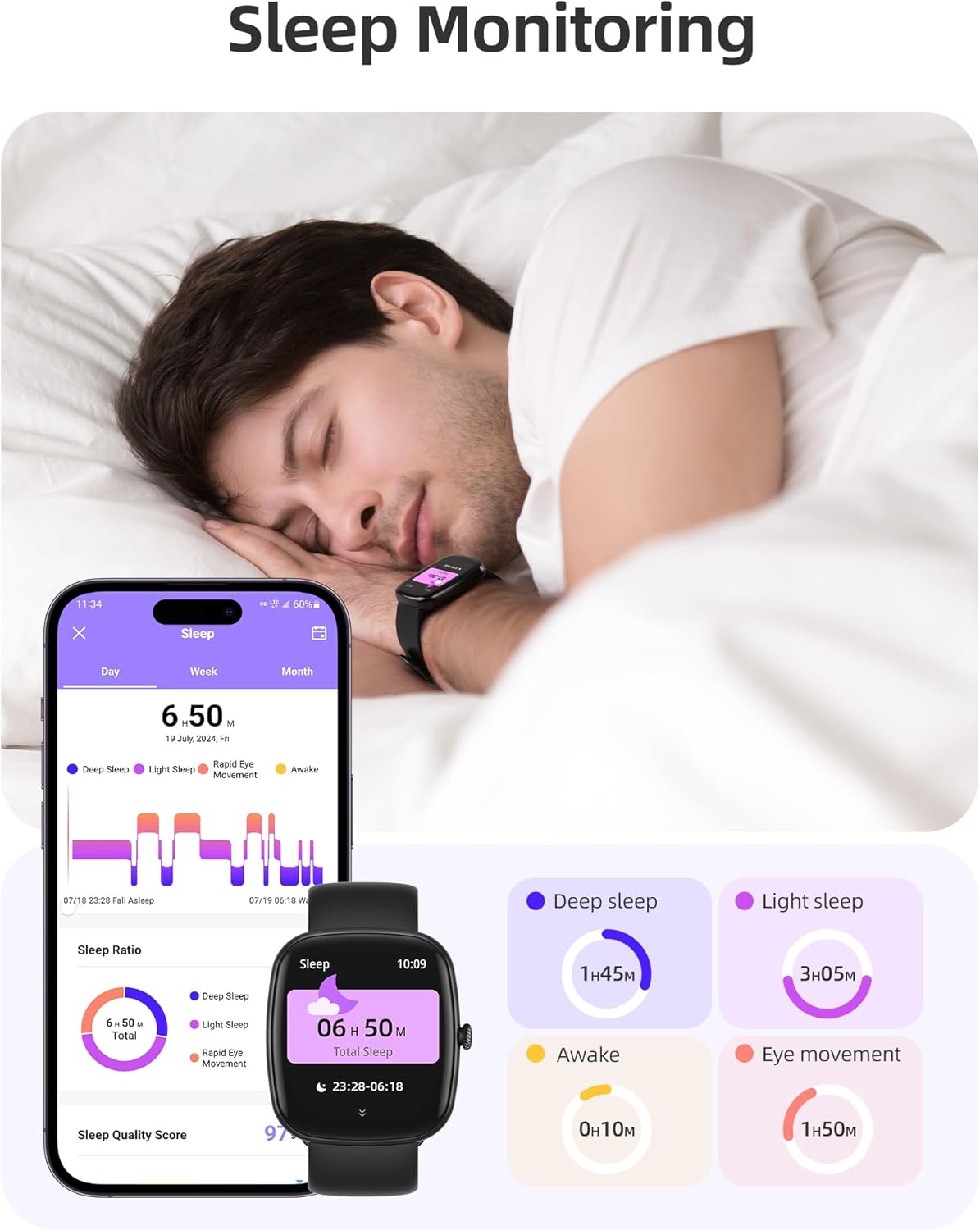
Image: The smartwatch monitoring sleep, with a detailed breakdown of sleep stages displayed on the companion app.
3.3 Mòd Espò ak Suivi Aktivite
The activity tracker supports over 100 sports modes to monitor your workouts effectively.
- Mòd ki disponib: Includes yoga, running, jumping, cycling, badminton, football, rowing, and many more.
- Suivi Done: Records steps, distance, calories burned, and real-time heart rate during exercise.
- Daily Readiness Score: Provides a summary of your daily activity and recovery.

Image: The smartwatch tracking a user's activity during a run, displaying key metrics like calories, steps, heart rate, and distance.
3.4 App Experience and BMI Tracking
The companion app offers additional features for health management.
- Weight and BMI Tracking: Manually input your weight in the app to track changes and automatically calculate your Body Mass Index (BMI). View daily, weekly, monthly, and yearly weight trends.
- Training Courses: Access integrated training courses from beginner to advanced levels.
- Relaxation Features: Includes white noise, meditation exercises, and relaxation training.

Image: The companion app displaying weight and BMI tracking features, helping users monitor their body composition.
3.5 figi gade personnalisable
Personalize your smartwatch with over 200 different watch face designs available through the app.

Image: A selection of customizable watch faces, demonstrating the variety of styles and information layouts available.
3.6 Lòt Fonksyon Pratik
The smartwatch includes several other useful features:
- Pwedi metewolojik: View 7-day weather forecasts.
- Kontwòl Mizik: Kontwole lèktur mizik la dirèkteman nan ponyèt ou.
- Kontwòl kamera: Kontwole kamera smartphone ou a adistans.
- Revèy Alam: Set multiple alarms.
- Kronomèt ak revèy: Orè egzak pou divès aktivite yo.
- Rapèl sedantèr: Li ankouraje w pou w deplase apre peryòd inaktivite.
- Egzèsis pou respire: Guided exercises to reduce stress.
- Jwenn telefòn: Locate your paired smartphone with a tap on your watch.
- Ajisteman klète: Continuously adjustable screen brightness for optimal visibility in any lighting condition.

Imaj: Yon plis paseview of the various practical functions available on the Parsonver Smartwatch Z139.
4. Antretyen
Proper care ensures the longevity and performance of your smartwatch.
- Netwayaj: Netwaye mont lan ak braslè a regilyèman avèk yon twal mou epi sèk. Evite pwodui chimik ki agresif.
- Rezistans dlo: The smartwatch has an IP68 water resistance rating, meaning it can withstand hand washing, rain, and splashes. Do not use it for swimming, diving, or in saunas.
- Chaje: Use only the provided charging cable. Avoid exposing charging contacts to moisture.
- Depo: Sere mont lan nan yon kote ki fre epi sèk lè w pa ap itilize li.
NAN. Depanaj
Si w rankontre pwoblèm ak mont entelijan ou an, eseye etap sa yo:
- Mont lan pa limen: Asire w ke mont lan chaje nèt.
- Pa ka konekte ak telefòn nan:
- Asire w ke Bluetooth la aktive sou telefòn ou ak sou mont lan.
- Asire w ke mont lan nan zòn telefòn ou an.
- Rekòmanse mont lan ak telefòn ou an.
- Try unpairing and re-pairing through the app.
- Notifikasyon ki pa resevwa:
- Check app permissions on your phone to ensure notifications are allowed for the Parsonver app.
- Verify that notifications are enabled within the Parsonver app settings.
- Asire w ke mont lan byen konekte via Bluetooth.
- Done sou sante ki pa egzak:
- Asire w ke mont lan byen sere sou ponyèt ou, ni twò sere ni twò lach.
- Netwaye detèktè ki sou dèyè mont lan.
- Evite twòp mouvman pandan mezi yo.
- Ekran an pa reponn: Try restarting the watch. If the issue persists, contact customer support.
6. Espesifikasyon
| Karakteristik | Spesifikasyon |
|---|---|
| Mak | Parsonver |
| Nimewo Modèl | Z139 |
| Gwosè ekran | 1.83 pous |
| Sistèm operasyon konpatibilite | iOS 9.0/Android 6.0 or above Smartphones |
| Koneksyon Teknoloji | Bluetooth |
| Karakteristik espesyal | Bluetooth Calls, 100+ Sports Modes, Heart Rate Monitoring, SpO2 Monitoring, Sleep Monitoring, IP68 Water Resistance, Music Control, Camera Control, Weather, Alarm, Timer, Stopwatch, Sedentary Reminder, Breathing Exercises, Find Phone, Brightness Adjustment, Women's Health Tracking |
| Konpozisyon batri | Lityòm-polymère |
| Kapasite batri | 230 mAh |
| Evalyasyon rezistans dlo | IP68 (Not for swimming/diving/sauna) |
| Kapasite Depo memwa | 512 MB |
| GPS | Via smartphone |
7. Garanti ak sipò
For warranty information and customer support, please refer to the documentation included with your purchase or visit the official Parsonver website. Typically, products are covered by a manufacturer's warranty against defects in materials and workmanship for a specified period from the date of purchase. Please retain your proof of purchase.
If you experience any issues not covered in this manual, or require further assistance, please contact Parsonver customer service.


