Pwodwi souview
The Honeywell Home DT4 spatial thermostats combine a sleek, modern design with simple features for ease of use. DT4 spatial thermostats are suitable for almost any home and application, from on/off and OpenTherm boilers to district heating and heat pumps. They are designed for various residential applications and systems and are available as wired or wireless solutions. DT4 spatial thermostats can be installed as a standalone thermostat or as part of a broader comfort solution, such as the HCC100 multi-zone floor comfort controller or as part of Honeywell Evohome. DT4 spatial thermostats are compatible with hybrid and greener energy systems, including heat pumps, zoning, and underfloor heating and cooling.
Karakteristik kle
- On/Off 24V and 230V: Versatile voltage compatibility for various heating systems.
- 2-Fil Koneksyon: Simple and straightforward wiring for easy installation.
- Suitable for Heating and Cooling: Provides year-round climate control for optimal comfort.
- Batri enkli: Ready for immediate use upon installation.
- Battery Life: 3.5 Years: Long-lasting battery ensures reliable operation.
- Backlit Touch Buttons: Easy-to-use interface with clear visibility in any lighting condition.
Enstalasyon ak Enstalasyon
Before proceeding with installation, ensure the power supply to your heating/cooling system is turned off at the main circuit breaker to prevent electrical shock.
Debake
Carefully remove all components from the packaging. Verify that all parts listed in the product contents are present and undamaged.
Montaj
The DT4 thermostat can be wall-mounted. Choose a location on an interior wall, away from direct sunlight, drafts, or heat sources, which could affect temperature readings. Ensure the mounting height is approximately 1.5 meters (5 feet) from the floor for accurate room temperature sensing.
Fil elektrik
The DT4 thermostat supports both 24V and 230V on/off systems. Connect the two wires from your heating/cooling system to the appropriate terminals on the thermostat's backplate. Refer to the detailed wiring diagram provided in the separate installation guide for specific terminal connections. Ensure all connections are secure.
Premye pouvwa-up
Once wiring is complete and the thermostat is securely mounted, restore power to your heating/cooling system. The thermostat display should illuminate, indicating it is powered on. Follow any on-screen prompts for initial setup, such as language selection or time setting.
Enstriksyon Operasyon
The Honeywell Home DT4 thermostat features intuitive backlit touch buttons for easy operation.
Mete Tanperati
Use the 'Up' and 'Down' arrow buttons on the thermostat to adjust the desired room temperature. The new setpoint will be displayed prominently on the screen.
Mode Selection (Heating/Cooling)
The thermostat can be switched between heating and cooling modes, depending on your system's capabilities. Consult the full user manual for specific instructions on how to change the operating mode, typically accessed through a dedicated mode button or menu option.
Backlit Touch Buttons
The touch buttons illuminate when pressed, providing clear feedback and ease of use, especially in low-light conditions. The display also features a temperature indicator for quick reference.
Antretyen
Ranplasman batri
The DT4 thermostat is powered by batteries with an expected life of 3.5 years. When the battery indicator appears on the display, replace the batteries promptly to ensure continuous operation. Refer to the full user manual for instructions on how to access the battery compartment and replace the batteries.
Netwayaj
To clean the thermostat, gently wipe the display and casing ak yon mou, damp twal. Pa sèvi ak pwodui netwayaj abrazif, solvan, oswa espre chimik, paske sa yo ka domaje aparèy la.
Depanaj
| Pwoblèm | Kòz posib | Solisyon |
|---|---|---|
| Ekspozisyon an vid | Pa gen kouran oswa pil mouri. | Check power supply to the heating system. Replace batteries if applicable. |
| Heating/Cooling not turning on | Incorrect mode selected, setpoint not reached, or wiring issue. | Verify the thermostat is in the correct mode (heating/cooling). Adjust the setpoint to be above/below the current room temperature. Check wiring connections. |
| Lekti tanperati ki pa egzak | Thermostat location affected by external factors. | Ensure the thermostat is not in direct sunlight, near drafts, or close to heat-emitting appliances. |
Espesifikasyon teknik
| Spesifikasyon | Detay |
|---|---|
| Mak | Honeywell Kay |
| Non modèl | DT4 |
| Koulè | Nwa |
| Voltage | 230 Vòlt, 24 Vòlt |
| Karakteristik espesyal | Endikatè tanperati |
| Kalite kontwolè | Manyèl kontwòl |
| Product Specific Uses | CV boiler |
| Kalite Kontwòl Tanperati | Manyèl Enstriksyon |
| Koneksyon Teknoloji | Branche |
| Konpozan ki enkli | Kab koneksyon (2) |
| Sous pouvwa | Batri Powered |
Vizyèl pwodwi ak demonstrasyon
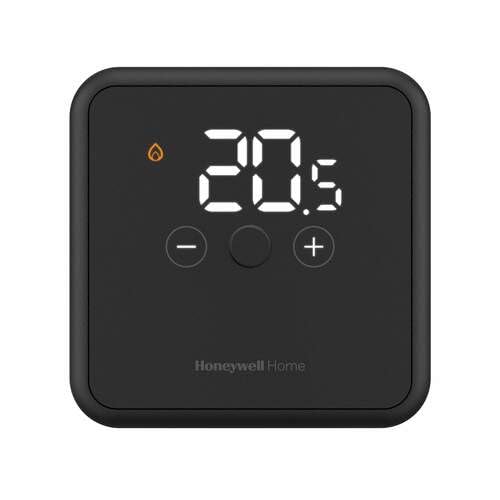
Deskripsyon imaj: Yon devan view of the Honeywell Home DT4 Wired Thermostat in black, showcasing its sleek design and digital display. The thermostat is placed on a stand with its power adapter visible.
Deskripsyon imaj: Yon dèyè view of the Honeywell Home DT4 Wired Thermostat, highlighting the backplate with wiring terminals for connection to the heating/cooling system. This view demonstrates the ease of installation.
Deskripsyon imaj: The Honeywell Home DT4 Wired Thermostat mounted on a wall, illustrating its discreet and modern appearance in a typical home environment. The digital display shows temperature information.
Videyo pwodwi ofisyèl yo
No official product videos specifically for the Honeywell Home DT4 model from a 'Seller' creator type were found in the provided data. Please refer to the written instructions for detailed guidance.
Garanti ak sipò
For warranty information, please refer to the documentation included with your product or visit the official Honeywell Home website. Technical support and customer service contact details can also be found on the official website or by contacting your retailer.


