1. Pwodwi souview
The CAMECHO Android 13 Car Radio is a 10-inch capacitive touchscreen head unit designed for Renault Sandero models from 2019 to 2024. It features an Android 13 operating system, a quad-core CPU, 1GB RAM, and 32GB ROM, providing a modern infotainment experience. Key functionalities include integrated GPS navigation, Wi-Fi connectivity, Bluetooth 4.0 for hands-free calling and music streaming, FM/RDS radio, Mirror Link for smartphone integration, and support for original steering wheel controls.
Nòt Konpatibilite Enpòtan: Do not purchase or install this product if your vehicle is equipped with a CAN bus system, as it is not compatible.
2. Pake kontni
Tanpri verifye ke tout atik ki nan lis anba a yo enkli nan pakè ou a:
- 1 x Android Car Radio Unit
- 1 x mikwofòn ekstèn
- 1 x fil elektrik ekipay
- 1 x GPS antèn
- 1 x kab RCA
- 2 x USB Câbles
- 1 x manyèl itilizatè
- 1 x Backup Camera (if included in your specific package)

Image: The CAMECHO Android 13 Car Radio shown before and after installation in a vehicle dashboard, highlighting its 10.1-inch screen and overall dimensions (262mm/10.3inch width, 169mm/6.7inch height). Below, the rear view of the unit displays connection ports for power, RCA, USB, backup camera, and GPS antenna. The image also illustrates the included accessories: USB cables, GPS antenna, rear camera input cable, power cable, RCA cable, user manual, rear camera, microphone, Canbus (if applicable), and installation tool.
3. Enstalasyon ak Enstalasyon
3.1 Tcheke Pre-Enstalasyon
- Ensure your vehicle is compatible with a double DIN 10-inch head unit.
- Confirm your vehicle does NOT have a CAN bus system.
- Disconnect the vehicle's battery before starting installation to prevent electrical damage.
3.2 Koneksyon fil elektrik
Refer to the wiring diagram provided in the included user manual and the labels on the rear of the unit for correct connections. Common connections include:
- Kòd pouvwa: Connect to the vehicle's power supply (ACC, B+, Ground).
- Kab RCA: For audio output (e.g., to external amplifier) and video input/output.
- Câbles USB: For connecting USB devices (e.g., flash drives) or for wired Mirror Link.
- Antre Kamera Retounen: Connect the included backup camera (if applicable) for automatic display when reversing.
- GPS Antèn: Monte nan yon kote ki klè view nan syèl la pou yon resepsyon siyal optimal.
- Mikwofòn ekstèn: Connect for improved call quality during Bluetooth hands-free operation.
3.3 Monte inite a
Carefully insert the head unit into the dashboard opening. Secure it using the provided mounting brackets and screws. Ensure all cables are properly routed and not pinched.
4. Operasyon Enstriksyon
4.1 Pouvwa Limen/Etenn ak Kontwòl Debaz yo
- Pouvwa sou: The unit will power on automatically when the vehicle's ignition is turned on.
- Pouvwa Off: The unit will power off automatically when the vehicle's ignition is turned off.
- Kontwòl Volim: Adjust using the on-screen controls or steering wheel buttons (if configured).
4.2 Navigasyon GPS
The unit comes with an integrated GPS receiver, supporting Waze, Navfree, Yandex Map, and other navigation applications. It supports both online and offline maps.
- Navigasyon sou entènèt: Connect to Wi-Fi or a phone hotspot to use real-time traffic and map updates.
- Kat jeyografik offline: Telechaje kat pou rejyon ou an pou itilize navigasyon san koneksyon entènèt.

Image: The CAMECHO Android 13 Car Radio screen showing GPS navigation with route details and map view. Below, the screen displays various applications like Spotify, YouTube, Facebook, and Instagram, illustrating the unit's Wi-Fi connectivity and app download capabilities.
4.3 Fonksyon Lyen Mirror
Mirror Link allows you to display your smartphone's screen content directly on the car radio's display. This function supports both wired and wireless connections.
- For iOS (One-way Control): Connect via Wi-Fi to mirror your iPhone screen. Control remains on the phone.
- For Android (Two-way Control): Connect via Wi-Fi or USB to mirror and control your Android phone directly from the car radio screen.
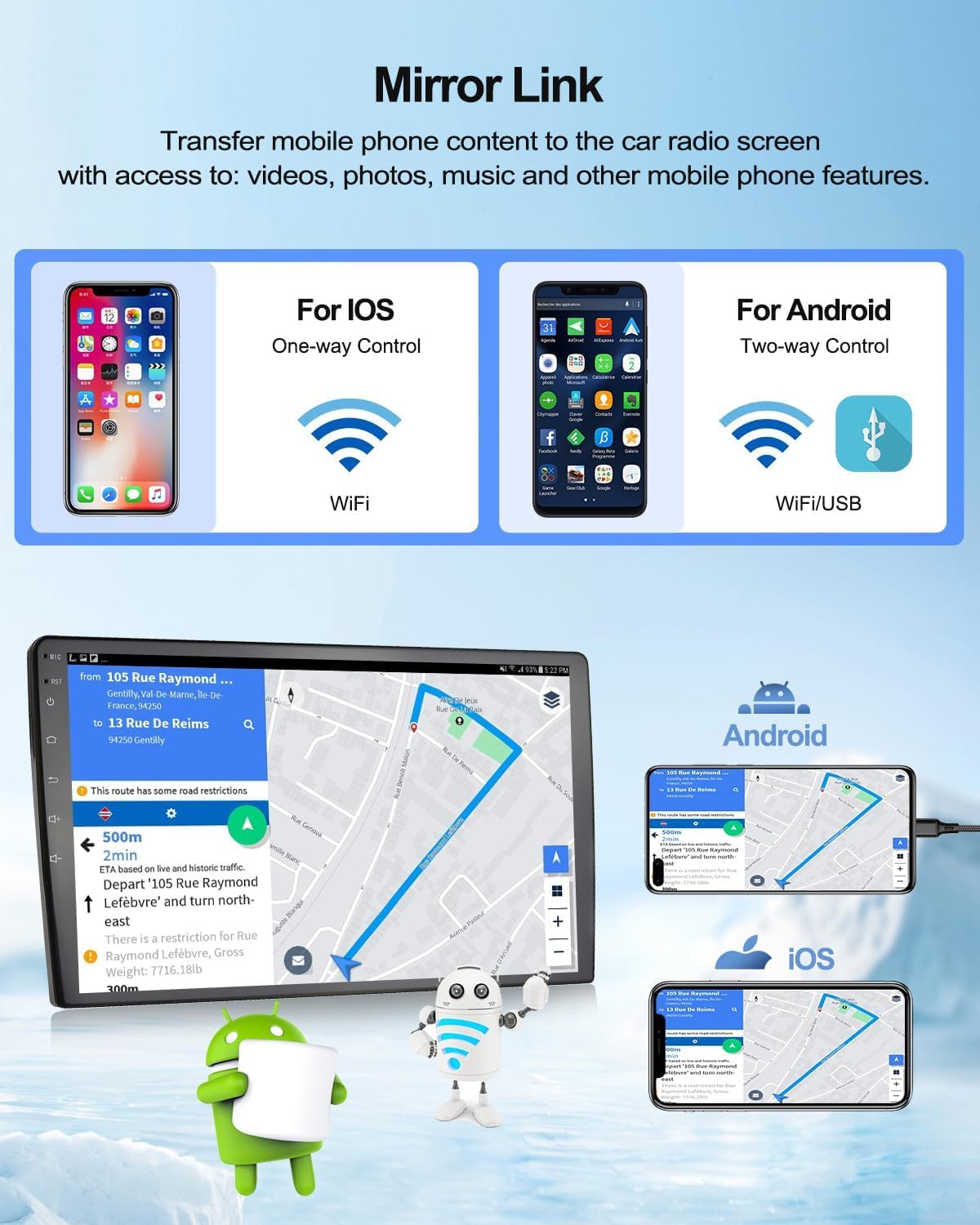
Image: The CAMECHO Android 13 Car Radio demonstrating the Mirror Link feature. It shows how iOS devices connect via Wi-Fi for one-way control, and Android devices connect via Wi-Fi/USB for two-way control, allowing the phone screen to be displayed and interacted with on the car radio.
4.4 Fonksyon Bluetooth
The integrated Bluetooth 4.0 module enables hands-free calling and wireless music streaming.
- Peyaj: Go to the Bluetooth settings on the car radio and your phone. Chèche pou available devices and select the car radio (usually named "CAMECHO" or similar). The default Bluetooth keyword is 0000.
- Apèl men lib: Make and receive calls directly from the car radio screen. The phonebook can be automatically loaded.
- Bluetooth Mizik: Stream audio from your phone to the car radio speakers.

Image: The CAMECHO Android 13 Car Radio screen displaying the FM/RDS radio interface with frequency tuning and preset stations. Below, the Bluetooth function is shown with options for BT Calls, BT Music, and Phone Book, alongside a smartphone connected via Bluetooth.
Radyo 4.5 FM/RDS
Enjoy high-quality digital stereo FM/RDS radio with automatic memory and preset scanning.
- Akor: Use the on-screen controls to manually tune or scan for stations.
- Prereglaj: Sove estasyon ou pi renmen yo pou jwenn aksè rapid.
- RDS: Radio Data System displays station information, song titles, and traffic announcements where available.
4.6 Reversing Camera Function
When a compatible backup camera is connected, the car radio automatically displays the rear view when the vehicle is put into reverse gear, enhancing parking safety.
- Features typically include guide lines, wide-angle view, waterproofing, and night vision.

Image: The CAMECHO Android 13 Car Radio screen displaying the view from a reversing camera with guide lines. Below, the unit shows the 'Steering Learn' interface for configuring steering wheel controls, with a steering wheel in the foreground.
4.7 Kontwòl Volan
The unit supports the original car steering wheel button learning function. This allows you to map functions like volume up/down, track skip, and mode selection to your vehicle's steering wheel buttons for convenient and safe operation.
- Access the 'Steering Learn' menu in the system settings to configure.
4.8 Fonksyon ekran divize
The split-screen feature allows you to run two applications simultaneously on the 10-inch display, such as navigation on one side and music playback on the other.
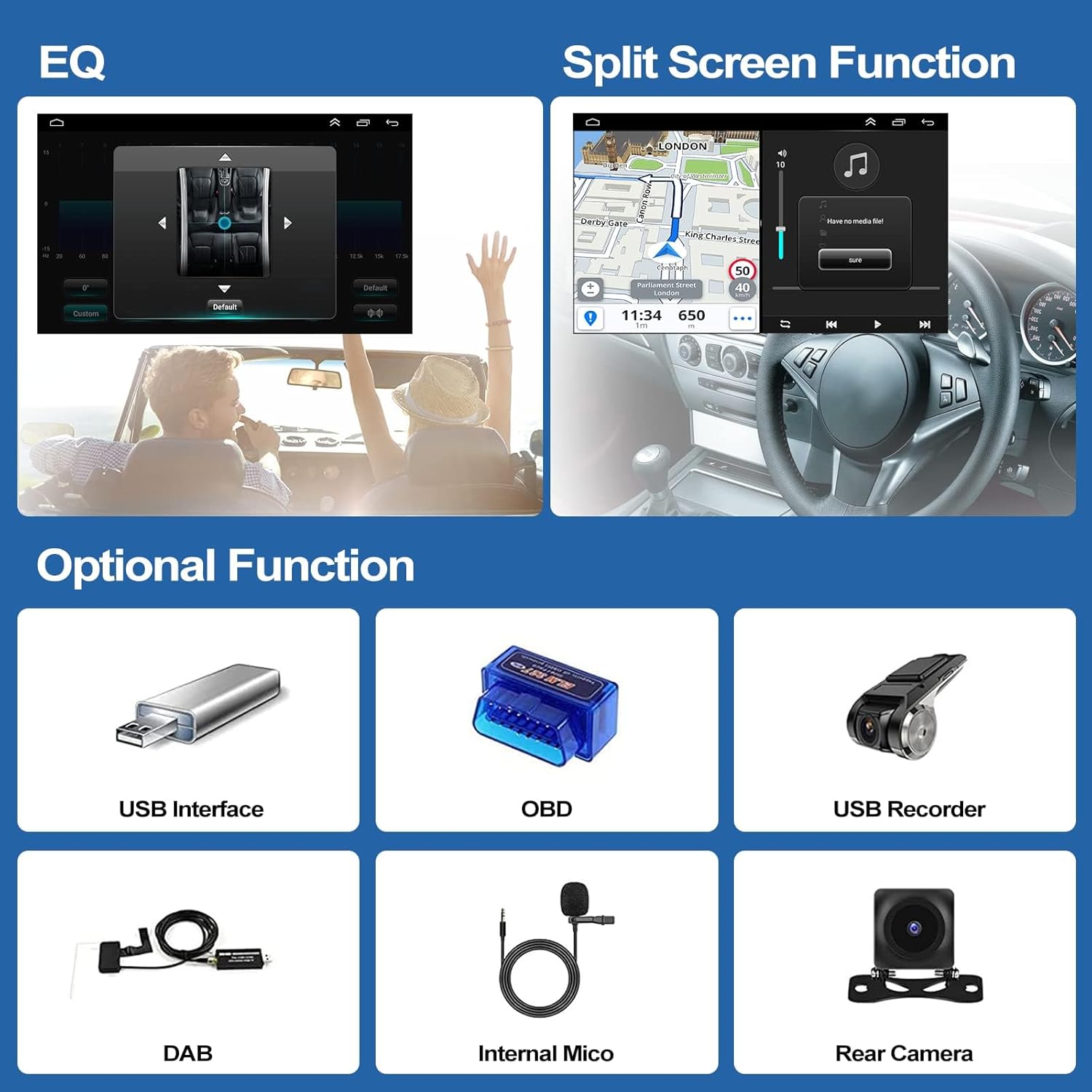
Image: The CAMECHO Android 13 Car Radio screen showing Equalizer (EQ) settings on the left and a split-screen view with navigation and music playback on the right. Below, various optional accessories are displayed: USB interface, OBD2 dongle, USB recorder, DAB+ module, internal microphone, and rear camera.
4.9 Optional Functions (Accessories Sold Separately)
The unit supports various external devices to expand its functionality. These accessories are typically not included in the standard package and must be purchased separately:
- External DVR: For recording driving footage.
- OBD2: For vehicle diagnostics.
- DAB+: For digital audio broadcasting.
- Subwoofers: For enhanced bass audio output.
- Disk USB: For additional media storage.
- Mikwofòn ekstèn: For improved voice input.
- Sòti videyo: Pou konekte ekran ekstèn yo.
5. Antretyen
5.1 Netwayaj ekran
To clean the touchscreen, power off the unit and gently wipe the screen with a soft, lint-free cloth. For stubborn smudges, use a screen cleaner specifically designed for electronic displays. Avoid abrasive materials or harsh chemicals.
5.2 Mizajou lojisyèl
Tcheke manifakti a regilyèman website or contact support for available software updates. Updates can improve performance, add new features, or fix bugs. Follow the provided instructions carefully when performing updates.
NAN. Depanaj
If you encounter issues with your CAMECHO car radio, refer to the following common problems and solutions:
| Pwoblèm | Kòz posib | Solisyon |
|---|---|---|
| Aparèy pa limen | Fil elektrik ki pa kòrèk, fizib boule, ignisyon machin nan koupe | Check power connections, inspect vehicle fuses, ensure ignition is on. |
| Pa gen son | Volume too low, incorrect audio settings, speaker wiring issues | Increase volume, check EQ settings, verify speaker connections. |
| Siyal GPS la pèdi oswa li pa egzak | GPS antenna obstructed or improperly installed | Asire w ke antèn GPS la gen yon vizyon klè. view nan syèl la epi li konekte byen fèm. |
| Pwoblèm koneksyon Bluetooth | Device not paired, incorrect password, Bluetooth off | Ensure Bluetooth is enabled on both devices, re-pair, use default password 0000. |
| Touchscreen pa reponn | System freeze, software issue | Restart the unit (turn vehicle ignition off and on). If issue persists, perform a factory reset (Factory Keyword: 8888). |
If problems persist after attempting these solutions, please contact CAMECHO customer support.
7. Espesifikasyon
| Karakteristik | Spesifikasyon |
|---|---|
| Sistèm operasyon | Android 13 |
| CPU | Kwadwilatè 1.3GHz |
| RAM + ROM | 1GB RAM + 32GB ROM |
| Gwosè ekran | 10-inch Capacitive IPS Screen |
| Rezolisyon ekran | 1024 x 600 piksèl (HD) |
| Bluetooth vèsyon | 4.0 (A2DP/Hands Free/Phonebook) |
| Bluetooth Keyword | 0000 |
| Factory Keyword | 8888 |
| Sipò USB | Max. 32GB flash memory |
| Fòma odyo | MP3, AAC, FLAC, APE, WMA, WAV |
| Fòma videyo | AVI, 3GP/MP4, MOV, MPG, MKV, WMV, RMVB |
| Voltage | DC 12V |
| Koneksyon | USB, RCA, Wi-Fi |
| Karakteristik espesyal | Touchscreen, GPS, Mirror Link, Steering Wheel Control, Split Screen |
8. Garanti ak sipò
8.1 Enfòmasyon sou Garanti
CAMECHO products are covered by a standard manufacturer's warranty. Please refer to the warranty card included in your package or contact customer support for specific details regarding warranty duration and terms.
8.2 Sipò pou Kliyan
For technical assistance, troubleshooting, or any questions regarding your CAMECHO Android 13 Car Radio, please contact our support team:
Imèl: CAMECHOVIP@126.com
Please provide your product model number and a detailed description of your issue when contacting support to ensure a prompt and effective resolution.


