Entwodiksyon
Thank you for choosing the Tronsmart T7 Lite Portable Bluetooth Speaker. This manual provides essential information for setting up, operating, and maintaining your speaker to ensure optimal performance and longevity. Please read it thoroughly before use.
Ki sa ki nan bwat la
- 1 x T7 Lite Portable Outdoor Speaker
- 1 x tip-C chaje kab
- 1 x manyèl itilizatè
- 1 x Lanyard
- Kat Garanti
Pwodwi souview
Familiarize yourself with the Tronsmart T7 Lite speaker's components and controls.
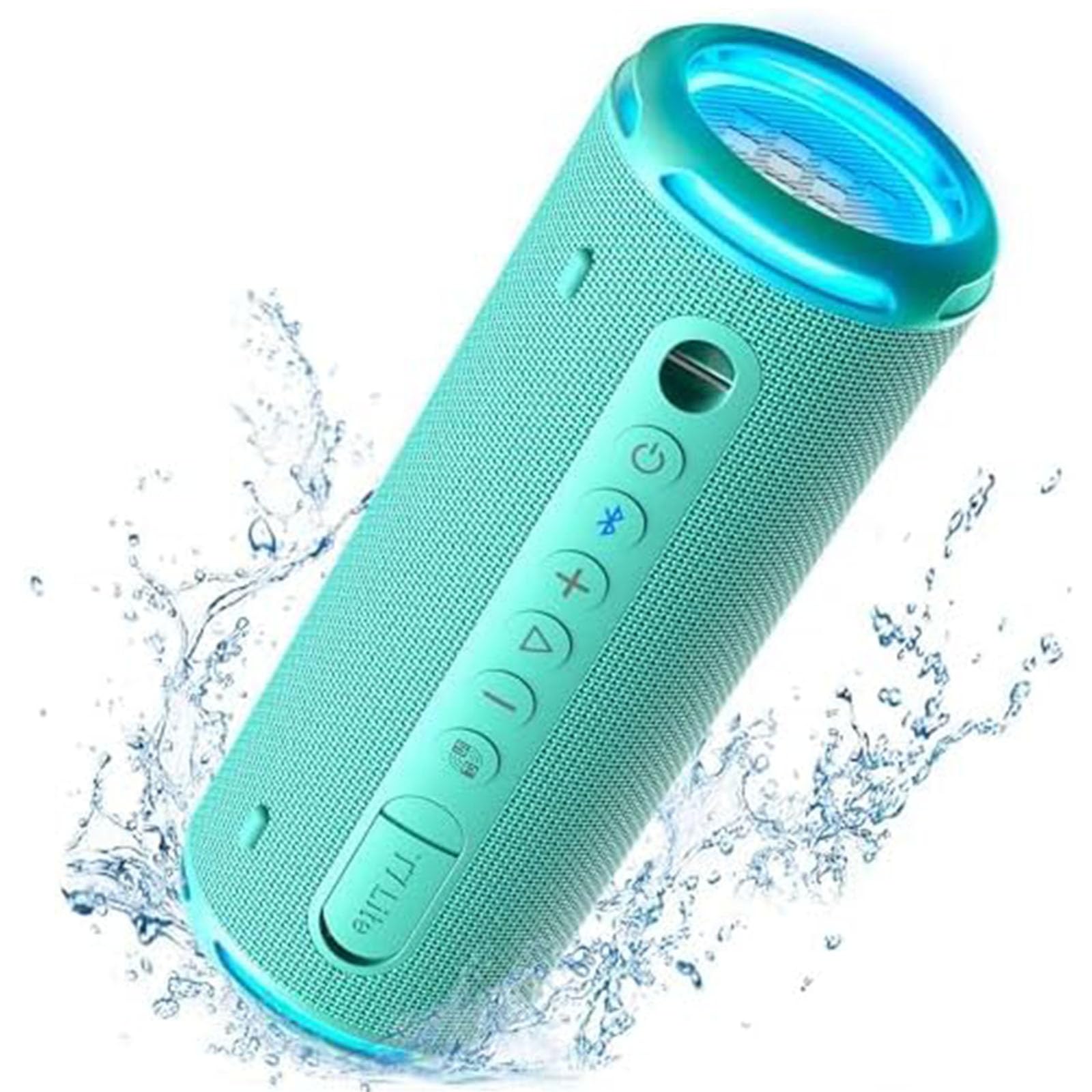
Control Buttons & Ports
- Bouton pouvwa: Peze epi kenbe pou pouvwa sou / koupe.
- Bouton Bluetooth: Peze pou antre nan mòd appariement Bluetooth.
- Volim moute (+): Ogmante volim.
- Volim desann (-): Diminye volim.
- Bouton jwe/poz: Jwe oswa pran yon poz odyo.
- EQ bouton: Cycle through equalizer modes.
- Kalite-C chaje pò: Pou chaje oratè a.
- Pò AUX-in: Pou koneksyon odyo ak fil.
- TF Kat plas: Pou jwe mizik dirèkteman nan yon kat TF.
Enstalasyon
1. Chaje Oratè a
Before first use, fully charge the speaker using the provided Type-C charging cable and a compatible USB power adapter (not included). The LED indicator will show charging status.
2. Power On/Off
Press and hold the Power button for 2 seconds to turn the speaker on or off. A sound prompt will indicate the power status.
3. Pè Bluetooth
- Turn on the speaker. The Bluetooth indicator will flash blue, indicating it's ready for pairing.
- Aktive Bluetooth sou aparèy ou an (telefòn entelijan, tablèt, elatriye).
- Select "Tronsmart T7 Lite" from the list of available Bluetooth devices.
- Once connected, the Bluetooth indicator will remain solid blue, and you will hear a confirmation sound.
The speaker features Bluetooth 5.3, offering a stable wireless connection up to 49 feet (15 meters).

Operasyon Speaker
Kontwòl debaz yo
- Jwe/Poz: Yon ti tan peze bouton Jwe/Paz la.
- Volim moute: Peze bouton '+' la yon ti kras.
- Volim desann: Peze bouton '-' la yon ti moman.
- Pwochen Track: Peze bouton '+' la pandan lontan.
- Track Previous: Peze bouton '-' la pandan lontan.
- Reponn/Fen Apèl: Yon ti tan peze bouton Jwe/Paz la.
- Rejte apèl: Long peze bouton Jwe/Paz la.
EQ and App Control
Customize your audio experience using the Tronsmart app. The app allows you to adjust the equalizer settings and control the light show. Download the Tronsmart app from your device's app store.

Rainbow Light Show
The speaker features a dynamic rainbow light show that moves to the beat of your music. Press the EQ button to cycle through different light modes or turn the lights off. You can also control the light show via the Tronsmart app.

Vrè Stereo Wireless (TWS) Pairing
For an immersive stereo sound experience, you can pair two Tronsmart T7 Lite speakers together.
- Asire w ke tou de oratè yo limen epi yo pa konekte ak okenn lòt aparèy Bluetooth.
- On one speaker (this will be the primary speaker), press and hold the Bluetooth button for 3 seconds until you hear a prompt.
- The two speakers will automatically connect to each other. Once connected, the primary speaker's Bluetooth indicator will flash blue, and the secondary speaker's indicator will be solid blue.
- Konekte aparèy ou a ak oratè prensipal la atravè Bluetooth.

Karakteristik kle
- Enhanced Bass & Versatility: The T7 Lite features a cutout design that reduces obstructions to sound transmission, boosting bass output. It delivers powerful audio with a maximum volume of 90dB.
- 24 èdtan jwe: Equipped with a built-in 4000mAh battery, the speaker can continuously play high-quality audio for up to 24 hours at 50% volume. Playtime may vary based on light display, audio content, and volume levels.
- IPX7 Waterproof & Durable Fabric: This wireless Bluetooth speaker is resistant to rain, splashes, and can be submerged in 3.3 feet of water for up to 30 minutes. Its durable fabric material and sturdy rubber cover provide protection for outdoor use.
- Opsyon koulè vibran: The T7 Lite is available in various colors, allowing you to choose one that matches your style.


Espesifikasyon
| Mak | Tronsmart |
| Non modèl | T7 Lite |
| Kalite Oratè | Deyò |
| Karakteristik espesyal | LED Light, Lightweight, Portable, Stereo Pairing, Waterproof |
| Koneksyon Teknoloji | Bluetooth 5.3 |
| Wireless Range | 49 pye (15 mèt) |
| Maksimòm Sorti pouvwa | 24 Watts |
| Playtime | Jiska 24 èdtan (nan 50% volim) |
| Evalyasyon ki enpèmeyab | IPX7 |
| Metòd kontwòl | Aplikasyon, Bouton |
| Dimansyon pwodwi | 2.83"P x 2.83"L x 7.68"H (7.2cm x 7.2cm x 19.5cm) |
| Pwa atik | 1.04 liv (0.47 kg) |
| Batri | 1 batri ityòm Ion (enkli) |
Antretyen
- Netwayaj: Siye oratè a ak yon mou, damp twal. Pa sèvi ak pwodui chimik piman bouk oswa pwodui netwayaj abrazif.
- Depo: Sere oratè a nan yon kote ki fre epi sèk, lwen limyè solèy dirèk ak tanperati ekstrèm.
- Swen batri: To prolong battery life, charge the speaker fully at least once every three months if not in regular use.
- Ekspozisyon dlo: While IPX7 rated, ensure the charging port cover is securely closed before exposing the speaker to water. After exposure, dry the speaker thoroughly before charging.
Depanaj
- Oratè a pa limen:
- Asire w ke oratè a byen chaje. Konekte l nan yon sous kouran epi eseye ankò.
- Pa ka konekte ak yon aparèy Bluetooth:
- Make sure the speaker is in pairing mode (Bluetooth indicator flashing blue). Ensure your device's Bluetooth is enabled and within range. Forget previous pairings on your device and try reconnecting.
- Pa gen son oswa volim ki ba:
- Check the volume levels on both the speaker and your connected device. Ensure the speaker is not muted. If using AUX-in, check the cable connection.
- TWS pairing failed:
- Ensure both speakers are Tronsmart T7 Lite models and are not connected to any other Bluetooth devices. Try resetting both speakers and repeating the TWS pairing steps.
Garanti ak sipò
The Tronsmart T7 Lite Portable Bluetooth Speaker comes with a limited warranty. Please refer to the included Warranty Card for detailed terms and conditions. For technical support, product inquiries, or warranty claims, please visit the official Tronsmart websit la oubyen kontakte sèvis kliyan yo dirèkteman.
Official Tronsmart Store: Tronsmart Store on Amazon


