1. Entwodiksyon
Thank you for choosing the TNICER G10 Motorcycle Intercom with 2K Camera. This device combines a high-definition camera with advanced intercom features, designed to enhance your riding experience by providing communication, entertainment, and reliable video recording. Please read this manual thoroughly before use to ensure proper operation and to maximize the device's potential.

Image 1.1: The TNICER G10 Motorcycle Intercom unit with an included 64GB TF card.
2. Pake kontni
Asire w tout atik yo prezan nan pakè w la:
- G10 Inite Prensipal
- Speaker & Arm Microphone
- Cord Microphone
- Rotatab baz
- 3M Double-sided Adhesive Mat
- 3M Single-sided Adhesive Mat
- Oratè Velcro
- Speaker Thickening Spacer
- Mikwofòn Velcro
- Clip metal
- USB Chaje Kab
- Manyèl Enstriksyon
- Kat memwa 64GB

Image 2.1: Visual representation of all components included in the TNICER G10 package.
3. Pwodwi souview
The TNICER G10 integrates a 2K camera with a motorcycle intercom system. Key features include:
- Kamera 2K HD: Equipped with a Sony IMX335 sensor for clear video recording and 5-megapixel photo capture.
- EIS Anti-Shake Technology: Electronic Image Stabilization minimizes blur for stable video footage during rides.
- Rotatable Lens & Body: The camera lens can rotate 30 degrees, and the main unit can rotate 360 degrees for optimal shooting angles.
- 8-Person Intercom: Supports group communication for up to 8 riders with a maximum range of 1000 meters.
- Bluetooth 5.2 & Wi-Fi: Advanced connectivity for stable communication and app control.
- 2000mAh batri: Provides up to 5 hours of continuous video recording.
- IP67 ki enpèmeyab: Ki fèt pou kenbe tèt ak divès kondisyon metewolojik.
- Music Sharing & FM Radio: Enjoy music with a fellow rider or tune into FM radio stations.
- CVC & DSP Noise Canceling: Reduces wind noise and engine sounds for clear audio.

Imaj 3.1: Yon anlèview of the TNICER G10's main functionalities and specifications.
4. Enstalasyon ak Enstalasyon
4.1 Chaje Aparèy la
Before first use, fully charge the G10 unit. Connect the USB charging cable to the device and a power source. The charging indicator will show the charging status.
4.2 Enstale kat memwa a
Insert the provided 64GB TF card into the designated slot on the G10 unit. The device supports up to 256GB TF cards for extended recording.

Image 4.1: Proper insertion of the 64GB memory card for recording.
4.3 Mounting on Helmet
Choose between the metal clip or the adhesive mount for securing the G10 to your helmet. Ensure the mount is firmly attached and the unit is stable.
- Attach the rotatable base to your helmet using either the metal clip or the 3M adhesive mat.
- Slide the G10 main unit onto the rotatable base until it clicks into place.
- Adjust the unit's position using the 360-degree rotatable body and the 30-degree rotatable camera lens to achieve the desired camera angle.

Image 4.2: The G10's rotatable bracket allows for flexible positioning on the helmet.

Image 4.3: The G10 offers both 30-degree lens rotation and 360-degree body rotation for precise camera angle adjustment.
4.4 Connecting Speakers and Microphones
Carefully route the speaker and microphone wires inside your helmet and connect them to the G10 unit. Use the provided Velcro pads to secure the speakers and microphone in optimal positions for clear audio.
5. Operasyon Enstriksyon
5.1 Power On/Off
- Pouvwa sou: Peze epi kenbe bouton Power la pou apeprè 3 segonn jiskaske limyè endikatè a limen.
- Pouvwa Off: Peze epi kenbe bouton Power la pou apeprè 3 segonn jiskaske limyè endikatè a etenn.
5.2 Operasyon Kamera
The G10 features a 2K HD camera with EIS anti-shake technology.
- Kòmanse anrejistreman: Press the Camera button once to begin video recording. The indicator light will change to confirm recording.
- Sispann anrejistreman: Press the Camera button again to stop recording.
- Pran foto: While not recording, press and hold the Camera button for 2 seconds to take a 5-megapixel photo.
- Anrejistreman bouk: The device automatically records in a loop, overwriting the oldest files when the memory card is full. Important moments can be protected by the G-sensor.

Image 5.1: The G10's 2K HD camera captures clear footage with a wide field of view.

Image 5.2: Demonstrating the effectiveness of EIS anti-shake technology for stable video recording.
5.3 Fonksyon Entèkom
The G10 supports group intercom for up to 8 riders.
- Peyaj: Use the one-touch auto pairing function to connect multiple G10 devices. Refer to the detailed pairing instructions in the full manual for specific steps. The G10 is also compatible with many third-party Bluetooth intercoms.
- Group Talk: Once paired, riders can communicate within a 1000-meter range.

Image 5.3: The G10 supports communication for up to 8 riders over a distance of 1000 meters.
5.4 Music and FM Radio
- Lektur Mizik: Konekte smartphone ou atravè Bluetooth pou jwe mizik.
- Pataje Mizik: Two riders can share music within a 50-meter range. Ensure the intercom function is off when using music sharing.
- Radyo FM: Activate the FM radio function to listen to local stations.
- Efè son: Adjust between three sound effect modes (Bass Boost, Treble Boost, Mid-range Boost) to customize your audio experience.

Image 5.4: Music sharing and customizable sound effects enhance the audio experience.
5.5 Wi-Fi ak kontwòl aplikasyon
The G10 has built-in Wi-Fi for seamless connection to its dedicated smartphone application.
- Download app: Download the official TNICER app from Google Play Store or Apple App Store.
- An tan reyèl View: Konekte atravè Wi-Fi a view live camera footage sou telefòn entelijan ou.
- File Jesyon: Download recorded videos and photos directly to your phone for easy sharing and backup.
- Ajisteman Anviwònman: Configure camera and intercom settings through the app.

Image 5.5: The G10's built-in Wi-Fi allows for real-time viewing and control via a smartphone app.
6. Batri ak Chaje
The G10 is equipped with a 2000mAh rechargeable battery.
- Anrejistreman kontinyèl: Jiska 5 èdtan.
- Tan pou pale: Jiska 35 èdtan.
- Lektur Mizik: Jiska 38 èdtan.
- Tan pou chaje: Apeprè 3 èdtan.
Always use the provided USB charging cable. Avoid using damaged cables or chargers.
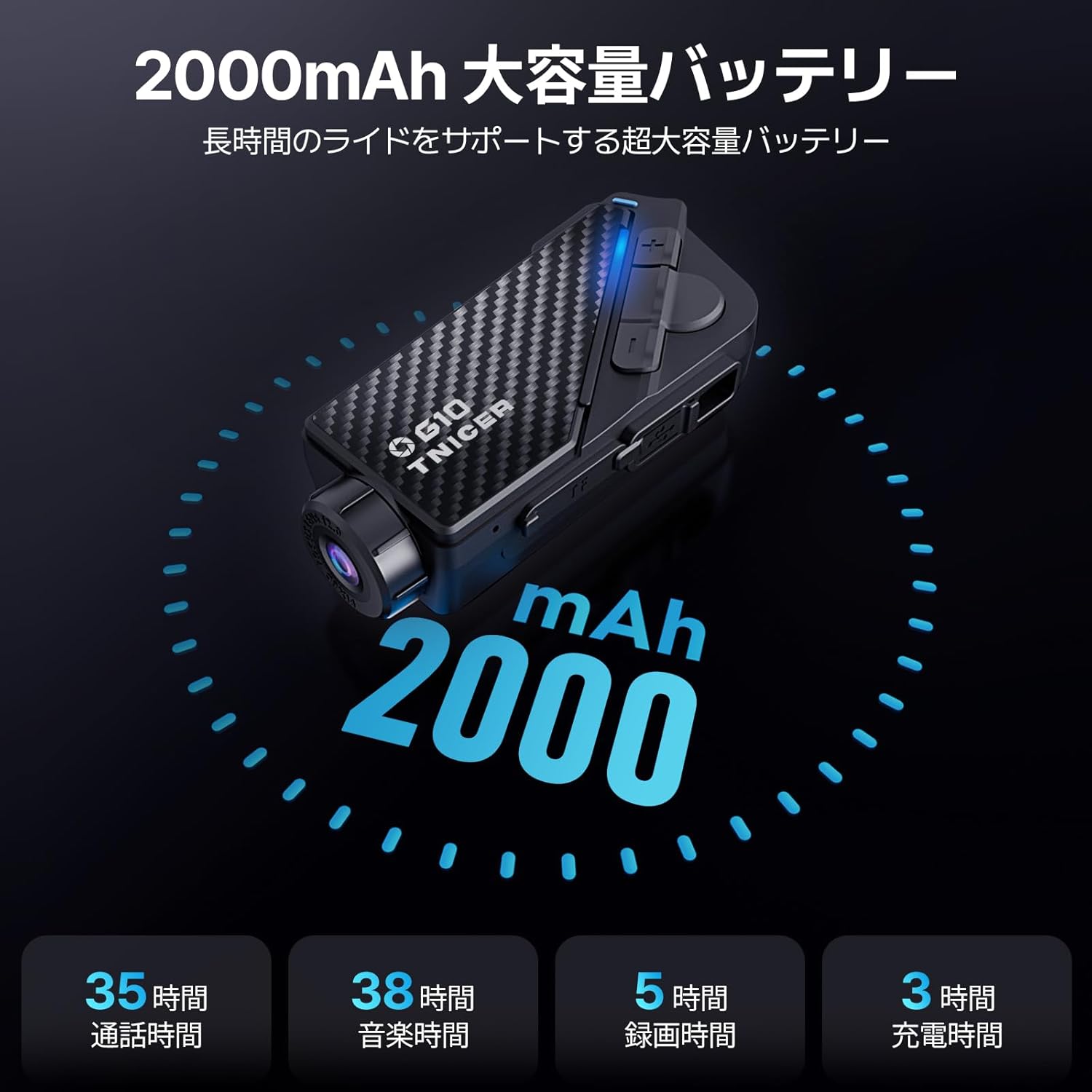
Image 6.1: Battery performance metrics for the TNICER G10.
7. Swen ak Antretyen
- Netwayaj: Sèvi ak yon mou, damp cloth to clean the device. Do not use harsh chemicals or abrasive cleaners.
- Rezistans dlo: The G10 is IP67 waterproof. While it can withstand rain, avoid submerging it in water for extended periods.
- Depo: Sere aparèy la nan yon kote ki fre, sèk lè li pa itilize.
- Swen batri: For optimal battery life, avoid extreme temperatures and fully charge the device periodically if stored for long durations.
NAN. Depanaj
If you encounter issues with your G10, try the following solutions:
- Aparèy pa soumen: Asire w batri a chaje. Konekte l nan yon sous kouran epi eseye ankò.
- Pa gen odyo ki soti nan oratè yo: Check speaker connections. Ensure volume is not muted or too low.
- Entèkom lan pa konekte: Ensure both devices are in pairing mode and within range. Try re-pairing the devices.
- Video recording issues: Check if the memory card is inserted correctly and has sufficient free space. Format the memory card if necessary (this will erase all data).
- Pwoblèm koneksyon Wi-Fi: Ensure Wi-Fi is enabled on the G10 and your smartphone. Restart both devices and try connecting again.
For further assistance, please refer to the comprehensive troubleshooting section in the full instruction manual or contact customer support.
9. Espesifikasyon
| Karakteristik | Spesifikasyon |
|---|---|
| Mak | TNICER |
| Nimewo Modèl | G10 |
| Rezolisyon Capture Videyo | 2K |
| Rezolisyon foto | 5 megapiksèl |
| Estabilizasyon Imaj | Digital (EIS) |
| Wotasyon lantiy | 30 degre |
| Body Rotation | 360 degre |
| Intercom Group Size | Jiska 8 pasaje |
| Intercom Range | Jiska 1000 mèt |
| Bluetooth vèsyon | 5.2 |
| Koneksyon Teknoloji | Bluetooth, WIFI |
| Kapasite batri | 2000mAh |
| Tan anrejistreman kontinyèl | Jiska 5 èdtan |
| Tan pale | Jiska 35 èdtan |
| Tan lèktur Klas Mizik | Jiska 38 èdtan |
| Tan pou chaje | Apeprè 3 èdtan |
| Sipò pou kat memwa | Up to 256GB TF card (64GB included) |
| Fòma Capture Videyo | MP4 |
| Evalyasyon ki enpèmeyab | IP67 |
| Anile Bri | CVC & DSP |
| Dimansyon | 20.4 x 10.9 x 8.9 cm (Pakè) |
| Pwa | 450 g (Pake) |
10. Garanti ak sipò
The TNICER G10 comes with a standard manufacturer's warranty. Please refer to the warranty card included in your package for specific terms and conditions. For technical support, product inquiries, or warranty claims, please contact TNICER customer service through the retailer where you purchased the product or visit the official TNICER websit.


