Pwodwi souview
The Thomson RC112A Android TV Remote Control is designed to provide seamless control over your Thomson Android TV. This official replacement remote offers a blend of sophisticated design and practical functionality, ensuring a comfortable and intuitive user experience. It features an ergonomic design, backlit buttons for low-light conditions, integrated voice control via Google Assistant, and a customizable favorite apps button.

Imaj: Devan view of the Thomson Android TV Remote Control, showcasing konsepsyon nwa elegant li yo ak dispozisyon bouton yo.
Enstalasyon ak premye itilizasyon
1. Enstalasyon batri
The remote control requires two (2) AAA batteries for operation. Ensure correct polarity when inserting the batteries.
- Jwenn kouvèti lòj batri a sou do kontwòl remote la.
- Glise kouvèti a anba oswa nan direksyon flèch la endike a pou ouvri li.
- Insert two AAA batteries, matching the positive (+) and negative (-) terminals as indicated inside the compartment.
- Remèt kouvèti konpatiman batri a, epi asire w li byen klike nan plas li.
2. Pairing with your Android TV
This remote control connects to your Thomson Android TV via Bluetooth. The pairing process may vary slightly depending on your TV model. Generally, follow these steps:
- Ensure your Thomson Android TV is powered on.
- Sou televizyon ou an, ale nan Anviwònman > Remote & Pwodwi pou Telefòn or Anviwònman Bluetooth.
- Chwazi Ajoute akseswar or Pè nouvo aparèy.
- On the Thomson remote control, press and hold the Lakay bouton ak a Retounen button simultaneously for a few seconds until the LED indicator on the remote starts blinking, indicating it's in pairing mode.
- On your TV screen, select "Thomson RC112A" or a similar name from the list of available devices.
- Confirm the pairing on your TV if prompted. The LED on the remote will stop blinking and remain solid for a moment, indicating successful pairing.
If pairing fails, ensure the remote is close to the TV and repeat the steps. Refer to your TV's user manual for specific pairing instructions if needed.
Opere kontwòl remote la
The Thomson RC112A remote control features a comprehensive set of buttons for navigating your Android TV. Below are the primary functions:
- Bouton pouvwa (●): Limen oswa etenn televizyon an.
- Pav Nimerik (0-9): Direct channel selection or input.
- Pavé navigasyon (Anwo, Anba, Agoch, Adwat, OK): Pou navigasyon ak seleksyon meni.
- Bouton tounen (←): Retounen nan ekran oswa meni anvan an.
- Bouton Kay (⌂): Aksè ekran prensipal Android TV a.
- Volume Up/Down (V+/V-): Ajiste volim televizyon an.
- Chanèl Monte/Desann (P+/P-): Chanje chanèl televizyon yo.
- Bouton bèbè (🔇): Sere oswa dekole odyo televizyon an.
- Google Assistant Button (🎤): Activates voice control. Press and hold to speak commands.
- Favorite Apps Button (⭐): Customizable button to quickly launch your preferred application. Refer to your TV's settings to assign an app to this button.
- Dedicated App Buttons (e.g., YouTube, Netflix, Prime Video, Disney+, Google Play): Aksè dirèk a sèvis difizyon sa yo.
Karakteristik espesyal
Ergonomik konsepsyon
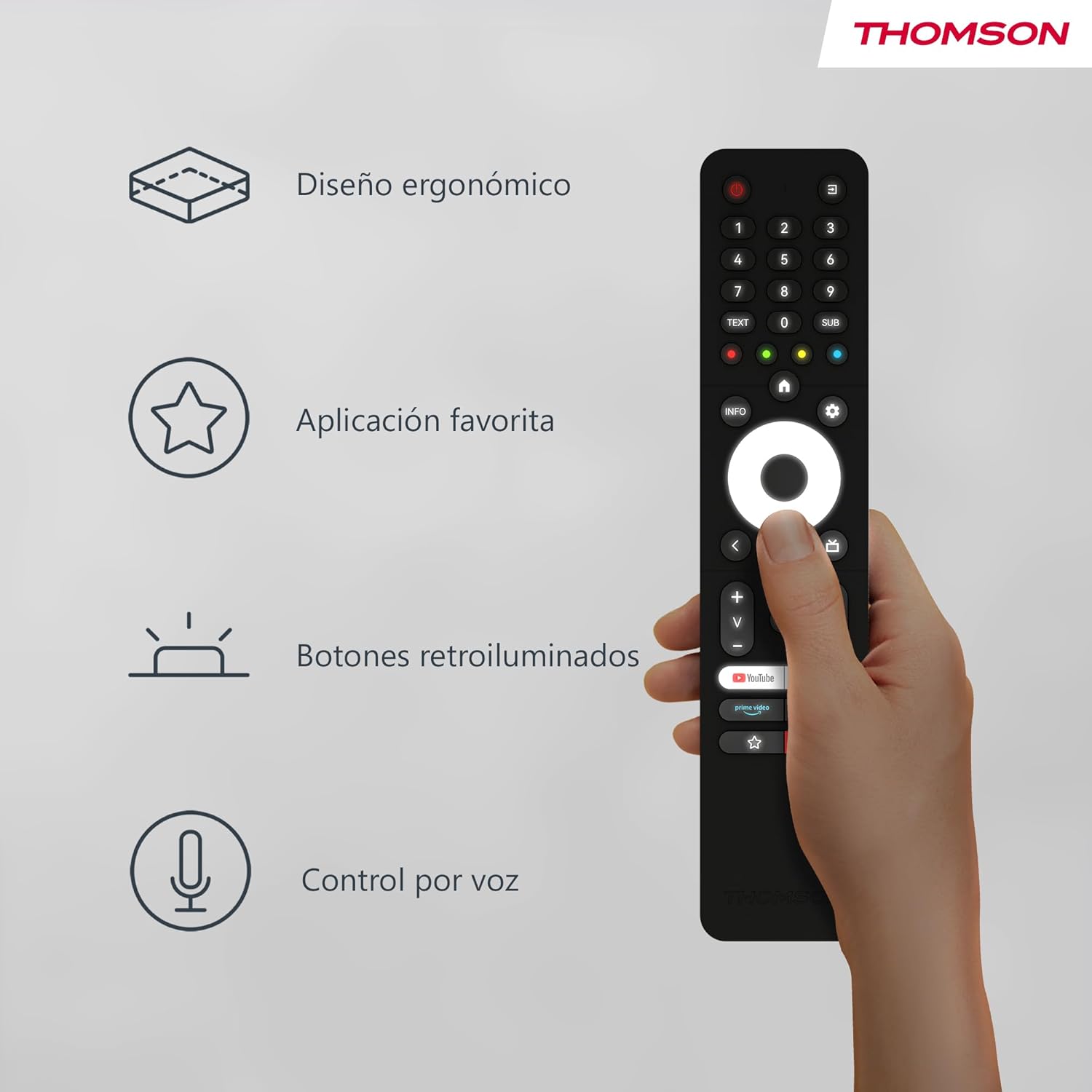
The remote control is designed to fit comfortably in your hand, making prolonged use easy and reducing fatigue. Its sleek profile and balanced weight contribute to a pleasant user experience.
Image: A hand holding the Thomson remote control, illustrating its comfortable ergonomic design and highlighting key features like voice control and favorite apps.
Bouton retroeklere

The buttons on the remote control illuminate, making it easy to locate and press the correct buttons in dimly lit environments. This feature prevents accidental key presses and enhances usability during night-time viewing.
Imaj: De views of the Thomson remote control side-by-side, one showing the buttons unlit and the other showing them illuminated, demonstrating the backlit feature for low-light use.
Kontwòl Vwa (Asistan Google)
With the integrated Google Assistant, you can control your TV using voice commands. Press and hold the Google Assistant button, then speak clearly into the remote. You can:
- Adjust volume (e.g., "Volume up", "Set volume to 20").
- Chèche pou content (e.g., "Find action movies", "Play [Movie Title]").
- Open applications (e.g., "Open Netflix", "Launch YouTube").
- Ask questions (e.g., "What's the weather like?").
- Kontwole aparèy kay entelijan konpatib yo.
Antretyen
Ranplasman batri
Replace batteries when the remote's performance degrades or if the LED indicator does not light up during use. Always replace both batteries simultaneously with new AAA alkaline batteries.
Netwayaj
Pou netwaye kontwòl remote la, sèvi ak yon twal mou epi sèk. Pou pousyè tè ki difisil pou retire, siye l yon ti kras.ampen the cloth with water or a mild, non-abrasive cleaner. Do not use harsh chemicals or abrasive materials, as they may damage the remote's surface or internal components. Avoid getting moisture into the battery compartment or button crevices.
Depo
Sere kontwòl remote la nan yon kote ki fre epi sèk, lwen limyè solèy dirèk, tanperati ekstrèm, ak imidite ki wo. Si ou pa pral itilize kontwòl remote la pou yon peryòd tan pwolonje, li rekòmande pou retire pil yo pou anpeche flit ak domaj potansyèl.
Depanaj
| Pwoblèm | Kòz posib | Solisyon |
|---|---|---|
| Telekòmand lan pa reponn. | Pil ki fèb oswa ki mouri; Telekòmand pa konekte; Gen yon obstak ant telekòmand lan ak televizyon an. | Replace batteries; Re-pair the remote with the TV (see "Pairing" section); Ensure no objects are blocking the signal (though Bluetooth is less sensitive to this, direct line of sight can sometimes help with initial pairing). |
| Kontwòl vwa a pa fonksyone. | Microphone blocked; Remote not properly paired for voice; Internet connection issue on TV. | Ensure nothing is covering the microphone hole; Re-pair the remote; Check TV's internet connection. |
| Backlight not illuminating. | Batteries are low; Feature is disabled (if applicable, though usually automatic). | Replace batteries. The backlight feature is typically automatic and activates when the remote is moved or a button is pressed. |
| Favorite app button not launching desired app. | App not assigned or incorrectly assigned. | Go to your TV's settings and re-assign the desired application to the favorite app button. |
Espesifikasyon
- Mak: Thomson
- Nimewo Modèl: RC112A
- Koulè: Nwa
- Karakteristik espesyal: Ergonomic, Backlit, Voice Search (Google Assistant)
- Aparèy konpatib: Thomson Android TVs
- Kalite batri: 2 x AAA pil (pa enkli)
- Ranje maksimòm: 10 mèt
- Koneksyon: Bluetooth
Garanti ak sipò
Warranty information for your Thomson RC112A remote control is typically provided with your purchase documentation or can be found on the official Thomson websit la. Tanpri konsève prèv acha ou a pou reklamasyon garanti.
For technical support, troubleshooting assistance beyond this manual, or to inquire about replacement parts, please visit the official Thomson support website or contact their customer service. Contact details are usually available on the manufacturer's official websit la oubyen nan anbalaj pwodwi ou a.
Remak: Yo pa bay enfòmasyon sou disponiblite pyès rezèv nan detay pwodwi a.


