Entwodiksyon
Thank you for choosing the WORKPRO 3.6V Electric Cordless Screwdriver. This manual provides essential information for the safe and efficient operation, maintenance, and care of your new tool. Please read this manual thoroughly before use and retain it for future reference.
Enfòmasyon sou Sekirite
Toujou obsève prekosyon sekirite debaz yo lè w ap itilize zouti elektrik pou diminye risk dife, chòk elektrik ak aksidan pèsonèl.
- Kenbe zòn travay la pwòp epi byen limen. Zòn ankonbre oswa nwa yo envite aksidan.
- Pa opere zouti elektrik nan atmosfè eksplozif, tankou nan prezans likid ki ka pran dife, gaz, oswa pousyè. Zouti elektrik kreye etensèl ki ka limen pousyè oswa lafimen.
- Kenbe timoun yo ak moun ki t ap gade yo lwen pandan w ap opere yon zouti elektrik. Distraksyon ka lakòz ou pèdi kontwòl.
- Evite demaraj aksidantèl. Asire w ke switch la nan pozisyon "off" anvan ou konekte l ak pake batri a, anvan ou ranmase l oswa anvan ou pote zouti a.
- Pa depase. Kenbe bon pye ak balans tout tan. Sa a pèmèt pi bon kontwòl zouti pouvwa a nan sitiyasyon inatandi.
- Abiye byen. Pa mete rad ki lach oswa bijou. Kenbe cheve ou ak rad ou lwen pati k ap deplase. Rad ki lach, bijou oswa cheve long ka kenbe nan pati k ap deplase.
- Sèvi ak ekipman sekirite. Toujou mete pwoteksyon pou je. Yo dwe itilize mask pousyè, soulye sekirite ki pa glise, chapo di oswa pwoteksyon pou tande pou kondisyon ki apwopriye yo.
Kontni pake
Verifye ke tout atik ki nan lis anba a yo enkli nan pakè ou a:
- 1 PC Electric Cordless Screwdriver
- 1 PC USB Cable (Type-A to Type-C)
- 1 PC Carrying Case
- 1 PC 50mm Extension Rod
- 2 PCS 50mm Bits (PH2/PZ2)
- 19 PCS 25mm Bits (PH0/1/2/3, PZ1/2/3, H1/8, 5/32, 3/16, 1/4, T10/15/20/25, SL1/8, 5/32, 3/16, 1/4)
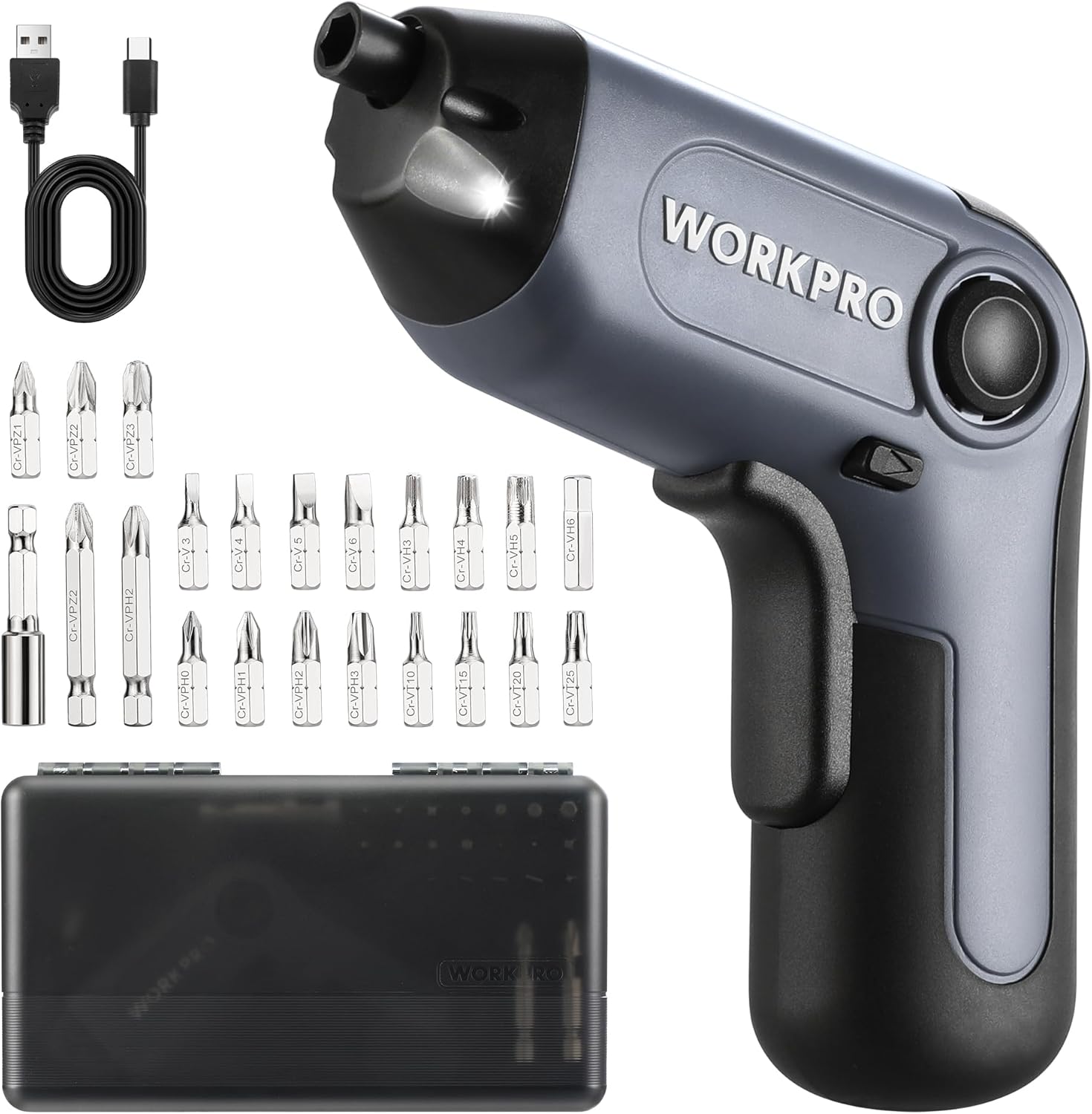
Image: The WORKPRO Electric Cordless Screwdriver, USB cable, carrying case, extension rod, and various screwdriver bits.
Pwodwi souview
Familiarize yourself with the components and features of your WORKPRO Electric Cordless Screwdriver.

Image: A diagram highlighting key parts of the screwdriver, including the 1/4" Collet Sleeve, LED Light, ON/OFF Switch, USB-C Cable port, Forward/Reverse/Lock Control, and Charge Port & Charge Indicator.
- Offset Driving Shaft: Designed for improved access in tight spaces and corners, offering greater flexibility compared to traditional center-driving tools.
- Limyè ki ap dirije: An integrated front LED light automatically illuminates the work area, enhancing visibility in dimly lit environments.
- Mandrin mayetik: The 1/4" magnetic chuck securely holds screwdriver bits in place during operation.
- Forward/Reverse/Lock Control: A convenient switch allows for easy selection of driving direction or locking the tool for manual use.
Enstalasyon
Chaje batri a
The screwdriver is equipped with a built-in rechargeable battery. Before first use, or when the battery is low, charge the tool using the provided USB cable.
- Connect the USB cable (Type-A to Type-C) to the charging port on the screwdriver.
- Connect the other end of the USB cable to a power source such as a power bank, USB charger (5V), car charger, or laptop/PC.
- The charge indicator light will show wouj pandan y ap chaje.
- Once fully charged, the indicator light will turn vèt. A full charge typically takes 1.5-2 hours.

Image: The screwdriver being charged via USB-C, illustrating the built-in 2000mAh battery and compatible charging methods.
Installing/Changing Bits
The screwdriver features a 1/4" magnetic chuck for quick and secure bit changes.
- Ensure the screwdriver is in the 'Lock' position (center position of the Forward/Reverse switch) to prevent accidental activation.
- Insert the desired 1/4" hex bit directly into the magnetic chuck until it is firmly seated.
- To remove a bit, simply pull it straight out from the chuck.
- For extended reach, insert the 50mm extension rod into the chuck first, then insert the desired bit into the extension rod.
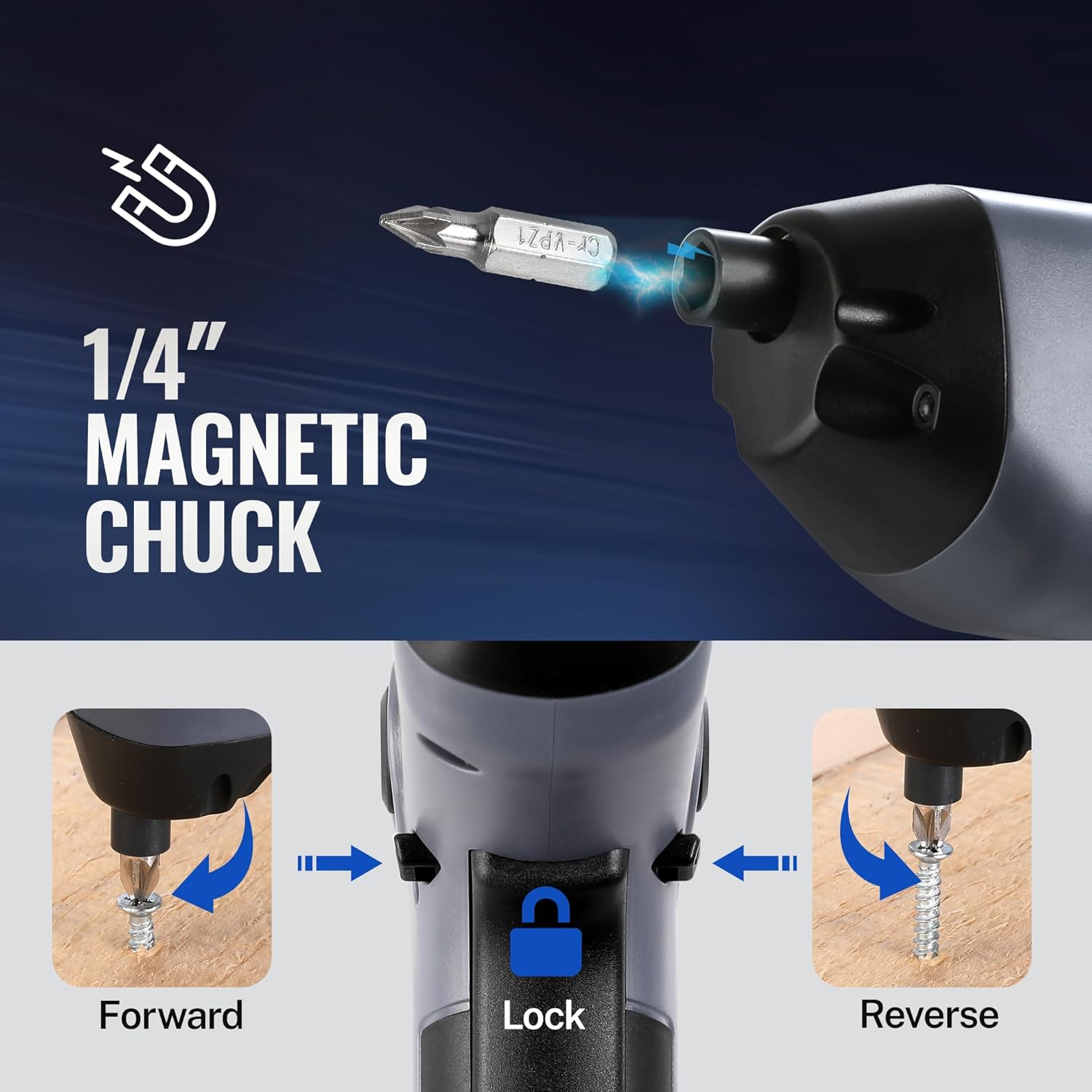
Image: A visual representation of inserting a bit into the magnetic chuck and the Forward, Lock, and Reverse positions of the control switch.
Enstriksyon Operasyon
Limen / Off
To operate the screwdriver, press the ON/OFF switch (trigger) located on the handle. Release the switch to stop the tool.
Operasyon Avanse/Aryè
The Forward/Reverse/Lock control switch is located near the top of the handle.
- Push the switch forward (towards the bit) for pi devan rotation (to drive screws).
- Push the switch backward (towards the base) for ranvèse rotation (to remove screws).
- Mete switch la sou la sant position to lock the tool, preventing accidental activation and allowing for manual tightening/loosening if needed.
Sèvi ak limyè a ki ap dirije
The integrated LED light automatically activates when the ON/OFF switch is pressed, illuminating your work area. It will turn off automatically when the switch is released.

Image: The screwdriver in use, demonstrating how the LED light illuminates the screw and surrounding area for better visibility.
Utilizing the Offset Driving Shaft
The offset design of this screwdriver allows it to reach screws in confined spaces and close to edges where traditional screwdrivers or drills might not fit.
- When working in corners or near obstacles, position the offset shaft to align the bit with the screw head.
- This design provides increased flexibility for precise work in challenging areas.

Image: A comparison showing a standard drill with a center driving shaft unable to reach a screw in a corner, contrasted with the WORKPRO screwdriver's offset driving shaft successfully accessing the screw in a narrow space.
Antretyen
Bon antretyen asire lonjevite ak pèfòmans optimal tournevis ou a.
- Netwayaj: Regularly wipe the tool with a soft, damp twal. Pa sèvi ak pwodui chimik ki agresif oswa pwodui netwayaj abrazif. Kenbe ouvèti vantilasyon yo pwòp de pousyè ak debri.
- Depo: Store the screwdriver and its accessories in the provided carrying case in a dry, cool place, away from direct sunlight and moisture.
- Swen batri: Pou depo alontèm, chaje batri a apeprè 50% chak 3-6 mwa pou kenbe batri a an bon eta.
- Enspeksyon Bit: Periodically inspect screwdriver bits for wear or damage. Replace worn bits to ensure effective screw driving and prevent damage to screw heads.
Depanaj
If you encounter issues with your WORKPRO Electric Cordless Screwdriver, refer to the following common problems and solutions:
- Screwdriver does not turn on:
- Ensure the battery is charged. Connect the tool to a power source and check the charging indicator.
- Verify the Forward/Reverse/Lock switch is not in the 'Lock' (center) position.
- Screwdriver lacks power/torque:
- The battery may be low. Recharge the tool.
- Ensure the correct bit size is used for the screw to prevent stripping and maximize torque transfer.
- Bit falls out of chuck:
- Ensure the bit is fully inserted into the magnetic chuck.
- Check if the bit is a standard 1/4" hex shank.
- Charging indicator light does not turn green:
- Ensure the USB cable is securely connected to both the screwdriver and the power source.
- Try a different USB cable or power adapter to rule out a faulty accessory.
Espesifikasyon
| Karakteristik | Spesifikasyon |
|---|---|
| Mak | WORKPRO |
| Modèl | 3.6V Electric Cordless Screwdriver |
| Kalite batri | Lityòm Ion (Enkli) |
| Koupl | Jiska 5 Nm |
| Vitès san chaj | 210 RPM |
| Tan pou chaje | 1.5-2 èdtan |
| Port chaje | USB-C |
| Jwèt Head Style | Phillips, Pozidriv, Torx, Hex, Slotted |
| Bit Size | 1/4" Hex Shank (25mm and 50mm bits included) |
| Pwa atik | 1.96 liv |
| Dimansyon pake | 9.96 x 5.71 x 2.64 pous |
Garanti ak sipò
WORKPRO products are manufactured to high-quality standards. For warranty information, technical support, or service inquiries, please refer to the contact information provided with your purchase documentation or visit the official WORKPRO websit la. Tanpri konsève prèv acha ou a pou reklamasyon garanti.


