1. Entwodiksyon
This manual provides detailed instructions for the installation, operation, and maintenance of your ZUMIMALL ZS-GX2S 3MP Wireless Outdoor Security Camera. Please read this manual thoroughly before using the product to ensure proper functionality and safety.
The ZUMIMALL ZS-GX2S is a solar-powered, wireless outdoor security camera designed for comprehensive surveillance. It features 3MP resolution, 360° pan and tilt capabilities, AI detection, two-way audio, and IP66 weatherproofing, making it suitable for various outdoor environments.
2. Pwodwi souview
2.1 Kontni pake a
Pake a gen ladan atik sa yo:
- ZUMIMALL ZS-GX2S 3MP Wireless Outdoor Security Camera (2 units)
- Panèl Solè (2 inite)
- Sipò Montaj pou Kamera
- Mounting Support pou panèl solè
- USB Chaje Kab
- Screw Package (screws and wall anchors)
- Manyèl Enstriksyon
- Tip Sticker ('Hey! YOU ARE ON CAMERA')
2.2 Konpozan Kamera
Familiarize yourself with the main parts of the camera:
- Lantiy kamera: Kaptire videyo footage.
- Limyè blan: Bay ekleraj pou vizyon lannwit koulè.
- Capteur PIR: Detekte mouvman.
- Mikwofòn: Kaptire odyo pou kominikasyon bidireksyonèl.
- Oratè: Outputs audio for two-way communication and siren.
- Antèn Wi-Fi: Enhances wireless connectivity.
- Endikatè mòd: Montre estati kamera.
- Reyajiste kle: Used to reset the camera.
- Kle pouvwa: Limen/etenn kamera a.
- Plas kat SD: Pou depo videyo lokal (sipòte jiska 128GB).
- Kalite-C chaj pò: For connecting the solar panel or charging.

2.3 Karakteristik kle
- 3MP Full Color Image: Delivers 2K resolution, 1.5 times sharper than standard 1080p, with 4X digital zoom.
- 360° View: Ofri wotasyon 355° orizontal ak 120° vètikal pou yon pwoteksyon konplè.
- Ki mache ak enèji solè epi 100% san fil: Equipped with a high-efficiency solar panel and large-capacity rechargeable battery for continuous operation.
- Koneksyon WiFi 2.4G: Features 4dBi dual antennas for stable wireless connection.
- Intelligent AI Detection: Advanced PIR sensor and AI algorithms identify persons, pets, vehicles, and parcels, reducing false alarms.
- Avètisman an tan reyèl: Sends instant notifications to your mobile app upon motion detection.
- De-fason Audio: Pèmèt kominikasyon an tan reyèl atravè kamera a.
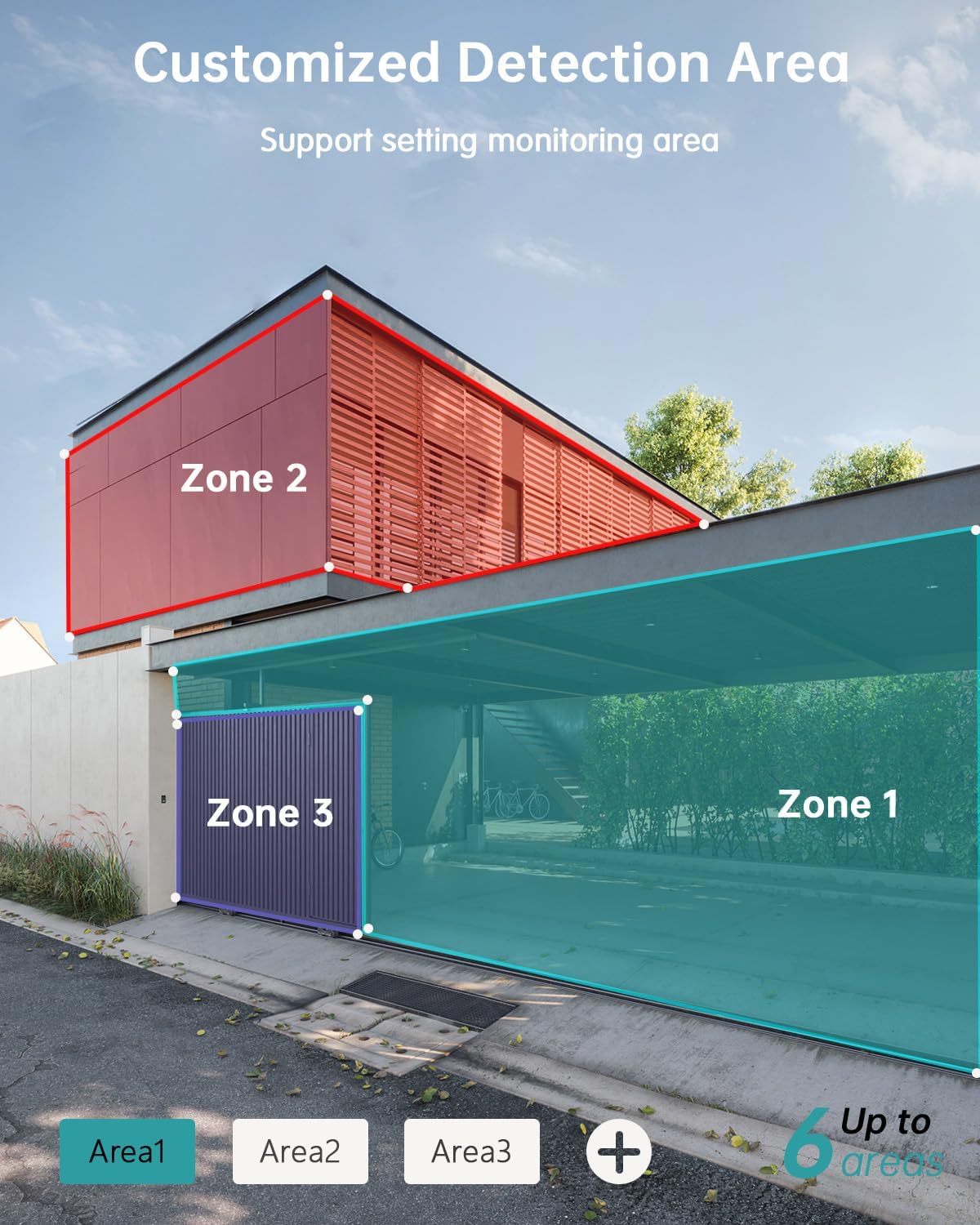
- Zòn Deteksyon Personnalisable: Set specific monitoring zones to focus on critical areas.
- IP66 Rezistan a move tan: Designed to withstand various weather conditions, including rain, wind, and snow.
- Plizyè Opsyon Depo: Supports local storage via Micro SD card (up to 128GB) and cloud storage.
- Travay ak Alexa: Entegre ak Amazon Alexa pou kontwòl vwa ak an dirèk view sou aparèy konpatib.
3. Enstalasyon
3.1 Enstalasyon Fizik
Before permanent installation, ensure the camera has a strong 2.4G Wi-Fi signal in the desired location. The camera can be mounted on various surfaces including wood, drywall, stucco, or even gutters using appropriate fasteners.
- Atache baz montaj la: Secure the camera's mounting base to your chosen surface using the provided screws and wall anchors.
- Konekte Panèl Solè: Attach the solar panel to its bracket and position it to receive maximum sunlight. Connect the solar panel's Type-C cable to the camera's charging port. Ensure the cable is neatly managed to prevent damage.
- Mount kamera: Align the camera with the mounting base and slide it down until it locks securely.

3.2 Enstalasyon ak koneksyon aplikasyon an
The ZUMIMALL app is required to operate your camera. Follow these steps to set up the app and pair your camera:
- Telechaje App a: Scan the QR code provided in the manual or on the product packaging, or search for 'ZUMIMALL' in your device's app store.
- Enskri kont: Open the ZUMIMALL app and follow the on-screen instructions to register a new account or log in if you already have one.
- Ajoute Aparèy: In the app, select 'Add Device' or the '+' icon. Follow the prompts to select your camera model.
- Limen Kamera a: Asire w kamera w la limen.
- Fè eskanè kòd QR: The app will display a QR code. Hold your camera's lens towards your phone screen to scan the QR code. You will hear a confirmation sound when successful.
- Konekte ak Wi-Fi: Follow the app's instructions to connect the camera to your 2.4G Wi-Fi network.
- Enstalasyon konplè: Once connected, you can name your camera and begin using it.

4. Operasyon
4.1 Viv View ak Lektur
Jwenn aksè nan flux an dirèk la epi re-view anrejistre footage directly from the ZUMIMALL app.
- Viv View: Louvri aplikasyon an epi chwazi kamera ou a view the real-time feed.
- Lektur: Navigate to the 'History' or 'Cloud' section in the app to review evènman anrejistre yo.

4.2 Deteksyon Mouvman ak Alèt
The camera's AI detection system identifies specific objects and sends alerts.
- AI Deteksyon: The camera can distinguish between persons, pets, vehicles, and parcels.
- Custom Areas: Set specific detection zones within the app to monitor areas of interest and reduce unnecessary alerts.
- Notifikasyon an tan reyèl: Resevwa alèt imedya sou telefòn ou lè yo detekte mouvman.

4.3 Odyo De-fason
Engage in real-time conversations through the camera using the app's two-way audio feature.
4.4 Kontwòl PTZ
Control the camera's pan (horizontal) and tilt (vertical) movements directly from the app to adjust your viewang ang.
- Pen: Wotasyon orizontal 355°.
- Enklinezon: Wotasyon vètikal 120°.

4.5 Opsyon Depo
Your camera offers flexible storage solutions for recorded footage.
- Kat mikwo SD: Insert a Micro SD card (up to 128GB) into the designated slot for local storage.
- Depo nwaj: ZUMIMALL offers cloud storage services for convenient access and backup of your recordings.
4.6 Entegrasyon Alexa
The ZUMIMALL ZS-GX2S camera is compatible with Amazon Alexa. You can use voice commands to view feed an dirèk la sou aparèy konpatib ak Alexa.
5. Antretyen
5.1 Batri ak Chaje Solè
The integrated solar panel is designed to keep your camera's battery charged, providing continuous operation.
- Asire w ke panèl solè a pozisyone nan yon zòn ki resevwa limyè solèy dirèk pandan plizyè èdtan chak jou.
- In periods of low sunlight or high usage, the camera's battery may require manual charging via the USB port.
5.2 Netwayaj
Netwayaj regilye ede kenbe pèfòmans optimal.
- Siye lantiy kamera a ak panèl solè a dousman avèk yon twal mou.amp twal pou retire pousyè ak debri.
- Avoid using harsh chemicals or abrasive materials that could damage the camera's surface or lens.
NAN. Depanaj
If you encounter issues with your ZUMIMALL ZS-GX2S camera, consider the following common solutions:
- Pa gen pouvwa: Ensure the solar panel is receiving adequate sunlight or manually charge the camera using the USB cable.
- Pwoblèm koneksyon Wi-Fi: Verify your Wi-Fi network is 2.4Ghz. Check the camera's proximity to the router and ensure a strong signal. Restart your router and camera if necessary.
- Fo Alam: Adjust the motion detection sensitivity settings in the app. Utilize the custom detection area feature to exclude irrelevant zones.
- No Recordings: Check if the Micro SD card is properly inserted and formatted. Ensure cloud storage is active if you are using that service.
- Kalite imaj pòv: Netwaye lantiy kamera a. Asire w pa gen okenn obstak nan chan mayetik kamera a. view.
- Pwoblèm Odyo Bidireksyonèl: Check the volume settings on your phone and in the app. Ensure there are no obstructions blocking the camera's microphone or speaker.
For further assistance, please refer to the ZUMIMALL app's help section or contact customer support.
7. Espesifikasyon
| Karakteristik | Detay |
|---|---|
| Nimewo Modèl | ZS-GX2S |
| Rezolisyon | 3MP (2K) |
| Sous pouvwa | Solar Powered (with rechargeable Lithium Ion battery) |
| Koneksyon | 2.4G Wi-Fi |
| Pan / Panche Range | 355 ° orizontal, 120 ° vètikal |
| Lantiy gran ang | 130° |
| Vizyon lannwit | 3MP Color Night Vision (with 2 IR and 2 white lights) |
| Zoom dijital | 4X |
| AI Deteksyon | Person, Pet, Vehicle, Parcel |
| Odyo | De-fason odyo |
| Depo | Kat Micro SD (jiska 128GB), Depo nan nwaj la |
| Rezistans move tan | IP66 |
| Tanperati Fonksyònman | -4 ° F a 120 ° F (-20 ° C a 50 ° C) |
| Aparèy konpatib | Telefòn entelijan, Amazon Alexa |
| Dimansyon pwodwi | 13.7 x 7.4 x 5.4 pous |
| Pwa atik | 4.71 liv |
8. Garanti ak sipò
ZUMIMALL is committed to providing high-quality products and customer satisfaction. For warranty information, technical support, or any inquiries regarding your ZS-GX2S camera, please refer to the ZUMIMALL app's support section or visit the official ZUMIMALL website. You can also contact ZUMIMALL customer service directly for assistance.


