Entwodiksyon
Mèsi pou acha aasing the KOKKO KMF-1 Multi-Effects Guitar Pedal. This versatile pedal combines 18 speaker models, a drum machine, and a looper, offering a comprehensive solution for guitarists. Please read this manual carefully to ensure proper operation and to fully utilize all features.
Karakteristik kle
- 18 Speaker Models: Features 18 high-fidelity speaker models, developed with advanced DSP algorithms and IR technology for world-renowned speaker simulations.
- IR Cabinet Simulation: Ensures superior sound quality with high-fidelity cabinet modeling.
- Drum Machine & Looper: Includes a drum machine with 6 styles and over 40 rhythms, and a looper with 30 seconds of non-overdub recording capability, enabling one-man band performances.
- Opsyon pouvwa fleksib: Can be powered by AA batteries or an adapter.
- Entèfas miltip: Equipped with external signal input, USB output, and headphone output for easy plug-and-play use.
Kontni pake
Lè w ap debale, tanpri asire w ke tout atik ki nan lis anba a yo la epi yo an bon kondisyon:
- 1 x KOKKO KMF-1 Multi-Effects Pedal
- (Note: Power adapter and AA batteries are typically sold separately and not included in the standard package.)
Pwodwi souview
Familiarize yourself with the various parts and controls of your KMF-1 pedal.

Figi 1: Top-desann view of the KOKKO KMF-1 Multi-Effects Pedal, showing the expression pedal on the left and the control panel with display, knobs, and footswitches on the right.
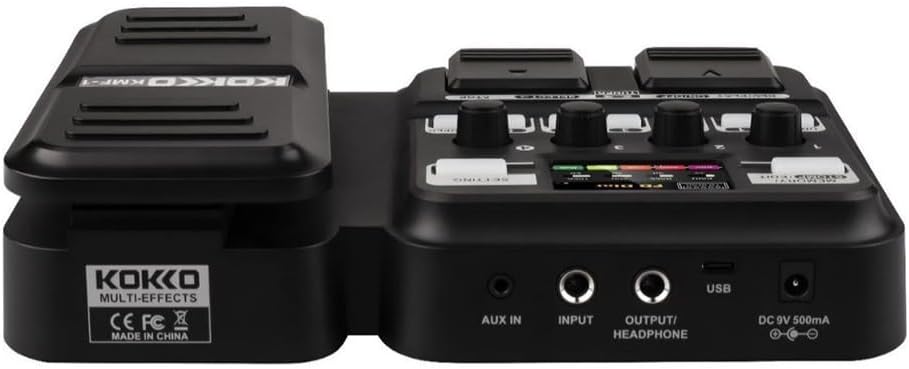
Figi 2: Dèyè view of the KOKKO KMF-1 Multi-Effects Pedal, highlighting the AUX IN, INPUT, OUTPUT/HEADPHONE, USB, and DC 9V power input ports.
Kontwòl ak Koneksyon:
- Pedal ekspresyon: Used for volume control or wah effects.
- Ekspozisyon ekran: Shows current settings, effects, and modes.
- Knobs (1-4): Control various parameters depending on the selected effect or mode.
- Footswitches (DRUM, REC/PLAY ON/OFF, TUNER, SELECT, STOP, LOOPER): For activating/deactivating functions and navigating presets.
- MEMORY/STOMP EDIT Button: Toggles between memory and stompbox modes, or enters edit mode.
- Bouton PARAMÈT: Aksè nan paramèt sistèm yo.
- AUX NAN: 3.5mm input for connecting external audio sources (e.g., MP3 player).
- ENTRÈ: 1/4" input for connecting your guitar.
- OUTPUT/HEADPHONE: 1/4" output for connecting to an amplifier oswa kas ekoutè.
- Pò USB: For connecting to a computer for recording or software updates.
- DC 9V Antre pouvwa: For connecting a 9V DC power adapter (center negative).
Enstalasyon
Limen:
- Pouvwa batri: Open the battery compartment on the underside of the pedal and insert 4 x AA batteries (not included), ensuring correct polarity.
- AC adaptè pouvwa: Connect a 9V DC (center negative) power adapter (not included) to the DC 9V input jack.
Connecting Your Gear:
- Konekte gita ou a Antre jack using a 1/4" instrument cable.
- Konekte a OUTPUT/HEADPHONE jack to your guitar amplifier's input or to headphones using a 1/4" cable.
- (Optional) Connect an external audio source (e.g., smartphone, MP3 player) to the AUX IN jack using a 3.5mm stereo cable.
- (Si ou vle) Konekte a USB port to your computer for direct recording or firmware updates.
Enstriksyon Operasyon
Operasyon debaz:
- Limen/Etenyen: The unit powers on automatically when connected to power. Disconnect power to turn off.
- Kontwòl Volim: Use the expression pedal to control the overall output volume.
- Navigating Presets: Use the SELECT footswitch to cycle through different presets or effects.
Using Speaker Models:
The KMF-1 features 18 high-quality speaker models. These models simulate the sound characteristics of various guitar cabinets.
- Enter the speaker model selection mode (refer to display).
- Use the SELECT footswitch or corresponding knobs to browse and choose your desired speaker model.
- Adjust parameters like gain, tone, and volume using the numbered knobs (1-4) as indicated on the display.
Tanbou machin:
The built-in drum machine offers 6 styles and over 40 rhythms to practice or jam along with.
- Peze a Tanbou footswitch to activate the drum machine.
- Use the SELECT footswitch or knobs to choose a drum style and rhythm.
- Adjust the drum volume using the appropriate knob.
- Peze Tanbou again to stop the drum machine.
Looper Function:
The looper allows you to record up to 30 seconds of audio without overdubbing, perfect for creating backing tracks.
- Peze a REC/PLAY ON/OFF footswitch once to start recording. The display will indicate recording status.
- Play your guitar part.
- Peze REC/PLAY ON/OFF again to stop recording and immediately start playback of the recorded loop.
- Pou sispann lèktur, peze la SISPANN switch pye.
- To clear the loop, press and hold the SISPANN switch pye.
Tuner Function:
The integrated tuner allows for accurate guitar tuning.
- Peze a Sentonizè footswitch to activate the tuner. The output signal will be muted.
- Play a single note on your guitar. The display will show the note and indicate if it is sharp, flat, or in tune.
- Adjust your guitar's tuning until the display indicates the note is in tune.
- Peze a Sentonizè footswitch again to exit the tuner and unmute the output.
Memory/Stomp Edit Mode:
This mode allows you to switch between saved presets (Memory mode) and individual stompbox effects (Stomp mode), as well as edit parameters.
- Peze a MEMORY/STOMP EDIT button to toggle between Memory and Stomp modes.
- In Stomp mode, individual effects can be turned on/off using their dedicated footswitches or by selecting them.
- To edit parameters, press and hold the MEMORY/STOMP EDIT button to enter edit mode. Use the knobs and footswitches to adjust settings as displayed.
- Save your changes by following the on-screen prompts (usually by pressing a specific footswitch or button).
Anviwònman sistèm:
Access system settings to configure global parameters.
- Peze a ANVIFÒ button to enter the system settings menu.
- Use the footswitches or knobs to navigate through the menu options.
- Adjust settings such as display brightness, factory reset, etc.
- Peze a ANVIFÒ bouton an ankò pou sòti nan meni an.
Antretyen
- Netwayaj: Sèvi ak yon twal mou epi sèk pou netwaye pedal la. Pa sèvi ak pwodui netwayaj abrazif oswa solvan.
- Depo: Sere pedal la nan yon kote ki fre epi sèk, lwen limyè solèy dirèk ak tanperati ekstrèm.
- Ranplasman batri: If using batteries, replace them when the low battery indicator appears or when the pedal's performance degrades. Remove batteries if the pedal will not be used for an extended period.
- Evite imidite: Keep the pedal away from water and other liquids.
- Manyen ak Swen: Evite lage pedal la oswa soumèt li a gwo enpak.
Depanaj
| Pwoblèm | Kòz posib | Solisyon |
|---|---|---|
| Pa gen pwodiksyon son. | Incorrect cable connections; Low battery; Tuner is active; Amplifier se koupe. | Check all cables are securely connected. Replace batteries or use AC adapter. Deactivate tuner. Ensure ampLifitè a limen epi volim nan monte. |
| Son defòme oswa move kalite. | Input level too high; Incorrect effect settings; Damaged cable. | Adjust guitar volume or pedal input level. Check and adjust effect parameters. Try a different cable. |
| Pedal does not power on. | No power source; Dead batteries; Faulty adapter. | Ensure power adapter is connected or batteries are inserted correctly. Replace batteries. Try a different compatible power adapter. |
| Looper not recording. | Incorrect looper mode; Memory full. | Ensure you are in the correct looper recording mode. Clear previous loops if memory is full. |
Espesifikasyon
| Karakteristik | Detay |
|---|---|
| Non modèl | KMF-1 |
| Dimansyon pwodwi (L x W x H) | 31 x 20 x 7 cm (12.2 x 7.9 x 2.8 pous) |
| Pwa atik | 900 g (1.98 lbs) |
| Pwovizyon pou pouvwa | 9V DC (center negative) adapter or 4 x AA batteries |
| Entèfas Materyèl | USB |
| Modèl Oratè | 18 (IR technology) |
| Looper Recording Time | 30 seconds (non-overdub) |
| Rit tanbou | Over 40 rhythms across 6 styles |
| Nimewo Modèl Manifakti | 43ST9NRST131F1P8K5GRJ7 |
Garanti ak sipò
KOKKO products are designed and manufactured to the highest quality standards. For information regarding warranty coverage, technical support, or service, please refer to the warranty card included with your product or visit the official KOKKO websit la. Tanpri konsève prèv acha ou a pou nenpòt reklamasyon garanti.
For further assistance, please contact our customer support team.


