Pwodwi souview
The Mars Gaming MC-3TCORE ATX Gaming Case is designed for gaming and technology enthusiasts, offering a blend of aesthetics and performance. This custom gaming case provides extensive customization options and transforms any PC configuration into a visually striking setup. It features triple removable tempered glass panels, exceptional cooling capabilities, and compatibility with reverse connector motherboards, enhancing both efficiency and visual appeal.
Karakteristik kle
- Custom Design with Triple Tempered Glass: Build your PC without limitations with a custom concept, offering total freedom to customize. Provides a panoramic view through three removable tempered glass panels with a screwless anchoring system.
- Dual Side Chamber Structure: Maximizes internal space, optimizing component distribution and cooling. Includes 7 expansion slots, support for graphics cards up to 410mm, and space for 2 x 3.5" hard drives and up to 3 x 2.5" SSDs.
- Optimized Cooling Capacity: Equipped with side and top mesh panels, accommodating up to 10 120mm fans and up to 360mm liquid cooling systems on the top panel. Supports CPU coolers up to 161mm high.
- Compatibility with Reverse Connector Motherboards: Supports back-pluggable ATX motherboards. This design improves airflow and cooling, facilitating more efficient and organized cable management.
- Connectivity and Functionality: Features USB 3.0, USB 2.0, USB-C, microphone, and HD audio connections for ultra-fast peripheral connectivity. Includes top and bottom magnetic dust filters and an internal cable management system.
Enstriksyon Enstalasyon
1. Debalaj ak premye enspeksyon
Carefully remove the MC-3TCORE case from its packaging. Inspect for any signs of damage during transit. Retain all packaging materials for future transport or warranty claims.
2. Retire Panel
The case features triple removable tempered glass panels. To access the interior, gently unlatch or unscrew the securing mechanisms for the desired panels. The screwless anchoring system allows for easy removal.

Image: The Mars Gaming MC-3TCORE case showcasing its panoramic view through the removable tempered glass panels, allowing full visibility of internal components.
3. Enstalasyon mèr
Install your ATX motherboard onto the standoffs provided. This case is compatible with reverse connector motherboards, which can simplify cable routing and improve airflow. Ensure all mounting screws are tightened securely.

Imaj: Yon gwo plan view of the internal structure, highlighting the compatibility with motherboards featuring a back-side connector for streamlined cable management.
4. Enstalasyon eleman
- Graphics Cards: Install your graphics card(s) into the PCIe slots. The case supports cards up to 410mm in length.
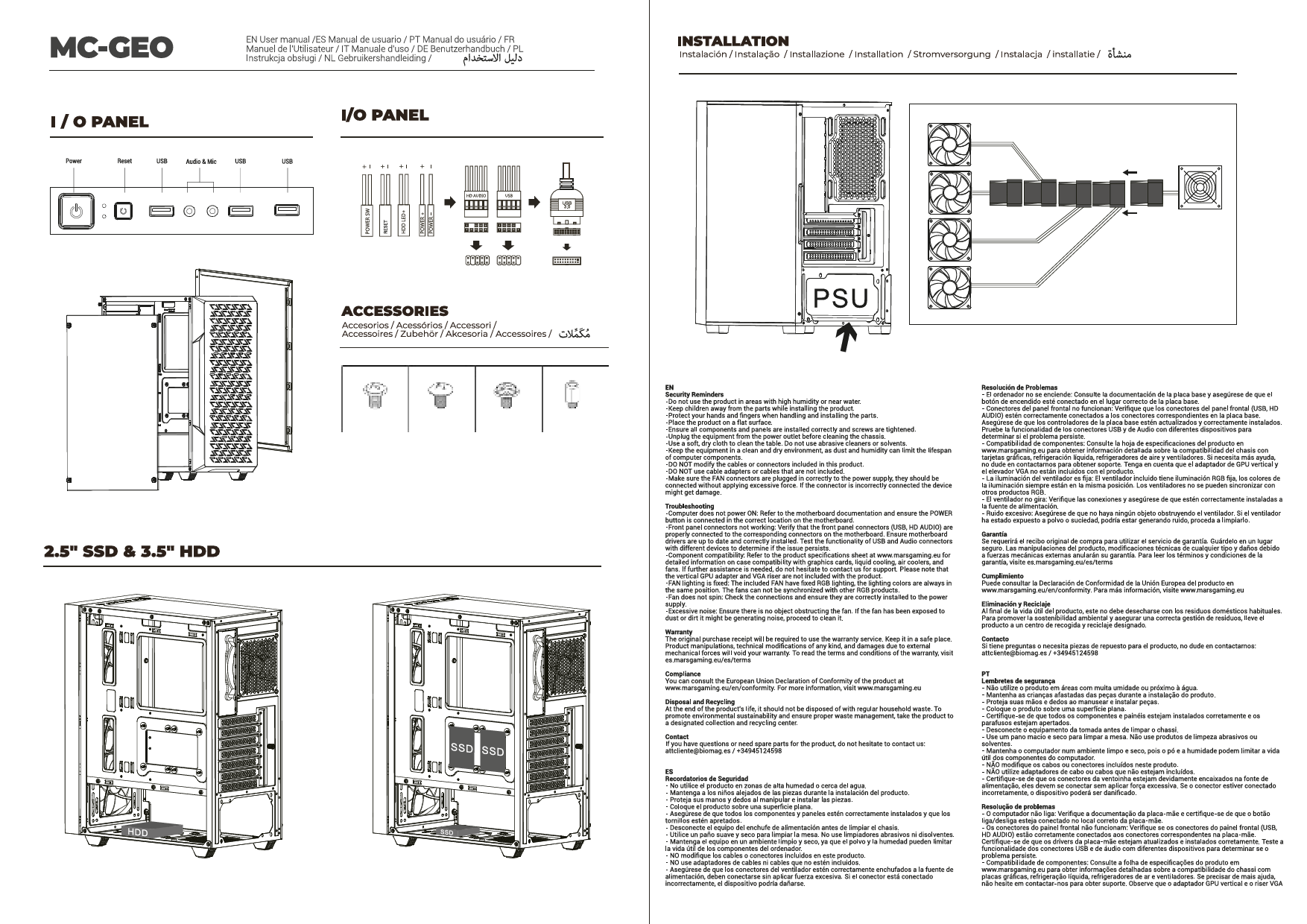
- Disques Depo: Mount 3.5" hard drives and 2.5" SSDs in the designated bays. The dual side chamber design provides ample space for up to 2 x 3.5" HDDs and 3 x 2.5" SSDs.

Imaj: Yon imaj anlè view of the case interior, illustrating the dual chamber design which separates components for improved organization and thermal performance.
5. Enstalasyon sistèm refwadisman
Install up to 10 120mm fans for optimal airflow. For liquid cooling, the top panel supports radiators up to 360mm. Ensure CPU coolers do not exceed 161mm in height.

Image: The interior of the case highlighting its extensive cooling capacity with multiple fans installed and space for liquid cooling solutions.
6. Jesyon kab
Utilize the internal cable management system, especially beneficial with reverse connector motherboards, to route and secure cables neatly. This improves airflow and maintains a clean aesthetic.
Gid Operasyon yo
1. Limen
After all components are securely installed and connected, press the power button located on the top panel of the case to start your system.
2. Optimizasyon koule lè a
Ensure that the case's ventilation areas (front, top, rear, and bottom) are unobstructed to maintain optimal airflow and cooling performance for your components.
Antretyen
1. Netwayaj Filtè Pousyè yo
The MC-3TCORE includes magnetic dust filters on the top and bottom panels. Regularly remove and clean these filters to prevent dust buildup inside the case, which can impede cooling efficiency.

Imaj: Yon imaj detaye view of the top panel, showing the integrated I/O ports and the magnetic dust filter for easy cleaning.
2. Netwayaj jeneral
Use a soft, dry cloth to clean the exterior surfaces and tempered glass panels. For internal cleaning, use compressed air to remove dust from components and fan blades. Always power off and unplug the PC before cleaning.
Depanaj
Pwoblèm komen ak solisyon:
- Pa gen pouvwa: Ensure all power cables (PSU, motherboard, components) are securely connected. Check the power supply switch.
- Surchof: Verify that all fans are spinning correctly and are oriented for proper airflow. Clean dust filters and internal components. Ensure liquid cooling systems are functioning.
- Components Not Fitting: Double-check component dimensions against case specifications (e.g., GPU length, CPU cooler height). Ensure proper installation angles.
- Front Panel I/O Not Working: Confirm that all front panel connectors (USB, audio, power/reset switches) are correctly plugged into the motherboard headers.
Espesifikasyon teknik
| Karakteristik | Spesifikasyon |
|---|---|
| Dimansyon pwodwi | 44 x 28.6 x 40.1 cm |
| Pwa | 6.3 kg |
| Nimewo Modèl Atik | MC3TCOREW |
| Mèr konpatibilite | ATX (including reverse connector compatible) |
| Fant ekspansyon | 7 |
| Max GPU Longè | 410mm |
| Max CPU Cooler Wotè | 161mm |
| Kondwi Bays | 2 x 3.5" HDD, 3 x 2.5" SSD |
| Sipò fanatik | Jiska 10 x 120mm fanatik |
| Sipò likid refwadisman | Up to 360mm radiator (top panel) |
| Front I / O pò | USB 3.0, USB 2.0, USB-C, Microphone, HD Audio |
| Filtè Pousyè | Magnetic (top and bottom) |
Enfòmasyon sou Garanti
This Mars Gaming product is covered by a manufacturer's warranty. For detailed information regarding warranty terms, duration, and claim procedures, please refer to the official Mars Gaming websit la oubyen kontakte revandè w la. Kenbe prèv acha w la pou validasyon garanti a.
Sipò pou Kliyan
Should you encounter any issues or require assistance with your Mars Gaming MC-3TCORE ATX Gaming Case, please visit the official Mars Gaming website for support resources, FAQs, and contact information. You may also reach out to your point of purchase for direct assistance.