Entwodiksyon
The NOKLEAD Indoor Thermometer and Hygrometer is designed to monitor temperature and humidity levels in various indoor environments. This compact device provides real-time readings and features a comfort level indicator to help maintain an optimal living climate. It is suitable for use in baby rooms, greenhouses, offices, and other spaces where environmental monitoring is beneficial.
Ki sa ki nan bwat la
- 2 x NOKLEAD Thermometer and Humidity Meters
- 2 x CR2032 Button Batteries
- 2 x Double-Sided Stickers
Karakteristik pwodwi
- Mezi egzat: Provides precise temperature and humidity readings.
- Endikatè konfò: Displays a face symbol to indicate dry, comfortable, or wet conditions.
- Konsepsyon kontra enfòmèl ant: Small and lightweight for easy placement and portability.
- ℃/℉ Switch: Easily switch between Celsius and Fahrenheit temperature units.
- Plizyè Opsyon Montaj: Can be placed on a tabletop or mounted using adhesive.
- Sekirize lòj batri: Features a screw-secured battery cover.
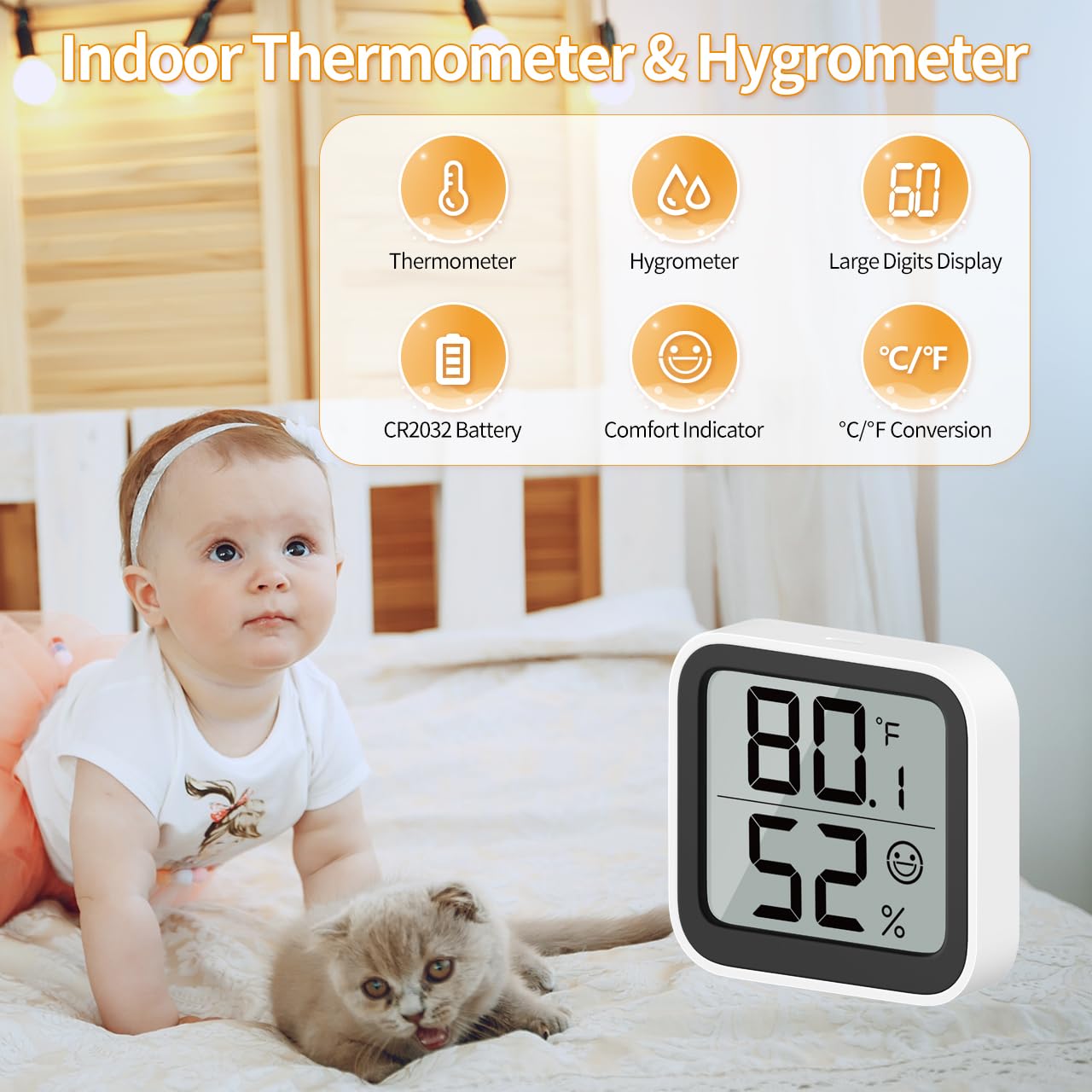
Imaj 1: Plis paseview of the NOKLEAD Indoor Thermometer and Hygrometer, highlighting its main functions and compact size. The display shows temperature, humidity, and a comfort indicator.
Enstalasyon
- Enstalasyon batri:
The device uses one CR2032 button battery. To install or replace the battery:
- Jwenn lòj batri a sou do aparèy la.
- Use a small screwdriver to unscrew the safety screw on the battery cover.
- Remove the cover and insert the CR2032 battery with the positive (+) side facing up.
- Ranplase kouvèti batri a epi an sekirite li ak vis la.
- Premye limen:
Once the battery is installed, the device will automatically power on and begin displaying temperature and humidity readings.

Imaj 2: Dèyè view of the device, indicating the battery safety screwgate and the ℃/℉ switch.
Enstriksyon Operasyon
- Lekti ekspozisyon an:
The large LCD screen displays the current temperature (top number) and humidity (bottom number). Readings are updated approximately every 30 seconds.
- Switching Temperature Units (℃/℉):
On the back of the device, locate the "℃/℉" switch button. Press this button to toggle between Celsius and Fahrenheit temperature displays.
Endikatè Nivo Konfò
The device features a comfort symbol on the display to visually indicate the current environmental conditions. This symbol changes based on both temperature and humidity levels:
- Dry (Sad Face): Humidity below 20% and temperature below 19°C (66.2°F).
- Comfortable (Smiling Face): Humidity between 20% and 60% and temperature between 19°C and 27°C (66.2°F - 80.6°F).
- Wet (Sad Face): Humidity above 60% and temperature above 27°C (80.6°F).
This indicator helps you quickly assess if adjustments to a humidifier or dehumidifier are needed.
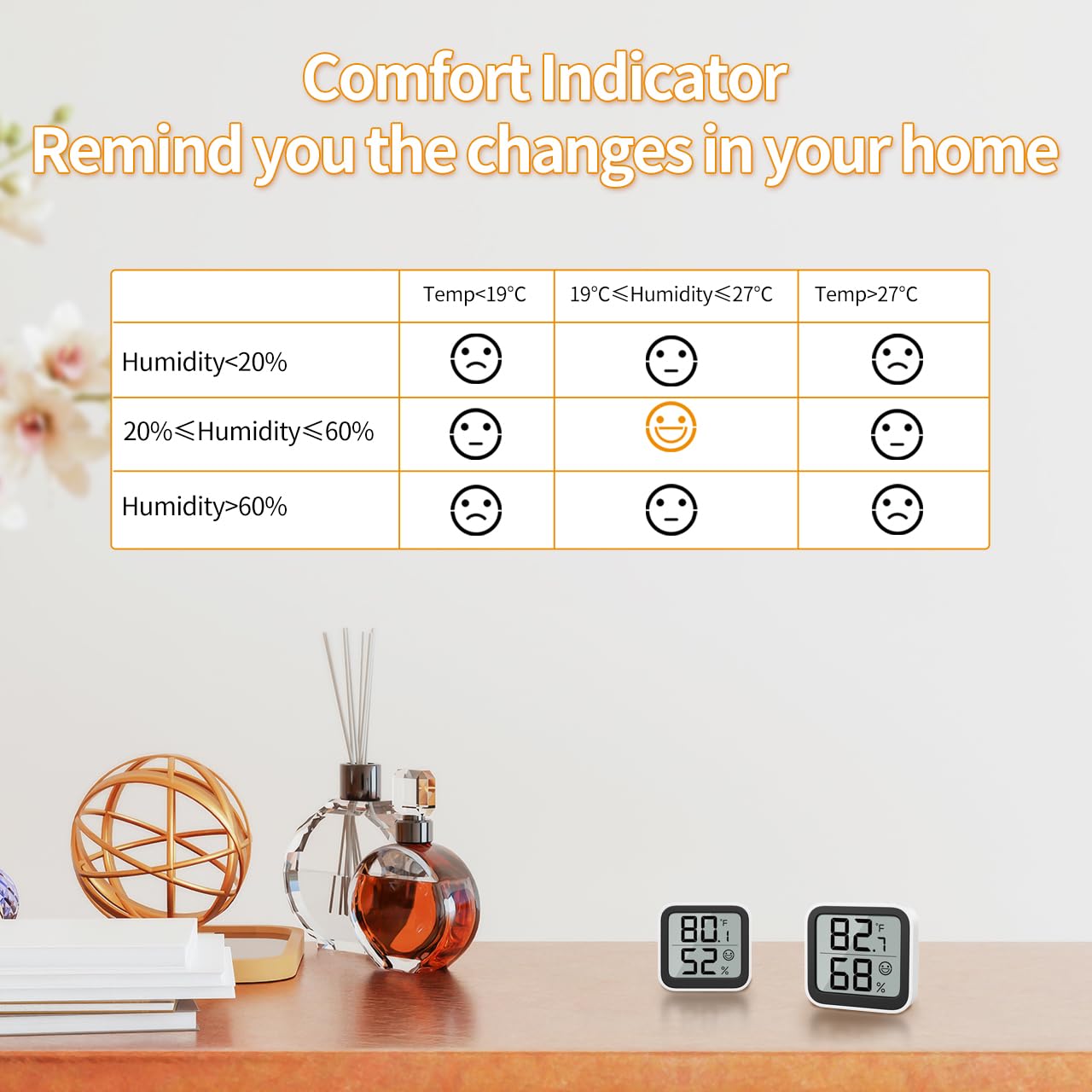
Image 3: Detailed table explaining the comfort indicator symbols based on specific temperature and humidity ranges.
Opsyon Montaj
The NOKLEAD Thermometer and Hygrometer offers versatile placement options:
- Plasman Tabletop: The device can stand freely on any flat surface, such as a desk, shelf, or nightstand.
- Montaj adezif: Use the provided double-sided stickers to attach the device to a wall or other smooth vertical surface. Ensure the surface is clean and dry before applying the sticker.

Imaj 4: Egzanpamples of mounting options, including adhesive wall mounting and tabletop placement.
Antretyen
- Ranplasman batri: Replace the CR2032 battery when the display becomes dim or stops functioning. Follow the battery installation steps in the "Setup" section.
- Netwayaj: Siye aparèy la avèk yon twal mou epi sèk. Pa sèvi ak pwodui netwayaj abrazif oswa plonje aparèy la nan dlo.
- Depo: If storing the device for an extended period, remove the battery to prevent leakage.
Depanaj
| Pwoblèm | Kòz posib | Solisyon |
|---|---|---|
| Pa gen ekspozisyon oswa ekspozisyon fèb | Batri a mouri oswa li mal enstale. | Ranplase pil CR2032 la, asire w ke polarite a kòrèk. |
| Lekti kòrèk | Device placed near heat/cold sources or in direct sunlight/drafts. | Relocate the device to a stable environment away from extreme temperature fluctuations. Allow time for readings to stabilize. |
| ℃/℉ switch not working | Button not pressed firmly or device malfunction. | Ensure the button is pressed firmly. If issue persists, contact customer support. |
Espesifikasyon

Image 5: Visual representation of the device dimensions and key technical specifications.
| Paramèt | Valè |
|---|---|
| Nimewo Modèl | 6223P2 |
| Ranje Mezi Tanperati | -9.9 ° C a 60 ° C (14.18 ° F a 140 ° F) |
| Presizyon Tanperati | ±1.0°C |
| Rezolisyon Tanperati | 0.1°C |
| Ranje mezi imidite | 10% RH a 95% RH |
| Presizyon imidite | ± 3-5% RH |
| Imidite Rezolisyon | 1% RH |
| Rafrechisman pousantaj | 30 segonn |
| Dimansyon pwodwi | 46 x 50 x 12 mm |
| Pwa atik | 26 g (per unit) |
| Kalite batri | CR2032 batri bouton |
| Kalite aliye | Tabletop, Surface Mount |
Garanti ak sipò
For warranty information and customer support, please refer to the documentation provided at the time of purchase or contact your retailer. You may also visit the official NOKLEAD websit pou plis asistans.


