1. Entwodiksyon
Welcome to the user manual for your Vortex Optics Razor UHD 10x32 Binoculars and GlassPak Pro Binocular Harness. This guide provides essential information for setting up, operating, and maintaining your new optical equipment. Please read these instructions carefully to ensure optimal performance and longevity of your product.
Ki sa ki nan bwat la
Pake ou a ta dwe genyen atik sa yo:
- Vortex Optics Razor UHD 10x32 Binoculars
- GlassPak Pro Binocular Harness
- Comfort Neck Strap
- Rangefinder Pouch
- Objektif lantiy kouvri
- Kouvri lantiy okilè
- Lens twal
- Manyèl pwodwi a (dokiman sa a)

Image: All items included in the Vortex Optics Razor UHD 10x32 Binoculars and GlassPak Pro Harness package.
2. Pwodwi konpozan
Familiarize yourself with the various parts of your Razor UHD Binoculars:

Image: Labeled diagram of the Vortex Optics Razor UHD Binoculars, indicating the Ocular Lens, Center Focus, Twist-up Eyecup, Locking Diopter/Diopter Focus, Strap Attachment, Objective Lens, and Tripod Adapter Socket.
- Ocular Lens: The lens closest to your eye.
- Rou Konsantrasyon Santral: Ajiste fokus la pou tou de barik yo an menm tan.
- Twist-up Eyecups: Je reglabl pou konfò viewak oswa san linèt.
- Locking Diopter/Diopter Focus: Adjusts the focus for individual eye differences, typically on the right barrel.
- Atachman braslè: Points for attaching the neck strap or harness.
- Lantiy objektif: Gwo lantiy devan yo ki rasanble limyè.
- Tripod Adapter Socket: Threaded socket for mounting the binoculars on a tripod (adapter sold separately).
3. Enstalasyon ak Ajisteman Inisyal yo
3.1. Adjusting Interpupillary Distance
The interpupillary distance (IPD) is the distance between the centers of your pupils. To achieve a full, single field of view, adjust the hinge between the binocular barrels until you see a single circular image.
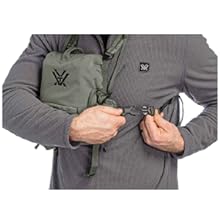
Image: A pair of binoculars being adjusted to match the user's eye spacing, ensuring a single, clear field of view.
3.2. Ajiste je yo
Twist the eyecups up or down to achieve a full field of view without dark shadows or "tunnel vision."
- Pou moun ki pa mete linèt: Twist the eyecups fully up.
- Pou moun ki mete linèt: Twist the eyecups down to the desired position to see the full field of view.
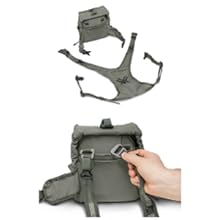
Image: Binocular eyecups shown in both twisted-up and twisted-down positions for different users.
3.3. Focusing the Binoculars
Your Razor UHD Binoculars have a center focus wheel and a right-eye diopter for precise focusing.
- Choose an object about 20 yards away.
- Cover the right objective lens (the large front lens) with your hand.
- Look through the binoculars with your left eye and rotate the center focus wheel until the object is sharp.
- Uncover the right objective lens and cover the left objective lens.
- Look through the binoculars with your right eye and rotate the diopter adjustment ring (on the right barrel, near the eyecup) until the object is sharp.
- Your binoculars are now set for your eyes. Use only the center focus wheel for future focusing.
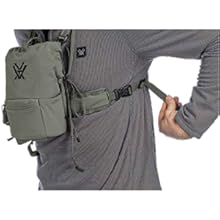
Image: A user adjusting the center focus wheel of binoculars for clear viewing.
3.4. Attaching the GlassPak Pro Harness
The GlassPak Pro harness provides a comfortable and secure way to carry your binoculars.
- Attach the harness straps to the binocular strap attachments.
- Adjust the straps for a snug, comfortable fit across your chest and shoulders.
- Place the binoculars into the main compartment of the GlassPak Pro.
- Secure the flap over the binoculars. The included rangefinder pouch can be attached to the side of the harness.
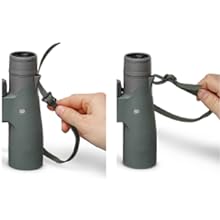
Imaj: Yon gwo plan view of a hand attaching a strap from the GlassPak Pro harness to the binocular's strap lug.
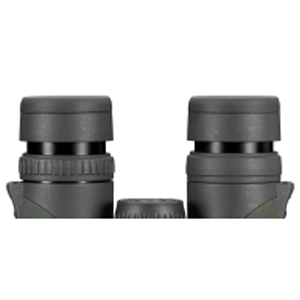
Image: A person wearing the GlassPak Pro harness, demonstrating how the binoculars are secured against the chest.
4. Operasyon Enstriksyon
4.1. Jeneral Itilizasyon
Once adjusted, simply raise the binoculars to your eyes and use the center focus wheel to bring your desired object into sharp focus. The 10x magnification provides a detailed view, while the 32mm objective lenses ensure good light gathering in various conditions.
4.2. Trepied aliye
Pou pwolonje viewing periods or to achieve maximum stability, your Razor UHD Binoculars can be mounted on a tripod. Locate the threaded socket at the front hinge of the binoculars. A tripod adapter (sold separately) is required to attach the binoculars to a standard photographic tripod or car window mount.
5. Swen ak Antretyen
5.1. Netwayaj Lantiy
Handle lenses with care. When cleaning, always use the provided lens cloth or a soft, lint-free optical cloth. First, gently brush away any loose dust or debris. Then, apply a small amount of lens cleaning fluid (if necessary) to the cloth, not directly to the lens, and wipe gently in a circular motion.
5.2. Depo
Store your binoculars in a cool, dry place when not in use. Use the provided lens covers to protect the objective and ocular lenses from dust and scratches. The GlassPak Pro harness also serves as a protective case.
5.3. Waterproof and Fogproof Performance
Your Razor UHD Binoculars are argon purged and O-ring sealed, providing waterproof and fogproof performance. This ensures reliable operation in various weather conditions. While waterproof, avoid submerging the binoculars for extended periods.
NAN. Depanaj
Si ou rankontre pwoblèm ak binòk ou yo, gade pwoblèm ak solisyon komen sa yo:
- Imaj flou:
Ensure the center focus wheel and diopter are correctly adjusted for your eyes. Re-perform the focusing procedure (Section 3.3). Check that the objective and ocular lenses are clean. - Dark Shadows or Partial View:
Adjust the interpupillary distance (Section 3.1) until a single, full circular image is visible. Adjust the twist-up eyecups (Section 3.2) to the correct position for your eyes, especially if you wear eyeglasses. - Difficulty Turning Focus Wheel:
The focus wheel is designed for precise movement. If it feels excessively stiff or jammed, do not force it. Contact Vortex Optics customer support for assistance. - Fogging Inside Lenses:
While your binoculars are fogproof, extreme temperature changes can sometimes cause external condensation. Allow the binoculars to acclimate to the temperature. If internal fogging occurs, contact Vortex Optics customer support.
7. Espesifikasyon
The Vortex Optics Razor UHD 10x32 Binoculars offer the following key specifications:
- Agrandisman: 10x
- Dyamèt lantiy objektif: 32mm
- Konsepsyon optik: Schmidt Pechan prism design for ultra-high definition optical quality.
- Kouch lantiy: Index-matched lenses with ultimate anti-reflective coatings for maximum light transmission.
- Materyèl chasi: Magnesium for increased strength and reduced weight.
- Ergonomi: True open hinge design.
- Pwoteksyon: Rubber armor for non-slip grip and external protection. Armortek coating protects lenses from scratches, oil, and dirt.
- Fermeture anviwònman: Argon purging and O-ring seals for waterproof and fogproof performance.
- Soulajman je: 17.0mm
- Konsantre fèmen: 5.9 pye
- Jaden lineyè nan View (nan 1000 yad): 388 pye
- Field angilè nan View: 7.4 degre
- Distans entèppillè: 55mm - 75mm
- Wotè: 5.7 pous
- Lajè: 5.1 pous
- Pwa: 21.9 ons (1.37 liv)
Pou yon konplè souview of all Razor UHD models, please refer to the specifications table below:

Image: A detailed table listing specifications such as magnification, objective lens diameter, field of view, eye relief, interpupillary distance, height, width, and weight for different Vortex Razor UHD binocular models.
8. VIP Warranty & Support
Vortex Optics stands behind its products with an unlimited, unconditional, lifetime VIP Warranty. This fully transferable promise ensures that if your product becomes damaged or defective, Vortex will repair or replace it at no cost to you.
The VIP Warranty does not cover loss, theft, deliberate damage, or cosmetic damage that does not hinder the performance of the product.
Enfòmasyon sou kontak
For warranty service or any product-related inquiries, please visit the official Vortex Optics website or contact their customer service department directly. Refer to the packaging or official websit la pou jwenn enfòmasyon kontak ki pi resan yo.


