1. Entwodiksyon
The COLMi P81 Smartwatch is a versatile and durable companion designed for an active and connected lifestyle. It offers essential functionalities in an elegant and robust design, including comprehensive health monitoring, smart notifications, and various sports modes. This manual provides detailed instructions to help you set up, operate, and maintain your smartwatch.

Figure 1.1: COLMi P81 Smartwatch
2. Ki sa ki nan bwat la
Upon opening your COLMi P81 Smartwatch package, please verify that all the following items are included:
- 1 x COLMi P81 Smartwatch
- 1 x mayetik chaje kab
- 1 x manyèl itilizatè angle

Figure 2.1: Items Included in the Box
3. Enstalasyon
3.1 Chaje mont entelijan an
Before initial use, fully charge your COLMi P81 Smartwatch. The device uses a 2-pin magnetic charging cable.
- Connect the magnetic end of the charging cable to the charging points on the back of the smartwatch. Ensure a secure connection.
- Branche bout USB kab la nan yon adaptè kouran USB estanda (5V/1A rekòmande) oubyen nan yon pò USB òdinatè.
- The screen will display a charging indicator. A full charge takes approximately 2 hours.

Figure 3.1: Smartwatch Charging Indicator
3.2 Limen/Etenyen
- Pouvwa sou: Peze epi kenbe bouton bò a pou kèk segond jiskaske ekran an limen.
- Pouvwa Off: From the watch face, swipe down to access quick settings, or navigate to 'Settings' > 'System' > 'Power Off'. Confirm your choice.
3.3 Enstalasyon ak koneksyon aplikasyon an
To unlock the full potential of your COLMi P81, download and install the compatible health application on your smartphone (Android or iOS).
- Scan the QR code in the manual or on the watch, or search for the official COLMi app in your phone's app store.
- Install the app and create an account if prompted.
- Pèmèt Bluetooth sou smartphone ou.
- Open the app, go to 'Device' or 'Add Device', and select 'COLMi P81' from the list of available devices.
- Follow the on-screen prompts to complete the pairing process. Ensure the pairing code displayed on the watch matches the one in the app.
4. Operasyon Enstriksyon
4.1 Navigasyon debaz
- Ekran manyen: Swipe left/right to navigate between main functions (e.g., activity, heart rate, weather). Swipe up to view notifications. Swipe down to access quick settings.
- Bouton bò: Press to return to the watch face or to wake the screen. Press and hold for power options or to access the voice assistant.
4.2 Notifikasyon
Once paired with your smartphone, the COLMi P81 can receive notifications for calls, messages, and social media apps directly on your wrist. Ensure notification permissions are enabled in both the smartwatch app and your phone's settings.
4.3 Siveyans Sante
The smartwatch provides 24/7 health monitoring, offering valuable insights into your well-being:
- Batman kè: Li kontwole batman kè ou pandan tout jounen an.
- Tansyon: Bay lekti tansyon estime.
- Oksijèn nan san (SpO2): Mezire nivo saturation oksijèn nan san ou.
- Suivi dòmi: Analize modèl dòmi ou, ki gen ladan dòmi pwofon, dòmi lejè, ak lè ou reveye.
Access detailed historical data for all health metrics within the companion app.
4.4 Espò mòd
The COLMi P81 supports over 100 sports modes, allowing you to track various activities comprehensively. It records data during exercise, helping you understand your performance and adjust your fitness routine.

Figure 4.1: Sports Data and Modes
4.5 Rele Bluetooth
The COLMi P81 features an integrated microphone and speaker, enabling you to make and receive calls directly from your wrist when connected to your smartphone via Bluetooth.

Figi 4.2: Fonksyonalite Apèl Bluetooth
4.6 Asistan Vwa
The smartwatch includes a voice assistant function, allowing you to control music playback and initiate calls on your connected mobile phone using voice commands.

Figure 4.3: Voice Assistant Interface
5. Antretyen
5.1 Rezistans dlo (IP68)
The COLMi P81 Smartwatch is IP68 water-resistant, meaning it can withstand immersion in water up to 1.5 meters for 30 minutes. It is suitable for daily use, including hand washing, rain, and swimming in shallow water. However, it is not recommended for hot showers, saunas, or diving, as steam and high-pressure water jets may compromise the seal.
5.2 Netwayaj
To keep your smartwatch clean and in good condition:
- Siye ekran an ak kò a ak yon twal mou,amp twal.
- For the silicone strap, you can wash it with mild soap and water, then rinse thoroughly and dry. The silicone material is durable and adjustable.
- Evite itilize pwodwi chimik piman bouk oswa materyèl abrazif.

Figure 5.1: Silicone Strap
5.3 Swen Batri
The COLMi P81 features a 230mAh lithium polymer battery, offering up to 7 days of continuous use on a single charge. To prolong battery life:
- Evite tanperati ekstrèm.
- Chaje aparèy la anvan batri a fin dechaje nèt.
- If storing for a long period, charge it to about 50% and power it off.
NAN. Depanaj
- Mont entelijan an pa limen: Asire w aparèy la byen chaje. Konekte l nan plato a epi tann kèk minit anvan ou eseye limen l ankò.
- Pa ka konekte ak telefòn entelijan an:
- Asire w ke Bluetooth aktive sou telefòn ou ak sou mont entelijan an.
- Asire w ke mont entelijan an nan zòn Bluetooth telefòn ou an.
- Rekòmanse tou de mont entelijan an ak telefòn ou.
- Efase kach Bluetooth la sou telefòn ou (si sa aplikab).
- Eseye dekonekte epi konekte aparèy la ankò atravè aplikasyon an.
- Lekti sante ki pa egzak: Ensure the smartwatch is worn snugly on your wrist, about one finger's width from your wrist bone. Avoid excessive movement during measurements.
- Notifikasyon ki pa resevwa: Check notification permissions in both the smartwatch app and your phone's system settings. Ensure the app is running in the background.
7. Espesifikasyon
| Karakteristik | Detay |
|---|---|
| Mak | COLMi |
| Modèl | P81 |
| Main Chip | RTL8763EWE |
| Chip batman kè | HX3602 |
| Ekspozisyon | 1.9-inch IPS, 240*286 pixels |
| Kapasite batri | 230mAh Lityòm Polymère |
| Chaje Metòd | 2-pin Magnetic Cable |
| Apeprè. Tan pou chaje | 2 èdtan |
| Tan Itilizasyon | Jiska 7 jou |
| Rezistans dlo | IP68 |
| Aparèy konpatib | Android Smartphones, iOS Smartphones |
| Koneksyon | Bluetooth, fil |
| Antre itilizatè | Manyen ekran |
| Koulè | Nwa |
| Kapasite Depo memwa | 128 MB |
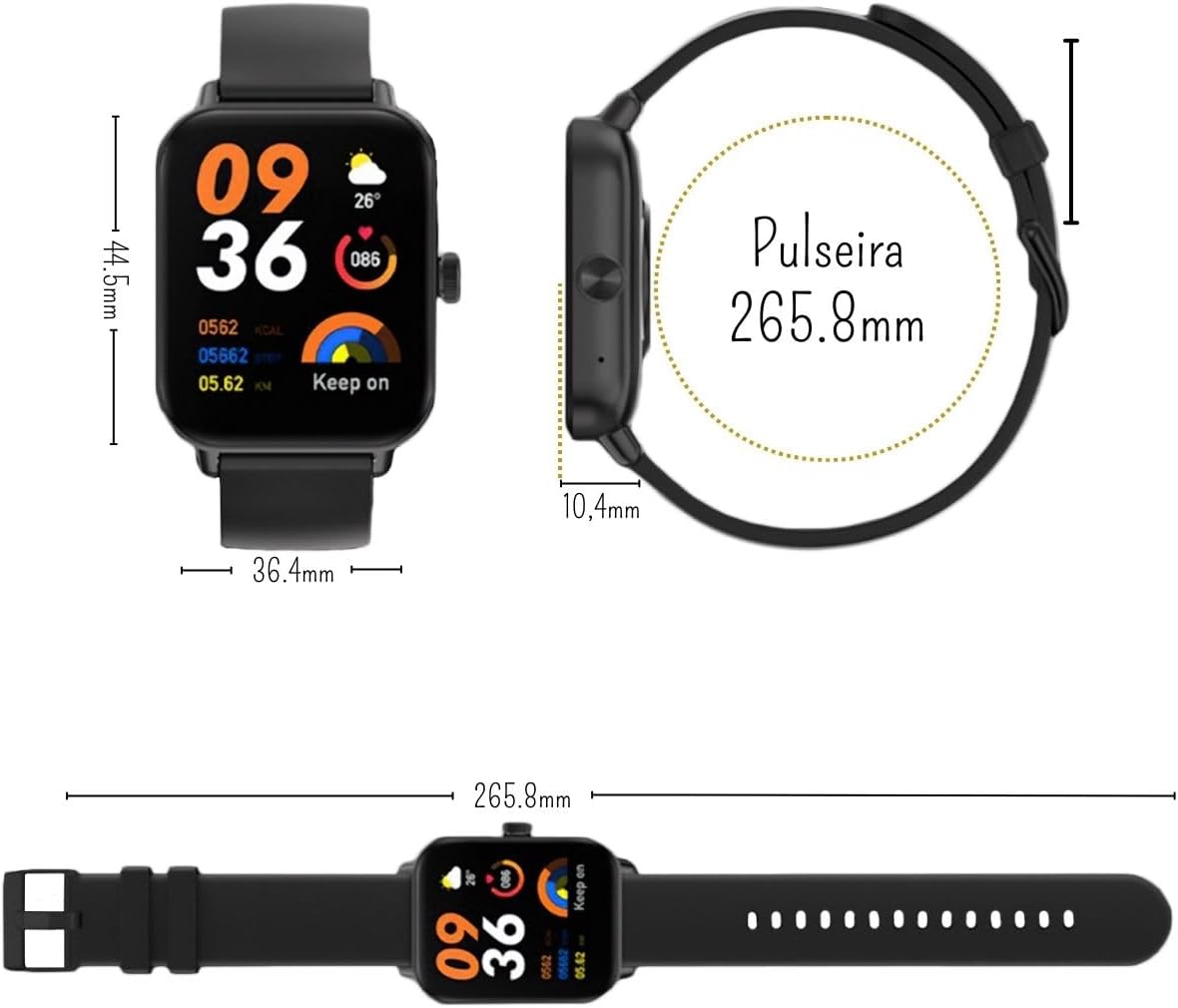
Figi 7.1: Dimansyon yon mont entelijan
8. Garanti ak sipò
8.1 Garanti manifakti a
The COLMi P81 Smartwatch comes with a manufacturer's warranty of 30 days from the date of purchase. This warranty covers manufacturing defects and malfunctions under normal use. It does not cover damage caused by misuse, accidents, unauthorized repairs, or normal wear and tear.
8.2 Sipò pou Kliyan
For any questions, technical assistance, or warranty claims, please contact the seller or the manufacturer's customer support. Refer to your purchase documentation for specific contact details.


