1. Entwodiksyon
This manual provides detailed instructions for the safe and effective use of your VILTROX AF 16mm F1.8 Z Full Frame Lens. Please read this manual thoroughly before using the product to ensure optimal performance and longevity. This lens is designed for Nikon Z-Mount cameras, offering a wide-angle perspective with a large F1.8 aperture.
2. Enfòmasyon sou Sekirite
- Do not look at the sun or other strong light sources through the lens, as this may cause permanent vision damage.
- Keep the lens away from water and moisture to prevent damage to internal electronic components.
- Evite lage lantiy la oswa soumèt li a gwo enpak.
- Do not attempt to disassemble or repair the lens yourself. Contact authorized service personnel for repairs.
- Store the lens in a dry, cool place, away from direct sunlight and extreme temperatures.
- Kenbe soti nan atenn timoun yo.
3. Pwodwi souview
The VILTROX AF 16mm F1.8 Z is a full-frame wide-angle prime lens featuring a fast F1.8 aperture, designed for Nikon Z-Mount mirrorless cameras. It incorporates advanced optical elements and a built-in LCD screen for convenient operation.
3.1 Konpozan Lantiy yo
- Lens Hood: Reduces flare and protects the front element.
- Bag konsantre: For manual focusing.
- Bag Ouvèti: Adjusts the lens aperture.
- Ekspozisyon LCD: Shows aperture, focus distance, and other shooting parameters.
- Chanjman AF/MF: Toggles between autofocus and manual focus.
- Function Buttons (Fn1, Fn2): Customizable buttons for quick access to camera functions.
- Click ON/OFF Switch: Enables or disables click stops on the aperture ring.
- Mòn lantiy: Connects the lens to the camera body.
- USB-C pò: Pou mizajou firmwèr.
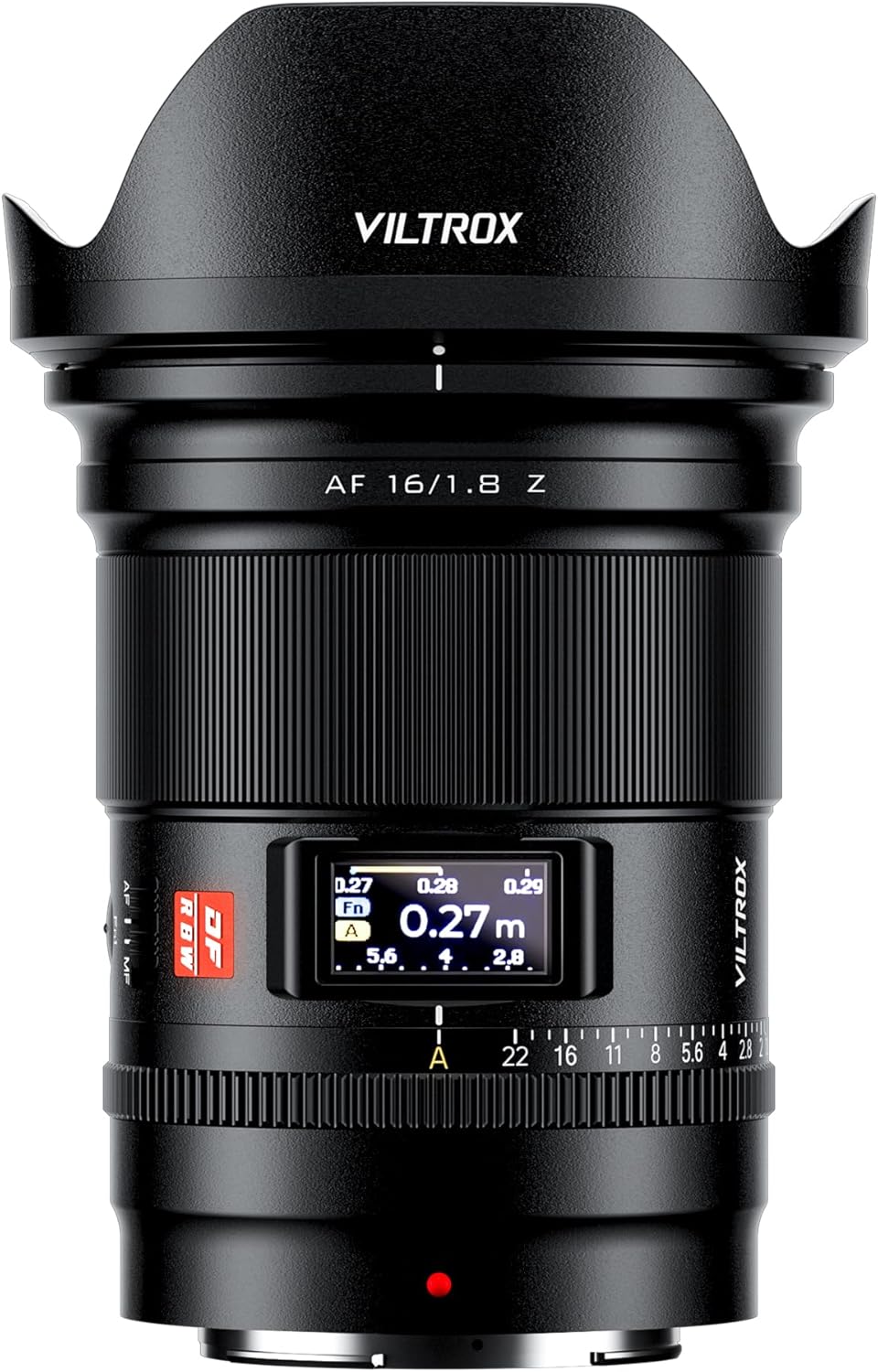
Figi 3.1: Devan view of the VILTROX AF 16mm F1.8 Z lens with the lens hood attached.

Figi 3.2: Devan view of the VILTROX AF 16mm F1.8 Z lens without the lens hood, showing the front element and filter thread.

Figi 3.3: Dèyè view of the VILTROX AF 16mm F1.8 Z lens, showing the Nikon Z-mount and the USB-C port.

Figi 3.4: Side view of the VILTROX AF 16mm F1.8 Z lens, highlighting the AF/MF switch and function buttons.

Figi 3.5: Detaye view of the lens controls, including the CLICK switch, LCD display, and Fn buttons.
4. Enstalasyon
4.1 Mete Lantiy la
- Asire w ke ni kamera a ni lantiy la etenn.
- Retire bouchon lantiy dèyè a ak bouchon kò kamera a.
- Align the mounting mark on the lens (red dot) with the mounting mark on the camera body.
- Mete lantiy la nan sipò kamera a epi vire l nan sans zegwi mont lan jiskaske li fè yon klik pou l anfòm nan plas li.
- Attach the lens hood by aligning its mark with the mark on the front of the lens and rotating until it locks.

Figure 4.1: The VILTROX AF 16mm F1.8 Z lens correctly mounted on a Nikon Z-Mount camera body.
4.2 Detache Lantiy la
- Asire w ke kamera a etenn.
- Peze epi kenbe bouton deblokaj lantiy la sou kò kamera a.
- Vire lantiy la nan sans kontrè ak zegwi mont lan jiskaske li detache de kò kamera a.
- Immediately attach the rear lens cap to the lens and the body cap to the camera to protect the sensors and lens elements.
4.3 Mizajou Firmware
The lens features a USB-C port for firmware updates. Visit the official VILTROX websit (www.viltrox.com) for the latest firmware and instructions. Ensure the lens is connected to a computer and follow the provided update procedure.
5. Operasyon
5.1 Autofocus (AF) and Manual Focus (MF)
Use the AF/MF switch on the lens barrel to select between autofocus and manual focus modes. In AF mode, the lens utilizes an STM stepping motor for precise and quiet focusing, supporting face and eye detection where available on your camera.
Figure 5.1: Location of the AF/MF switch on the lens barrel.
5.2 Kontwòl Ouvèti
The lens features an aperture ring for direct control over the aperture. The CLICK ON/OFF switch allows you to enable or disable the click stops, providing smooth, stepless aperture changes for video recording or precise adjustments.
Figure 5.2: The CLICK ON/OFF switch and aperture ring for aperture control.
5.3 LCD Display
The built-in LCD display provides real-time information such as aperture value, focus distance, and depth of field. This allows for quick monitoring of key shooting parameters without needing to check the camera's screen.
Figure 5.3: The LCD display showing focus distance and aperture settings.
5.4 Function Buttons (Fn1, Fn2)
The two customizable function buttons (Fn1 and Fn2) can be assigned various camera functions through your camera's menu system. Refer to your camera's instruction manual for details on customizing these buttons.
Figure 5.4: Location of the Fn1 and Fn2 function buttons.
5.5 Optical Design and Performance
The lens features an optical design of 15 elements in 12 groups, including 3 aspherical elements and 4 ED (Extra-low Dispersion) glass elements. This construction aims to achieve high resolution from the center to the edges of the frame and effectively suppress chromatic aberrations and color fringing.

Figi 5.5: Eksploze view illustrating the optical elements within the lens.
6. Antretyen
- Cleaning the Lens Surface: Use a soft, clean microfiber cloth specifically designed for optical lenses. For stubborn smudges, use a small amount of lens cleaning solution applied to the cloth, not directly to the lens.
- Netwayaj kò lantiy la: Wipe the lens body with a soft, dry cloth. Do not use organic solvents like paint thinner or benzene.
- Depo: When not in use, attach the front and rear lens caps and store the lens in a dry, well-ventilated area, away from direct sunlight and high temperatures. If storing for extended periods, place it in a sealed container with desiccant to prevent mold and mildew.
- Evite kondisyon ekstrèm: Protect the lens from sudden temperature changes, which can cause condensation. If condensation occurs, allow the lens to acclimatize gradually in a dry environment before use.
NAN. Depanaj
| Pwoblèm | Kòz posib | Solisyon |
|---|---|---|
| Lens not recognized by camera / Aperture not detected. | Improper mounting; dirty electrical contacts; firmware issue. |
|
| Otofokus la ralanti oswa li pa egzak. | Low light conditions; subject lacks contrast; AF/MF switch in MF position; outdated firmware. |
|
| LCD display is blank or not functioning. | Camera not powered on; lens not properly mounted; display setting. |
|
| "Click" sound from aperture ring is absent or present when not desired. | CLICK ON/OFF switch position. | Adjust the CLICK ON/OFF switch on the lens barrel to the desired position. "ON" for click stops, "OFF" for stepless aperture. |
8. Espesifikasyon
| Modèl | AF 16mm F1.8 Z |
| Longè Fokal | 16mm |
| Ouverture maksimòm | F1.8 |
| Ouverture minimòm | F16 |
| Mòn lantiy | Nikon Z |
| Fòma konpatibilite | Full Frame |
| Konsepsyon optik | 15 Elements in 12 Groups (3 Aspherical, 4 ED) |
| Motè otofokus | STM Stepping Motor |
| Distans Minimòm Konsantre | 0.27m (0.9ft) |
| Gwosè filtre | 77mm |
| Dimansyon (D x L) | Apeprè 4.06 x 3.35 x 3.35 pous |
| Pwa | Approximately 1.21 pounds (550g) |
| Pwodwi pou Telefòn enkli | Lens, Lens Hood, Front Lens Cap, Rear Lens Cap |
9. Garanti & Sipò
VILTROX products typically come with a limited warranty. Please refer to the warranty card included with your product for specific terms and conditions, including the warranty period and coverage details. Retain your proof of purchase for warranty claims.
For technical support, service, or inquiries, please visit the official VILTROX websit la oubyen kontakte depatman sèvis kliyan yo a:
- Ofisyèl Websit: www.viltrox.com
- Manifakti: Shenzhen Jueying Teknoloji co, Ltd
- Enfòmasyon pou kontakte: Gade anbalaj pwodwi a oswa dokiman ofisyèl la websit la pou jwenn enfòmasyon kontak ki pi resan yo.
10. Videyo pwodwi yo
The following videos provide additional visual guidance and information about the VILTROX AF 16mm F1.8 Z lens.
Pa gen okenn videyo ofisyèl vandè ki disponib pou pwodui sa a kounye a.


