1. Entwodiksyon
The LEVN Wireless Headset LE-HS011 is designed for clear communication and comfortable wear, ideal for work-from-home professionals, call centers, and PC users. Featuring Bluetooth 5.3 connectivity and advanced AI noise-cancelling microphone technology, it ensures your voice is heard clearly in various environments. Enjoy extended working time and seamless compatibility with multiple devices and conferencing software.

Figure 1: LEVN Wireless Headset LE-HS011 with included USB dongle.
2. Ki sa ki nan bwat la
- LEVN Wireless Headset (Model: LE-HS011)
- USB Dongle (2.4G)
- USB-A pou USB-C chaje kab
- Manyèl Itilizatè (dokiman sa a)
3. Pwodwi souview
3.1 Konpozan kas ekoutè
- Adjustable Headband: For a comfortable and secure fit.
- Soft, Breathable Earmuffs: Designed for all-day wear without pressure.
- 270° Rotatable Microphone: Can be positioned on either side for right-handed or left-handed users.
- Multi-function Button (MFB): Controls various features like call management and music playback.
- Volume Up/Down Buttons: Adjusts audio volume.
- Mute Button: Located on the microphone boom for quick privacy control.
- USB-C Charging Port: For recharging the headset battery.

Figure 2: Headset design emphasizing comfort features.
4. Enstalasyon
4.1 Chaje kas ekoutè a
Before first use, fully charge the headset. Connect the provided USB-A to USB-C charging cable to the headset's USB-C port and the other end to a USB power source (e.g., computer USB port, wall adapter). The LED indicator will show charging status and turn off when fully charged.
4.2 Power On/Off
- Pouvwa sou: Press and hold the Multi-function Button (MFB) for approximately 3 seconds until you hear a voice prompt indicating "Power On" and "Pairing". The LED indicator will flash.
- Pouvwa Off: Press and hold the Multi-function Button (MFB) for approximately 3 seconds until you hear a voice prompt indicating "Power Off". The LED indicator will turn off.
4.3 Koneksyon
The LEVN Wireless Headset offers two primary connection methods: Bluetooth 5.3 and a 2.4G USB dongle. Only one device can be connected at a time.
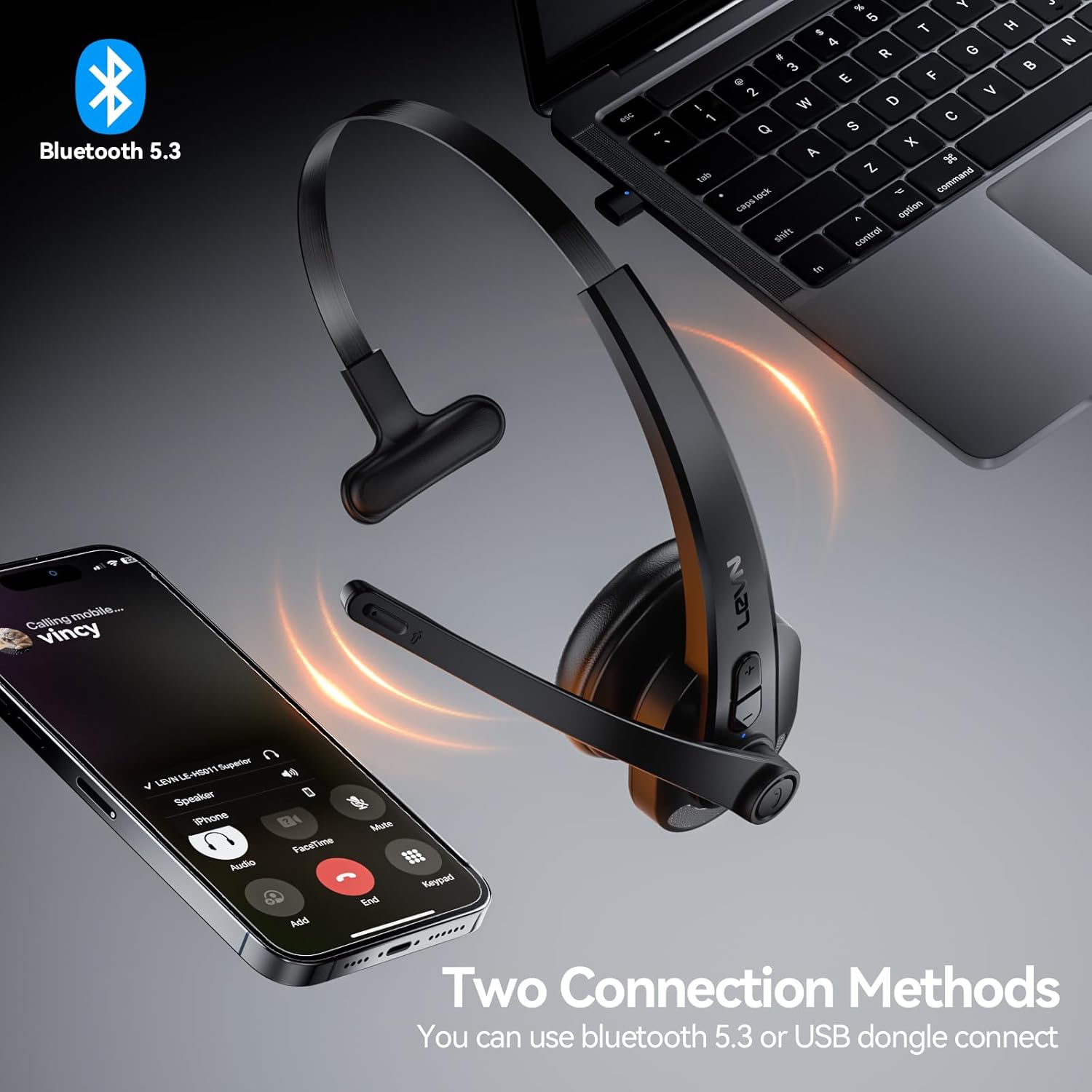
Figure 3: Two connection methods: Bluetooth and 2.4G USB dongle.
4.3.1 Bluetooth Pairing (for Phones, Tablets, Bluetooth-enabled Computers)
- Asire ekoutè a koupe.
- Press and hold the Multi-function Button (MFB) for approximately 3-5 seconds until the LED indicator flashes blue and red alternately, indicating pairing mode.
- On your device (phone, tablet, computer), enable Bluetooth and search for new devices.
- Select "LEVN LE-HS011" from the list of available devices.
- Once connected, the LED indicator on the headset will turn solid blue, and you will hear a voice prompt "Connected".
4.3.2 2.4G USB Dongle Connection (for Computers without Bluetooth)
- Branche kle USB 2.4G la nan yon pò USB ki disponib sou òdinatè w la.
- Power on the LEVN headset (refer to Section 4.2). The headset and dongle will automatically pair.
- Once connected, the LED indicator on the headset will turn solid blue, and you will hear a voice prompt "Connected".
- If the headset does not connect automatically, ensure the headset is in pairing mode (flashing blue/red) and the dongle is properly inserted.
5. Operasyon Enstriksyon
5.1 Jesyon Apèl
- Reponn/Fen Apèl: Peze bouton milti-fonksyon an (MFB) yon fwa.
- Rejte apèl: Peze epi kenbe bouton milti-fonksyon (MFB) la pandan 2 segonn.
- Recomposition Dènye Nimewo: Double-press the Multi-function Button (MFB).
5.2 Music Playback (Mobile Phones Only)
- Jwe/Poz: Peze bouton milti-fonksyon an (MFB) yon fwa.
- Pwochen Track: Peze epi kenbe bouton Ogmante Volim nan pandan 2 segonn.
- Track Previous: Peze epi kenbe bouton Diminye Volim nan pandan 2 segonn.
5.3 Mikwofòn an silans
To mute or unmute the microphone during a call, press the dedicated Mute Button located on the microphone boom. You will hear a voice prompt indicating "Mute On" or "Mute Off".

Figure 4: Microphone mute function for privacy during calls.
5.4 Kontwòl Volim
Press the Volume Up (+) or Volume Down (-) buttons on the headset to adjust the listening volume. You can also control the volume directly from your connected device.
6. Antretyen
- Netwayaj: Sèvi ak yon twal mou epi sèk pou netwaye kas ekoutè a. Pa sèvi ak pwodui chimik ki agresif oswa materyèl abrazif.
- Depo: Lè w pa ap itilize kas ekoutè a, sere l nan yon kote ki fre epi sèk, lwen limyè solèy dirèk ak tanperati ekstrèm.
- Swen batri: Pou pwolonje lavi batri a, evite dechaje batri a nèt souvan. Chaje l regilyèman, menm si w pa itilize l tout tan.
NAN. Depanaj
| Pwoblèm | Kòz posib | Solisyon |
|---|---|---|
| Kas ekoutè a pa limen. | Batri ki ba. | Chaje kas ekoutè a nèt. |
| Pa ka konekte ak aparèy la. | Kas ekoutè a pa nan mòd koneksyon; Bluetooth aparèy la etenn; entèferans. | Ensure headset is in pairing mode (flashing blue/red). Turn device Bluetooth off/on. Move closer to the device. |
| Pa gen odyo oswa bon jan kalite odyo a pa bon. | Volim twò ba; yo chwazi yon move sòti odyo; pwoblèm koneksyon. | Increase headset and device volume. Check device's audio settings to ensure LEVN LE-HS011 is selected. Reconnect the headset. |
| Microphone not working or buzzing noise. | Microphone muted; incorrect input selected; environmental noise. | Ensure microphone is not muted. Check device's audio input settings. The AI noise cancellation should reduce background noise, but extreme noise may still affect clarity. |
| Koneksyon tanzantan. | Pa nan zòn nan; entèferans; batri fèb. | Stay within 49 feet (15 meters) of the connected device. Avoid strong electromagnetic interference. Ensure headset is fully charged. |
8. Espesifikasyon
| Karakteristik | Detay |
|---|---|
| Non modèl | LE-HS011 |
| Mak | LEVN |
| Koneksyon Teknoloji | Wireless, branche |
| Teknoloji kominikasyon san fil | Bluetooth, RF |
| Bluetooth vèsyon | 5.3 |
| Mikwofòn | AI Anile Bri |
| Tan travay | Up to 65 Hours (as per product title, though specifications list 8 hours, using title for user benefit) |
| Konpatibilite | Smartphones, Computers, Communication Software (Zoom, Microsoft Teams, WebEx, Jabber, Skype, FaceTime, etc.) |
| Kalite kontwòl | Kontwòl Medya, Manyen |
| Plasman Zòrèy | Sou Zòrèy |
| Pwa atik | 7 ons |
| Manifakti | LEVN |
9. Garanti ak sipò
For warranty information and customer support, please refer to the documentation included with your product or visit the official LEVN websit. Kenbe resi acha ou pou reklamasyon garanti.


