Entwodiksyon
This manual provides detailed instructions for the setup, operation, and maintenance of your TNICER R3 Motorcycle Helmet Camera. The R3 camera is designed to capture high-resolution video during motorcycle rides, cycling, and other outdoor sports. It features 1080P video recording, a 120° wide-angle lens, IP67 waterproofing, and Wi-Fi connectivity for smartphone control. Please read this manual thoroughly before using the device to ensure proper functionality and longevity.
Kontni pake
Verifye ke tout atik ki nan lis anba a yo enkli nan pakè ou a. Si gen nenpòt atik ki manke oswa ki domaje, tanpri kontakte sèvis kliyan.
- Camera Body (R3)
- 3 Mounting Accessory Kits (Fixed base, Helmet bracket kit, Handlebar mounting bracket)
- Kab chaje ki enpèmeyab
- Done Kab
- Manyèl itilizatè (dokiman sa a)
- 32GB TF Card (Micro SD)
- 3M fikse adezif
- Velcro

Image: The TNICER R3 camera body, various mounting accessories, cables, 32GB TF card, 3M adhesive, and Velcro, illustrating the complete package contents.
Pwodwi souview
The TNICER R3 camera is a compact and robust device designed for capturing dynamic footage. Key features include a 1080P lens system, Wi-Fi module, and a durable, waterproof casing.

Image: The TNICER R3 camera, shown with a handlebar mounting bracket and a 32GB Micro SD card, highlighting its compact design.
Lens Sistèm
The camera features a 6-layer glass lens with an F1.8 caliber and a 120° wide-angle view, ensuring clear 1080P video capture at 30 frames per second. It incorporates a SONY CMOS sensor for enhanced image quality.

Imaj: Yon eksplozyon view diagram illustrating the multi-layer lens structure and internal components of the TNICER R3 camera, emphasizing its optical design.
Konektivite ak Kontwòl
The R3 camera connects to your smartphone via 2.4GHz Wi-Fi for real-time preview, video playback, and download through a dedicated application. It does not support Bluetooth connectivity.
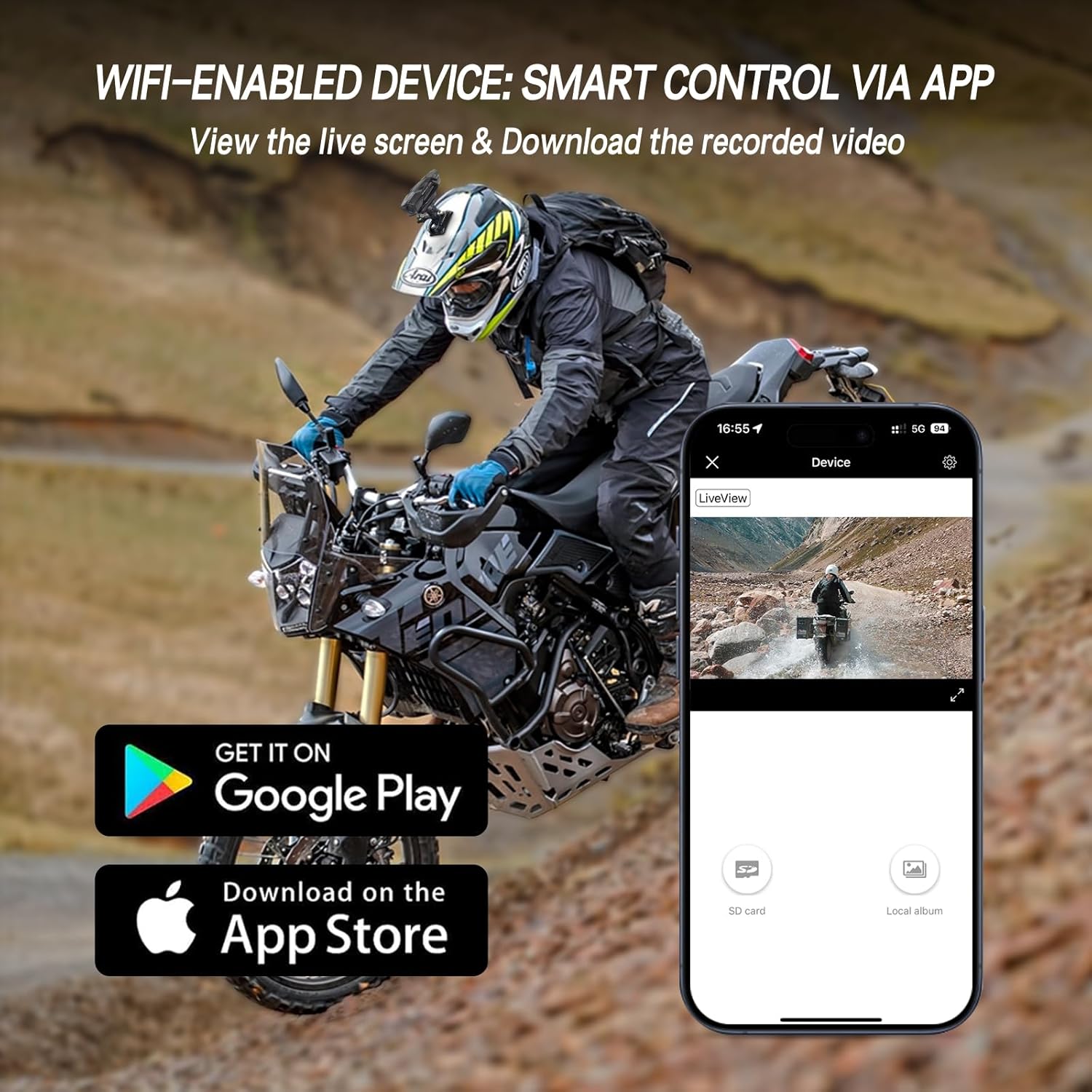
Image: A smartphone displaying the TNICER R3 camera's companion application, showing live view and options for accessing recorded videos, with app store download icons.
Durability and Power
The camera is IP67 rated, making it waterproof and dustproof for reliable performance in various weather conditions. It includes a 720mAh battery, providing over 2 hours of 1080P recording, and supports continuous recording with the waterproof charging cable.

Image: The TNICER R3 camera mounted on a bicycle handlebar, with water droplets visible on its surface, demonstrating its IP67 waterproof rating.

Imaj: Yon entèn view of the TNICER R3 camera highlighting its 720mAh battery and the connection point for the waterproof charging cable, indicating power capabilities.
Enstalasyon
1. Enstalasyon Kat Memwa
- Locate the Micro SD card slot on the camera body.
- Insert the included 32GB Micro SD card into the slot until it clicks into place. Ensure the card is inserted correctly to avoid damage.
- The camera supports loop recording, which will automatically overwrite the oldest files lè kat la plen.

Imaj: Yon imaj detaye view of the TNICER R3 camera's Micro SD card slot, showing a card being inserted, illustrating the memory card installation process.
2. Chaje Kamera a
- Connect the provided Data Cable or Waterproof Charging Cable to the camera's charging port.
- Konekte lòt bout kab la nan yon sous kouran USB (pa egzanp, yon òdinatè, yon adaptè USB nan miray).
- The charging indicator light will illuminate. Once fully charged, the light will change or turn off (refer to specific indicator behavior in the operating section).
- For continuous recording during rides, use the Waterproof Charging Cable connected to a suitable power source on your vehicle.
3. Monte Kamera a
The R3 camera offers multiple installation options to suit your needs.
- Mòn gidon: Use the handlebar mounting bracket to secure the camera to your motorcycle or bicycle handlebars.
- Helmet Mount (Top): Attach the fixed base and helmet bracket kit to the top of your helmet using the 3M fixing adhesive. Ensure the surface is clean and dry before application.
- Helmet Mount (Side): Use the appropriate bracket and adhesive to mount the camera to the side of your helmet.
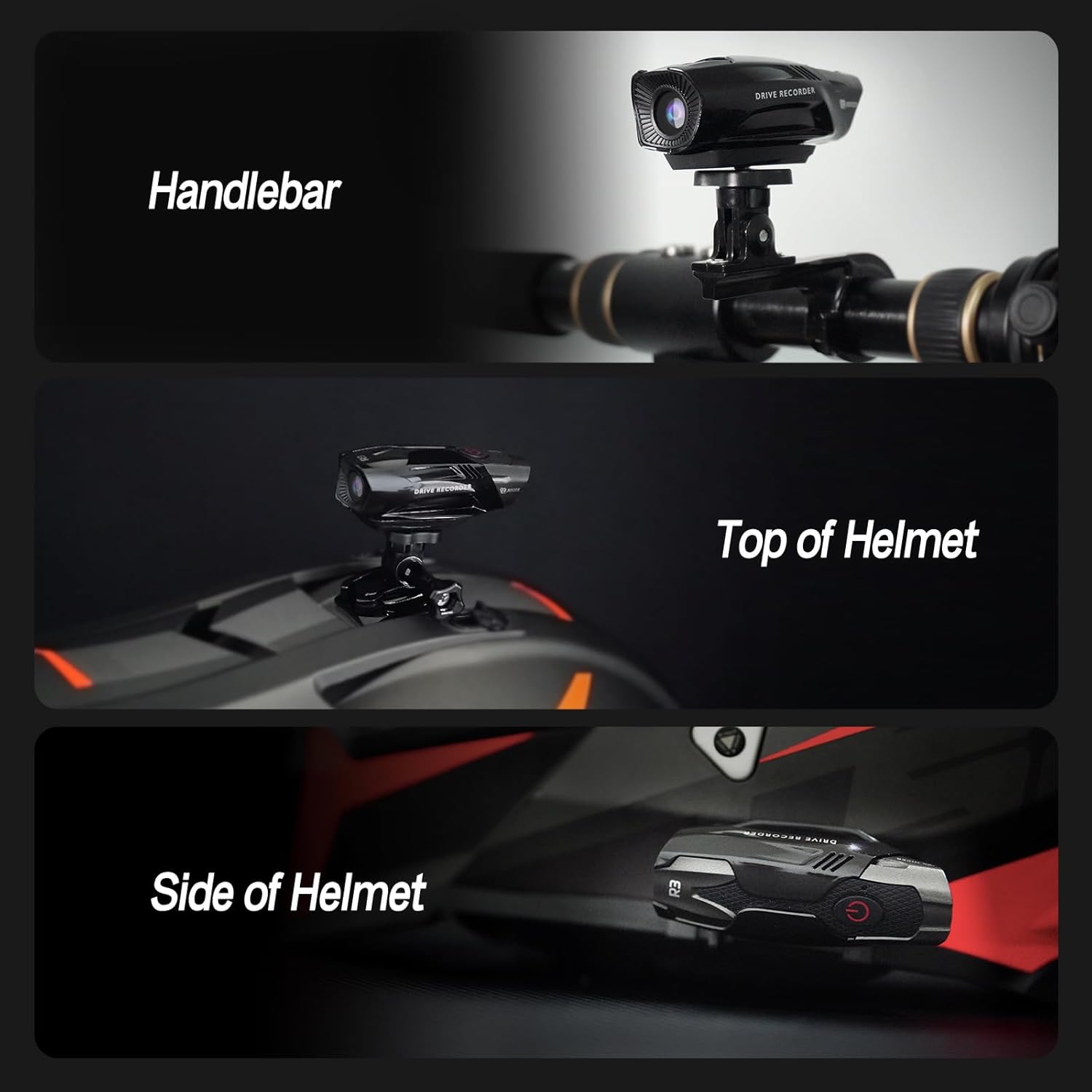
Image: A composite image demonstrating three different mounting positions for the TNICER R3 camera: on a handlebar, on the top of a helmet, and on the side of a helmet.
4. Enstalasyon ak Koneksyon Aplikasyon an
- Download the dedicated TNICER R3 application from the Google Play Store (for Android) or Apple App Store (for iOS).
- Limen kamera a.
- On your smartphone, go to Wi-Fi settings and connect to the camera's Wi-Fi network (SSID and password typically found on the camera or in a quick start guide).
- Open the TNICER R3 app. You should now be able to see a live preview and access camera functions.
Enstriksyon Operasyon
Power On/Off
- Pou limen: Press and hold the power button (usually marked with a power symbol) for a few seconds until the indicator light illuminates.
- Pou etenn: Peze epi kenbe bouton pouvwa a ankò jiskaske limyè endikatè a etenn.
Anrejistreman videyo
- Once powered on, the camera typically begins recording automatically. Refer to the indicator light for recording status (e.g., flashing light).
- The camera records in 1080P resolution at 30 frames per second.
- Anrejistreman bouk: The camera supports loop recording, meaning it will continuously record and overwrite the oldest files when the memory card is full. This ensures uninterrupted recording.
- G-Capteur: The integrated G-sensor detects sudden impacts or collisions. In such events, the camera will automatically lock the current video file, anpeche anrejistreman bouk la ranplase li.

Image: The TNICER R3 camera displayed alongside icons representing its ultra-light design, loop recording capability, and G-sensor function, with a motorcycle accident scene in the background to illustrate G-sensor activation.
Sèvi ak App a Smartphone
After connecting your smartphone to the camera's Wi-Fi:
- Viv Preview: View a real-time feed from the camera on your smartphone screen.
- Lèktur videyo: Access and play back recorded videos directly from the camera's memory card.
- Download Videos: Transfer recorded video files from the camera to your smartphone for editing or sharing.
- Anviwònman: Adjust camera settings such as video resolution, loop recording duration, and G-sensor sensitivity (if available in the app).
Antretyen
- Netwayaj: Wipe the camera body and lens with a soft, damp cloth. Avoid using harsh chemicals or abrasive materials that could scratch the lens or casing.
- Ekspozisyon dlo: While the camera is IP67 waterproof, ensure all ports are securely closed before exposing it to water. After exposure to saltwater, rinse with fresh water and dry thoroughly.
- Depo: Sere kamera a nan yon kote ki fre epi sèk, lwen limyè solèy dirèk lè w pa ap itilize li.
- Kat memwa: Periodically format the Micro SD card using the camera's app or a computer to maintain optimal performance and prevent data corruption. Back up important files anvan fòma.
- Swen batri: For long-term storage, charge the battery to approximately 50% to prolong its lifespan. Avoid fully discharging the battery for extended periods.
Depanaj
| Pwoblèm | Kòz posib | Solisyon |
|---|---|---|
| Kamera a pa limen. | Pil ki fèb; bouton pouvwa a gen pwoblèm. | Charge the camera for at least 2 hours. If the issue persists, contact support. |
| Pa ka konekte ak Wi-Fi. | Incorrect Wi-Fi password; camera Wi-Fi not active; app issue. | Ensure camera Wi-Fi is enabled. Verify password. Restart camera and phone. Reinstall app if necessary. Note: R3 does not have Bluetooth. |
| Video footage is blurry or distorted at high speeds. | Vibrations from motorcycle; unstable mounting. | Ensure the camera is securely mounted and vibrations are minimized. Consider alternative mounting positions. |
| Erè kat memwa. | Kat la pa byen mete; kat la pèvèti; kat la pa konpatib. | Reinsert the card. Format the card via the app or computer. Try a different compatible Micro SD card. |
| Kamera casing appears fragile or separates easily. | Physical impact; manufacturing defect. | Handle with care. If damage occurs under normal use within warranty, contact customer support. |
Espesifikasyon
| Karakteristik | Detay |
|---|---|
| Mak | TNICER |
| Modèl | R3 |
| Rezolisyon Capture Videyo | 1080p at 30FPS |
| Ang lantiy | 120 ° Gran Ang |
| Teknoloji Capteur Foto | CMOS (SONY CMOS Sensor) |
| Evalyasyon ki enpèmeyab | IP67 |
| Kapasite batri | 720mAh Lityòm Polymère |
| Tan anrejistreman | Over 2 hours (1080P video) |
| Koneksyon | Wi-Fi (2.4GHz) |
| Kalite kat memwa | Micro SD (32GB included) |
| Karakteristik espesyal | Loop Recording, G-Sensor, Lightweight |
| Pwa atik | Apeprè 13.7 ons |
| Dimansyon pake | 6.1 x 3.66 x 3.19 pous |
Garanti ak sipò
Enfòmasyon sou Garanti
The TNICER R3 Motorcycle Helmet Camera comes with a one-year warranty from the date of purchase. This warranty covers manufacturing defects and malfunctions under normal use. It does not cover damage caused by misuse, accidents, unauthorized modifications, or natural disasters. Please retain your proof of purchase for warranty claims.
Sipò pou Kliyan
For technical assistance, warranty claims, or any questions regarding your TNICER R3 camera, please refer to the official TNICER websit la oswa enfòmasyon kontak ki vini ak anbalaj pwodwi ou a.


