Entwodiksyon
This manual provides essential instructions for the safe and effective use of your Sony FX30 Digital Cinema Camera. The Sony FX30 is designed for content creators and filmmakers, featuring an APS-C sensor for cinematic capture. Please read this manual thoroughly before operating the camera and retain it for future reference.
Kontni pake
Verifye ke tout atik ki nan lis anba a yo enkli nan pakè ou a. Si gen nenpòt atik ki manke oswa ki domaje, tanpri kontakte machann ou an.

Image: The Sony FX30 Digital Cinema Camera body with various accessories including a memory card, LED light, microphone, and stabilization grip.
Sony Manufacturer Items:
- Sony FX30 Digital Cinema Camera Body
- Sony NP-FZ100 Rechargeable Lithium-Ion Battery
- Sony AC Adapter
- Sony ALC-B1EM Body Cap for E-Mount Cameras
- Sony Multi Interface Shoe Cap
- USB-A to USB-C Cable (USB 3.2)
Bundled Items:
- SanDisk 128GB High Speed Extreme Pro SD Memory Card
- High Power LED Light with Diffusers
- Mikwofòn gè
- Padded Deluxe Camera Bag
- U-Stabilization Grip
- Extra Replacement Battery (Compatible with NP-FZ100)
- Pistol Hand Grip
- Photo & Video Editing Software (1 Year Digital Download)
- USB Memory Card Reader
- Camera Hand Grip Strap
- Lens Pen
- Lantiy soufle
- Camera Starter Kit (Microfiber Cloth, Memory Card Case, Buds)
Enstalasyon
1. Enstalasyon batri
Insert the provided Sony NP-FZ100 battery into the battery compartment located at the bottom of the camera. Ensure it clicks into place securely. Charge the battery fully before first use using the supplied AC adapter and USB-A to USB-C cable.
2. Enstalasyon Kat Memwa
The FX30 supports SD memory cards. Open the memory card slot cover, typically located on the side of the camera. Insert the SanDisk 128GB Extreme Pro SD card with the label facing the correct direction until it clicks into place. The camera features dual card slots for extended recording or backup.

Imaj: Dèyè view of the Sony FX30 showing the open memory card slots with two SD cards partially inserted.
3. Attaching the Body Cap
When no lens is attached, always keep the Sony ALC-B1EM Body Cap on the camera's E-mount to protect the sensor from dust and damage.
4. Premye Limen
Press the power button to turn on the camera. Follow any on-screen prompts for initial setup, such as language selection and date/time settings.
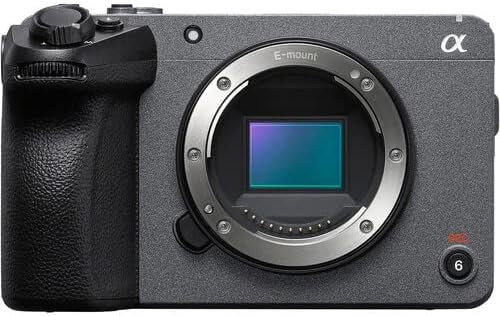
Imaj: Devan view of the Sony FX30 camera body, showcasing the E-mount lens interface and grip.
5. Mete Pwodwi pou Telefòn yo
Attach the U-Stabilization Grip, Shotgun Microphone, and LED Light as needed for your shooting requirements. The camera features a Multi Interface Shoe for compatible accessories.
Opere kamera a
Kontwòl debaz souview
Familiarize yourself with the camera's main controls for efficient operation.

Imaj: Dèyè view of the Sony FX30, highlighting the LCD screen, MODE dial, MENU button, and various control buttons and dials.
- MODE Dial: Chwazi mòd tire.
- Bouton MENI: Accesses camera settings and functions.
- FOCUS MAG: Magnifies the display for precise focusing.
- Bouton Fn (Fonksyon): Provides quick access to frequently used settings.
- Bouton DISP (Afichaj): Changes the information displayed on the screen.
- Rou kontwòl: Navigates menus and adjusts settings.
- Zebra/Peaking: Assists with exposure and focus.

Imaj: Anlè view of the Sony FX30, showing the Multi Interface Shoe, IRIS, WB, ISO buttons, and the REC button.
- IRIS Button: Adjusts aperture.
- WB (White Balance) Button: Sets white balance.
- ISO Button: Adjusts ISO sensitivity.
- Bouton REC: Kòmanse epi sispann anrejistreman videyo.
Manyen ekran operasyon
The FX30 features a touch-sensitive LCD screen for intuitive control. You can tap to select menu items, adjust focus, and navigate settings directly on the display.

Image: A hand interacting with the touch-sensitive LCD screen on the back of the Sony FX30 camera.
Anrejistreman videyo
To begin recording, ensure a memory card is inserted and the battery is charged. Press the REC button to start recording. Press it again to stop. The camera supports video capture resolutions up to 4K and 1080p in MP4 format.
Koneksyon
The Sony FX30 supports Wi-Fi connectivity for remote control, file transfer, and other smart functions. Refer to the camera's on-screen menu for Wi-Fi setup instructions.
Antretyen
- Netwayaj kò kamera a: Sèvi ak yon twal mou epi sèk pou siye kò kamera a. Pou pousyè tè ki difisil pou retire, siye l yon ti kras.ampen the cloth with water. Avoid using strong cleaning agents.
- Netwayaj lantiy la ak detèktè a: Use a lens blower to remove dust from the lens and sensor. For smudges on the lens, use a lens pen or a specialized lens cleaning solution with a microfiber cloth. Sensor cleaning should be performed with extreme care or by a professional.
- Swen batri: Sere pil yo nan yon kote ki fre epi sèk. Evite dechaje pil yo nèt souvan pou pwolonje dire lavi yo.
- Depo: When not in use, store the camera in a dry, dust-free environment, preferably in the padded deluxe camera bag provided.
Depanaj
This section addresses common issues you might encounter. For more detailed troubleshooting, refer to the official Sony support websit.
- Kamera a pa limen: Ensure the battery is fully charged and correctly inserted. Try using the extra replacement battery.
- Erè Kat Memwa: Reinsert the memory card. Ensure it is formatted correctly by the camera. Try a different memory card if the issue persists.
- Pa gen anrejistreman videyo: Check if the memory card has sufficient free space. Verify that the camera is in a video recording mode.
- Pwoblèm Kalite Imaj: Check lens cleanliness. Ensure appropriate ISO, aperture, and shutter speed settings for your lighting conditions.
Espesifikasyon
| Karakteristik | Detay |
|---|---|
| Dimansyon pwodwi | 3.3 x 3.1 x 3.3 pous |
| Pwa atik | 8 liv |
| ASIN | B0D1RWMS36 |
| Nimewo Modèl Atik | CC-FX30BODY-41524 |
| Manifakti | Sony |
| Mak | Sony |
| Teknoloji Capteur Foto | APS-C |
| Rezolisyon Capture Videyo | 1080p, 4K |
| Kalite memwa flash | SD |
| Fòma Capture Videyo | MP4 |
| Sipòte fòma odyo | AAC, MP3 |
| Gwosè ekran | 3 pous |
| Koneksyon Teknoloji | Wi-Fi |
| Koulè | Nwa |
| Karakteristik espesyal | San fil |
Garanti ak sipò
The Sony FX30 Digital Cinema Camera comes with a Limited 1-Year Manufacturer Warranty. Please retain your proof of purchase for warranty claims.
For technical support, service, or further information, please visit the official Sony support websit la oubyen kontakte sèvis kliyan yo. Ou ka jwenn plis enfòmasyon nan Sony sipò Websit.


