1. Pwodwi souview
The COCOCAM ZY-C3 is an advanced 2K wireless outdoor security camera designed for comprehensive property surveillance. It features dual lenses, intelligent AI detection, and flexible power options, ensuring reliable monitoring and ease of use.

Figure 1.1: COCOCAM ZY-C3 Camera and Solar Panel
Karakteristik kle:
- Dual PIR & Smart Motion Detection: Two PIR sensors for simultaneous monitoring of different angles, reducing false alarms with human detection and customizable alarm zones.
- 2K 3MP Dual Lens & Wide Pan-Tilt Coverage: Crystal-clear 2K video quality with 355° horizontal pan and 90° vertical tilt for multi-angle surveillance.
- Intelligent AI Analysis: Effectively detects people, cars, animals, and packages (premium feature).
- 100% Wireless & Two-Way Audio: Easy installation with no wiring, and remote two-way communication.
- Pouvwa ki dire lontan: Equipped with a 10000mAh rechargeable battery and a 6W solar panel for continuous operation.
- Bluetooth Pairing & Storage Options: Quick Bluetooth setup, supports TF card (up to 128GB, not included) and cloud storage.
- Vizyon lannwit koulè: Clear night vision up to 25m in white light and 30m in infrared.
2. Gid Enstalasyon
2.1 Kontni pake a
Anvan enstalasyon an, asire w ke tout konpozan yo prezan:
- COCOCAM ZY-C3 Camera Unit
- Panèl solè (6W)
- Mounting Support ak Vis
- USB Chaje Kab
- Manyèl itilizatè
2.2 Enstalasyon Fizik
The camera is designed for outdoor use and is 100% wireless, making installation flexible. Choose a location with good Wi-Fi signal and direct sunlight for the solar panel.
- Monte kamera a: Secure the camera to a wall or suitable surface using the provided mounting bracket and screws. Ensure the camera has a clear view nan zòn ou vle kontwole.
- Monte Panel Solè a: Install the solar panel in a location that receives maximum direct sunlight throughout the day. Connect the solar panel cable to the camera's charging port.

Figure 2.1: Camera and Solar Panel Installation Example

Figi 2.2: Koneksyon Panèl Solè pou Kouran Kontini
2.3 Konfigirasyon ak Konektman Aplikasyon yo
Download the COCOCAM app from your device's app store (compatible with Android/iOS). Follow these steps to pair your camera:
- Telechaje epi enstale aplikasyon an: Chèche pou "COCOCAM" in the App Store or Google Play Store and install it.
- Kreye kont: Louvri aplikasyon an epi kreye yon nouvo kont oubyen konekte si ou deja genyen youn.
- Ajoute Aparèy: Tap the "Add Device" or "+" icon in the app. Select "Camera on Battery" or the appropriate camera type.
- Limen Kamera a: Asire w kamera w la limen.
- Bluetooth mak: The camera supports quick Bluetooth pairing. Follow the on-screen prompts in the app to connect via Bluetooth.
- Konfigirasyon Wi-Fi: Select your 2.4GHz Wi-Fi network (5GHz is not supported) and enter the password. The camera will connect to your network.
- Konplete: Once connected, you can name your camera and begin monitoring.

Figure 2.3: App Pairing Step 1 - Add Device
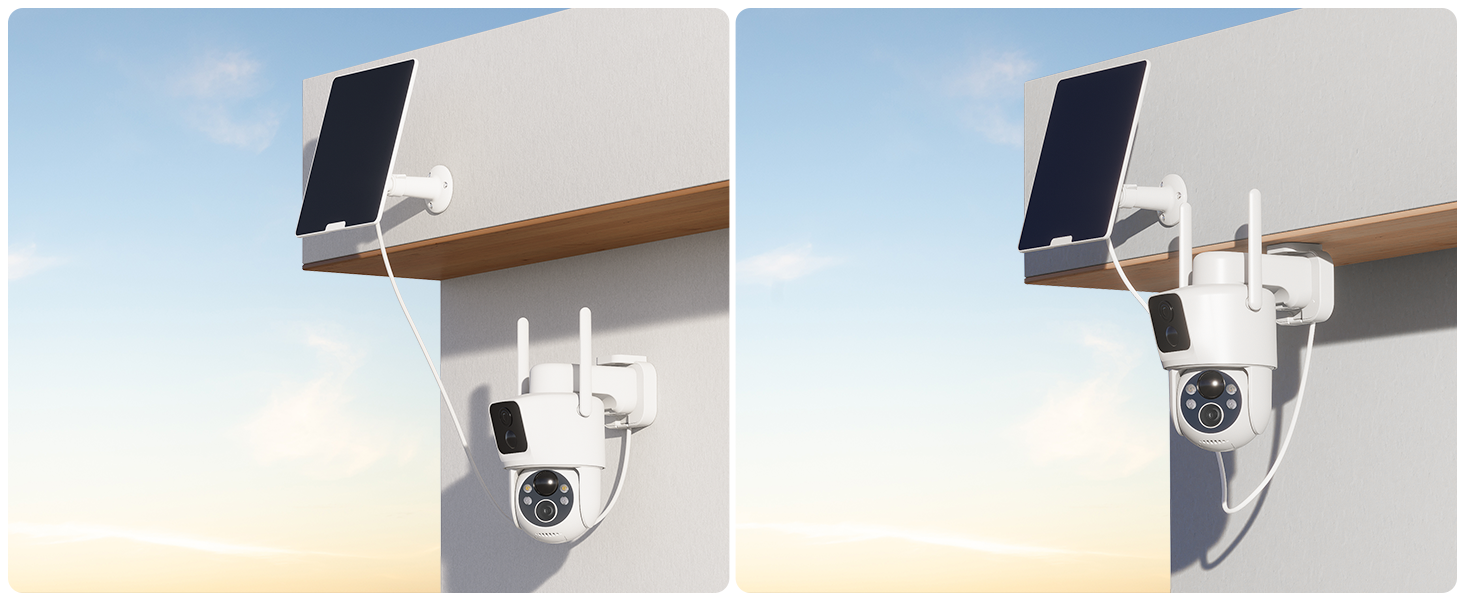
Figure 2.4: App Pairing Step 2 - Select Device Type

Figure 2.5: App Pairing Step 3 - Wi-Fi Configuration
3. Operasyon Enstriksyon
3.1 Viv View ak Kontwòl Pan-Tilt
Access the live feed from your camera via the COCOCAM app. The dual lenses provide a wide field of view, and the pan-tilt function allows you to adjust the camera's perspective remotely.
- Pan-Tilt Control: Use the directional controls within the app to rotate the camera horizontally (355°) and vertically (90°).
- Doub Lens View: The app displays feeds from both lenses, allowing you to monitor two different areas simultaneously or get a broader perspective.
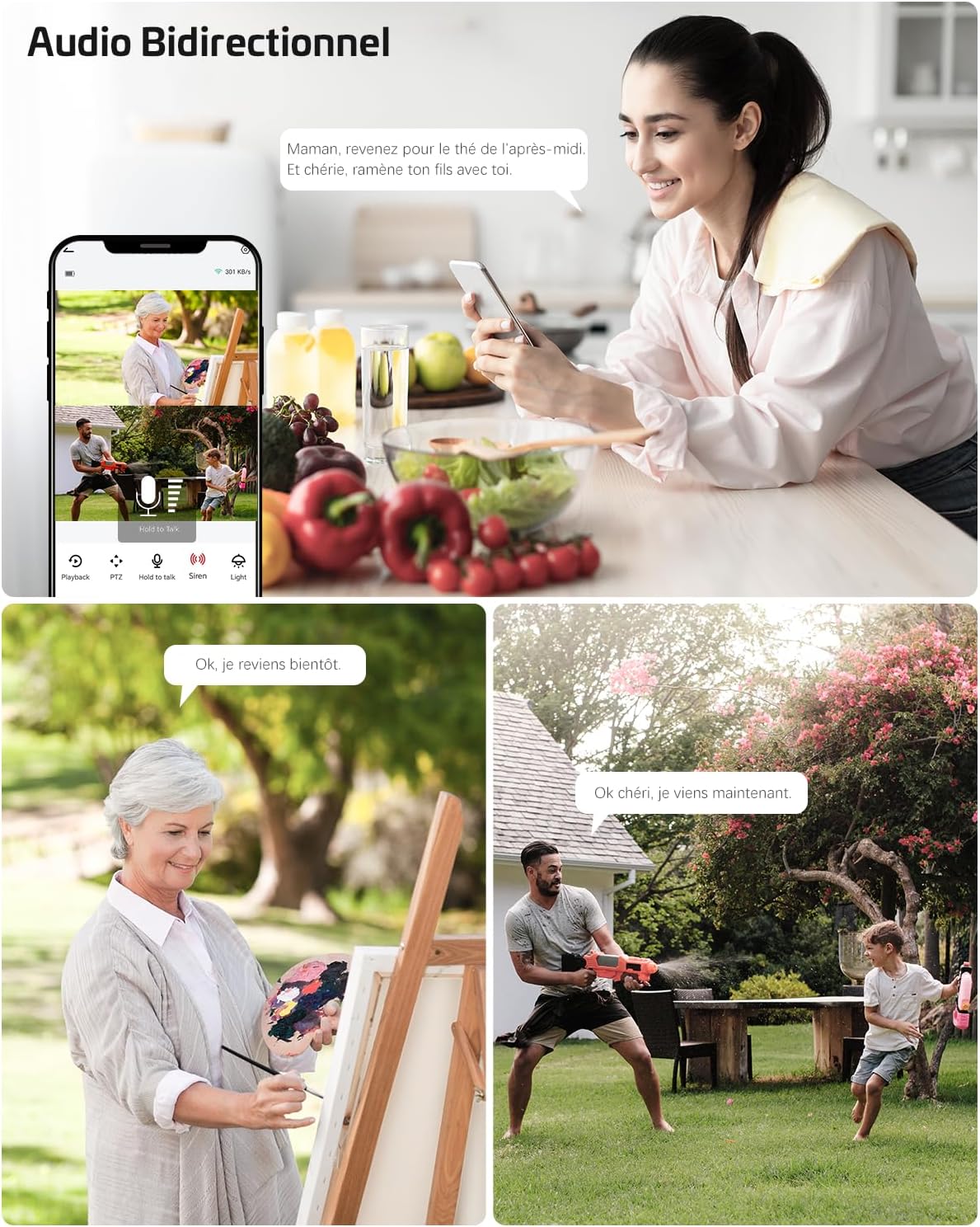
Figure 3.1: Pan-Tilt Functionality
Figure 3.2: Dual Zone Monitoring
3.2 Intelligent Detection and Alerts
The camera utilizes dual PIR sensors and AI analysis to accurately detect motion and identify specific objects, sending instant alerts to your device.
- Dual PIR Detection: Advanced motion detection system that triggers recording and alerts based on heat and movement, reducing false alarms from environmental factors.
- Analiz IA: The camera can differentiate between people, vehicles, animals, and packages, providing more relevant notifications.
- Customizable Alarm Zones: Set specific areas within the camera's view kote deteksyon mouvman an ta dwe aktif.

Figure 3.3: AI-Powered Object Recognition

Figure 3.4: Smart PIR Detection with Alarms
3.3 Odyo De-fason
Kominike avèk vizitè yo oubyen dekouraje entru yo lè l sèvi avèk mikwofòn ak oratè entegre a.
- Pale: Tap the microphone icon in the app to speak through the camera.
- Koute: The camera's microphone picks up audio from the monitored area.

Figi 3.5: Kominikasyon odyo bidireksyonèl
3.4 Vizyon lannwit
The camera provides clear surveillance even in low-light conditions with its advanced night vision capabilities.
- Vizyon lannwit koulè: Up to 25 meters with white light illumination.
- Vizyon lannwit enfrawouj: Jiska 30 mèt nan fènwa total.

Figure 3.6: 2K Color Night Vision
3.5 Opsyon Depo
Anrejistre epi estoke videyo footage using either a local TF card or cloud storage services.
- Depo kat TF: Supports up to 128GB TF card (not included). Insert the card into the designated slot on the camera.
- Depo nwaj: Offers 6-second event recording and 7-day loop coverage (subscription may be required for extended features).

Figure 3.7: TF Card and Cloud Storage Options
4. Antretyen
4.1 Jesyon pouvwa
The camera is designed for low power consumption and continuous operation with its solar panel.
- Chaje batri: The 10000mAh battery is charged by the 6W solar panel. Ensure the solar panel is clean and receives adequate sunlight.
- Manyèl Chaje: If solar charging is insufficient (e.g., during prolonged cloudy periods), you can manually charge the camera using a 5V 2A power adapter (8-10 hours for full charge).
4.2 Rezistans move tan
The camera has an IP66 waterproof rating, making it suitable for various outdoor weather conditions.

Figi 4.1: Rezistans Dlo IP66
4.3 TF Card Management
For optimal performance, it is recommended to format the TF card before its first use in the camera.
NAN. Depanaj
5.1 Pwoblèm koneksyon
- Kamera a pa konekte ak Wi-Fi a: Ensure your Wi-Fi network is 2.4GHz. The camera does not support 5GHz Wi-Fi. Check Wi-Fi signal strength at the camera's location.
- App not finding camera during pairing: Ensure Bluetooth is enabled on your phone and the camera is powered on and in pairing mode.
5.2 Pwoblèm pouvwa ak chaje
- Panèl solè a pa chaje: Verify the solar panel is clean and positioned to receive direct sunlight. Check the connection cable between the solar panel and the camera.
- Batri a vide byen vit: Diminye frekans alèt deteksyon mouvman oswa an dirèk view access. Ensure the solar panel is providing sufficient charge.
5.3 Image/Video Quality Issues
- Imaj flou: Clean the camera lenses. Ensure there are no obstructions in front of the camera.
- Vizyon lannwit ki fèb: Ensure the night vision LEDs are not obstructed. Check for strong light sources directly facing the camera at night.
5.4 Fo Alam
- Twòp avètisman: Adjust the motion detection sensitivity in the app. Define specific alarm zones to exclude areas with frequent irrelevant motion (e.g., swaying trees).
- AI detection not working as expected: Ensure the camera's firmware is up to date. Review the AI detection settings in the app.
6. Espesifikasyon
| Karakteristik | Spesifikasyon |
|---|---|
| Mak | COCOCAM |
| Nimewo Modèl | ZY-C3 |
| Voltage | 5 Volts |
| Pouvwa | 6 Watts (Solar Panel) |
| Dimansyon (L x W x H) | 11 x 15 x 17.5 santimèt |
| Nivo rezistans dlo | IP66 (enpèmeyab) |
| Koneksyon Teknoloji | Bluetooth, Wi-Fi (2.4GHz) |
| Rezolisyon toujou efikas | 3 megapiksèl |
| Konpozisyon batri | Lityòm |
| Batri rechargeable | Wi (10000mAh) |
| Rezolisyon anrejistreman videyo | 1296p (2K) |
| Kantite Chanèl | 2 (Dual Lens) |
| Materyèl | Akrilonitrile butadien stirèn (ABS) |
7. Garanti ak sipò
COCOCAM offers a Garanti pou tout lavi for this product, ensuring long-term reliability and customer satisfaction.
For technical support, troubleshooting assistance, or warranty claims, please contact COCOCAM customer service through the official website or your purchase platform. Refer to the contact information provided with your product packaging or on the COCOCAM brand store page.
Note: The provided product data did not include specific video URLs with 'creator_type' or 'm3u8' format, therefore, no videos could be embedded in this manual.


