1. Entwodiksyon
This manual provides detailed instructions for the VILTROX AF 56mm F1.7 XF APS-C lens. Designed for Fujifilm X-Mount mirrorless cameras, this prime portrait-length lens offers an 85mm equivalent focal length, a bright f/1.7 maximum aperture, and quiet autofocus, making it suitable for various photographic applications, especially portraiture and low-light conditions. Please read this manual thoroughly before using the lens to ensure optimal performance and longevity.
2. Pwodwi souview & Pake kontni
The VILTROX AF 56mm F1.7 XF lens is a compact and lightweight optic. Below is an image illustrating the lens and its included accessories.
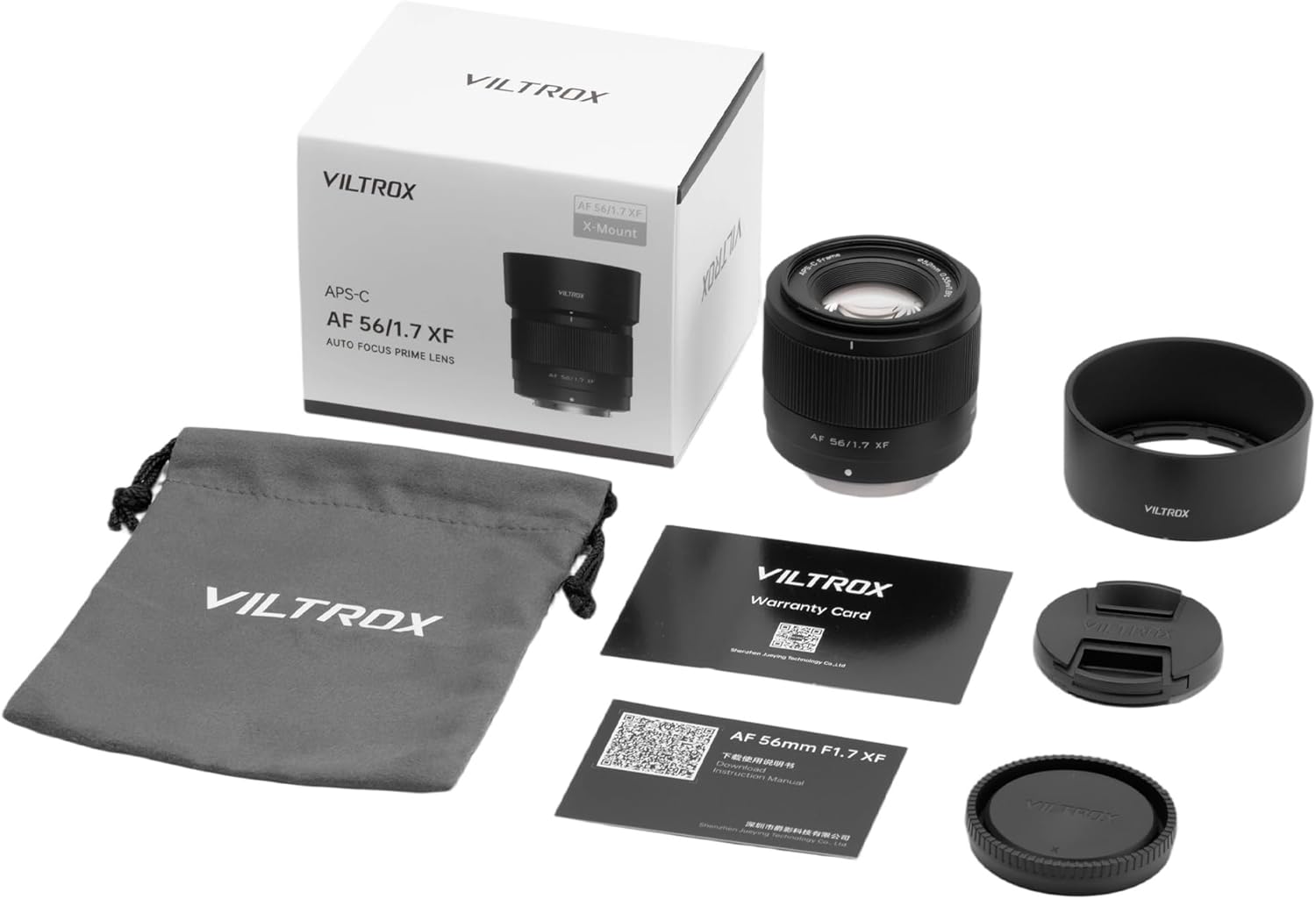
Figure 2.1: VILTROX AF 56mm F1.7 XF lens and its package contents.
2.1. Pake kontni
- VILTROX AF 56mm F1.7 X-mount Lens
- Lens Hood
- Lens Sak
- Cap Lens devan
- Dèyè Lens Cap
- Kat Garanti
- Manyèl itilizatè
2.2. Konpozan lantiy yo

Figi 2.2: Devan view of the VILTROX AF 56mm F1.7 XF lens with lens hood attached.

Figi 2.3: Dèyè view of the VILTROX AF 56mm F1.7 XF lens, highlighting the metal mount and USB-C port for firmware updates.
3. Karakteristik kle
- Portrait-Length Prime: Designed for APS-C-format FUJIFILM X-mount mirrorless cameras, providing an 85mm equivalent focal length.
- Ouvèti klere: f/1.7 maximum aperture excels in low-light conditions and offers precise control over depth of field for selective focus.
- Kontra enfòmèl ant ak lejè: Weighing only 171g, its design is ideal for travel and everyday use, ensuring compatibility with Fujifilm cameras.
- Advanced Optical Design: Features 9 groups, 11 piece optical structures, including 4 ED (Extra-low Dispersion) lenses and 3 high refraction index lenses for superior image quality.
- Quiet Autofocus: Utilizes an STM (Stepping Motor) for silent, fast, and accurate autofocus performance, suitable for both photo and video recording.
- Bokeh lis: A nine-blade diaphragm contributes to a pleasing and smooth bokeh quality.
- Mizajou Mizajou: Integrated micro-USB port allows for convenient lens firmware updates.
4. Espesifikasyon teknik
| Spesifikasyon | Valè |
|---|---|
| Mak | VILTROX |
| Nimewo Modèl | AF 56/1.7 XF |
| Longè Fokal | 56mm (85mm equivalent on APS-C) |
| Ouverture maksimòm | f/1.7 |
| Ouverture minimòm | Not specified (typically f/16 or f/22) |
| Estrikti optik | 11 elements in 9 groups (including 4 ED, 3 high refraction index) |
| Lam dyafram | 9 |
| Motè otofokus | STM (Motè pa pas) |
| Distans Minimòm Konsantre | 0.55m (1.8ft) |
| Gwosè filtre | 52mm |
| Dimansyon pwodwi | 2.5 x 2.1 x 2.1 pous |
| Pwa atik | 13.1 ons (apeprè 371g) |
| Mizajou Firmware Port | USB-C |
5. Pou kòmanse (Enstalasyon)
5.1. Tache Lantiy la
- Asire w ke kamera ou etenn.
- Remove the rear lens cap from the VILTROX AF 56mm F1.7 XF lens and the body cap from your Fujifilm X-Mount camera.
- Align the white dot on the lens barrel with the white dot on your camera's lens mount.
- Mete lantiy la dousman nan sipò kamera a epi vire l nan sans zegwi mont lan jiskaske li klike an plas. Pa fòse lantiy la.
Video 5.1: Unboxing and mounting the VILTROX AF 56mm F1.7 XF lens on a Fujifilm camera. This video demonstrates the physical attachment process.
5.2. Detaching the Lens
- Asire w ke kamera ou etenn.
- Peze epi kenbe bouton deblokaj lantiy la sou kò kamera ou a.
- Rotate the lens counter-clockwise until it detaches from the camera mount.
- Immediately attach the rear lens cap to the lens and the body cap to your camera to protect them from dust and damage.
6. Itilizasyon Lantiy la
6.1. Autofocus (AF)
The VILTROX AF 56mm F1.7 XF lens features an STM (Stepping Motor) for fast, quiet, and accurate autofocus. This motor is designed to minimize noise during video recording and is responsive for still photography.
- Set your camera's focus mode to AF (Autofocus).
- The lens will automatically focus when the shutter button is half-pressed.
- The STM motor provides precise focus, even with features like face and eye recognition on compatible Fujifilm cameras.
Videyo 6.1: Yon revizyon detayeview of the VILTROX 56mm f/1.7 lens, including demonstrations of its autofocus capabilities in various scenarios.
6.2. Manual Focus (MF)
To use manual focus, set your camera's focus mode to MF (Manual Focus). The lens features a smooth-turning plastic focus ring. While not lightning-fast, the manual focus response is precise enough for accurate adjustments.
6.3. Kontwòl Ouvèti
The lens has a bright f/1.7 maximum aperture, allowing for excellent performance in low-light conditions and significant control over depth of field. Aperture is controlled electronically via the camera body, as the lens does not feature a physical aperture ring.
6.4. Mizajou Firmware
The VILTROX AF 56mm F1.7 XF lens includes an integrated micro-USB port on the lens mount for firmware updates. To update the firmware:
- Visit the official VILTROX website to download the latest firmware for your lens model.
- Connect the lens directly to your computer using a USB-C cable.
- Follow the instructions provided with the firmware download to complete the update process.
7. Image Quality Characteristics
The VILTROX AF 56mm F1.7 XF lens delivers strong optical performance, especially considering its compact size and price point. Here's a summary of its image quality characteristics:
7.1. Sharpness & Contrast
The lens exhibits excellent sharpness and good contrast, even wide open at f/1.7 in the center of the image. The image corners are also remarkably sharp, which is a pleasant surprise for a lens in this category. Stopping down slightly to f/2.8 can yield a tiny bit of extra resolution, but overall sharpness is impressive across the frame.
7.2. Distortion & Vignetting
When shooting in RAW format without in-camera corrections, the lens may exhibit a small amount of pincushion distortion. More notably, there can be heavy vignetting at f/1.7. However, stopping down to f/2 begins to clear this up, and by f/2.8 or f/4, vignetting is mostly gone. If shooting in RAW, vignetting is the primary optical aberration to consider correcting in post-processing.
7.3. Bokeh
The nine-blade diaphragm contributes to impressively smooth out-of-focus backgrounds (bokeh). Even in transitional zones, the bokeh appears smooth with almost no outlining on highlights, resulting in a pleasing aesthetic for portrait photography.
7.4. Chromatic Aberration
Longitudinal chromatic aberration is minimal with this lens. At f/1.7, a tiny bit might be visible through low contrast areas, but stopping down to f/2 or f/2.8 effectively mitigates this, making it a non-issue for most shooting scenarios.
8. Antretyen ak Swen
- Netwayaj: Use a soft, lint-free cloth or a lens brush to remove dust from the lens surface. For smudges or fingerprints, use a specialized lens cleaning solution and a microfiber cloth. Avoid harsh chemicals or abrasive materials.
- Depo: When not in use, store the lens with both front and rear caps attached in the provided lens pouch or a dry, cool place away from direct sunlight and extreme temperatures. Avoid storing in areas with high humidity to prevent mold growth.
- Manyen: Always handle the lens by its barrel, not by the front element. Avoid dropping or subjecting the lens to strong impacts.
- Tan sele: Please note that this lens does pa feature weather sealing. Exercise caution when using it in dusty, humid, or rainy environments.
NAN. Depanaj
- Kamera a pa rekonèt lantiy la: Ensure the lens is securely attached to the camera body and that the camera's firmware is up to date. Try cleaning the electrical contacts on both the lens and camera with a clean, dry cloth.
- Otofokus la ralanti oswa li pa egzak: Check that the camera's focus mode is set to AF. Ensure there is sufficient light for the autofocus system to operate effectively. If the issue persists, consider updating the lens firmware.
- Image quality issues (e.g., vignetting, distortion): For RAW images, these can often be corrected in post-processing software. Ensure your camera's in-camera lens corrections are enabled if shooting JPEGs.
- Lens not turning on/off: This lens is powered by the camera. Ensure the camera battery is charged and the camera is functioning correctly.
10. Garanti & Sipò
For warranty information, please refer to the Warranty Card included in your package. For technical support, firmware downloads, or further assistance, please visit the official VILTROX websit oswa kontakte depatman sèvis kliyan yo.
VILTROX Official Store: Vizite Magazen an


