1. Entwodiksyon
The KETOTEK KT99pro is a versatile dual digital temperature controller designed for precise temperature management. It features two independent 10A relay outputs, allowing simultaneous control of both heating and cooling devices. This thermostat is ideal for a wide range of applications including home brewing, reptile habitats, fermentation, incubation, and more, ensuring your environment maintains an ideal temperature.
Key features include a wide temperature control range, high accuracy, switchable Celsius/Fahrenheit display, adjustable high and low temperature alarms, temperature calibration, cooling delay start, and memory storage function.

Figi 1: Plis paseview of KETOTEK KT99pro features.

Figi 2: Egzamples of applications for the temperature controller.
2. Enstriksyon Enstalasyon
Follow these steps to set up your KETOTEK KT99pro temperature controller:
- Depake aparèy la: Carefully remove the temperature controller and its components from the packaging. Ensure all parts are present: the main unit, two waterproof NTC temperature sensors, and two suction cups.
- Koneksyon pouvwa: Plug the temperature controller into a standard 220V AC 50/60Hz power outlet. The LED displays will illuminate.
- Konekte aparèy yo: Plug your heating device into the TC1 outlet and your cooling device into the TC2 outlet. Ensure the appliances are compatible with 10A relay outputs.
- Plasman Capteur: Position the two waterproof NTC temperature sensors in the environment where temperature monitoring and control are required. The sensors can be secured using the provided suction cups. Ensure the sensors are not directly exposed to heating or cooling elements to get accurate readings.
- Montaj (si ou vle): The controller features double hanging holes on the back for wall mounting, or it can be placed on a flat surface.

Figure 3: Included components and physical features.

Figure 4: Mounting the controller and sensor placement examples.
3. Operasyon Enstriksyon
The KT99pro features a dual LED display and simple buttons for easy operation.
3.1 Anviwònman Tanperati Debaz
- Fikse Tanperati Kòmanse: Peze a ▲ button for 3 seconds to enter the start temperature setting mode. Use the ▲ or ▼ buttons to adjust the desired start temperature.
- Fikse Tanperati Arè a: Peze a ▼ button for 3 seconds to enter the stop temperature setting mode. Use the ▲ or ▼ buttons to adjust the desired stop temperature.
3.2 Advanced Settings (P0-P7 Modes)
To access advanced settings, press the TC1 ▲ epi TC2 ▲ bouton yo an menm tan pandan 3 segonn. Sèvi ak ▲ or ▼ buttons to navigate through the P0-P7 modes and adjust their values.
- P0: Heating/Cooling Mode Selection: Set to 'H' for heating or 'C' for cooling.
- P1: Hysteresis Setting: Adjust the temperature difference between the turn-on and turn-off points.
- P2: Alam Tanperati ki Wo: Set the upper limit for the temperature alarm.
- P3: Alam Tanperati Ba: Set the lower limit for the temperature alarm.
- P4: Temperature Calibration: Adjust the temperature reading for accuracy.
- P5: Cooling Delay Start: Set a delay (0-5 minutes) before the cooling output activates.
- P6: Celsius/Fahrenheit Switch: Toggle between °C and °F display.
- P7: Button Sound On/Off: Aktive oubyen dezaktive son lè w peze bouton an.
3.3 Kalibrasyon Tanperati
To calibrate the temperature, press the TC1 ▲ epi TC2 ▼ buttons simultaneously for 5 seconds. Adjust the calibration value using the ▲ or ▼ bouton.
3.4 Reyajiste Fonksyon
To reset the controller to factory settings, press the TC1 ▼ epi TC2 ▼ bouton an menm tan pou 5 segonn.

Figure 5: Visual guide for basic and advanced settings.

Figure 6: Temperature control range and precision details.
4. Antretyen
Proper maintenance ensures the longevity and accurate performance of your temperature controller.
- Netwayaj: Disconnect the device from power before cleaning. Use a soft, dry cloth to wipe the main unit. For the waterproof sensors, they can be gently cleaned with a damp cloth if necessary. Avoid using abrasive cleaners or solvents.
- Swen Capteur: Regularly inspect the sensor cables for any signs of damage or wear. Ensure the sensors are kept clean for accurate readings.
- Depo: Lè w pa itilize kontwolè a pou yon bon bout tan, sere l nan yon kote ki fre epi sèk, lwen limyè solèy dirèk ak tanperati ekstrèm.
NAN. Depanaj
Seksyon sa a adrese pwoblèm komen ak solisyon yo.
- Alarm Indicators (HHH/LLL):
If the temperature exceeds the high temperature alarm value, the display will show "HHH" and an audible alarm will sound. If the temperature falls below the low temperature alarm value, the display will show "LLL" and an audible alarm will sound. Check the environment and connected devices to address the temperature deviation. - Lekti tanperati ki pa egzak:
Ensure the sensors are clean and properly placed. Perform a temperature calibration (refer to section 3.3) if you suspect the readings are consistently off. - Aparèy pa reponn:
Check if the device is properly plugged into a working power outlet. If the issue persists, try performing a factory reset (refer to section 3.4). - Sòti ki pa aktive:
Verify that the heating/cooling mode (P0) is correctly set. Check the start and stop temperature settings. Ensure the connected appliances are functional and properly plugged into the controller's outlets.
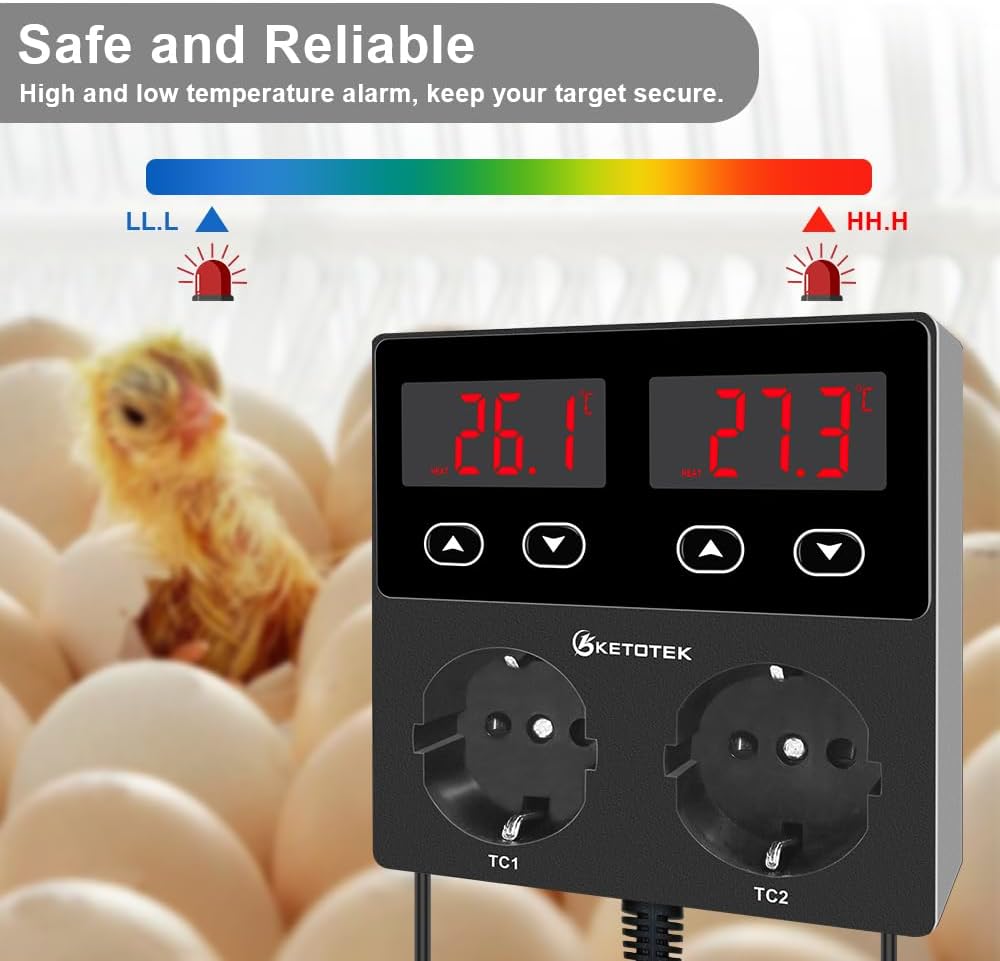
Figure 7: High and low temperature alarm indicators.
6. Espesifikasyon
| Mak | KETOTEK |
| Nimewo Modèl | KT99PRO EU version |
| Voltage | 220 Volts |
| Relè Sòti | 2 x 10A |
| Ranje kontwòl tanperati | -50 ° C a 100 ° C (-58 ° F a 212 ° F) |
| Presizyon Tanperati | ± 1 ° C / ± 2 ° F. |
| Kalite ekspozisyon | dirije |
| Dimansyon pwodwi (L x W x H) | 11 x 3.5 x 11 cm (4.33 x 1.38 x 4.33 pous) |
| Pwa atik | 488 gram (1.07 liv) |
| Longè kòd pouvwa | 1.40 m (4.6 pye) |
| Sensè kab longè | 1.9 m (6.23 pye) |
| Materyèl | Materyèl lejè |
| Koulè | Nwa |

Figure 8: Product dimensions and cable lengths.
7. Enfòmasyon sou Garanti
This KETOTEK product is covered by a standard manufacturer's warranty. For specific details regarding warranty duration and terms, please refer to the product packaging or contact KETOTEK customer support. The warranty typically covers defects in materials and workmanship under normal use.
8. Sipò pou Kliyan
If you encounter any issues or have questions not covered in this manual, please contact KETOTEK customer support for assistance. You can typically find contact information on the product packaging or the official KETOTEK websit.
KETOTEK aims to provide reliable electronic materials and functional modules to make life easier and smarter.


