Entwodiksyon
This manual provides essential information for using your new Samsung Galaxy M55 5G smartphone. Please read this manual carefully to ensure proper and safe use of your device. Keep this manual for future reference.
The Samsung Galaxy M55 5G features a 6.7-inch FHD+ Super AMOLED+ display with a 120Hz refresh rate, powered by the Snapdragon 7 Gen 1 processor. It includes a versatile triple-camera system and a 5000mAh battery.
Enfòmasyon sou Sekirite
Before using the device, read all safety information to ensure safe and proper use. Follow warnings and regulations to prevent injury to yourself or others and to prevent damage to your device.
- Pa ekspoze aparèy la anba tanperati ekstrèm oswa anba limyè solèy dirèk pou yon peryòd tan pwolonje.
- Use only Samsung-approved batteries, chargers, and accessories.
- Evite lage aparèy la oswa soumèt li a gwo enpak.
- Keep the device dry. Do not use it in wet environments.
- Kenbe yon distans ki an sekirite ak aparèy medikal yo pou evite entèferans.
Kontni pake
Tcheke bwat pwodwi a pou atik sa yo:
- Telefòn entelijan Samsung Galaxy M55 5G
- USB Kalite-C kab
- PIN Ejeksyon SIM
- Gid Quick Start
- 25W Fast Charger (if bundled)
The actual components may vary depending on the region and service provider.
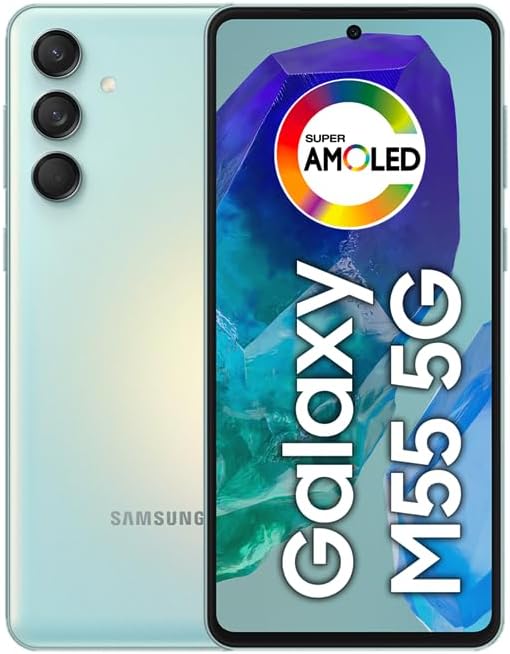
Imaj: Devan ak dèyè view of the Samsung Galaxy M55 5G smartphone, showcasing modil kamera a ak ekran an.
Layout aparèy
Familiarize yourself with the main components of your device.
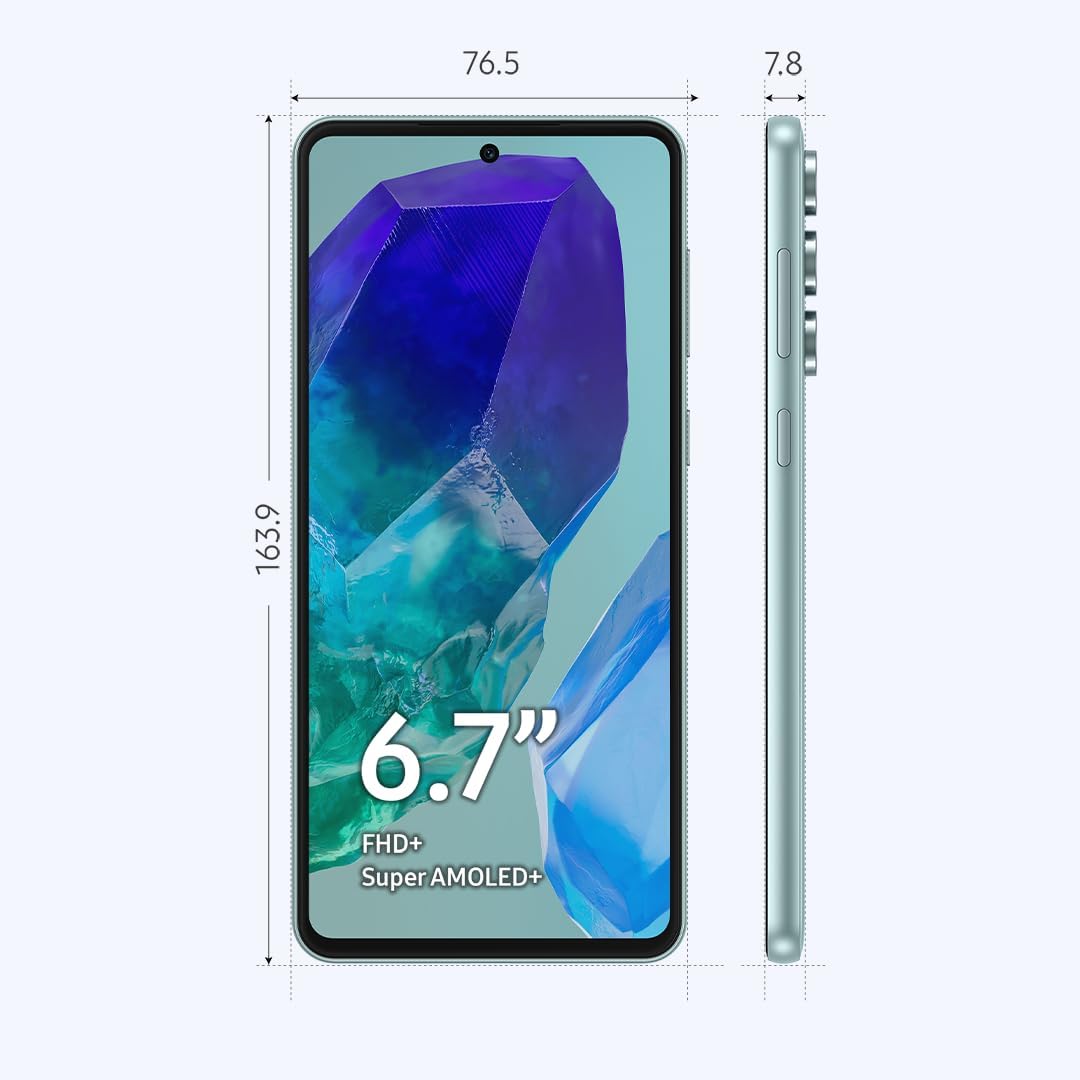
Image: Diagram showing the dimensions (163.9mm height, 76.5mm width, 7.8mm thickness) and key physical features of the Samsung Galaxy M55 5G, including the 6.7-inch Super AMOLED+ display, power button, and volume buttons.
- Kamera devan: Pou selfie ak apèl videyo.
- Ekspozisyon: 6.7-inch FHD+ Super AMOLED+ screen.
- Kle volim: Ajiste volim monte oswa desann.
- Kle bò (Power/Bixby): Power on/off, wake/sleep, or activate Bixby.
- USB Kalite-C Port: Pou chaje ak transfè done.
- Oratè: Pwodiksyon odyo.
- Mikwofòn: Pou apèl ak kòmandman vokal.
- Plato SIM/SD kat: Insert SIM cards and a microSD card.
- Kamera dèyè: Main, Ultrawide, and Macro lenses.
- Flash: For photos in low light.
Enstalasyon
1. Insert SIM or SD Card
- Jwenn plato kat SIM/SD a sou kote aparèy ou an.
- Mete peny pou retire kat SIM lan nan ti twou ki akote plato a pou ouvri li.
- Mete kat Nano-SIM ou yo ak/oswa kat microSD ou yo nan plato a ak kontak lò yo anba. Asire w ke yo byen chita.
- Pouse plato a tounen nan fant lan avèk prekosyon jiskaske li fè yon klik.
Nòt: The device supports Dual SIM functionality, allowing two SIM cards or one SIM card and one microSD card. You cannot use two SIM cards and a microSD card simultaneously.
2. Chaje Batri a
- Konekte kab USB Kalite-C a nan pò chaje aparèy la.
- Konekte lòt bout kab la nan adaptè kouran an, answit branche adaptè a nan yon priz kouran.
- Allow the device to charge until the battery is full before initial use.
3. Limen ak Konfigirasyon Inisyal
- Peze epi kenbe bouton bò a jiskaske logo Samsung lan parèt.
- Follow the on-screen prompts to complete the initial setup, including language selection, Wi-Fi connection, Google account setup, and fingerprint/face recognition.
Opere aparèy ou an
Ekspozisyon ak Navigasyon
- Jès ekran taktil: Tap, double-tap, swipe, pinch-to-zoom.
- Ekran Kay: Jwenn aksè a aplikasyon, widjèt, ak notifikasyon.
- Ba Navigasyon: Use gestures or traditional buttons (Back, Home, Recents) to navigate.
- Capteur anprent: The optical fingerprint sensor is located under the display for secure unlocking.
Itilizasyon Kamera
Your device features a versatile camera system:
- Kamera prensipal (50MP): Pou foto ki gen gwo rezolisyon.
- Ultrawide Camera (8MP): Pou kaptire sèn ki pi laj.
- Kamera Makro (2MP): Pou pran foto pre-plan sou ti objè.
- Kamera Devan (50MP): Pou selfie ak apèl videyo.
To open the camera, tap the Camera app icon. Select your desired mode (Photo, Video, Portrait, Pro, etc.) and tap the shutter button to capture.
Koneksyon
- Rezo 5G: The device supports 5G connectivity for faster data speeds where available.
- Wi-Fi: Konekte ak rezo san fil yo atravè Anviwònman > Koneksyon > Wi-Fi.
- Bluetooth: Konekte ak lòt aparèy Bluetooth atravè Anviwònman > Koneksyon > Bluetooth.
- NFC: Pou peman san kontak ak echanj done.
Jesyon batri
Batri 5000mAh la pèmèt yon itilizasyon pwolonje. Pou optimize dire lavi batri a:
- Ajiste klète ekran an.
- Enable Power saving mode in Settings > Battery and device care.
- Fèmen aplikasyon ki pa itilize yo kouri nan background nan.
- Dezaktive Wi-Fi, Bluetooth, ak GPS lè w pa ap itilize yo.
Antretyen
Mizajou lojisyèl
Regularly check for software updates to ensure your device has the latest features and security enhancements. Go to Settings > Software update > Download and install.
Netwayaj aparèy ou an
- Sèvi ak yon twal mou ki pa gen pousyè pou netwaye ekran an ak kò a.
- Evite itilize pwodwi chimik piman bouk oswa materyèl abrazif.
- Gently wipe ports to remove dust, but avoid inserting objects.
Jesyon Depo
Your device comes with 256GB of internal storage. You can expand this using a microSD card. To manage storage, go to Settings > Battery and device care > Storage. Here you can view itilizasyon epi libere espas.
Depanaj
Si ou rankontre pwoblèm ak aparèy ou an, eseye solisyon sa yo:
Pwoblèm komen
- Aparèy pa limen: Ensure the battery is charged. Press and hold the Side Key for an extended period (up to 10 seconds).
- Aplikasyon yo ap plante oswa bloke: Fèmen aplikasyon an epi relouvri li. Vide kach aplikasyon an (Anviwònman > Aplikasyon > [Non aplikasyon an] > Depo > Vide kach).
- Pòv koneksyon rezo: Check your SIM card insertion. Restart the device. Verify network settings.
- Batri a vide byen vit: Refer to the Battery Management section for tips.
- Ekran an pa reponn: Force restart the device by pressing and holding the Side Key and Volume Down button simultaneously for about 7 seconds.
Faktori Done Reyajiste
If problems persist, you may need to perform a factory data reset. This will erase all data from your device. Fè yon backup done ou yo anvan ou kontinye.
- Ale nan Anviwònman > Jesyon jeneral > Reyajiste > Reyajiste done faktori.
- Review the information and tap "Reset".
- Antre enfòmasyon ou bezwen pou bloke ekran an si yo mande w.
- Tap "Delete all" to confirm.
Espesifikasyon
| Non modèl | Samsung Galaksi M55 5G |
| Nimewo Modèl | SM-M556B/DS |
| Ekspozisyon | 6.7-inch FHD+ Super AMOLED+, 120Hz Refresh Rate (1080 x 2400 pixels) |
| Processeur | Qualcomm Snapdragon 7 Jen 1 (4nm) Okta-nwayo |
| RAM | 8 GB |
| Depo Entèn | 256 GB (ou ka elaji li atravè yon kat microSD) |
| Kamera dèyè | 50MP (lajè) + 8MP (ultra lajè) + 2MP (makro) |
| Kamera devan | 50MP (laj) |
| Batri | 5000 mAh |
| Sistèm operasyon | Android 14, One UI 6.1 |
| Koneksyon | 5G, 4G LTE, Wi-Fi, Bluetooth 5.2, GPS, NFC |
| Kalite SIM | Dual Nano-SIM (Hybrid slot) |
| Dimansyon (H x W x P) | 163.9 x 76.5 x 7.8 mm (6.45 x 3.01 x 0.31 pous) |
| Pwa | 180 gram (6.3 ons) |
Garanti ak sipò
This device is an International Model. Please note that there is no warranty coverage in the United States for this specific model.
For support and further information, please visit the official Samsung support website for your region or contact your local service provider.
- Sipò sou entènèt: www.samsung.com/support/
- Sèvis Kliyan: Gade enfòmasyon Samsung nan rejyon ou an. websit pou nimewo kontak.


