1. Entwodiksyon
Mèsi pou acha aasing the Thermalright TL-M12 120mm ARGB CPU Fan. This fan is designed to provide efficient cooling and vibrant ARGB lighting for your computer system. Please read this manual carefully before installation and use to ensure proper operation and longevity of your product.

Image: Thermalright TL-M12 120mm ARGB Fan highlighting its infinite mirror effect, balanced airflow, low noise S-FDB bearing, and addressable RGB support.
2. Pwodwi Features
- Refwadisman pèfòmans segondè: Automatic speed control via 4-pin PWM interface, adjusting fan speed based on motherboard temperature.
- Unique ARGB Mirror Lighting Effect: Features a well-designed ARGB infinite frame structure on the side and ARGB lines around the front, creating positive and measured surface ARGB lighting effects with multiple colorful options.
- Konstriksyon dirab: Made from industrial-grade PBT+PC material for strength and stability.
- Kote yo pote: S-FDB Equipped with a high-durability magnetic assist Fluid Dynamic Bearing (S-FDB) for low-friction, low-noise operation, and a long service life.
- Absòpsyon Vibrasyon: Soft-touch rubber pads are pre-installed on each corner of the fan to reduce noise and vibration.
- Aplikasyon versatile: Can be used as a case fan, with CPU air coolers, or with CPU water coolers to enhance overall system cooling.

Image: Infinity mirror lighting trims located on both sides of the fan frame for unique aesthetics.

Image: High-quality PBT+PC material construction and pre-installed silicone rubber pads for noise and vibration damping.

Image: Detail of the S-FDB (Fluid Dynamic Bearing) for long-lasting, low-noise operation.

Image: The TL-M12 fan used in case airflow, air coolers, and water cooling radiators.
3. Pake kontni
The Thermalright TL-M12 fan package includes:
- 1 x TL-M12 CPU Fan
- Montaj Vis
4. Enfòmasyon sou Sekirite
- Ensure your computer system is powered off and unplugged before installation or maintenance.
- Manyen konpozan yo avèk prekosyon pou evite domaj.
- Do not attempt to disassemble the fan bearing as it is maintenance-free.
- Kenbe soti nan atenn timoun yo.
- Do not connect more than 5 ARGB fans of the same specification in series to a single header to prevent overloading.
5. Enstalasyon ak Enstalasyon
Follow these steps to install your Thermalright TL-M12 fan:
- Monte fanatik la: Use the included screws to securely install the fan onto your computer case, CPU cooler, or water cooling radiator. Ensure the fan is oriented correctly for desired airflow (intake or exhaust).
Video: Installation tutorial for the TL-M12 CPU fan series, demonstrating how to install the fan on a case using screws.
- Connect PWM for Fan Speed Control: Connect the 4-pin PWM fan cable from the TL-M12 fan to an available 4-pin fan header on your motherboard. This allows for automatic speed control based on system temperature.
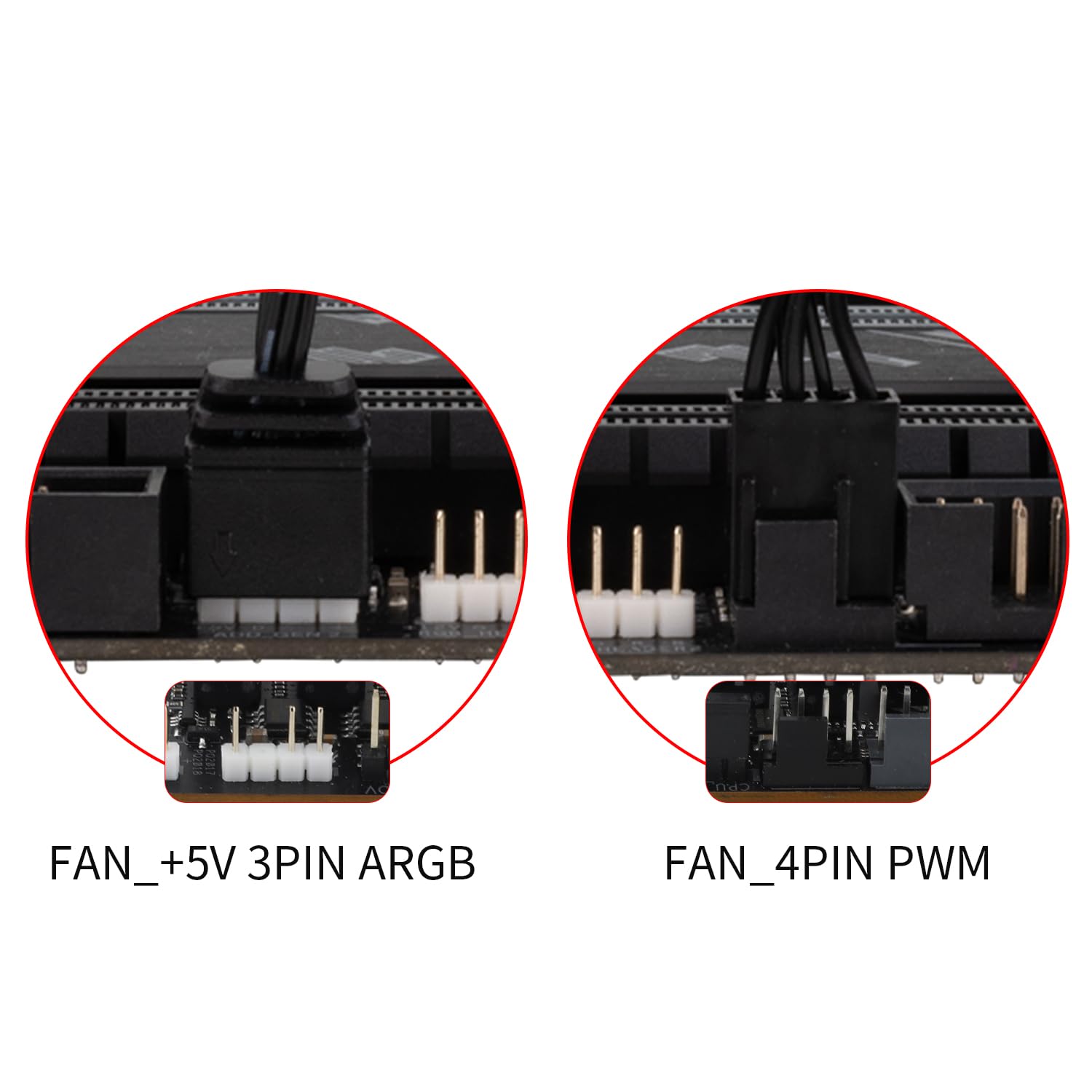
Image: Motherboard headers for fan and ARGB connections. Connect the 4-pin PWM cable to the FAN_4PIN PWM header.

Image: Diagram illustrating PWM and ARGB header connections for fan speed and lighting effect synchronization. Up to three fans can be connected to one motherboard fan socket for PWM signal sync.
- Connect ARGB for Lighting Effects: Connect the ARGB lighting cable from the TL-M12 fan to a compatible 3-pin +5V ARGB header on your motherboard. Ensure the arrows on the connectors align before plugging them in. This enables control over the fan's lighting effects.
Image: Motherboard headers for fan and ARGB connections. Connect the ARGB cable to the FAN_+5V 3PIN ARGB header.
Image: Diagram illustrating PWM and ARGB header connections for fan speed and lighting effect synchronization. Connect 3-pin ARGB headers to sync ARGB lighting effect.
- Jesyon kab: Chemen kab yo byen pou evite entèferans ak lòt konpozan yo epi pou kenbe yon bon sikilasyon lè anndan bwat la.
6. Operasyon Enstriksyon
Once installed and connected, the Thermalright TL-M12 fan operates as follows:
- Kontwòl vitès otomatik: The fan's speed is automatically regulated by your motherboard via the 4-pin PWM connection, adjusting to the CPU or system temperature to optimize cooling performance and noise levels.
- Kontwòl ekleraj ARGB: The ARGB lighting effects can be controlled through your motherboard's compatible ARGB software (if available) or a dedicated ARGB controller (not included). This allows for customization of colors, patterns, and synchronization with other ARGB components.
- Airflow: The 7-blade design outputs a rated 47.6 CFM at 1500 RPM, providing effective airflow for cooling.
7. Antretyen
To ensure optimal performance and longevity of your fan:
- Netwayaj: Netwaye lam vantilatè yo ak ankadreman an detanzantan pou retire pousyè ki akimile. Sèvi ak yon bwòs mou oswa lè konprese. Asire w ke vantilatè a etenn epi debranche anvan ou netwaye li.
- Portant: The S-FDB (Fluid Dynamic Bearing) is designed to be maintenance-free. Do not attempt to disassemble the fan or lubricate the bearing.
- Enspeksyon kab: Occasionally check the fan and ARGB cables for any signs of wear or damage.
NAN. Depanaj
If you encounter issues with your Thermalright TL-M12 fan, refer to the following common problems and solutions:
- Vantilatè a pa ap vire:
- Tcheke si kab PWM 4-pin lan byen konekte ak tèt fanatik kat manman an.
- Ensure the motherboard fan header is enabled in the BIOS/UEFI settings.
- Verify that the system is receiving power.
- Ekleraj ARGB pa fonksyone:
- Check if the 3-pin +5V ARGB cable is securely connected to the motherboard ARGB header.
- Asire w ke header ARGB la aktive nan lojisyèl kat manman w lan oswa nan BIOS/UEFI a.
- Confirm that the arrows on the ARGB connectors are correctly aligned.
- Avoid connecting more than 5 ARGB fans in series to a single header.
- Twòp bri/vibrasyon:
- Ensure the fan is securely mounted and screws are tightened.
- Tcheke pou nenpòt fil oswa obstak ki touche lam vantilatè yo.
- Verify that the rubber pads are properly seated on the fan corners.
- Pòv pèfòmans refwadisman:
- Check the fan's orientation to ensure it's pushing air in the desired direction (e.g., into the case for intake, out for exhaust).
- Clean any dust buildup on the fan blades or heatsink fins.
- Asire bon sikilasyon lè a andedan bwat òdinatè a.
9. Espesifikasyon
| Karakteristik | Spesifikasyon |
|---|---|
| Modèl | TL-M12 |
| Dimansyon pwodwi | 4.72"L x 0.98"W x 4.72"H (120mm x 25mm x 120mm) |
| Mak | Dwa tèmik |
| Pouvwa Connector Kalite | 4-PIN PWM |
| Voltage | 12 Vòlt (DC) |
| Wattage | 1.8 wat |
| Metòd refwadisman | Air |
| Aparèy konpatib | Desktop |
| Nivo bri | 23.2 Desibèl |
| Materyèl | Plastic (PBT+PC) |
| Maksimòm vitès wotasyon | 1500 RPM |
| Kapasite Flow Air | 47.6 pye kib pou chak minit (CFM) |
| Kalite kote yo pote | S-FDB (Fluid Dynamic Bearing) |
| Ekleraj | Addressable RGB (ARGB) with Infinite Mirror Effect |
10. Garanti ak sipò
Thermalright products are manufactured to the highest quality standards. For warranty information, technical support, or customer service, please refer to the official Thermalright websit la oubyen kontakte détayan lokal ou a. Kenbe resi acha ou a pou reklamasyon garanti.


