1. Entwodiksyon
This manual provides comprehensive instructions for the installation, operation, and maintenance of your Shelly BLU Button Tough 1. Please read this manual carefully before using the device to ensure proper functionality and safety. Keep this manual for future reference.
The Shelly BLU Button Tough 1 is a durable, battery-powered Bluetooth button designed for activating actions and scenes within your smart home ecosystem. It offers versatile control without constant reliance on a mobile phone, allowing for up to four pre-set actions or scenes through intuitive click combinations.
2. Pwodwi souview
The Shelly BLU Button Tough 1 is engineered for resilience and ease of use. Its robust design and Bluetooth Low Energy (BLE) technology ensure reliable performance and extended battery life.
Karakteristik kle:
- Fonksyone ak Bluetooth: Itilize teknoloji BLE pou yon repons rapid ak yon batri ki dire pi lontan.
- Fonksyonalite plizyè klik: Execute up to four pre-set actions or scenes with different click combinations (single, double, triple, long press).
- Durabilite Eksepsyonèl: IP54 rated, making it resistant to shocks, splashes, and dust. Suitable for various environments.
- Gwo Ranje: Offers a significant operating range, connecting seamlessly with compatible Shelly gateways.
- Aktivasyon Sèn: Directly trigger complex smart home scenes or control individual devices.

Figure 2.1: Shelly BLU Button Tough 1 and its packaging.

Figure 2.2: Dimensions of the Shelly BLU Button Tough 1, showing a thickness of 13mm and a width of 42mm.

Figure 2.3: The Shelly BLU Button Tough 1 operates via Bluetooth Low Energy (BLE), providing quick response times, extended battery life, and simplified device inclusion.

Figure 2.4: The Shelly BLU Button Tough 1 features IP54 durability, making it resistant to shock, splashes, and dust, suitable for outdoor applications.

Figure 2.5: Key features include an indoor range of 10m/33ft, outdoor range of 30m/100ft, strong encryption, beacon mode, and sound alerts.

Figure 2.6: The multi-click trigger allows execution of up to 4 pre-set actions or scenes, providing simple control over smart devices.

Figure 2.7: The button enables comprehensive control over smart lights, blinds, garage doors, and location-based automations.
3. Enstalasyon
3.1. Enstalasyon batri
The Shelly BLU Button Tough 1 requires one CR2032 battery, which is included with the device. To install or replace the battery:
- Jwenn lòj batri a sou aparèy la.
- Louvri kouvèti konpatiman an avèk prekosyon.
- Mete pil CR2032 la nan plas li, bò pozitif la (+) anlè.
- Fèmen kouvèti lòj batri a byen.
3.2. Konekte ak yon Gateway
The Shelly BLU Button Tough 1 requires a compatible Shelly gateway for integration with the Shelly Smart Control app and your smart home system. Compatible gateways include the Shelly BLU Gateway, or any Shelly Plus, Pro, or Gen3 device.
- Ensure your Shelly gateway device is powered on and connected to your network.
- Telechaje epi louvri Aplikasyon Shelly Smart Control la sou aparèy mobil ou.
- Follow the in-app instructions to add a new device. The app will guide you through the discovery and pairing process for the Shelly BLU Button Tough 1.
- Once paired, you can configure the button's actions and scenes within the Shelly Smart Control app.
Nòt: For detailed instructions on setting up your specific Shelly gateway, please refer to its respective user manual.
4. Operasyon Enstriksyon
The Shelly BLU Button Tough 1 allows you to trigger various actions and scenes with different click combinations. These combinations are configured within the Shelly Smart Control app.
4.1. Configuring Actions
- Louvri a Aplikasyon Shelly Smart Control la.
- Navigate to the settings for your paired Shelly BLU Button Tough 1.
- You will find options to assign actions to different click types:
- Klike sèl: Yon peze epi lage rapid.
- Double Klike: De peze rapid youn apre lòt.
- Triple Klike: Twa peze rapid youn apre lòt.
- Long Press: Press and hold the button for a specified duration (e.g., 2 seconds).
- Select the desired action or scene for each click combination. Examples yo enkli:
- Turning lights on/off.
- Adjusting smart blinds.
- Opening/closing a garage door.
- Activating a "Good Morning" or "Good Night" scene.
- Sove konfigirasyon ou yo.
4.2. Using the Button
Once configured, simply press the button according to your defined click combinations to trigger the associated actions or scenes. The button provides tactile feedback upon press.
5. Antretyen
5.1. Ranplasman batri
The Shelly BLU Button Tough 1 is powered by a CR2032 battery. When the battery level is low, the device may indicate this through the Shelly Smart Control app or reduced responsiveness. Replace the battery as described in Section 3.1.
Atansyon: Jete pil yo itilize yon fason responsab selon règleman lokal yo.
5.2. Netwayaj
The device is IP54 rated, offering protection against dust and splashing water. To clean the device:
- Sèvi ak yon mou, sèk, oswa yon ti kras damp twal.
- Avoid using harsh chemicals, abrasive cleaners, or solvents, as these can damage the device's surface or internal components.
- Ensure the device is completely dry before re-use, especially if it has been exposed to moisture.
5.3. Depo
Store the Shelly BLU Button Tough 1 in a cool, dry place away from direct sunlight and extreme temperatures when not in use for extended periods. If storing for a long time, consider removing the battery to prevent leakage.
NAN. Depanaj
Si ou rankontre pwoblèm ak Shelly BLU Button Tough 1 ou a, gade pwoblèm ak solisyon komen sa yo:
6.1. Aparèy la pa reponn
- Tcheke batri: Ensure the CR2032 battery is correctly installed and has sufficient charge. Replace if necessary.
- Koneksyon Gateway: Verify that your Shelly gateway (e.g., Shelly BLU Gateway, Shelly Plus/Pro/Gen3 device) is powered on, connected to your network, and within range of the button.
- Konfigirasyon aplikasyon an: Confirm that the desired actions are correctly configured for the button in the Shelly Smart Control app.
- Ranje: Ensure the button is within the operational range of its paired gateway (up to 10m/33ft indoors, 30m/100ft outdoors). Obstacles can reduce range.
6.2. Pwoblèm pè
- Gateway konpatibilite: Ensure you are using a compatible Shelly gateway.
- Bouton Reyajiste: If the button was previously paired or is not discoverable, perform a factory reset (refer to the Shelly Smart Control app or Shelly support for specific reset procedures).
- Vèsyon App: Asire w ke aplikasyon Shelly Smart Control ou a mete ajou ak dènye vèsyon an.
6.3. Inconsistent Action Triggering
- Click Timing: For multi-click actions (double, triple), ensure your presses are distinct and within the expected timing window. Practice the click patterns.
- Gateway Load: If your gateway is managing many devices or complex automations, there might be slight delays.
6.4. Lòt Asistans
If you cannot resolve the issue using the above steps, please refer to the "7. Warranty and Support" section for contact information and additional resources.
7. Espesifikasyon
| Atribi | Valè |
|---|---|
| Manifakti | Shelly Ewòp |
| Nimewo Pati | 685 |
| Pwa atik | 0.529 ons (15 gram) |
| Dimansyon pwodwi | 0.51 x 1.65 x 1.65 pous (13 x 42 x 42 mm) |
| Nimewo Modèl Atik | 3800235266854 |
| Batri | 1 batri CR2032 obligatwa (enkli) |
| Kalite selil batri | Lityòm Manganèz diyoksid |
| Koulè | Moka |
| Materyèl | Plastik |
| Chanje Kalite | 1-fason |
| Kalite aliye | Sifas mòn |
| Chanje style | Pouse bouton |
| Sètifikasyon | CE, RoHS |
| Koneksyon | Bluetooth Low Enèji (BLE) |
| Evalyasyon Pwoteksyon Ingress (IP). | IP54 |
8. Garanti ak sipò
8.1. Garanti pwodwi
Shelly bay yon Garanti aparèy 2 zan for the Shelly BLU Button Tough 1, covering manufacturing defects and malfunctions under normal use conditions. Please retain your proof of purchase for warranty claims.
8.2. Sipò pou Kliyan
For any questions, technical assistance, or further support, Shelly offers multiple resources:
- Shelly Smart Control App: Provides remote control, device configuration, and notifications.
- Baz Konesans: Access product specifications, guidelines, and FAQs. Visit Shelly Support
- Sipò teknik: Kontakte ekip sipò pwofesyonèl Shelly a.
- Fowòm Kominote: Engage with other users and experts in Facebook Support Groups and Reddit communities.
- Akademi Shelly: Eksplore leson patikilye videyo ak webinars pou aprantisaj apwofondi.
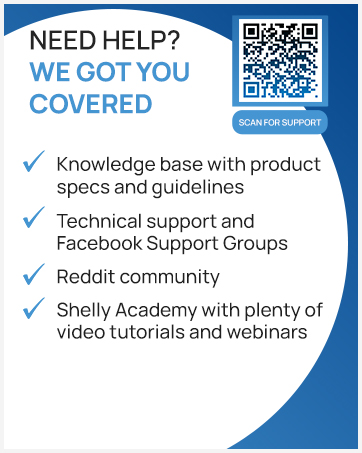
Figure 8.1: Scan this QR code for direct access to Shelly's support resources.


