1. Enfòmasyon sou Sekirite
Tanpri li tout enstriksyon sekirite yo ak anpil atansyon anvan ou itilize pwodui sa a. Si ou pa swiv enstriksyon sa yo, sa ka lakòz chòk elektrik, dife oswa lòt danje.
- Pa ekspoze pwojektè a ak lapli oswa imidite pou anpeche dife oswa chòk elektrik.
- Pa louvri pwojektè a casing. Pa gen pyès ki ka sèvi ak men itilizatè a anndan an. Konfye tout antretyen bay pèsonèl sèvis kalifye.
- Asire bon vantilasyon. Pa bloke ouvèti vantilasyon yo.
- Sèvi sèlman ak adaptè kouran ki vini ak pwojektè a.
- Evite kontak dirèk ak lantiy pwojektè a lè l ap fonksyone.amp se sou.
- Kenbe pwojektè a lwen sous chalè ak limyè solèy dirèk.
2. Pake kontni
Verifye ke tout atik ki nan lis anba a yo enkli nan pakè ou a:
- 1 x Jectse Mini LED Projector
- 1 x Remote Control (2 AAA batteries not included)
- 1 x AV Line (3-in-1 RCA cable)
- 1 x manyèl enstriksyon
- 1 x pouvwa adaptè

Figure 2.1: Contents of the Jectse Mini LED Projector package.
3. Pwodwi souview
The Jectse Mini LED Projector is a compact and portable device designed for various multimedia applications. It features a 1080P resolution, LED light source, and multiple connectivity options.

Figi 3.1: Devan ak anwo view of the Jectse Mini LED Projector.
3.1 Konpozan Pwojektè yo

Figure 3.2: Top panel controls of the Jectse Mini LED Projector.
- Lantiy: Pwojte imaj la sou ekran an.
- Griy vantilasyon: Asire bon sikilasyon lè pou refwadisman.
- Bouton kontwòl: (Refer to Figure 3.2) For basic navigation and power control.
- Konsantre wou: Ajiste klète imaj la.
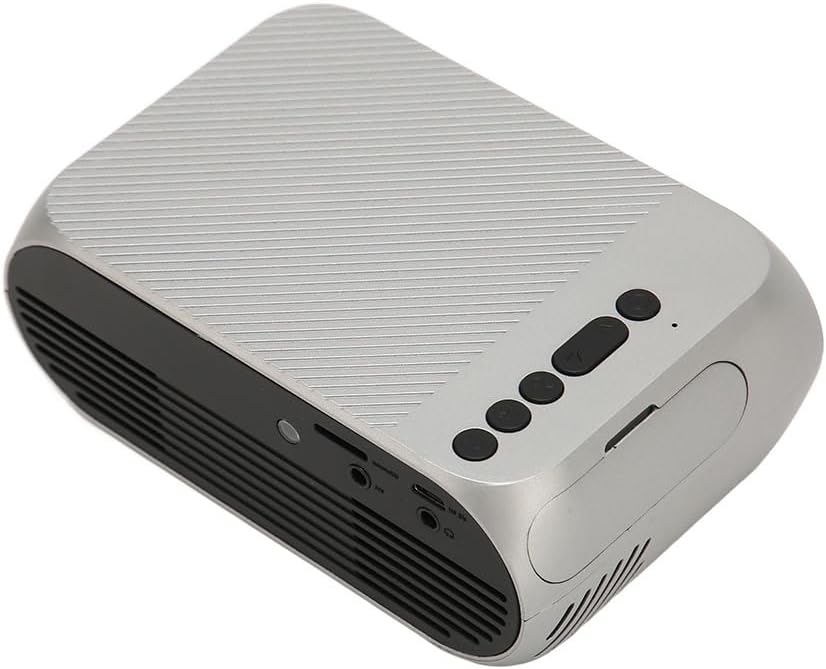
Figi 3.3: Dèyè ak bò view with input/output ports.
3.2 Pò Antre / Sòti
- HD Multimedia Interface (HDMI): For connecting devices like laptops, gaming consoles, and media players.
- Pò AV: Pou konekte ansyen aparèy yo lè l sèvi avèk kab AV ki enkli a.
- Pò USB: Pou konekte kle USB pou jwe medya files dirèkteman.
- Antre pouvwa: Pou konekte adaptè pouvwa a.
- Audio Output (3.5mm Jack): Pou konekte oratè ekstèn oswa kas ekoutè.
4. Enstalasyon
4.1 Plasman
Place the projector on a stable, flat surface. Ensure there is adequate space around the projector for ventilation. The ideal projection distance is between 1.5 to 2 meters for optimal image size and clarity.

Figure 4.1: Recommended projection distance and screen sizes.
4.2 Koneksyon pouvwa
- Konekte adaptè kouran an nan pò antre kouran pwojektè a.
- Branche adaptè kouran an nan yon priz elektrik ki apwopriye (100-240V).
4.3 Konekte Sous Antre yo
The projector supports HD Multimedia Interface, AV, and USB inputs.

Figure 4.2: Projector compatibility with various devices.
- HD Multimedia Interface: Connect an HD Multimedia Interface cable from your source device (e.g., laptop, game console) to the projector's HD Multimedia Interface port.
- DE: Connect the included AV cable to the projector's AV port and the corresponding audio/video output ports on your source device.
- USB: Insert a USB flash drive into the projector's USB port.
4.4 Ajisteman Konsantre
After powering on the projector, rotate the focus wheel (usually located near the lens) until the projected image appears clear and sharp.
5. Operasyon Enstriksyon
5.1 Limen/Etenyen
- Pou limen: Press the Power Switch button on the projector or the power button on the remote control.
- Pou etenn: Press the Power Switch button again. The projector will shut down.
5.2 Seleksyon Sous
After powering on, use the "Signal Source Button" on the projector or the "Source" button on the remote control to cycle through available input sources (HD Multimedia Interface, AV, USB).
5.3 Navigasyon meni
Use the Direction Buttons and Confirm Button on the projector or the arrow keys and OK button on the remote control to navigate through the projector's on-screen menu for settings adjustments (e.g., picture mode, aspect ratio, sound settings).
5.4 Itilizasyon kontwòl Remote
Insert two AAA batteries (not included) into the remote control. Point the remote control towards the projector's IR receiver to operate functions such as power, source selection, volume, and menu navigation.
6. Antretyen
6.1 Netwaye Lantiy la
Sèvi ak yon twal mou ki pa gen pousyè, espesyalman fèt pou lantiy optik, pou siye lantiy pwojektè a dousman. Pa sèvi ak pwodui netwayaj abrazif oswa fòs twòp, paske sa ka grate lantiy la.
6.2 Netwayaj jeneral
Wipe the exterior of the projector with a soft, dry cloth. Do not use liquid cleaners or solvents. Ensure the ventilation grilles are free from dust and debris to maintain optimal cooling.
NAN. Depanaj
| Pwoblèm | Kòz posib | Solisyon |
|---|---|---|
| Pa gen imaj projeté |
|
|
| Imaj la twoub |
|
|
| Pa gen son |
|
|
| Remote kontwòl pa travay |
|
|
8. Espesifikasyon
| Karakteristik | Detay |
|---|---|
| Mak | Jectse |
| Nimewo Modèl | Jectse3giz17bkpy |
| Rezolisyon | 1920 * 1080p |
| Sous limyè | dirije |
| Dirije lavi | 3000 èdtan |
| Distans pwojeksyon | 1.5-2m |
| Pwojeksyon rapò | 1.6:1 |
| Aspè rapò | 16:9 |
| Antre pouvwa | 100-240V |
| Gwosè pwodwi | 13 x 8.5 x 5 cm (apeprè 5.1 x 3.3 x 2 pous) |
| Pwa atik | 1.1 liv |
| Koneksyon Teknoloji | HD Multimedia Interface, AV, USB |
| Karakteristik espesyal | Adjustable, Portable Design |
9. Garanti ak sipò
For warranty information or technical support, please refer to the contact details provided with your purchase or visit the official Jectse websit la. Kenbe prèv acha ou pou reklamasyon garanti.