1. Entwodiksyon
The EPOMAKER x LEOBOG Hi75 is a high-performance wired mechanical keyboard designed for both gaming and professional use. Featuring a durable aluminum alloy construction, a gasket-mounted structure for enhanced typing feel, and a versatile mode-switching knob, this keyboard offers extensive customization and reliable performance. This manual provides detailed instructions for setup, operation, and maintenance to ensure optimal use of your device.

Figi 1: Plis paseview of the EPOMAKER x LEOBOG Hi75 Mechanical Keyboard.
2. Pake kontni
- EPOMAKER x LEOBOG Hi75 Mechanical Keyboard
- USB-C kab
- Keycap Puller
3. Enstalasyon
3.1 Konekte klavye a
The Hi75 keyboard uses a USB-C interface for a stable wired connection. To connect:
- Locate the USB-C port on the keyboard, typically on the rear edge.
- Konekte yon bout kab USB-C ki founi an nan klavye a.
- Konekte lòt bout kab USB-C a nan yon pò USB ki disponib sou òdinatè w la.
- Sistèm operasyon ou an ap rekonèt klavye a otomatikman.

Figure 2: Connecting the USB-C cable to the keyboard for wired operation.
3.2 Konpatibilite sistèm operasyon
The Hi75 keyboard is compatible with both Windows and Mac operating systems. If the WIN key or Alt key stops working properly, use the following shortcuts to switch to the correct OS mode:
- FN + Q: Android mòd
- FN + W: Windows Mode
- FN + E: Mòd Mac
- FN + R: iOS mòd
4. Operasyon Enstriksyon
4.1 Bouton Chanjman Mòd
The innovative knob on the Hi75 keyboard allows for seamless transitions between different modes and provides refined control over various functions.
- Pressing the Knob: Switches between Work Mode (constant RGB glow) and Gaming Mode (dynamic RGB flashing).
- Rotating the Knob: Adjusts volume and lighting settings.
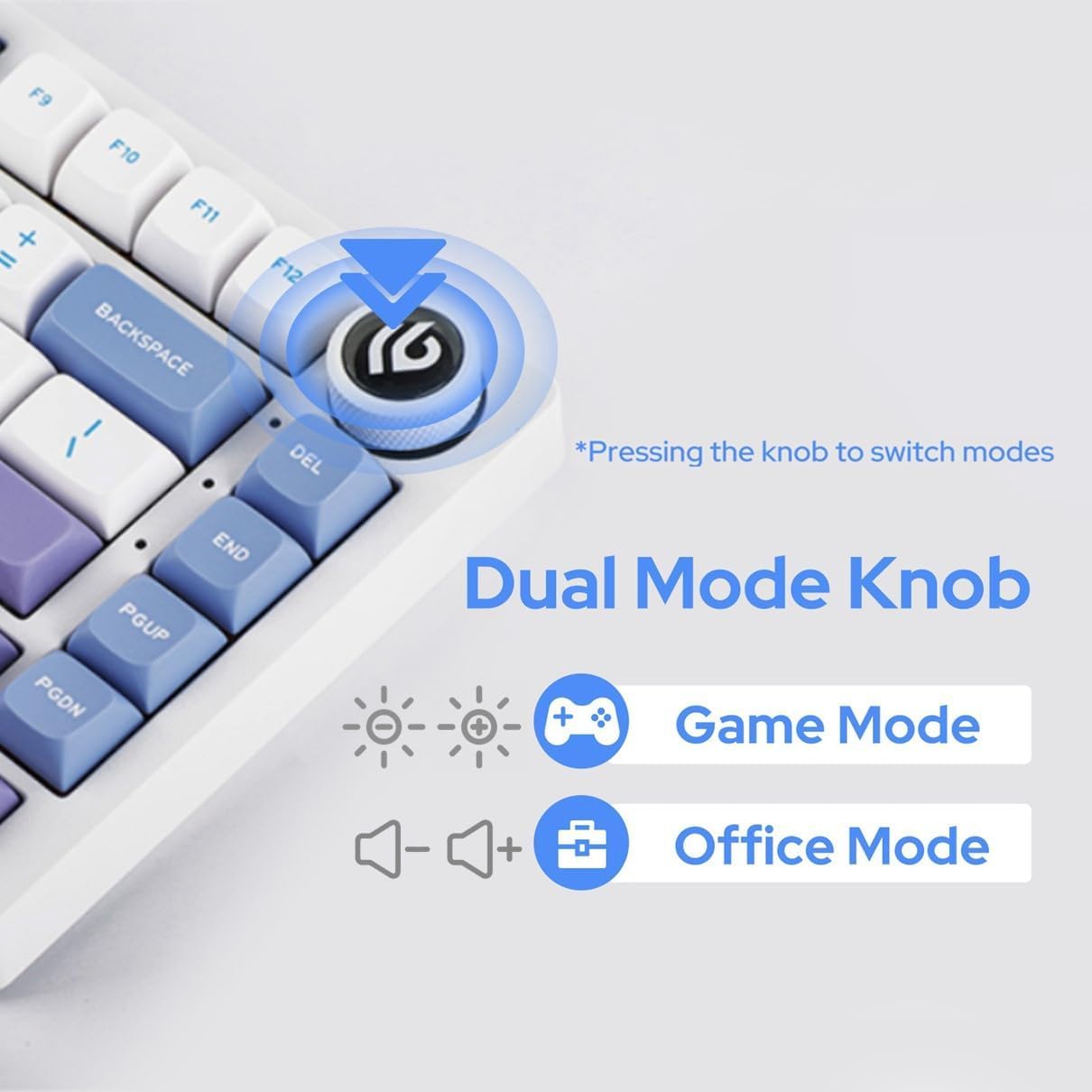
Figure 3: The multi-functional mode-switching knob for quick adjustments.
4.2 NKRO (N-Key Rollover)
The Hi75 supports N-Key Rollover, ensuring that every keypress is registered accurately, even when multiple keys are pressed simultaneously. This feature is crucial for fast typing and gaming scenarios.

Figure 4: Diagram illustrating the N-Key Rollover capability.
4.3 Advanced Gaming-Grade Chip
Equipped with a top-tier gaming chip, the Hi75 ensures rapid and responsive keystroke registration. Customize delay settings for a swift and seamless experience.

Figure 5: Illustration of the advanced gaming-grade chip.
4.4 Programming Software (VIA)
The Hi75 keyboard is programmable via VIA software, allowing for extensive customization of key assignments, macros, and lighting effects. To use VIA:
- Download the VIA software from the official EPOMAKER websit oswa usevia.app.
- Connect your Hi75 keyboard to your computer via USB-C.
- Louvri lojisyèl VIA a. Lojisyèl la ta dwe detekte klavye w la otomatikman.
- Load the appropriate JSON definition file for your Hi75 model (usually available on the EPOMAKER websit).
- Customize keymaps, create macros, and adjust lighting to your preference. Changes are applied in real-time.
Video 1: Demonstration on how to use VIA software for keyboard customization.
5. Antretyen
5.1 Netwayaj
To maintain the longevity and appearance of your keyboard:
- Dekonekte klavye a nan òdinatè w la anvan ou netwaye li.
- Sèvi ak yon twal mou ki pa gen pousyè pou siye kouvèti kle yo ak kouvèti a.
- Pou yon netwayaj ki pi pwofon, sèvi ak yon boutèy lè konprese pou retire pousyè ak debri ki ant bouchon kle yo.
- Evite itilize pwodwi chimik piman bouk oswa materyèl abrazif.
5.2 Switch ki ka ranplase a cho
The Hi75 features full key hot-swap capability, allowing you to change switches without soldering. It is compatible with most 3/5-pin mechanical switches.
- Sèvi ak zouti pou rale bouchon kle yo bay la, retire bouchon kle ou vle a avèk anpil atansyon.
- Using a switch puller (not included, but often bundled with switches), gently grip the switch and pull it straight up to remove it.
- Aliyen broch nouvo switch la ak twou ki sou PCB a.
- Press the new switch firmly into place until it clicks. Ensure it is seated correctly and not bent.
- Ranplase kouvèti kle a.

Figure 6: Demonstration of replacing hot-swappable switches.
Video 2: Comparison of different switch types, relevant for understanding hot-swappable options.
NAN. Depanaj
6.1 Klavye a pa reponn
- Asire w kab USB-C a byen konekte ak klavye a ak òdinatè a.
- Eseye konekte klavye a nan yon lòt pò USB sou òdinatè w la.
- Teste klavye a sou yon lòt òdinatè pou elimine yon pwoblèm espesifik ak òdinatè a.
- Si w ap itilize yon hub USB, eseye konekte l dirèkteman ak òdinatè a.
6.2 Incorrect Key Output or Layout
- Verify the operating system mode is correctly set (FN + W for Windows, FN + E for Mac).
- Check VIA software for any custom key assignments that might be causing unexpected behavior.
- Perform a factory reset if necessary (refer to VIA software documentation for specific instructions).
6.3 Pwoblèm ekleraj RGB
- Ensure the keyboard is in the correct mode (Work Mode for constant glow, Gaming Mode for dynamic flashing) using the mode-switching knob.
- Adjust brightness and effects using the knob or VIA software.
- If specific keys are not lighting up, check for any physical damage or improperly seated switches.
7. Espesifikasyon
- Dimansyon pwodwi: 12.99 x 5.31 x 1.77 pous
- Pwa atik: 4.44 liv
- Manifakti: EPOMAKER
- Nimewo Modèl: Hi75
- Koneksyon Teknoloji: USB-C
- Deskripsyon klavye: Gaming
- Karakteristik espesyal: Backlit, Customizable Display Keys, Ergonomic, Hot-Swappable, Wired
- Sipò pou koulè ekleraj klavye: RGB
- Premye dat disponib: 25 fevriye 2024
8. Additional Product Videos
Videyo 3: Finiview of the EPOMAKER x LEOBOG Hi75 Aluminum Alloy Wired Mechanical Keyboard.
Video 4: Detailed look at the EPOMAKER x LEOBOG Hi75 Aluminum Alloy Wired Gaming Keyboard.
Video 5: Comparison between the Hi75 and P75 keyboards, highlighting key differences.
Video 6: Showcase of the EPOMAKER x LEOBOG Hi75 White Wired Mechanical Keyboard.
9. Garanti ak sipò
For warranty information and customer support, please visit the official EPOMAKER websit la oubyen kontakte sèvis kliyan yo dirèkteman. Kenbe resi acha w la pou reklamasyon garanti.


