Rigol DG902 Pro

RIGOL DG902 Pro Waveform Generator User Manual

Model: DG902 Pro

Mak: Rigol

1. Pwodwi souview

The RIGOL DG902 Pro is a high-performance waveform generator designed for a wide range of applications requiring precise signal generation. It features a 16-bit vertical resolution, a maximum sample rate of 1.25 GSa/s, and a 70 MHz output frequency. This device is capable of generating various waveforms and offers advanced modulation capabilities.

Karakteristik kle yo enkli:

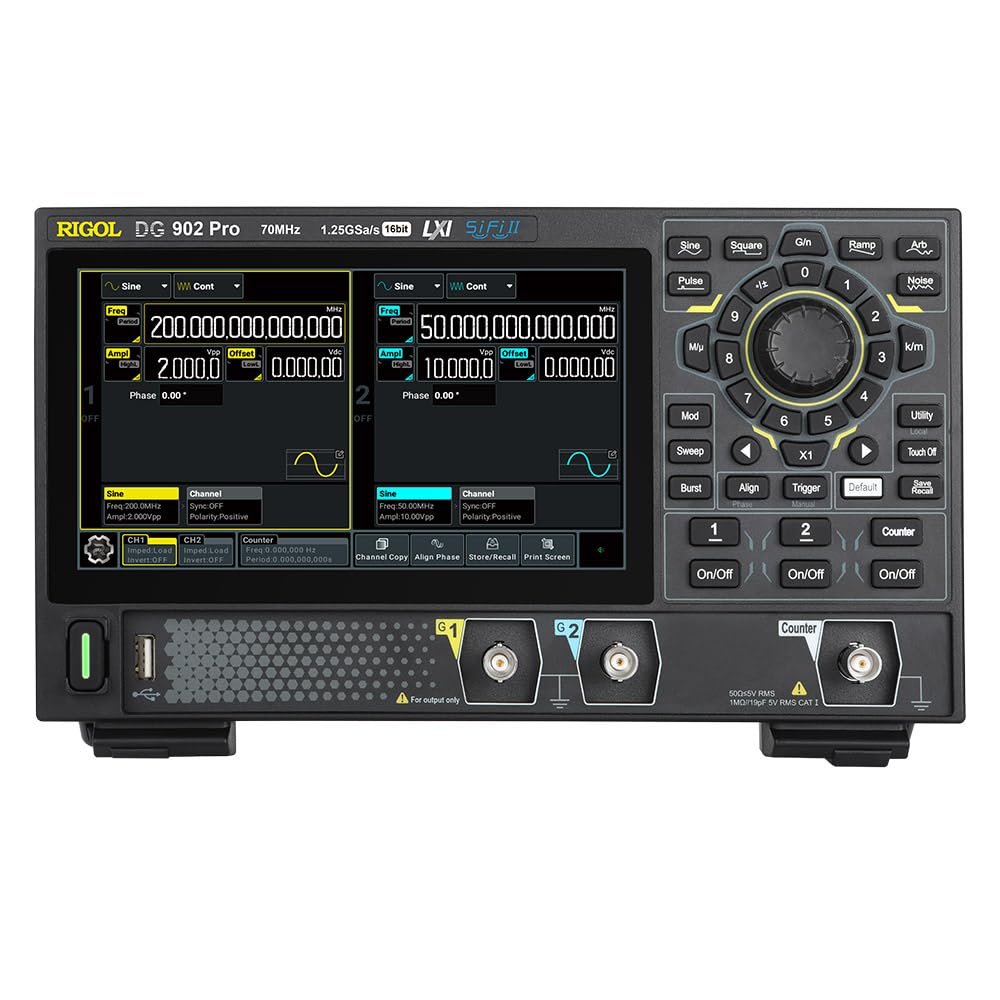
Devan view of the RIGOL DG902 Pro Waveform Generator

Figi 1.1: Devan view of the RIGOL DG902 Pro Waveform Generator, showing the display, control panel, and output channels.

2. Enstalasyon ak Koneksyon

2.1 Debalaj ak enspeksyon

Carefully unpack the DG902 Pro waveform generator and all accessories from the shipping carton. Inspect the instrument for any signs of damage that may have occurred during transit. If any damage is found, contact your supplier immediately.

2.2 Koneksyon pouvwa

Connect the provided power adapter to the DC input port on the rear panel of the instrument. Plug the power adapter into a suitable AC power outlet. The DG902 Pro can also be operated via a USB-C power bank for portable use.

RIGOL DG902 Pro connected to a USB-C power bank

Figure 2.1: The DG902 Pro connected to an external USB-C power bank, demonstrating its portable power capability.

2.3 Input/Output Connections

The rear panel of the DG902 Pro provides various input and output ports for signal generation and external synchronization.

Dèyè view of the RIGOL DG902 Pro Waveform Generator showing connection ports

Figi 2.2: Dèyè view of the DG902 Pro, highlighting the 10MHz REF IN/OUT, AUX IN/OUT, LAN, USB DEVICE, and USB-C ports.

  • Channel Outputs (CH1, CH2): Located on the front panel, these BNC connectors provide the main waveform outputs.
  • 10MHz REF IN/OUT: Used for external reference clock synchronization.
  • AUX IN/OUT: Auxiliary input/output ports for additional signal routing.
  • Pò LAN: For network connectivity and remote control.
  • USB DEVICE Port: For connecting to a computer for data transfer and control.

3. Operasyon Enstriksyon

3.1 User Interface and Display

The DG902 Pro features a 7.0-inch color display with a resolution of 1024x600 pixels, providing a clear and intuitive interface for operation. Navigation is primarily done through the rotary knob, directional buttons, and dedicated function keys.

Close-up of the RIGOL DG902 Pro's 7.0-inch display

Figi 3.1: Yon gwo plan view of the DG902 Pro's 7.0-inch display, highlighting its size and resolution.

RIGOL DG902 Pro screen showing channel 1 and channel 2 settings

Figure 3.2: The DG902 Pro display showing detailed settings for Channel 1 and Channel 2, including frequency, amplitude, and offset.

3.2 Basic Waveform Generation

  1. Pouvwa sou: Press the power button located on the front panel to turn on the instrument.
  2. Chwazi chanèl: Use the CH1 or CH2 buttons to select the desired output channel.
  3. Select Waveform Type: Peze a Fòm vag button (e.g., Sine, Square, Pulse, Ramp, Arb, Noise) to choose the desired waveform.
  4. Mete Paramèt: Use the rotary knob and numeric keypad to adjust parameters such as frequency, amplitude, and offset. The display will show the current settings.
  5. Aktive Sòti: Peze a Sou / Off button for the selected channel to enable the waveform output.

3.3 Advanced Modulation Functions

The DG902 Pro supports various modulation types to meet complex signal generation requirements. These include Amplitude Modulation (AM), Frequency Modulation (FM), Phase Modulation (PM), Amplitude Shift Keying (ASK), Frequency Shift Keying (FSK), Pulse Width Modulation (PWM), and Sum modulation.

RIGOL DG902 Pro with various modulation types illustrated around it

Figure 3.3: An illustration showing the DG902 Pro's support for various modulation types, including AM, FM, PM, ASK, FSK, PWM, and SUM.

To access modulation settings, press the Mod button and navigate through the options using the display and control knob.

4. Antretyen

4.1 Netwaye enstriman an

To maintain the performance and appearance of your DG902 Pro, regularly clean its exterior. Use a soft, damp cloth with a mild detergent to wipe down the casing. Avoid using abrasive cleaners or solvents that could damage the plastic components or screen.

  • Toujou dekonekte kouran an anvan w netwaye.
  • Do not allow any liquids to enter the instrument.
  • Clean the display screen gently with a soft, lint-free cloth.

4.2 Depo

When not in use for extended periods, store the DG902 Pro in a dry, dust-free environment, away from direct sunlight and extreme temperatures. It is recommended to store the instrument in its original packaging or a protective case to prevent damage.

NAN. Depanaj

This section provides solutions to common issues you might encounter with your DG902 Pro Waveform Generator. If the problem persists after trying these steps, please contact Rigol customer support.

PwoblèmKòz posibSolisyon
Enstriman an pa limen.Power cable not connected properly; power outlet issue; power adapter fault.Check power cable connection. Try a different power outlet. Ensure power adapter is functioning correctly.
No waveform output.Output channel not enabled; amplitude set to zero; incorrect cable connection.Peze a Sou / Off button for the channel. Increase amplitude. Verify BNC cable connections.
Ekran an vid oswa li bloke.Software error; temporary glitch.Restart the instrument by powering it off and on again. If the issue persists, contact support.

6. Espesifikasyon

The following table outlines the key technical specifications of the RIGOL DG902 Pro Waveform Generator.

ParamètValè
Nimewo ModèlDG902 Pro
Max. Sample Rate1.25 GSa/s
Sòti FrekansJiska 70 MHz
Chanèl2
Rezolisyon vètikal16 Bit
Arb Length16 Mpts/CH (32 Mpts/CH optional)
Tan Leve nonAs low as 3 ns
Waveform JitterAs low as 200 ps
Counter Bandwidth1 GHz
Dimansyon pwodwi10.47 x 6.5 x 3.15 pous
Pwa3.92 liv
ManifaktiRIGOL

7. Garanti ak sipò

7.1 Enfòmasyon sou Garanti

RIGOL provides a standard warranty for its products, covering defects in materials and workmanship under normal use. For specific warranty terms and duration, please refer to the warranty card included with your product or visit the official RIGOL websit la. Kenbe resi acha ou kòm prèv acha pou reklamasyon garanti.

7.2 Sipò pou Kliyan

For technical assistance, troubleshooting, or service requests, please contact RIGOL customer support. You can find contact information, including phone numbers and email addresses, on the official RIGOL websit (www.rigol.com). When contacting support, please have your product model number (DG902 Pro) and serial number ready.

Dokiman ki gen rapò - DG902 Pro

Preview Gid Pwogramasyon RIGOL DG800 Pro/DG900 Pro Seri
Gid pwogramasyon sa a bay enfòmasyon detaye sou itilizasyon kòmand SCPI pou kontwole fonksyon/dèlko fòm ond abitrè seri RIGOL DG800 Pro ak DG900 Pro atravè koòdone a distans tankou USB ak LAN.
Preview Gid rapid pou dèlko fonksyon/fòm vag abitrè RIGOL DG5000 Seri Pro a
Quick guide for the RIGOL DG5000 Pro Series Function/Arbitrary Waveform Generator, covering safety, setup, operation, parameter setting, troubleshooting, and remote control.
Preview Gid rapid pou dèlko fonksyon/fòm vag abitrè RIGOL DG800 Seri Pro a
A quick guide to the RIGOL DG800 Pro Series Function/Arbitrary Waveform Generator, covering safety requirements, product overview, preparation, operation, remote control, and troubleshooting.
Preview Gid Itilizatè pou Fonksyon/Dèlko Fòm Vag Abitrè RIGOL DG5000 Seri Pro a
Gid itilizatè konplè pou RIGOL DG5000 Pro Series Fonksyon/Dèlko Fòm Vag Abitrè. Manyèl sa a detaye karakteristik pwodwi a, enstriksyon sekirite, operasyon demaraj rapid, ak fonksyon avanse tankou modilasyon, bale, rafale, ak jenerasyon modèl. Li kouvri modèl tankou DG5508 Pro, DG5252 Pro, ak lòt, bay enfòmasyon esansyèl pou itilizasyon ak konfigirasyon efikas.
Preview Gid rapid pou dèlko fonksyon/fòm vag abitrè RIGOL DG5000 Seri Pro a
Gid rapid sa a bay enfòmasyon esansyèl pou RIGOL DG5000 Pro Series Fonksyon/Dèlko Fòm Vag Abitrè a, ki kouvri egzijans sekirite, pwodwi sou...view, preparasyon pou itilizasyon, operasyon, ak depanaj.
Preview Verifikasyon Pèfòmans Fonksyon/Dèlko Fòm Vag Abitrè DG5000 Seri Pro a
Dokiman sa a bay pwosedi detaye pou verifikasyon pèfòmans RIGOL DG5000 Pro Series Fonksyon/Dèlko Fòm Vag Abitrè a, ki kouvri presizyon frekans, amppresizyon lititid, presizyon offset DC, platite AC, distòsyon amonik, siyal fo, ak tès depase.