1. Entwodiksyon
The STRONG Leap-S3+ Google TV Box is a powerful media streaming adapter designed to enhance your entertainment experience. It provides easy access to applications, games, and streaming services via Google Play, transforming your television into a comprehensive entertainment hub. This device supports advanced audio and video technologies, ensuring a high-quality vieweksperyans ak tande.
2. Pake kontni
Verifye ke tout atik yo prezan nan pakè a:
- STRONG Leap-S3+ Android TV Box
- Kontwòl remote (avèk 2 pil AA enkli)
- Adaptè pouvwa (DC 12V/1A)
- HDMI kab
- Manyèl Itilizatè (dokiman sa a)

Image: The retail packaging of the STRONG Leap-S3+ Android TV Box, showing the device, remote control, and branding.
3. Gid Enstalasyon
- Konekte ak televizyon an: Connect one end of the HDMI cable to the HDMI port on the STRONG Leap-S3+ box and the other end to an available HDMI input on your television.
- Konekte pouvwa: Plug the power adapter into the DC 12V/1A port on the box and then into a power outlet.
- Koneksyon Rezo (Si ou vle): For a wired connection, connect an Ethernet cable from your router to the LAN port on the box. For Wi-Fi, you will configure this during the initial setup on screen.
- Mete pil: Open the battery compartment of the remote control and insert the two AA batteries, ensuring correct polarity.
- Pouvwa sou: Turn on your television and select the correct HDMI input source using your TV remote. The STRONG Leap-S3+ box should power on automatically.
- Premye konfigirasyon: Follow the on-screen instructions to complete the initial setup, including language selection, Wi-Fi connection (if not using Ethernet), and Google account login. Manual setup is recommended if automatic setup via Google Home encounters issues.

Image: Rear panel of the device illustrating the various connection ports including S/PDIF, HDMI, LAN, DC power input, and USB.
4. Operasyon Enstriksyon
4.1. Fonksyon kontwòl Remote
The included remote control allows navigation through the Google TV interface. Key functions include:
- Navigasyon Pad: Use the directional buttons to move through menus and select items.
- OK bouton: Konfime seleksyon yo.
- Bouton tounen: Retounen nan ekran anvan an.
- Bouton Kay: Retounen nan ekran prensipal Google TV a.
- Bouton Asistan Google la: Activates voice control for searching content or controlling the device.
- Bouton Volim: Ajiste volim odyo a.
- Bouton Aplikasyon Dedye: Quick access to popular streaming services like Netflix, YouTube, Disney+, and Prime Video.

Image: The remote control demonstrating the Google Assistant voice command feature, with a TV screen displaying search results.
4.2. Accessing Streaming Services and Apps
Once connected to the internet and logged into your Google account, you can access a wide range of content:
- Google Play Store: Download and install additional applications and games.
- Aplikasyon pre-enstale: Utilize dedicated buttons or navigate to pre-installed apps like Netflix, YouTube, Disney+, and Prime Video.
- Chromecast entegre: Cast content directly from your mobile phone or other compatible devices to your TV screen.

Image: A smartphone screen mirroring content to a large television, demonstrating the Chromecast built-in feature.

Image: A television screen showing the Google TV interface with icons for various streaming applications, alongside the STRONG Leap-S3+ box and remote.
5. Karakteristik kle
- Rezolisyon 4K UHD: Supports Ultra High Definition (UHD) 2160p resolution for crisp and detailed visuals.
- Dolby Vision: Provides enhanced HDR (High Dynamic Range) for superior brightness, contrast, and color accuracy.
- Dolby Atmos: Delivers immersive, multi-dimensional audio that moves around you, creating a realistic sound experience.
- Chromecast entegre: Seamlessly cast movies, shows, photos, and more from your mobile device to your TV.
- Google Asistan: Use voice commands via the remote control to search for content, control playback, and manage smart home devices.
- Koneksyon anpil: Includes S/PDIF, HDMI, USB 2.0, LAN/Internet, Wi-Fi, and Bluetooth for versatile device connections and data transfer.

Image: Visual representation of 4K UHD 2160p resolution, highlighting fine detail.

Image: The Dolby Vision logo, indicating enhanced visual quality.

Image: The Dolby Atmos logo, representing immersive audio technology.
6. Antretyen
- Netwayaj: Sèvi ak yon twal mou epi sèk pou netwaye aparèy la. Pa sèvi ak pwodui netwayaj likid oswa materyèl abrazif.
- Vantilasyon: Asire w ke aparèy la mete nan yon zòn ki byen ayere pou anpeche li chofe twòp. Pa bloke ouvèti vantilasyon yo.
- Mizajou lojisyèl: The device may receive automatic software updates. Ensure it is connected to the internet to receive these updates, which can improve performance and add new features.
- Depo: Lè w pa itilize aparèy la pou yon bon bout tan, dekonekte adaptè kouran an epi sere l nan yon kote ki fre epi sèk.
NAN. Depanaj
| Pwoblèm | Kòz posib | Solisyon |
|---|---|---|
| Pa gen kouran/Aparèy la pa limen | Adaptè kouran an pa konekte oswa li gen pwoblèm. | Ensure the power adapter is securely connected to the device and a working power outlet. Check if the outlet is functional. |
| Pa gen imaj sou televizyon an | Incorrect HDMI input selected on TV; HDMI cable loose or faulty. | Verify your TV is set to the correct HDMI input. Check HDMI cable connections at both ends. Try a different HDMI port or cable. |
| Pa gen son | TV volume muted or too low; audio settings incorrect. | Increase TV volume. Check audio output settings on the STRONG Leap-S3+ box. Ensure Dolby Atmos is correctly configured if used. |
| Remote kontwòl pa travay | Batteries depleted or incorrectly inserted; remote not paired. | Replace batteries, ensuring correct polarity. Re-pair the remote control with the device if necessary (refer to on-screen instructions during initial setup or device settings). |
| Pèfòmans ralanti oswa konjelasyon | Poor internet connection; too many apps running in background; insufficient storage. | Check your internet connection speed. Close unused applications. Clear cache or uninstall unnecessary apps to free up storage. Restart the device. |
| Automatic setup via Google Home fails | Connectivity issues or software glitch. | Proceed with manual setup directly on the TV screen using the remote control. This often resolves such issues. |
8. Espesifikasyon
| Karakteristik | Detay |
|---|---|
| Mak | Fò |
| Non modèl | LEAP-S3 plus |
| Koulè | Blan |
| Kalite pwodwi | Box form factor |
| Koneksyon Teknoloji | Bluetooth, Ethernet, HDMI, USB, Wi-Fi |
| Kalite Connector | HDMI |
| Karakteristik espesyal | 4K UHD, Chromecast, Browser |
| Rezolisyon | 4K (2160p) |
| Sèvis Entènèt Sipòte | Apple TV, Disney, Free Sat/Free View, Freesat/Freeview, Google TV, Magenta TV, Browser, Netflix, Prime Video, RTL, Wow, YouTube |
| Kalite kontwolè | Kontwòl Remote |
| Aparèy konpatib | Smartphone, Television, Screen |
| Pwovizyon pou pouvwa | DC 12V/1A |
| Dimansyon (Apeprè) | 9.6 cm x 9.6 cm x 2.3 cm (from image) |
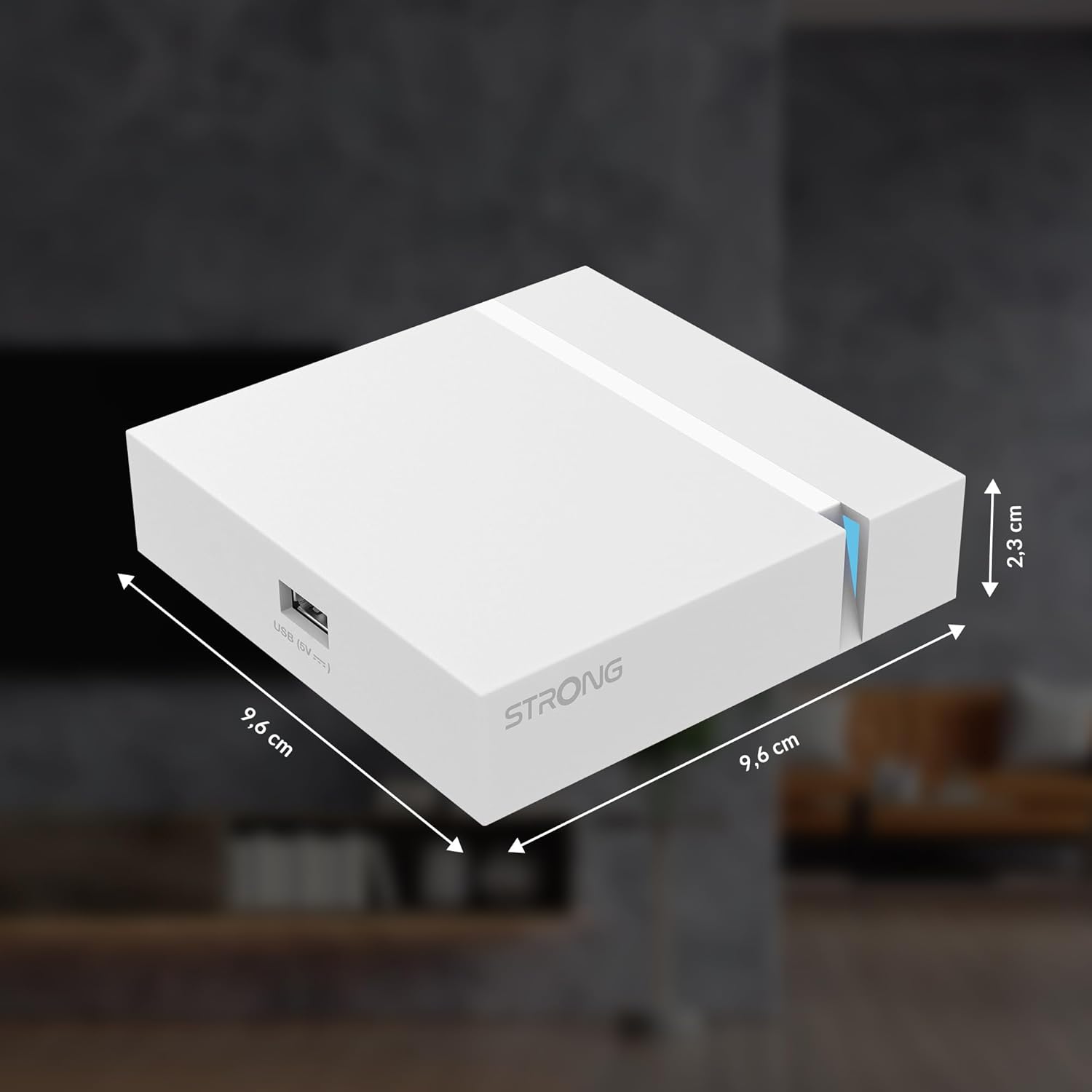
Image: The physical dimensions of the STRONG Leap-S3+ Android TV Box.
9. Garanti ak sipò
For warranty information and technical support, please refer to the documentation provided with your purchase or visit the official Strong website. Information regarding spare parts availability and software update guarantees is not available in this manual.


