Enstriksyon Sekirite Enpòtan
Tanpri li tout enstriksyon yo ak anpil atansyon anvan ou itilize aparèy la. Kenbe manyèl sa a pou referans pita.
- Pa plonje aparèy la, kòd, oswa ploge nan dlo oswa lòt likid.
- Asire voltage endike sou aparèy la koresponn ak volim lokal outage anvan konekte.
- Sipèvizyon sere se nesesè lè nenpòt aparèy itilize pa oswa toupre timoun yo.
- Pa opere nenpòt aparèy ki gen yon kòd oswa ploge ki domaje, oswa apre aparèy la fonksyone mal oswa li te domaje nan nenpòt fason.
- Debranche soti nan priz lè yo pa itilize ak anvan netwaye. Kite refwadi anvan ou mete oswa retire pati yo.
- Pa mete aparèy la kont yon miray oswa kont lòt aparèy. Kite omwen 10 cm espas lib sou do a ak sou kote yo epi 10 cm espas lib anlè aparèy la.
- Pa mete anyen anlè aparèy la.
- Pandan fri lè cho, vapè cho lage nan ouvèti priz lè yo. Kenbe men ou ak figi ou nan yon distans ki san danje nan vapè a ak nan ouvèti priz lè yo.
- Fè atansyon tou ak vapè cho ak lè lè w retire chodyè a nan aparèy la.
- Debranche aparèy la imedyatman si w wè lafimen nwa k ap soti nan aparèy la. Tann emisyon lafimen an sispann anvan ou retire chodyè a nan aparèy la.
Pwodwi souview
Familiarize yourself with the components of your LEHMANN Hot Air Fryer.

Figi 1: Devan view of the LEHMANN 8L Hot Air Fryer, showcasing the digital display and the transparent window of the cooking basket filled with vegetables.

Figi 2: The LEHMANN 8L Hot Air Fryer with its removable non-stick cooking basket pulled out, showing the interior cavity.

Figi 3: Diagram illustrating the dimensions of the LEHMANN 8L Hot Air Fryer: 35.5 cm height, 38 cm depth, and 29.5 cm width.
Eleman:
- Inite Prensipal: Li gen eleman chofaj la ak vantilatè a ladan l.
- Digital LED Touch Screen: For setting time, temperature, and selecting programs.
- Cooking Basket (8L capacity): Removable, non-stick, with transparent viewfenèt ing.
- Manch: Pou retire epi mete panyen kwit manje a san danje.
- Inlet/Sòti lè: Pou bon sikilasyon lè a pandan operasyon.
Enstalasyon ak Premye Itilizasyon
- Debake: Retire tout materyèl anbalaj ak avek anpil atansyon.
- Netwayaj: Clean the cooking basket and any removable parts with hot water, dish soap, and a non-abrasive sponge. Wipe the main unit with a damp twal. Asire w tout pati yo byen sèk anvan w itilize yo.
- Plasman: Place the appliance on a stable, horizontal, and level surface. Do not place the appliance on non-heat-resistant surfaces. Ensure adequate ventilation around the appliance.
- Koneksyon pouvwa: Ploge kòd elektrik la nan yon priz miray ki baze sou tè.
- Premye Egzekisyon (Si ou vle men ou rekòmande): For the first use, it is recommended to run the air fryer empty for about 10-15 minutes at 180°C to burn off any manufacturing residues. A slight odor may be present, which is normal.
Enstriksyon Operasyon
Digital Touch Screen Control:

Figi 4: The intuitive digital LED touch screen, showing temperature and time settings, along with various cooking program icons.

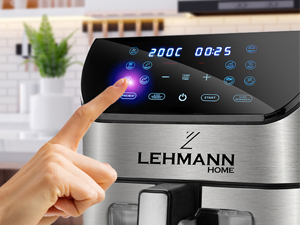
Figi 5: A hand interacting with the touch screen, demonstrating the ease of setting functions.
The LEHMANN Hot Air Fryer features a digital LED touch screen for easy operation. You can manually adjust temperature and time or select from 12 pre-set cooking programs.
Pwogram pou kwit manje:
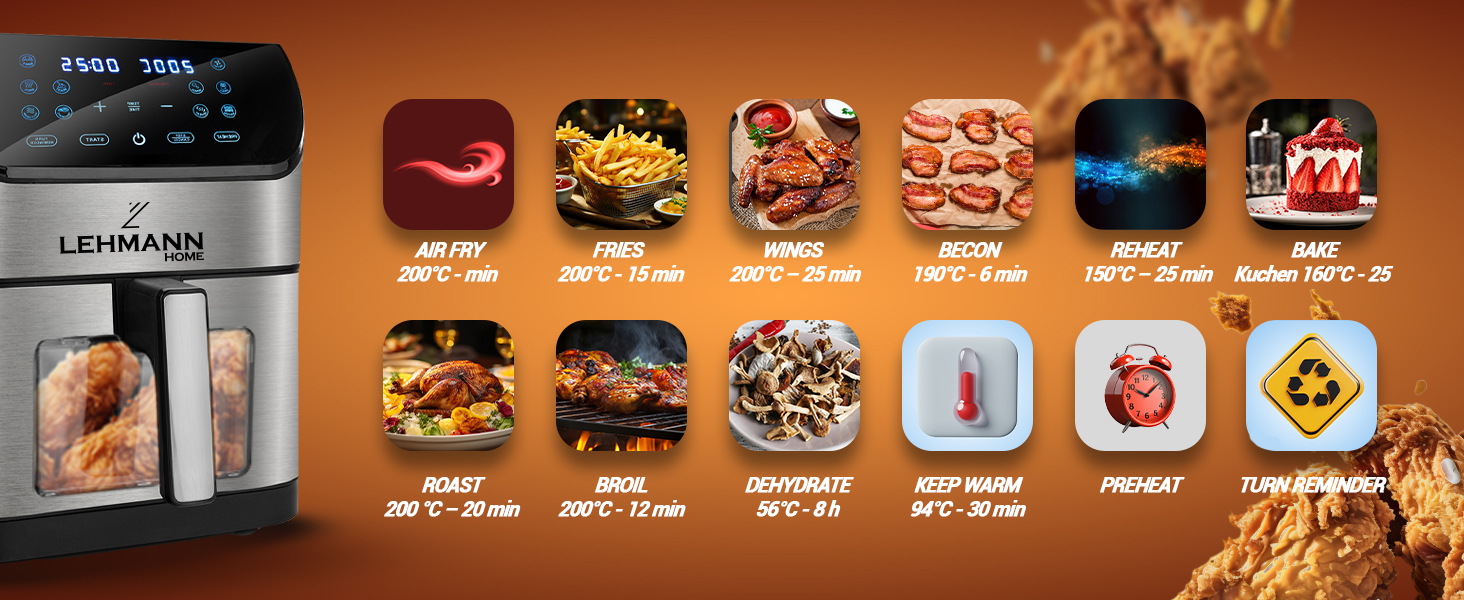
Figi 6: Visual representation of the 12 pre-set cooking functions, including Air Fry, Fries, Wings, Bacon, Reheat, Bake, Roast, Broil, Dehydrate, Keep Warm, Preheat, and Turn Reminder.
The appliance offers 12 versatile functions for various cooking needs:
- Air fri: General air frying.
- Fries: Optimize pou fri franse kroustiyan.
- Zèl: Ideal for chicken wings.
- Bacon: For perfectly cooked bacon.
- Chofe: Pou chofe manje ki te deja kuit.
- Kwit: For baking cakes, pastries, etc.
- Boukannen: Pou griye vyann ak legim.
- Griye: For browning or crisping food.
- Dezidrate: For drying fruits, vegetables, or jerky.
- Kenbe cho: Kenbe tanperati manje a apre kwit manje.
- Chofe: Chofe friteuz la nan tanperati ki nesesè a anvan ou ajoute manje.
- Vire rapèl: Prompts you to shake or turn food during cooking for even results.
Etap Jeneral pou Kwit Manje:
- Prepare Manje: Place your ingredients in the cooking basket. Do not overfill the basket to ensure proper air circulation.
- Mete panyen an: Glise panyen pou kwit manje a tounen nan inite prensipal la jiskaske li fè yon klik an plas.
- Pouvwa sou: Press the power button on the touch screen.
- Select Program or Set Manually:
- Pre-set Program: Tap the icon for your desired cooking program. The appliance will automatically set the recommended temperature and time.
- Anviwònman manyèl: Use the temperature and time adjustment buttons (+/-) to set your desired cooking temperature (up to 200°C) and time.
- Kòmanse kwit manje: Press the "Start" button. The appliance will begin the cooking process.
- Siveye Pwogrè: Sèvi ak transparan an viewing window and internal light to monitor cooking progress without opening the basket.
- Shake/Turn (if prompted): If the "Turn Reminder" function is active or recommended for your food, the appliance will beep. Carefully remove the basket, shake or turn the food, and reinsert the basket to resume cooking.
- Konplete: The appliance will beep when cooking is complete. Carefully pull out the basket using the handle.
- Sèvi: Transfer the cooked food to a plate. Be cautious of hot oil or food.
- Pouvwa Off: Press the power button to turn off the appliance and unplug it from the wall outlet.
Antretyen ak netwayaj
Netwayaj regilye asire pèfòmans optimal epi pwolonje lavi friteuz lè ou la.
Figi 7: The non-stick cooking basket is dishwasher safe for convenient cleaning.
- Deploge epi refwadi: Toujou debranche friteuz la epi kite l refwadi nèt anvan ou netwaye li.
- Netwaye panyen an: The non-stick cooking basket is removable and dishwasher safe. For manual cleaning, wash with hot water, dish soap, and a non-abrasive sponge. For stubborn residue, soak the basket in hot water with dish soap for about 10 minutes.
- Netwaye Enteryè a: Siye enteryè aparèy la ak anonsamp twal. Pa sèvi ak pwodui netwayaj abrazif oswa kousinen.
- Netwaye eksteryè a: Siye eksteryè friteur lè a ak piblisiteamp twal.
- Eleman chofaj: Sèvi ak yon bwòs netwayaj pou retire tout rès manje ki sou eleman chofaj la.
- Depo: Ensure all parts are dry before storing the appliance in a cool, dry place.
Depanaj
| Pwoblèm | Kòz posib | Solisyon |
|---|---|---|
| Air fryer pa limen. | Aparèy la pa branche. Priz kouran pa travay. Pannye a pa byen mete. | Ploge kòd elektrik la nan yon priz miray ki baze sou tè. Check the power outlet by plugging in another appliance. Ensure the basket is fully pushed into the main unit until it clicks. |
| Manje pa kwit menm jan. | Panyen an twò chaje. Manje a pa t souke/vire. | Kwit manje a an ti kantite. Shake or turn food halfway through cooking time. |
| Lafimen blan ki soti nan aparèy la. | Engredyan gra yo ap kuit. Oil residue from previous use. | This is normal for greasy foods. Ensure proper ventilation. Netwaye panyen an ak anndan an byen apre chak itilizasyon. |
| Dark smoke coming from the appliance. | Manje ap boule. Fonksyone eleman chofaj. | Immediately unplug the appliance. Remove the basket and discard burnt food. If smoke persists after cleaning and with no food, contact customer support. |
| Manje pa kroustiyan. | Not enough oil used (for some foods). Temperature too low or cooking time too short. | Lightly brush or spray food with oil for crispier results. Ogmante tanperati a oswa tan pou kwit manje a yon ti kras. |
Espesifikasyon
- Mak: LEHMANN
- Nimewo Modèl: LHODF-1880C
- Koulè: Nwa
- Dimansyon (L x W x H): 35.5 x 37.6 x 40.2 cm (apeprè 13.98 x 14.80 x 15.83 pous)
- Kapasite: 8 lit
- Pouvwa: 1800 Watts
- Voltage: 230 Volts
- Materyèl: Plastik, Metal
- Karakteristik espesyal: Automatic shut-off, Temperature control, Timer, Programmable, Digital LED Touch Screen, Viewing Window, Internal Light, Non-stick coating, Dishwasher safe basket.
- Pwa atik: 6.1 kilogram (apeprè 13.45 liv)
Garanti ak sipò
For warranty information and customer support, please refer to the warranty card included with your product or visit the official LEHMANN website. Please have your model number (LHODF-1880C) and purchase details ready when contacting support.
While specific warranty details are not provided here, LEHMANN is committed to providing high-quality home appliances and customer satisfaction.


