1. Entwodiksyon
The HIKMICRO ECO-V Handheld Thermography Camera is a versatile thermal imaging device designed for various professional applications. It offers thermal, bi-spectrum image fusion, and visible light modes to meet diverse business needs. This manual provides essential information for the safe and effective operation of your ECO-V camera.
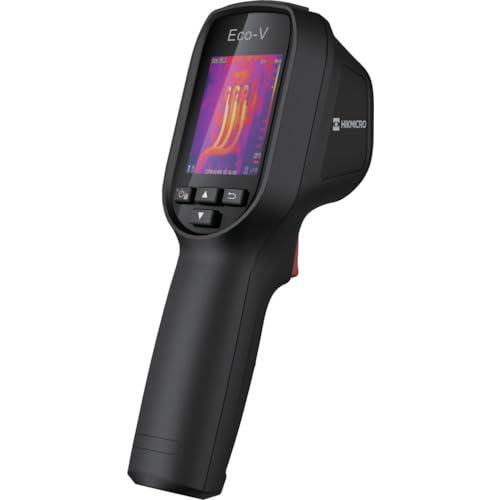
Figure 1: HIKMICRO ECO-V Handheld Thermography Camera
2. Enfòmasyon sou Sekirite
Tanpri li epi konprann tout avètisman ak enstriksyon sekirite yo anvan ou itilize pwodui sa a. Si ou pa swiv enstriksyon sa yo, sa ka lakòz chòk elektrik, dife oswa blesi grav.
Prekosyon Sekirite Jeneral
- Pa sèvi ak aparèy la nan atmosfè eksplozif, tankou nan prezans likid, gaz oswa pousyè ki ka pran dife.
- Kenbe aparèy la lwen dlo ak lòt likid.
- Pa eseye ouvri oswa modifye aparèy la. Konfye tout antretyen bay pèsonèl kalifye.
- Use only HIKMICRO-approved accessories.
- Avoid direct exposure of the thermal lens to strong light sources (e.g., sun, laser) as this may damage the detector.
Sekirite batri
- The device contains a built-in Lithium-ion battery. Do not expose the battery to excessive heat, direct sunlight, or fire.
- Do not puncture, open, or disassemble the battery.
- Charge the battery only with the provided USB cable and a compatible power adapter.
- Jete pil yo selon règleman lokal yo.
3. Pake kontni
The HIKMICRO ECO-V package includes the following items:
- HIKMICRO Handheld Thermography Camera ECO-V
- USB Kalite-C kab
- Quick Start Guide (not explicitly mentioned but standard)
- Calibration Certificate (not explicitly mentioned but standard)
Video 3.1: Unboxing the HIKMICRO M-Series (similar to ECO-V, showing typical package contents and device appearance).
4. Aparèy souview
Familiarize yourself with the physical components and interface of your HIKMICRO ECO-V camera.
Aparans ak Entèfas
The ECO-V features a compact, ergonomic design for comfortable handheld use. Key components include the thermal lens, optical lens, laser indicator, white light, trigger button, navigation buttons, and a 2.4-inch display.
Video 4.1: This video demonstrates the physical appearance and interface of a HIKMICRO M-Series camera, which shares similar design elements and interface components with the ECO-V.
5. Enstalasyon
5.1 Chaje Aparèy la
Before initial use, fully charge the device's built-in Lithium-ion battery.
- Connect the provided USB Type-C cable to the device's USB port.
- Connect the other end of the USB cable to a compatible power adapter (5V2A recommended) and plug it into a power outlet.
- The charging indicator will show red during charging and turn green when fully charged.
Video 5.1: This HIKMICRO ECO operation video demonstrates the charging process for the device.
5.2 Power On/Off
To power on the device, press and hold the power button for more than 6 seconds. To power off, press and hold the power button again until the device shuts down.
Video 5.2: This HIKMICRO ECO operation video demonstrates how to power on the device.
6. Operasyon Enstriksyon
This section covers the basic and advanced operational features of your ECO-V camera.
6.1 Image Capture and Display
To capture a thermal image, aim the camera at the target and press the trigger button. The captured image will be saved to the internal EMMC storage. To view saved images, navigate to the 'Albums' section in the menu.
Video 6.1: This HIKMICRO ECO operation video demonstrates image capture and viewing saved snapshots.
6.2 Zouti Mezi
The ECO-V provides various measurement tools to analyze thermal images:
- Pwen cho: Automatically identifies and displays the highest temperature point.
- Cold Spot: Automatically identifies and displays the lowest temperature point.
- Sant plas: Displays the temperature at the center of the screen.
Video 6.2: This HIKMICRO ECO operation video demonstrates the use of measurement tools like hot, cold, and center spots.
6.3 SuperIR Image Enhancement
SuperIR technology enhances the thermal image resolution, providing more detail for analysis. You can enable or disable this feature in the settings menu.
Video 6.3: This HIKMICRO ECO operation video demonstrates how to enable and use the SuperIR image enhancement feature.
6.4 mòd imaj
The ECO-V supports multiple image modes for different inspection needs:
- Tèmik: Montre sèlman imaj tèmik la.
- Fizyon: Blends the thermal and visible light images for enhanced detail.
- PIP (Foto-an-Foto): Overlays a smaller thermal image on a visible light image.
- Optik: Montre sèlman imaj limyè vizib la.
Video 6.4: This HIKMICRO B10S product video demonstrates switching between different image modes, including Thermal, Fusion, PIP, and Optical.
6.5 Parallax Correction
When using fusion modes, adjust the parallax correction based on the distance to the target to ensure accurate alignment between thermal and visible images.
Video 6.5: This HIKMICRO B10S product video demonstrates how to adjust parallax correction for accurate image fusion.
6.6 Palette Adjustment
Select from various color palettes (e.g., White Hot, Black Hot, Rainbow, Ironbow) to visualize temperature differences more effectively. This can be adjusted in the settings menu.
Video 6.6: This HIKMICRO B10S product video demonstrates how to adjust color palettes.
6.7 Emissivity and Distance Settings
For accurate temperature measurements, it is crucial to set the correct emissivity value for the target material and the distance to the target. Refer to the general emissivity reference table in the specifications section.
Video 6.7: This HIKMICRO ECO operation video demonstrates setting emissivity and distance for accurate temperature readings.
6.8 Lazè Pointer
The built-in laser pointer helps to precisely identify the measurement target. It can be enabled or disabled in the settings menu.
Video 6.8: This HIKMICRO ECO operation video demonstrates how to enable and use the laser pointer.
6.9 Alam Tanperati Segondè
Set a high temperature alarm threshold to be notified when temperatures exceed a predefined limit. This feature is useful for identifying potential overheating issues.
Video 6.9: This HIKMICRO B10S product video demonstrates how to set a high temperature alarm.
6.10 Hotspot Connection
The ECO-V can connect to a mobile device via Wi-Fi hotspot for live viewing and data transfer. Enable the Wi-Fi hotspot function in the device settings and connect your mobile device.
Video 6.10: This HIKMICRO M-Series video demonstrates how to establish a hotspot connection with a mobile device.
6.11 HIKMICRO Viewer App Connection
Download the HIKMICRO Viewer app on your mobile device to access live view, manage images and videos, and generate reports. Connect the device to your phone via Wi-Fi.
Video 6.11: This HIKMICRO Pocket series video demonstrates connecting the device to the HIKMICRO Viewer app for various functions.
7. Antretyen
7.1 Netwayaj
- Siye kò aparèy la ak yon twal mou,amp twal. Pa sèvi ak pwodui netwayaj abrazif oswa solvang.
- Gently clean the lenses with a lens cleaning cloth. Avoid touching the lens surface with bare hands.
7.2 Depo
- Sere aparèy la nan yon kote ki fre epi sèk, lwen limyè solèy dirèk ak tanperati ekstrèm.
- Si w ap sere l pou yon peryòd pwolonje, asire w ke batri a chaje pasyèlman (anviwon 50%) epi rechaje l chak kèk mwa pou kenbe l an bon eta.
NAN. Depanaj
If you encounter issues with your HIKMICRO ECO-V, refer to the following common problems and solutions:
| Pwoblèm | Kòz posib | Solisyon |
|---|---|---|
| Aparèy pa limen | Batri fèb; Aparèy la pa fonksyone byen. | Charge the battery; Contact support |
| Lekti tanperati ki pa kòrèk | Incorrect emissivity/distance settings; Dirty lens | Adjust emissivity/distance; Clean the lens |
| Cannot connect to Wi-Fi hotspot | Incorrect password; Hotspot not enabled | Verify password; Enable hotspot in settings |
9. Espesifikasyon
Detailed technical specifications for the HIKMICRO ECO-V camera:
| Karakteristik | Spesifikasyon |
|---|---|
| Modèl | ECO-V |
| Measurement Temperature Range | -20 ° C a 550 ° C |
| Minimum Temperature Display | 0.1°C |
| Jaden nan View (FOV) | 50° × 50° |
| Rezolisyon espasyal (IFOV) | 8.89 mrad |
| Fonksyone Tanperati Range | -10 ° C a 50 ° C |
| Ranje Tanperati Depo | -40 ° C a 70 ° C |
| Gwosè ekspozisyon | 2.4 pous |
| Sous pouvwa | Bati-an ityòm-ion batri |
| Tan fonksyònman batri | 8 èdtan |
| Wi-Fi | Pa disponib |
| Nivo Pwoteksyon | IP54 |
| Entèfas | USB Kalite-C |
| Pitch Pitch | 12μm |
| Mezire longèdonn | 7.5-14μm |
| NETD | < 40 mK (@ 25°C, F#=1.0) |
| Longè Fokal | 1.35 mm |
| Ouverture | F1.0 |
| Distans Konsantre Minimòm | 0.1m (0.33ft) |
| To Frame | 25Hz |
| Konsantre Sistèm | Konsantre-gratis |
| Anrejistreman Medya | EMMC (4GB) |
| Kapasite Depo Imaj | 30,000 imaj |
| Imaj File Fòma | BMP (includes measurement data) |
| Rezolisyon imaj tèmik | 96×96 (9,216 pixels) |
| Visible Image Resolution | 640×480 |
| Presizyon | ±2°C or ±2% (whichever is greater), when ambient temperature is 15°C to 35°C and target temperature is 0°C or above. |
| Materyèl | Polycarbonate, ABS résine |
| Pwa | 360g |
General Emissivity Reference
| Materyèl | Emisyon |
|---|---|
| Po moun | 0.98 |
| PCB | 0.91 |
| Siman siman | 0.95 |
| Seramik | 0.92 |
| Kawotchou | 0.95 |
| Penti | 0.93 |
| Bwa | 0.85 |
| Brik | 0.96 |
| Sand | 0.90 |
| Tè | 0.92 |
| Koton | 0.98 |
| Katon | 0.90 |
| Papye Blan | 0.96 |
| Dlo | 0.96 |
10. Garanti ak sipò
HIKMICRO products are covered by a limited warranty. For detailed warranty terms and conditions, please refer to the official HIKMICRO websit la oubyen kontakte distribitè lokal ou a.
Sipò pou Kliyan
If you require technical assistance, troubleshooting, or have questions about your ECO-V camera, please contact HIKMICRO customer support through their official websit la oswa enfòmasyon kontak ki nan anbalaj pwodwi ou a.


