Entwodiksyon
This manual provides comprehensive instructions for the PowerA Enhanced Wireless Controller, designed for use with Nintendo Switch, Nintendo Switch Lite, Nintendo Switch – OLED Model, and Nintendo Switch 2. Please read this manual thoroughly before use to ensure proper setup and operation.
Kontni pake
- PowerA Enhanced Wireless Controller (Pikachu Vibrant)
- 10ft (3m) USB-C Charge Kab
- Manyèl Itilizatè (dokiman sa a)
Karakteristik kontwolè
The PowerA Enhanced Wireless Controller offers a range of features for an optimized gaming experience:
- Koneksyon Wireless: Utilizes Bluetooth 5.0 technology for seamless connection.
- Batri rechargeable: Internal lithium-ion battery provides up to 30 hours of gameplay per charge.
- Advanced Gaming Buttons: Two mappable buttons for custom control configurations.
- Kontwòl Mouvman: Integrated motion sensors for intuitive gameplay.
- Konsepsyon ergonomique: Superior ergonomics for extended comfortable gaming sessions.
- Smooth Thumbsticks: Embedded anti-friction rings ensure precise thumbstick control.
Nòt: This controller does not support HD rumble, IR camera, or Amiibo NFC functionality.
Kontwolè Layout
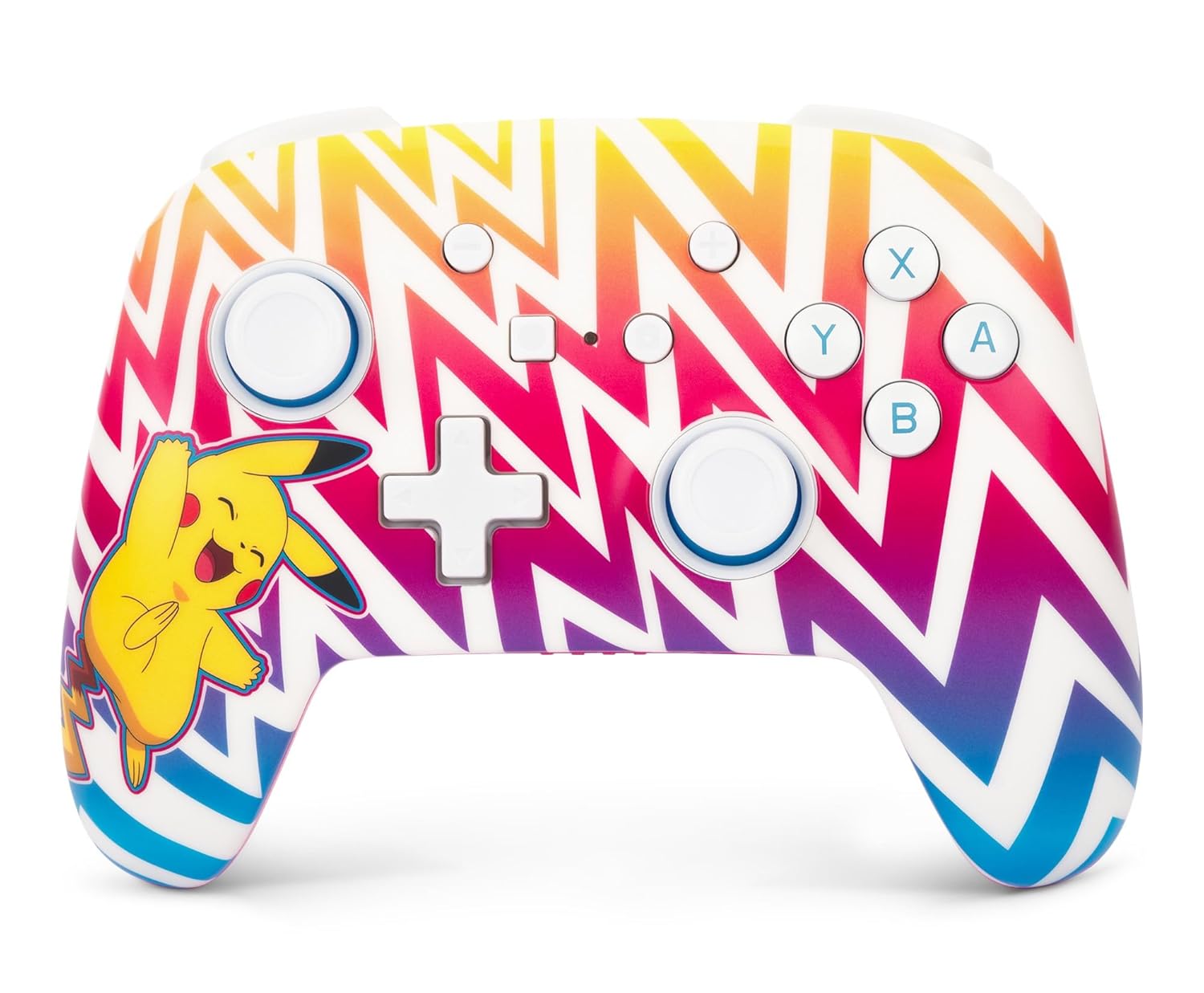
Imaj 1: Devan view of the PowerA Enhanced Wireless Controller, featuring a vibrant Pikachu design on a zigzag pattern. Shows the left and right analog sticks, D-pad, A/B/X/Y buttons, Home button, Capture button, Plus and Minus buttons, and indicator lights.

Imaj 2: Retounen view of the PowerA Enhanced Wireless Controller. This image highlights the two mappable Advanced Gaming Buttons (AGB) located on the grips, and the program button in the center.

Imaj 3: Top view of the PowerA Enhanced Wireless Controller. This perspective shows the L, R, ZL, and ZR shoulder buttons, along with the USB-C charging port located between the ZL and ZR buttons.
Enstalasyon
Chaje kontwolè a
- Connect the small end of the included USB-C cable to the USB-C port on the top of the controller.
- Connect the large end of the USB-C cable to a USB power source (e.g., Nintendo Switch dock, USB wall adapter, computer USB port).
- The LED indicator lights on the front of the controller will illuminate to show charging status. All four LEDs will be solid when fully charged.
- A full charge provides up to 30 hours of gameplay. Actual battery life may vary based on usage.

Imaj 4: Side view of the controller with the USB-C charging cable connected to the port on the top edge.
Koneksyon ak Nintendo Switch
Follow these steps to pair your PowerA Enhanced Wireless Controller with your Nintendo Switch console:
- Asire w ke konsole Nintendo Switch ou a limen epi li mete ajou ak dènye lojisyèl sistèm lan.
- Soti nan la HOME Menu, chwazi "Kontwolè", lè sa a "Chanje priz/lòd".
- On the PowerA controller, press and hold the Bouton SYNC (small button next to the USB-C port) for at least three seconds. The LED indicator lights will begin to flash.
- Once the controller is successfully paired, the player LED(s) corresponding to the controller number will remain solid.
- Peze a Bouton Kay on the controller to return to the HOME Menu and begin playing.
The controller can be used whether the Nintendo Switch is docked or in handheld mode.
Enstriksyon Operasyon
Programming Advanced Gaming Buttons (AGB)
The controller features two mappable Advanced Gaming Buttons (AGB) on the back. These can be programmed on-the-fly:
- Peze a Bouton Pwogram (small white button on the back, between the AGBs). The Program LED will flash, indicating the controller is in programming mode.
- Press the button you wish to map (e.g., A, B, X, Y, L, R, ZL, ZR, D-pad directions, Left Stick Click, Right Stick Click).
- Peze a Bouton jwèt avanse (AGB L or AGB R) you want to assign the function to. The Program LED will stop flashing, indicating the AGB has been successfully programmed.
- To clear an AGB assignment, repeat steps 1-2, but instead of pressing a button to map, press the Program Button again to exit programming mode without assigning a new function.
Kontwòl Mouvman
This controller supports motion controls in compatible Nintendo Switch games. No special setup is required; motion controls will function automatically when supported by the game.
Antretyen
- Netwayaj: Sèvi ak yon twal mou epi sèk pou netwaye kontwolè a. Evite itilize pwodui chimik ki agresif oswa materyèl abrazif.
- Depo: Sere kontwolè a nan yon kote ki fre epi sèk, lwen limyè solèy dirèk ak tanperati ekstrèm.
- Swen batri: To prolong battery life, avoid fully discharging the controller frequently. Charge it regularly, even if not in constant use.
Depanaj
- Kontwolè a pa konekte:
- Asire w ke kontwolè a chaje nèt.
- Verify the Nintendo Switch console is powered on and within range.
- Repeat the pairing process as described in the "Pairing with Nintendo Switch" section.
- If issues persist, try restarting both the controller and the Nintendo Switch console.
- Buttons or joysticks not responding:
- Check if the controller is properly connected to the console.
- Ensure no debris is obstructing the buttons or joysticks.
- Test the controller in another game or on the Switch's controller test menu to isolate the issue.
- Kout lavi batri:
- Asire w ke kontwolè a byen chaje anvan w itilize li.
- Battery life can be affected by game intensity and environmental factors.
- If battery life significantly degrades over time, contact customer support.
Espesifikasyon
| Nimewo Modèl | NSGP0262-01 |
| Koneksyon | Bluetooth 5.0 |
| Kalite batri | Rechargeable Lityòm-ion |
| Lavi batri | Up to 30 hours per charge (approximate) |
| Dimansyon | 6.02 x 4.41 x 2.48 pous |
| Pwa | 8 ons (apeprè 227 gram) |
| Konpatibilite | Nintendo Switch, Switch Lite, Switch – OLED Model, Switch 2 |
| Enkli kab | 10ft (3m) USB-C Charge Kab |
Enfòmasyon sou Garanti
PowerA backs all products with a 2-ane garanti limite. For detailed warranty terms and conditions, please refer to the official PowerA websit oswa kontakte sipò kliyan.
Sipò
For further assistance, technical support, or warranty claims, please visit the official PowerA support website or contact their customer service department. Contact information can typically be found on the PowerA websit oswa anbalaj pwodwi a.
Resous sou entènèt: www.powera.com/support


