Entwodiksyon
Welcome to the Kuephom Portable CD Player Boombox. This versatile device offers multiple audio playback options including CD, MP3, FM radio, Bluetooth, USB, and TF card support. Designed for both home and portable use, it features stereo speakers and a rechargeable battery for extended listening enjoyment. Please read this manual thoroughly to ensure proper operation and care of your new device.
Enfòmasyon enpòtan sou sekirite
- Avètisman: Pa ekspoze aparèy sa a lapli oswa imidite.
- Atansyon: To prevent electric shock, do not open the casing. Konfye tout antretyen bay pèsonèl kalifye.
- Evite mete aparèy la toupre sous chalè tankou radyatè, recho, oswa lòt aparèy ki pwodui chalè.
- Sèvi ak sèlman atachman/akseswa manifakti a espesifye.
- Pwoteje kòd pouvwa a pou yo pa mache sou li oswa pense, patikilyèman nan ploge, resipyan konvenyans, ak pwen kote yo sòti nan aparèy la.
- Deploge aparèy sa a pandan tanpèt zèklè oswa lè li pa itilize pou yon tan long.
- Pa bloke okenn ouvèti vantilasyon. Enstale li dapre enstriksyon manifakti a.
- Asire w ke gen bon vantilasyon lè w ap itilize aparèy la.
- Pa mete objè etranje nan aparèy la.
- Kenbe inite a lwen gwo chan mayetik.
- Jete pil yo byen selon règleman lokal yo.
Kontni pake
Tanpri verifye ke tout atik yo prezan:
- Kuephom Portable CD Player Boombox (Model W15)
- USB Chaje Kab
- Adaptè pouvwa
- Manyèl itilizatè
Pwodwi souview
Familiarize yourself with the main components and controls of your CD player boombox.

Figi 1: Devan View - This image displays the main unit with its top-loading CD compartment open, revealing a CD. The front panel features control buttons for playback (play/pause, skip), a mode button, an LCD screen showing track time, and a large rotary volume knob. Two speaker grilles are visible at the bottom.

Figi 2: Dèyè View - The rear of the boombox is shown, highlighting the extendable FM antenna. Below the antenna, from left to right, are the USB port, TF (Micro SD) card slot, DC 5V IN power input, and a headphone jack. The speaker grilles are also visible from this angle.
Kontwòl ak pò:
- Bouton Jwe/Pòz (►▮▮): Peze pou jwe oswa pou mete yon poz nan lekti odyo a.
- Previous/Rewind Button (◀◀): Press to go to the previous track or rewind the current track.
- Next/Fast Forward Button (►►): Press to go to the next track or fast forward the current track.
- Bouton mòd (M): Press to switch between CD, FM Radio, Bluetooth, USB, and TF card modes.
- Repeat/Random Button (↺): Press to cycle through repeat modes (repeat one, repeat all) or enable random playback (shuffle).
- Volume Knob (MIN-MAX): Rotate to adjust the volume level. Also serves as the power on/off switch.
- Ekspozisyon LCD: Shows current mode, track number, time, and FM frequency.
- Konpatiman CD: Plato ki chaje anlè pou mete CD odyo.
- Antèn FM: Extendable antenna for improved FM radio reception.
- Pò USB: Pou jwe MP3/WMA files from a USB flash drive (up to 32GB).
- TF Kat plas: Pou jwe MP3/WMA files from a TF (Micro SD) card (up to 32GB).
- Pò DC 5V ANTRE: Power input for charging the internal battery or operating the unit via the included power adapter.
- Headphone Jack (🎧): For private listening with wired headphones.
Enstalasyon
1. Alimante Inite a
Your Kuephom CD player boombox comes with a built-in rechargeable Lithium Ion battery. Before first use, it is recommended to fully charge the battery.
- Connect the provided USB charging cable to the DC 5V IN port on the back of the unit.
- Connect the other end of the USB cable to the power adapter, and plug the adapter into a standard wall outlet.
- The LCD display will indicate charging status. Charging typically takes 3-4 hours for a full charge.
- Alternatively, the unit can be powered directly from the wall adapter without battery charge.

Figi 3: Opsyon chaje - This image illustrates the versatility of charging the boombox. It can be charged using a standard wall charger, a car charger (via a USB car adapter, not included), or a portable power bank, making it convenient for both indoor and outdoor use.
2. Limen/Etenyen
To turn the unit on, rotate the Volume Knob clockwise from the MIN position. To turn off, rotate the Volume Knob counter-clockwise to the MIN position until it clicks.
Mòd fonksyònman
Peze a Mòd (M) button repeatedly to cycle through the available playback modes: CD, FM Radio, Bluetooth, USB, and TF Card.

Figure 4: 5 Play Modes - This graphic highlights the five primary playback modes of the Kuephom boombox: CD Player, Bluetooth, FM Radio, TF Card, and USB Input, emphasizing its multi-functional capabilities.
1. Lektur CD
- Louvri kouvèti konpatiman CD a lè w leve l dousman.
- Place an audio CD or MP3 CD onto the spindle, label side up.
- Close the CD compartment lid firmly.
- Peze a Mòd (M) button until "CD" appears on the LCD display.
- CD a ap kòmanse jwe otomatikman. Si se pa sa, peze bouton an Play/Pause (►▮▮) bouton.
- Sèvi ak la Previous (◀◀) epi Next (►►) bouton pou sote tras.
- Peze epi kenbe la Previous (◀◀) or Next (►►) bouton pou avanse rapidman oswa rebobine.
- Peze a Repeat/Random (↺) button to cycle through repeat modes (Repeat One, Repeat All) or enable random (shuffle) playback.
2. Lekti Bluetooth
- Peze a Mòd (M) button until "BT" appears on the LCD display. The unit will enter Bluetooth pairing mode, indicated by a flashing "BT".
- Sou aparèy ou ki gen Bluetooth la (pa egzanp, telefòn entelijan, tablèt), aktive Bluetooth epi chèche aparèy ki disponib yo.
- Select "Kuephom W15" from the list of devices.
- Once paired, "BT" will stop flashing and remain solid. You can now play audio from your device through the boombox.
- Use the playback controls on your connected device or the boombox's Play/Pause (►▮▮), Previous (◀◀), ak Next (►►) bouton pou kontwole lèktur.

Figure 5: CD Player & Bluetooth Speaker Functionality - This image demonstrates the dual functionality of the device, showing it first as a standalone CD player and then as a Bluetooth speaker, with a smartphone successfully paired to it. This highlights its versatility for different audio sources.
3. Operasyon radyo FM
- Extend the FM antenna on the back of the unit for optimal reception.
- Peze a Mòd (M) button until "FM" appears on the LCD display.
- Pou eskane epi sove estasyon yo otomatikman: Peze epi kenbe bouton an Play/Pause (►▮▮) button. The unit will automatically scan for available FM stations and save them as presets (up to 30 stations).
- To tune to a saved preset station: Use the Previous (◀◀) epi Next (►►) buttons to navigate through the saved presets.
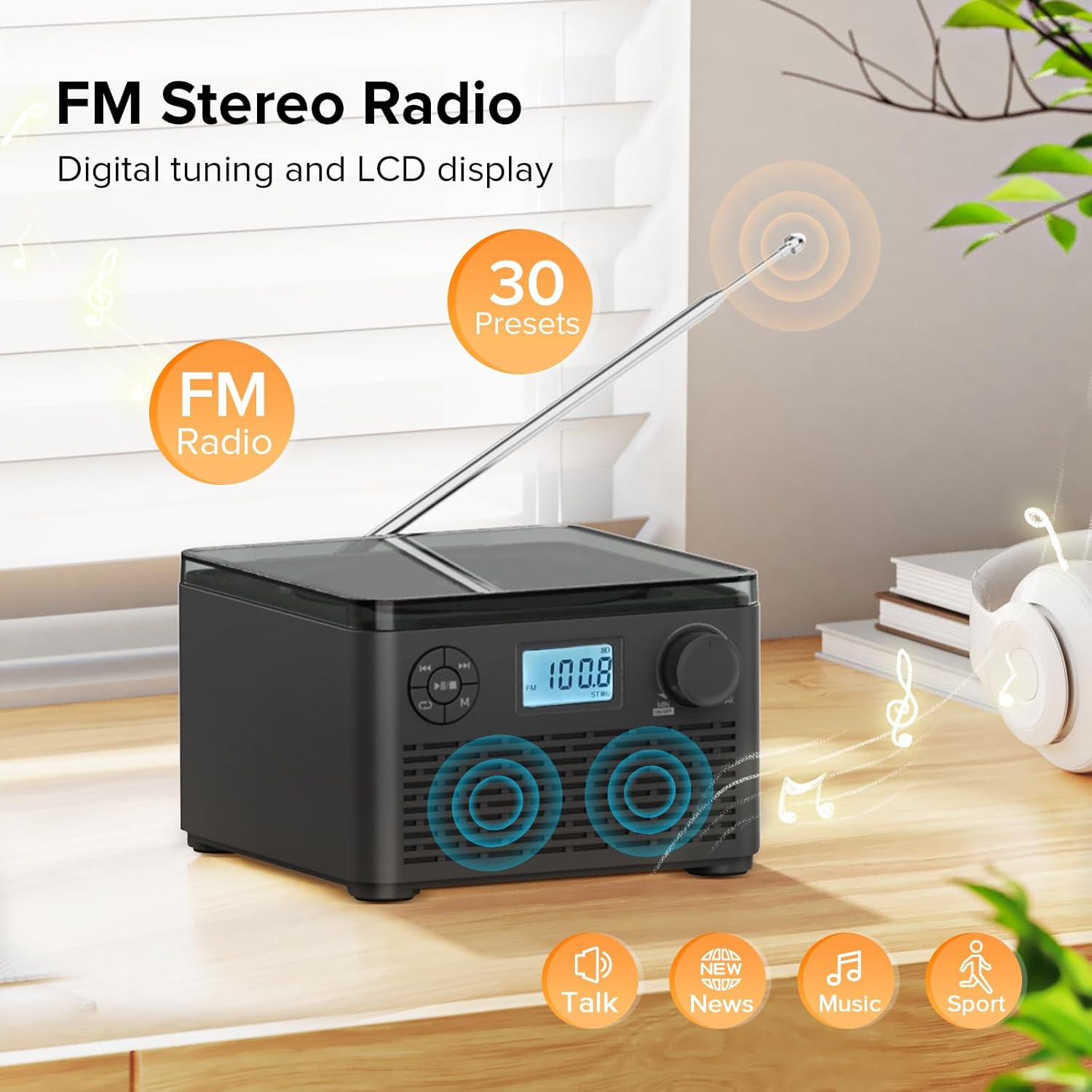
Figure 6: FM Stereo Radio - This image focuses on the FM radio feature, showing the digital display tuned to a frequency and indicating the availability of 30 presets. The extendable antenna is also visible, emphasizing its radio capabilities.
4. Lekti Kat USB/TF
The unit supports MP3 and WMA audio formats from USB flash drives and TF (Micro SD) cards up to 32GB.
- Insert a USB flash drive into the USB port or a TF card into the TF card slot on the back of the unit. Ensure the antenna is moved out of the way if necessary.
- Peze a Mòd (M) button until "USB" or "TF" appears on the LCD display.
- The unit will automatically detect and begin playing audio files soti nan aparèy depo ki mete a.
- Sèvi ak la Play/Pause (►▮▮), Previous (◀◀), ak Next (►►) bouton pou kontwole lèktur.
- Peze a Repeat/Random (↺) button to cycle through repeat modes or enable random playback.
5. Itilizasyon kas ekoutè
For private listening, connect standard 3.5mm headphones to the headphone jack on the back of the unit. The internal speakers will automatically mute when headphones are connected.
Antretyen ak Swen
- Netwayaj: Sèvi ak yon twal mou epi sèk pou netwaye deyò aparèy la. Pa sèvi ak pwodui netwayaj abrazif oswa solvan.
- Swen CD: Manyen CD yo nan kwen yo. Kenbe yo pwòp epi san reyur. Sèvi ak yon twal mou ki pa gen pousyè pou siye CD yo soti nan sant la rive deyò.
- Depo: Lè w pa itilize aparèy la pou yon bon bout tan, sere l nan yon kote ki fre epi sèk, lwen limyè solèy dirèk ak tanperati ekstrèm.
- Swen batri: Pou pwolonje lavi batri a, evite dechaje batri a nèt souvan. Rechaje aparèy la regilyèman, menm si w pa ap itilize l tout tan.
Depanaj
| Pwoblèm | Kòz posib | Solisyon |
|---|---|---|
| Aparèy pa limen. | Batri a fini oswa adaptè kouran an pa byen konekte. | Ensure the volume knob is rotated clockwise to turn on. Connect the power adapter and charge the unit. |
| CD is skipping or not playing. | CD a sal, grate, oswa li pa byen mete. | Clean the CD with a soft cloth. Ensure the CD is placed correctly in the compartment. Try a different CD. |
| Resepsyon radyo FM ki fèb. | Antèn nan pa lonje oswa siyal la fèb. | Fully extend the FM antenna. Try repositioning the unit for better signal. |
| Aparèy Bluetooth la pa ka konekte. | Unit is not in pairing mode or device is too far. | Ensure the unit is in "BT" mode and flashing. Move your Bluetooth device closer to the boombox. Disconnect other Bluetooth devices. |
| Kat USB/TF la pa rekonèt. | Pa sipòte file format or card capacity. | Asire w files are MP3 or WMA format. Check that the card capacity is 32GB or less. Reinsert the card/drive. |
Espesifikasyon
- Modèl: W15
- Mak: Kuephom
- Dimansyon pwodwi (L x W x H): 6.3 x 6.3 x 4.2 pous
- Pwa atik: 1.9 liv
- Antre pouvwa: DC 5V
- Batri: 1 batri ityòm Ion (enkli)
- Tan pou jwe batri: 6-10 hours (approx., varies with usage)
- Fòma disk sipòte: CD, CD-R, CD-RW, CD MP3
- Supported USB/TF Card Formats: MP3, WMA (up to 32GB)
- FM Radio Frequency Range: 87.5 - 108 MHz
- Kalite oratè: Entegrasyon Oratè Stereo
- Kas ekoutè Jack: 3.5mm
Garanti ak sipò
Kuephom products are designed and manufactured to the highest quality standards. For any questions, technical support, or warranty claims, please contact Kuephom customer service through the retailer where you purchased the product or visit the official Kuephom websit pou plis enfòmasyon.
Tanpri konsève prèv acha ou a pou rezon garanti.


