1. Entwodiksyon
This manual provides essential information for the safe and efficient operation of your TELLUR Obia PRO 60W Bluetooth Speaker. Please read this manual thoroughly before using the product and retain it for future reference.
2. Enfòmasyon sou Sekirite
- Pa ekspoze oratè a nan tanperati ekstrèm oswa nan limyè solèy dirèk pou yon bon bout tan.
- Evite jete oswa soumèt oratè a nan gwo enpak.
- Pa eseye demonte oswa modifye oratè a. Sa ap anile garanti a.
- Kenbe oratè a lwen aparèy medikal yo.
- Ensure the charging port cover is securely closed when near water to maintain IPX6 water resistance.
- Sèvi sèlman ak kab chaje ak adaptè kouran ki espesifye a.
3. Pake kontni
Verifye ke tout atik yo prezan nan pakè a:
- TELLUR Obia PRO 60W Bluetooth Speaker
- USB Chaje Kab
- 3.5mm AUX Audio Kab
- Manyèl Itilizatè (dokiman sa a)
4. Pwodwi souview ak Kontwòl
Familiarize yourself with the speaker's components and control buttons.

Figi 4.1: Devan view of the TELLUR Obia PRO speaker, showcasing the main grille, control panel, and integrated LED lights on the handle and side woofers.
4.1 Kontwòl Panel

Figi 4.2: Detaye view of the control buttons located on the top panel of the speaker.
- Diminye Volim (-) / Chante Anvan: Peze yon ti tan pou diminye volim nan. Peze epi kenbe pou ale nan mizik anvan an.
- Ogmante Volim (+) / Pwochen Mizik: Press briefly to increase volume. Press and hold to go to the next track.
- LED Light Mode Button: Press to cycle through different LED light modes.
- Bouton pouvwa: Press and hold to power on/off. Briefly press to play/pause music.
- TWS (True Wireless Stereo) Button: Press to activate TWS pairing mode.
- Bouton mòd (M): Press to switch between Bluetooth, USB, and AUX input modes.
4.2 Pò Antre / Sòti
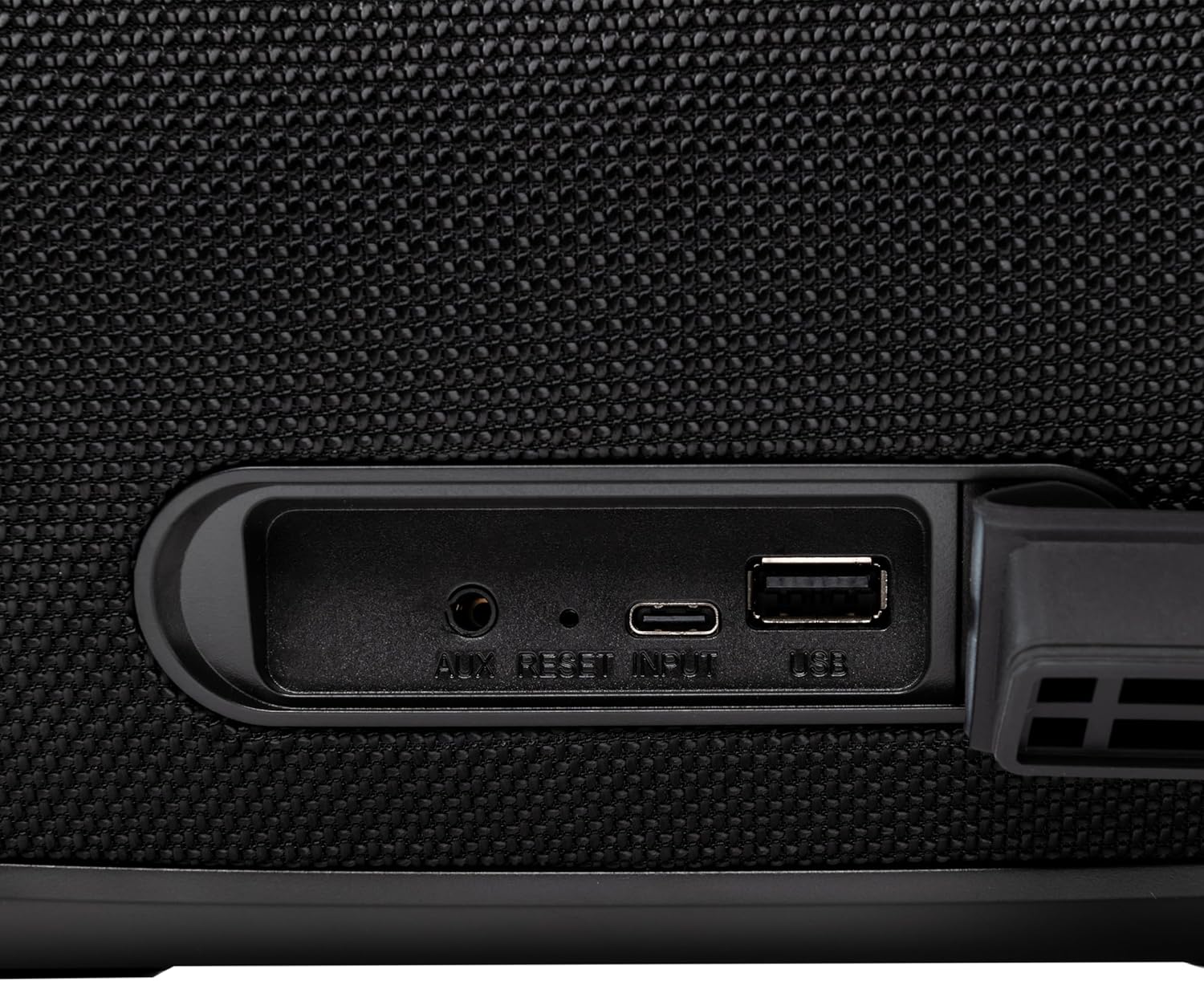
Figi 4.3: Close-up of the protected input/output ports on the rear of the speaker.
- Pò AUX-IN: Pou konekte aparèy odyo ekstèn atravè yon kab odyo 3.5mm.
- Bouton Reyajiste: Use a thin object to press and reset the speaker if necessary.
- USB-C Antre: Pou chaje oratè a.
- USB-A pò: For playing MP3 audio files from a USB drive or for power bank functionality.
5. Enstalasyon
5.1 Chaje Oratè a
Before initial use, fully charge the speaker. The speaker also functions as a power bank to charge other devices via its USB-A port.
- Connect the USB charging cable to the USB-C input port on the speaker.
- Konekte lòt bout kab la nan yon adaptè kouran USB konpatib (pa enkli).
- The charging indicator light will illuminate. It will turn off once charging is complete.
- The battery level can be displayed on your connected phone when paired via Bluetooth.
5.2 Limen/Etenyen
- Pou limen: Peze epi kenbe la Bouton pouvwa for approximately 3 seconds until you hear an audible prompt and the LED lights activate.
- Pou etenn: Peze epi kenbe la Bouton pouvwa pou apeprè 3 segonn jiskaske ou tande yon siy ak limyè LED yo etenn.
6. Operasyon Enstriksyon
6.1 Bluetooth Pairing
The speaker uses Bluetooth v5.3 for stable wireless connection up to 10 meters.
- Ensure the speaker is powered on and in Bluetooth mode (indicated by a flashing blue LED). If not, press the Bouton mòd (M) pou chanje an mòd Bluetooth.
- Aktive Bluetooth sou aparèy mobil ou a (telefòn entelijan, tablèt, elatriye).
- Chèche pou aparèy Bluetooth ki disponib yo epi chwazi "TELLUR Obia PRO"nan lis la.
- Once paired, the speaker will emit an audible confirmation, and the blue LED will stop flashing.
- Oratè a ap rekonekte otomatikman ak dènye aparèy ki te konekte a lè li limen, si li disponib.

Figi 6.1: The TELLUR Obia PRO speaker wirelessly connected to a smartphone, ready for audio playback.
6.2 Fonksyon Vrè Stereo San Fil (TWS)
TWS allows you to pair two Obia PRO speakers for a stereo sound experience.
- Ensure both Obia PRO speakers are powered on and in Bluetooth mode, but not yet paired with any device.
- Sou yon oratè (sa a pral oratè prensipal la), peze bouton an TWS bouton. The speaker will enter TWS pairing mode, indicated by a flashing light.
- The two speakers will automatically connect to each other. Once connected, you will hear an audible confirmation, and the TWS indicator light on both speakers will become solid.
- Now, connect your mobile device to the primary speaker via Bluetooth as described in Section 6.1. The audio will play in stereo across both speakers.
6.3 Multiple Link Technology
This technology allows connecting an unlimited number of Obia PRO speakers wirelessly for a synchronized audio experience. Refer to the manufacturer's website or specific instructions for detailed setup of Multiple Link.
6.4 USB Playback (MP3)
Jwe odyo MP3 files directly from a USB flash drive (up to 128GB).
- Mete yon kondwi flash USB ki gen MP3 files into the USB-A port.
- Peze a Bouton mòd (M) to switch to USB mode. The speaker will automatically begin playing music from the USB drive.
- Sèvi ak la Volim monte/desann epi Bouton pouvwa (for play/pause) to control playback.
6.5 Koneksyon AUX-IN
Connect non-Bluetooth devices using the 3.5mm AUX audio cable.
- Connect one end of the 3.5mm AUX audio cable to the AUX-IN port on the speaker.
- Konekte lòt bout la nan priz pwodiksyon odyo aparèy ekstèn ou an (pa egzanp, yon lektè MP3, yon laptop).
- Peze a Bouton mòd (M) pou chanje nan mòd AUX.
- Kontwole lekti ak volim nan soti nan aparèy ekstèn ou an.
6.6 Apèl men-gratis
When connected to a smartphone via Bluetooth, the speaker's built-in microphone allows for hands-free calls.
- Reponn/Fen Apèl: Yon ti tan peze la Bouton pouvwa.
- Rejte apèl: Peze epi kenbe la Bouton pouvwa pou 2 segonn.
6.7 mòd limyè ki ap dirije
The speaker features integrated LED lights with multiple display modes.
- Peze a Dirije Limyè Mode bouton to cycle through available light patterns and colors.
- Peze epi kenbe la Dirije Limyè Mode bouton to turn the lights off or on.

Figi 6.2: A user interacting with the LED light mode button to change the speaker's lighting effects.
6.8 Equalizer Settings (Indoor/Outdoor)
The speaker allows for equalizer customization for different environments. Specific controls for this are not detailed in the provided data, but typically involve a dedicated button or a combination of existing buttons. Refer to the product's quick start guide or manufacturer's website for precise instructions on adjusting the equalizer.
7. Antretyen
7.1 Netwayaj
- Siye oratè a ak yon twal mou epi sèk.
- Pa sèvi ak pwodui netwayaj abrazif, alkòl, oswa solvan chimik.
7.2 Rezistans dlo (IPX6)
The Obia PRO speaker is rated IPX6, meaning it is protected against high-pressure water jets from any direction. This makes it suitable for outdoor use and environments where it might be exposed to splashes or rain.
- Ensure the rubber cover for the charging and AUX ports is securely closed before exposing the speaker to water.
- Pa plonje oratè a nan dlo.
- After exposure to water, wipe the speaker dry before charging.
7.3 Swen Batri
- Pou pwolonje lavi batri a, evite dechaje batri a nèt souvan.
- Chaje oratè a regilyèman, menm si w pa ap itilize l, pou batri a rete an bon eta.
- Sere oratè a nan yon kote ki fre epi sèk lè w pa itilize li pou yon bon bout tan.
NAN. Depanaj
| Pwoblèm | Kòz posib | Solisyon |
|---|---|---|
| Oratè a pa limen. | Batri ki ba. | Chaje oratè a nèt. |
| Pa ka konekte atravè Bluetooth. | Oratè a pa nan mòd koneksyon; Bluetooth aparèy la etenn; li twò lwen oratè a. | Ensure speaker is in Bluetooth mode (flashing LED). Turn on Bluetooth on your device. Move device closer to speaker (within 10m). |
| Pa gen son. | Volim twò ba; mòd ki pa kòrèk la chwazi; aparèy la pa ap jwe. | Increase speaker and device volume. Press Bouton mòd (M) to select correct input. Ensure audio is playing on the connected device. |
| Koneksyon TWS la echwe. | Speakers already paired to a device; not both Obia PRO models. | Disconnect both speakers from any Bluetooth devices. Ensure both speakers are Obia PRO models. Try TWS pairing again. |
| Lektur USB a pa fonksyone. | Kle USB a pa fòma byen; li pa sipòte file type; drive capacity too large. | Ensure USB drive is formatted to FAT32. Only MP3 files are supported. Max capacity 128GB. |
9. Espesifikasyon
| Non modèl | Obia PRO |
| Mak | TELLUR |
| Sortie pouvwa | 60W (2x 20W RMS subwoofers, 2x 10W RMS tweeters) |
| Bluetooth vèsyon | v5.3 |
| Wireless Range | Jiska 10 mèt |
| Repons Frekans | 80 MHz (Note: This value is unusual for speaker frequency response and may be a typo in source data. Typically measured in Hz-kHz.) |
| Enpedans | 4 ohm |
| Mòd odyo | Bluetooth, USB (MP3), AUX-IN |
| Sipò USB | USB 2.0/3.0, up to 128GB (MP3 format) |
| Rezistans dlo | IPX6 |
| Kapasite batri | 5400 mAh |
| Lektur Tan | Jiska 12 èdtan (nan volim modere) |
| Fonksyon Bank pouvwa | Yes, via USB-A port |
| Dimansyon (L x W x H) | 37.7 x 17 x 18 cm |
| Pwa | 3.48 kg |
| Materyèl | Plastik |
| Koulè | Nwa |
Remak: Espesifikasyon yo sijè a chanje san avètisman davans.
10. Garanti ak sipò
TELLUR products are manufactured to the highest quality standards. For information regarding warranty terms, technical support, or service, please refer to the warranty card included with your product or visit the official TELLUR websit.
Enfòmasyon pou kontakte: Tanpri vizite www.tellur.com pou dènye enfòmasyon sipò yo.


