Entwodiksyon
The NOYAFA NF-859G is a versatile network cable tester designed for comprehensive network cable testing. It integrates multiple functions including wire detection, alignment testing, crimping testing, PoE detection, visual fault location (VFL), and an LED flashlight. This manual provides detailed instructions for the proper setup, operation, maintenance, and troubleshooting of your device.
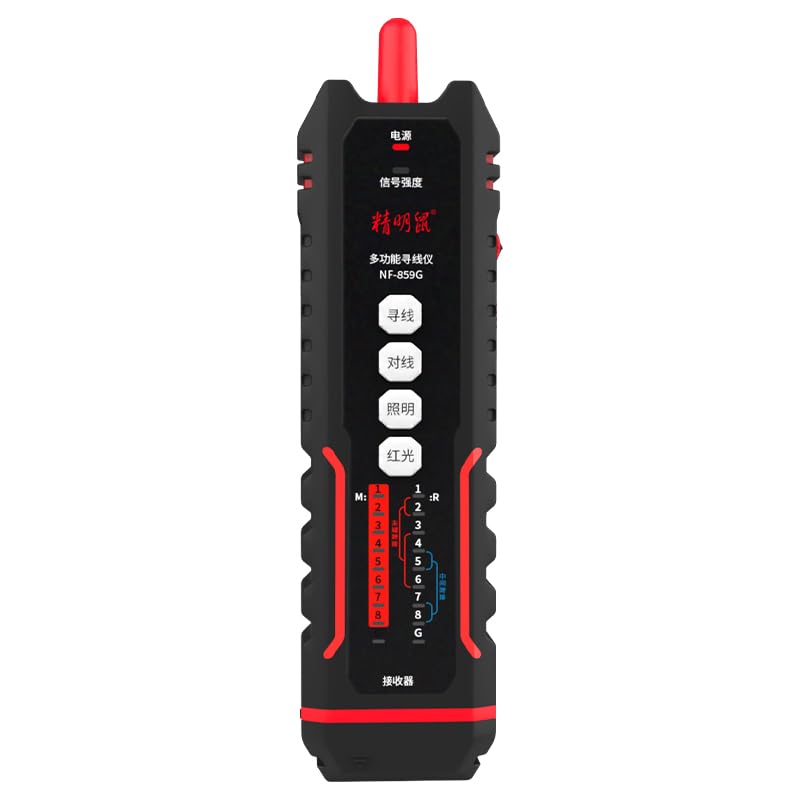
Image: The NOYAFA NF-859G Network Cable Tester, showing the main unit and the receiver.
Enstalasyon
Debalaj ak premye enspeksyon
Carefully unpack the NOYAFA NF-859G Network Cable Tester. Verify that all components are present and undamaged. The package should include:
- Inite tèsteur prensipal la
- Receiver (auxiliary machine)
- Manyèl Itilizatè (dokiman sa a)
- Remak: Pil yo pa enkli epi yo dwe achte separeman.
Enstalasyon batri
- Locate the battery compartment on the main tester unit and the receiver.
- Louvri kouvèti lòj batri a.
- Insert the required batteries, ensuring correct polarity (+/-). The device uses a 3.7V lithium polymer battery.
- Fèmen kouvèti lòj batri a byen.
Enstriksyon Operasyon
The NOYAFA NF-859G offers various testing modes. Familiarize yourself with the device's interface before operation.
Fonksyon deteksyon fil
This function allows for tracing and locating cables. It supports both anti-interference mode and ordinary mode.
- Connect the cable to be traced to the main unit's appropriate port (RJ45/RJ11).
- Select the wire detection mode on the main unit.
- Use the receiver to trace the cable. The receiver will emit an audible signal when near the cable.
- Switch between anti-interference mode and ordinary mode as needed for optimal tracing in different environments.
Alignment Test (Cable Mapping)
Perform local and remote alignment tests to check for open circuits, short circuits, cross-overs, and split pairs in network cables.
- For local alignment test, connect both ends of the cable to the main unit.
- For remote alignment test, connect one end of the cable to the main unit and the other end to the receiver.
- Initiate the alignment test. The display will show the wiring status of the cable.
Tès Crimping
Verify the proper crimping of RJ11 and RJ45 connectors.
- Mete konektè RJ11 oswa RJ45 ki sèrti a nan pò ki koresponn lan sou inite prensipal la.
- Select the crimping test function. The device will indicate if the crimping is correct or if there are faults.
PoE (Power over Ethernet) Detection
Identify the power supply wire core and detect mid-span or end-span PoE configurations.
- Connect the network cable with PoE to the main unit.
- Activate the PoE detection function. The device will display information about the PoE type and power status.
Localisateur vizyèl fay (VFL)
The integrated 20mw red light function helps locate breaks and bends in fiber optic cables.
- Connect the fiber optic cable to the VFL port.
- Activate the VFL. A red laser light will be emitted.
- Observe the cable for light leakage, which indicates a fault.
- Caution: Avoid direct eye exposure to the laser light.
Dirije flach
The built-in LED flashlight provides illumination in dark working environments.
- Press the dedicated flashlight button to turn it on or off.
Antretyen
Proper maintenance ensures the longevity and accuracy of your NOYAFA NF-859G Network Cable Tester.
- Netwayaj: Sèvi ak yon twal mou epi sèk pou netwaye aparèy la. Pa sèvi ak pwodui netwayaj abrazif oswa solvan.
- Depo: Sere aparèy la nan yon kote ki fre epi sèk, lwen limyè solèy dirèk ak tanperati ekstrèm. Si w ap sere l pou yon bon bout tan, retire pil yo pou anpeche l koule.
- Ranplasman batri: Replace batteries when the low battery indicator appears. Always use the specified battery type (3.7V lithium polymer).
- Manyen: Evite jete aparèy la oswa soumèt li a gwo enpak.
Depanaj
This section addresses common issues you might encounter with your NOYAFA NF-859G.
| Pwoblèm | Kòz posib | Solisyon |
|---|---|---|
| Aparèy pa limen. | Pil ki fèb oswa ki mouri; move enstalasyon pil. | Check battery indicator. Replace batteries or ensure they are installed with correct polarity. |
| Rezilta tès kab ki pa egzak. | Damaged test cable; incorrect test mode selected; dirty connectors. | Use a known good test cable. Ensure the correct test mode (e.g., alignment test) is selected. Clean connectors. |
| Wire tracing signal is weak or absent. | Cable is shielded; interference from other cables; low battery on receiver. | Switch to anti-interference mode. Ensure receiver batteries are charged. Try tracing in a less congested area. |
| VFL red light is dim or not working. | Low battery; VFL port obstruction; internal fault. | Check battery level. Ensure VFL port is clean and unobstructed. If problem persists, contact support. |
Espesifikasyon
Key technical specifications for the NOYAFA NF-859G Network Cable Tester:
- Nimewo Modèl: NF-859G
- Mak: NOYAFA
- Non jenerik: Rezo Kab tèsteur
- Koneksyon Teknoloji: Ethernet
- Sous pouvwa: Battery Powered (3.7V lithium polymer battery)
- Eleman ki enkli: Main Tester Unit, Receiver (auxiliary machine)
- VFL Output Power: 20mw (Red Light Function)
- Wire Detection Modes: Anti-interference mode, Ordinary mode
- Konektè ki sipòte: RJ45, RJ11
- Kalite kab sipòte: CAT5, CAT6, CAT5E, CAT6A
- Pwa atik: 420 g
- Dimansyon pake: 28.8 x 16.6 x 5.3 cm
- Koulè: Nwa
- Manifakti: NOYAFA
Garanti ak sipò
For warranty information or technical support, please refer to the official NOYAFA websit la oubyen kontakte distribitè lokal ou a. Kenbe resi acha ou kòm prèv acha pou reklamasyon garanti.
Manifakti: NOYAFA
Dat premye disponib: 22 septanm 2024
Pou plis asistans, tanpri vizite NOYAFA Brand Store on Amazon.


