Entwodiksyon
Thank you for choosing the WORKPRO Cordless Rotary Tool Kit. This manual provides essential information for the safe and effective operation, maintenance, and troubleshooting of your new rotary tool. Please read this manual thoroughly before first use and keep it for future reference.
Kontni pake
Upon opening the package, please verify that all items listed below are present and in good condition. If any items are missing or damaged, contact customer support.

Image: The WORKPRO Cordless Rotary Tool, its carrying case, Type-C charging cables, and a wide array of 117 accessories including various grinding, polishing, cutting, sanding, carving, and drilling bits.
- Zouti Rotary san fil WORKPRO (Woz)
- 117 Accessories (various grinding, carving, polishing, milling, cutting, sanding, collet, and drilling attachments)
- Kalite-C chaje kab
- Tool Bag/Carrying Case
- Manyèl Itilizatè (dokiman sa a)

Image: A visual guide detailing the 117 accessories, categorized by function such as grinding/sharpening, carving, polishing, milling, cutting, sanding, collet, and drilling, showing quantities for each type.
Enstalasyon
Charging the Rotary Tool
The WORKPRO Cordless Rotary Tool is equipped with a Type-C charging port and built-in rechargeable batteries. Before first use, fully charge the tool.
- Connect the provided Type-C charging cable to the tool's charging port.
- Konekte lòt bout kab la nan yon adaptè kouran USB konpatib (pa enkli).
- Charging typically takes 1.5 to 2 hours. The five indicator lights will turn white when fully charged.
- A full charge provides up to 200 minutes of continuous operation.
- Enpòtan: For safety, do not operate the tool while it is charging.
Enstale Pwodwi pou Telefòn
The tool features an automatic shaft locking design for easy and secure accessory replacement.

Image: A visual comparison highlighting the WORKPRO tool's automatic shaft locking design, which eliminates the need to press a button during accessory changes, contrasting it with other tools that require a button press.

Image: A detailed three-step guide demonstrating how to install accessories: 1. Unscrew the collet nut. 2. Choose the suitable collet and insert the accessory. 3. Tighten the collet nut. It also shows specific instructions for fitting sanding bands and cutting discs/sanding paper.
- Unscrew the collet nut at the tip of the rotary tool.
- Select the appropriate collet size for your desired accessory (two collet sizes are included: 0.235mm and 0.32mm).
- Mete tij la akseswar nan kolye a.
- Tighten the collet nut securely to hold the accessory in place.
- To replace accessories, simply unscrew the collet nut. The automatic locking mechanism will engage, allowing for easy removal and insertion.

Imaj: Yon gwo plan view of the two different collet sizes (0.235mm and 0.32mm) provided with the WORKPRO rotary tool, along with various compatible accessory shanks.
Enstriksyon Operasyon
Zouti souview
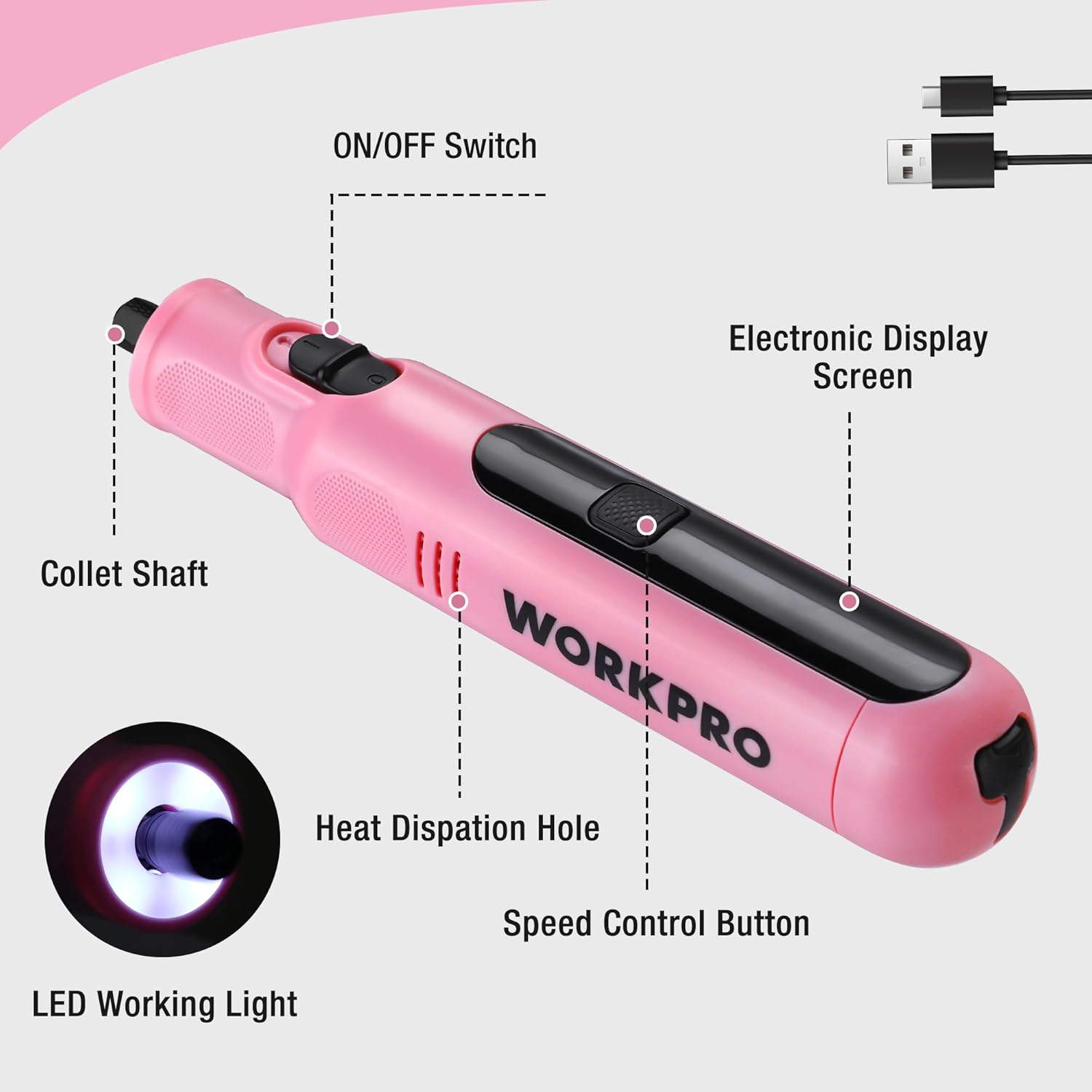
Image: An annotated diagram of the WORKPRO rotary tool, pointing out key features such as the ON/OFF switch, electronic display screen, collet shaft, heat dissipation hole, speed control button, and LED working light.
- ON / OFF switch: Located on the side, controls power to the tool.
- Electronic Display Screen: Shows current speed setting.
- Bouton kontwòl vitès: Ajiste vitès wotasyon an.
- Ki ap dirije limyè travay: Bay limyè pou travay presi.
- Collet Shaft: Where accessories are inserted and secured.
- Twou Dissipation Chalè: Ede kenbe tanperati fonksyònman optimal la.
Limen/Etenn ak Ajisteman Vitès
The tool features 6 variable speed settings for diverse applications.
- To turn on the tool, slide the ON/OFF switch to the "ON" position. The LED work light will illuminate.
- Press the Speed Control Button to cycle through the 6 available speed settings: 5000 RPM, 10000 RPM, 15000 RPM, 20000 RPM, 25000 RPM, and 30000 RPM. The electronic display will show the current speed.
- Select the appropriate speed for your task. Lower speeds are suitable for delicate work, while higher speeds are for more robust applications.
- To turn off the tool, slide the ON/OFF switch to the "OFF" position.
- Nòt: When turned off, the product automatically locks the shaft, which may cause a slight clicking sound. This is normal and indicates the safety locking mechanism is engaged.

Imaj: Yon koupe view of the WORKPRO rotary tool highlighting its powerful motor and variable speed capabilities, indicating a maximum speed of 30000 RPM.

Image: A close-up of the rotary tool's electronic display, clearly showing the selectable speed settings: 5000RPM, 10000RPM, 15000RPM, 20000RPM, 25000RPM, and 30000RPM.
Aplikasyon
The WORKPRO Cordless Rotary Tool is versatile and suitable for a wide range of home projects and crafts, including but not limited to:
- Grinding/Sharpening: For shaping and sharpening various materials.
- Gravure: Creating intricate designs on surfaces like wood, metal, or plastic.
- Koupe: Precision cutting of light materials.
- Perçage: Creating small holes.
- Ponçage: Smoothing rough surfaces.
- Polisaj: Bringing a shine to finished pieces.

Image: A collage demonstrating the versatility of the 8V Cordless Rotary Tool, showing it in use for cutting, carving, polishing, sanding, and drilling various materials.

Image: A person using the WORKPRO rotary tool with a carving bit to engrave a design onto a clear acrylic sheet, demonstrating its precision for detailed work.
Antretyen
Netwayaj
Regular cleaning ensures optimal performance and extends the life of your tool.
- Toujou dekonekte zouti a nan nenpòt sous kouran anvan ou netwaye li.
- Sèvi ak yon twal mou epi sèk pou siye deyò zouti a.
- Remove any dust or debris from the heat dissipation holes using a soft brush or compressed air.
- Clean accessories after each use to prevent buildup that could affect performance.
Swen batri ak depo
Proper battery care is crucial for maintaining battery health and longevity.
- It is recommended to charge the battery periodically, even if the tool is not used for a long time, to protect the battery's lifespan.
- Store the rotary tool and its accessories in the provided tool bag in a cool, dry place, away from direct sunlight and extreme temperatures.

Image: A hand placing the compact WORKPRO rotary tool carrying case onto a shelf, demonstrating its portability and ease of storage.
Depanaj
| Pwoblèm | Kòz posib | Solisyon |
|---|---|---|
| Zouti a pa limen. | Batri ap vide. | Charge the tool fully using the Type-C cable. |
| Tool makes a clicking sound when turned off. | Normal operation of the automatic shaft locking mechanism. | No action required; this is a normal function for safety. |
| Akseswa a lach oswa li tranble. | Collet nut not tightened sufficiently or incorrect collet size. | Ensure the collet nut is securely tightened. Verify that the correct collet size is used for the accessory shank. |
| Pèfòmans oswa vitès ki redwi. | Batri fèb oswa vitès la pa kòrèk. | Recharge the battery. Adjust the speed setting to a higher RPM if needed for the task. |
Espesifikasyon
| Karakteristik | Detay |
|---|---|
| Mak | WORKPRO |
| Nimewo Modèl | 1 |
| Koulè | Woz |
| Style | Kreyon |
| Sous pouvwa | Batri Powered |
| Voltage | 8 Volts |
| Kalite batri | Lityòm Ion (1 enkli) |
| Tan pou chaje | Approx. 1.5 - 2 hours (Type-C) |
| Tan operasyon | Jiska 200 minit |
| Anviwònman vitès varyab | 6 (5000/10000/15000/20000/25000/30000 RPM) |
| Maksimòm vitès wotasyon | 30000 RPM |
| Pwa | 227 g (0.5 lbs) |
| Dimansyon | 19 x 3.61 x 3.61 cm (7.48 inches length) |
| Karakteristik espesyal | Lightweight, Cordless, Rechargeable, LED Work Light, Auto-Locking Protection |
| Konpozan ki enkli | Rotary Tool, 117 Accessories, Type-C Cable, Tool Bag |
| Peyi orijin | Lachin |

Image: A visual representation of the WORKPRO rotary tool's compact size (7.48 inches in length) and lightweight design (0.5 lbs), shown resting in a hand.
Enfòmasyon sou Garanti
This WORKPRO Cordless Rotary Tool comes with a 2-ane garanti from the date of purchase, covering manufacturing defects. Additionally, a politik retounen 30 jou is available for refunds or replacements through the retailer.
Tanpri konsève prèv acha ou a pou nenpòt reklamasyon garanti.
Sipò pou Kliyan
For any questions, concerns, or technical assistance regarding your WORKPRO Cordless Rotary Tool, please contact the manufacturer or your point of purchase. Refer to the product packaging or the retailer's websit la pou jwenn enfòmasyon kontak espesifik.
You can also visit the official WORKPRO store on Amazon for more product information and support resources: Magazen WORKPRO


