Entwodiksyon
This manual provides comprehensive instructions for the installation, operation, and maintenance of the Zapco HB-410-ADSP 10-Channel DSP / 8-Channel Class D Amplifier. The HB-410-ADSP is designed to integrate advanced digital sound processing with efficient amplification, offering a versatile solution for car audio systems. Please read this manual thoroughly before using the device to ensure proper functionality and longevity.

Imaj: Devan view of the Zapco HB-410-ADSP amplaviyè, montreasing konsepsyon kontra enfòmèl ant li yo ak mak li a.
Karakteristik ak Espesifikasyon
Karakteristik kle:
- 10-Channel Digital Sound Processor (DSP): Equipped with a 31-band equalizer for precise audio tuning.
- 8-Chanèl Klas D Amplifier: Delivers 70 Watts (Max) per channel.
- Opsyon Antre: Includes 4-channel high-level inputs and 2-channel RCA inputs for versatile source connectivity.
- Opsyon pwodiksyon: Features 10-channel RCA outputs for system expansion.
- Konpatibilite Plug & Play: Designed for straightforward integration into existing audio systems.
- Bluetooth 5.1 Streaming: Enables wireless audio playback from compatible devices.
- Integrated Music Player: Supports various audio formats including MP2, MP3, MP4, WMA, APE, FLAC, AAC, M4A, WAV, AIF, and AIFC.
- DSP Control Tools: Accessible via PC software and a dedicated mobile application.
Espesifikasyon teknik:
| Nimewo Modèl | HB-410-ADSP |
| Amplifier pouvwa | 8 x 70 Watt (Maksimòm) |
| Kantite Chanèl | 10 (DSP), 8 (Amplifier) |
| Dimansyon pwodwi (L x W x H) | 160 mm x 115 mm x 45 mm (6.3 x 4.53 x 1.77 pous) |
| Pwa | Apeprè 6 liv |
| Kalite aliye | Sifas mòn |
| Bluetooth vèsyon | 5.1 |
| Fòma odyo sipòte | MP2, MP3, MP4, WMA, APE, FLAC, AAC, M4A, WAV, AIF, AIFC |
Enstalasyon ak Enstalasyon
Proper installation is crucial for optimal performance. It is recommended that installation be performed by a qualified professional. Ensure the vehicle's battery is disconnected before beginning any wiring.
Koneksyon souview:
- Koneksyon pouvwa: Connect the +12V, GND, and REM (Remote Turn-On) wires to the appropriate terminals.
- Antre wo nivo: Use the 4-channel high-level inputs for direct connection to factory head unit speaker outputs.
- Antre RCA: Utilize the 2-channel RCA inputs for aftermarket head units or other audio sources.
- Sòti RCA: The 10-channel RCA outputs allow for connection to additional amplifiers or external audio processors.
- Rezilta Oratè: Connect your speakers to the designated speaker output terminals.
- PC USB: Connect to a computer for DSP software control and configuration.

Imaj: Detaye view of the Zapco HB-410-ADSP's input and output terminals, including RCA, high-level, power, and USB connections.
Enstriksyon Operasyon
The HB-410-ADSP offers extensive control over your audio system through its Digital Sound Processor and integrated features.
Digital Sound Processor (DSP) Control:
The DSP can be configured using either a PC application or a mobile application. Both interfaces provide access to the 31-band equalizer and other DSP tools for fine-tuning your audio.
- Lojisyèl PC: Konekte a amplifier to your computer via the PC USB port. Install the Zapco DSP software to access the full graphical user interface (GUI) for detailed adjustments.
- Aplikasyon mobil: Download the Zapco Harmony DSP mobile application from your device's app store. Connect via Bluetooth to control basic DSP functions and the integrated music player.
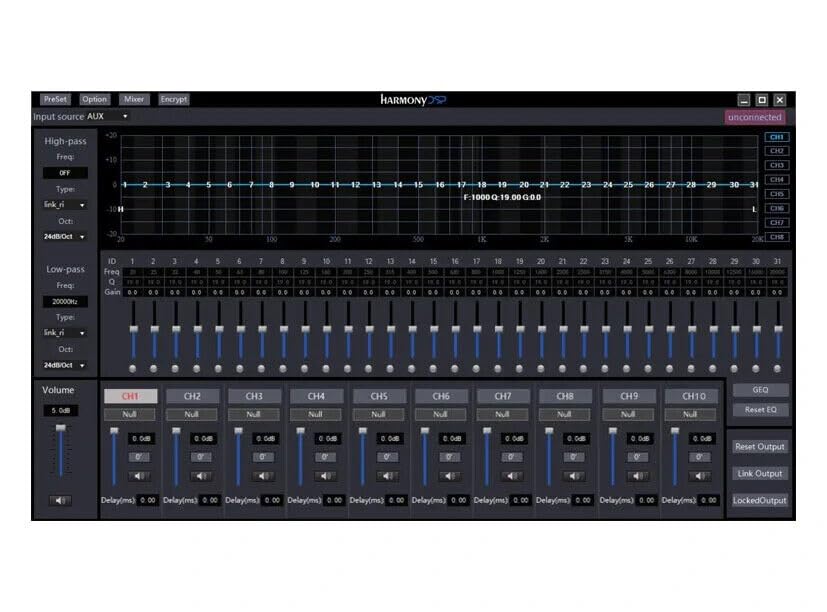
Imaj: Screenshot of the Zapco Harmony DSP PC software, showing the 31-band equalizer and channel controls for precise audio tuning.
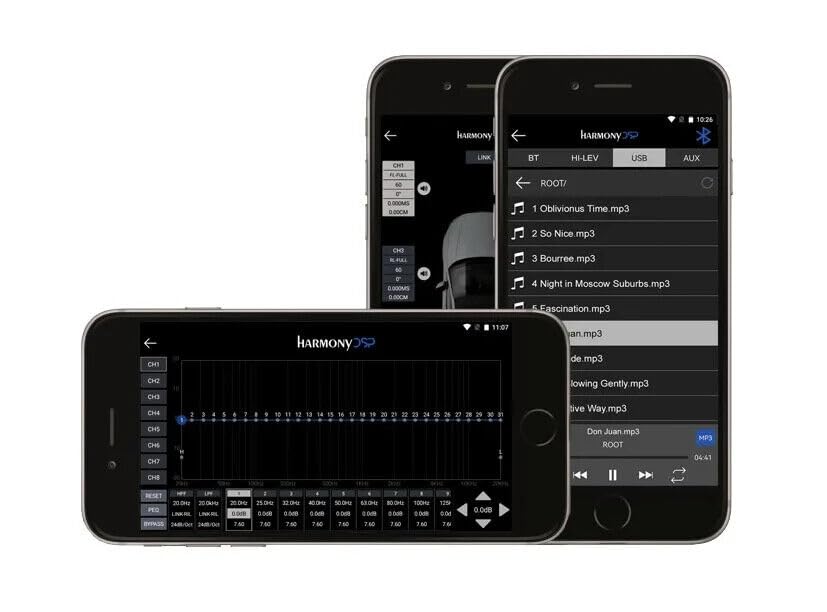
Imaj: Screenshots of the Zapco Harmony DSP mobile application on a smartphone, illustrating the interface for Bluetooth streaming and DSP adjustments.
Difizyon Bluetooth:
To stream audio wirelessly, enable Bluetooth on your mobile device and pair it with the HB-410-ADSP. The device name will typically appear as "Zapco HB-410-ADSP" or similar. Once paired, you can play audio from your device through the amplifier.
Integrated Music Player:
La amplifier includes a built-in music player that supports various file formats. You can manage and play music files directly through the mobile application.
Antretyen
The Zapco HB-410-ADSP is designed for durability and requires minimal maintenance. Follow these guidelines to ensure its continued performance:
- Netwayaj: Sèvi ak yon twal mou, sèk pou netwaye eksteryè a ampEvite itilize pwodui chimik ki agresif oswa pwodui netwayaj abrazif.
- Vantilasyon: Asire w ke ampOuvèti vantilasyon lifter la pa bouche pou anpeche li chofe twòp.
- Koneksyon: Tcheke tout koneksyon fil elektrik yo detanzantan pou asire yo byen fèm epi yo pa gen korozyon.
- Anviwònman: Enstale la amplifier in a location that is protected from excessive moisture, dust, and extreme temperatures.
Depanaj
If you encounter issues with your Zapco HB-410-ADSP, refer to the following common problems and solutions:
- Pa gen pouvwa:
- Check all power connections (+12V, GND, REM) for proper contact and voltage.
- Verify that the vehicle's battery is charged.
- Enspekte nenpòt fizib an liy pou kontinwite.
- Pa gen Sòti odyo:
- Ensure all input and output cables are securely connected.
- Check the source device (head unit, phone) for audio output.
- Verify DSP settings; ensure channels are not muted or gain is not set too low.
- Confirm speaker connections are correct and speakers are functional.
- Odyo defòme:
- Reduce input gain if the signal is clipping.
- Check speaker impedance compatibility with the amplifier.
- Review DSP equalizer and crossover settings for anomalies.
- Mobile App Issues (Input/Output Mapping):
- Some users have reported inconsistencies with input channel mapping to outputs when using the mobile application. If precise mapping is required, it is recommended to use the PC software for configuration.
- Ensure the mobile app is updated to the latest version.
- Pwoblèm koneksyon Bluetooth:
- Asire w la amplifier is in pairing mode or discoverable.
- Delete previous pairings on your mobile device and re-attempt pairing.
- Move the mobile device closer to the amplifier to rule out range issues.
Garanti ak sipò
For warranty information, please refer to the documentation provided with your purchase or visit the official Zapco website. If you require technical assistance or have questions not covered in this manual, please contact Zapco customer support through their official channels.
Resous sou entènèt: For additional support and software downloads, visit the Magazen Zapco sou Amazon oubyen Zapco ofisyèl la websit.


