1. Entwodiksyon
Thank you for choosing the ATTACK SHARK Ajazz AK820 Mechanical Keyboard. This 75% TKL keyboard is designed for gaming and productivity, featuring hot-swappable switches, customizable RGB backlighting, and a convenient multi-function knob. This manual provides detailed instructions for setup, operation, maintenance, and troubleshooting to ensure optimal performance and longevity of your keyboard.
2. Karakteristik kle
- 75% Layout (82 Keys): Compact design retaining essential arrow and function keys, optimizing desk space. Features N-key rollover for simultaneous key presses.
- Multi-Function Metal Knob: Allows independent control of volume level and mute function. Compatible with Mac and Windows operating systems.
- Konsepsyon monte sou jwenti: Coupled with a Flex-cut PC plate and 5 layers of sound insulation (Poron sandwich cotton, IXPE under-axis pad, PET premium sound pad, bottom cotton, bottom silicone) to maximally reduce noise and provide a softer, more elastic typing feel.
- Hot-Swappable Mechanical Sea Salt Switches: High-quality PCB supports 3/5-pin hot-swap, allowing easy switch replacement without soldering. Pre-lubed Sea Salt Linear switches offer a smooth and pleasing typing experience with a 50 million keystroke lifespan.
- Ekleraj RGB: South-facing LEDs with 1.6M RGB. Offers 20 lighting effects changeable via "FN+|" and customizable via driver software. Double-shot PBT keycaps provide superior shine-through.
3. Pake kontni
- ATTACK SHARK Ajazz AK820 Mechanical Keyboard
- USB-C kab
- 2-in-1 Keycap/Switch Puller

Image 1: The ATTACK SHARK Ajazz AK820 Mechanical Keyboard and its included USB-C cable.

Imaj 2: Yon anlèview highlighting the 82-key layout and key features like Knob Design, Gasket Mount, PBT Keycaps, RGB, 75% Layout, and Hot Swap capability.
4. Gid Enstalasyon
4.1 Konekte klavye a
- Jwenn pò USB-C a sou do oswa sou kote klavye a.
- Konekte yon bout kab USB-C ki founi an nan klavye a.
- Connect the other end of the USB-C cable to an available USB port on your computer (Laptop or PC).
- The keyboard is plug-and-play and should be automatically recognized by your operating system (Windows/Mac).

Image 3: The keyboard displaying its RGB backlighting, illustrating the 16.8 million colors and FN key combinations for controlling lighting modes.
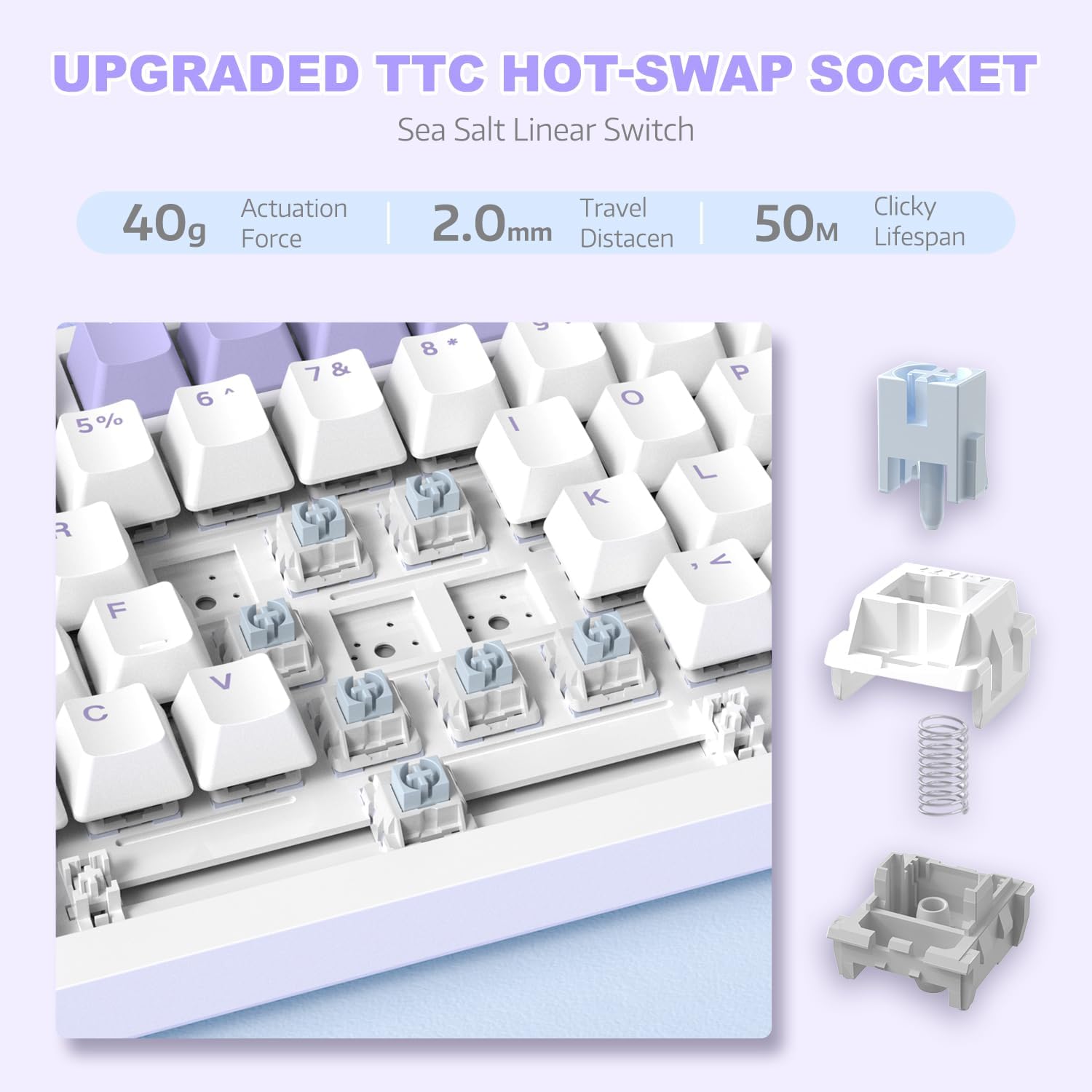
Imaj 4: Yon imaj detaye view of the hot-swappable switch socket, demonstrating how switches can be easily removed and replaced.
5. Operasyon Enstriksyon
5.1 Multi-Function Knob Control
The metal knob located on the top right of the keyboard provides convenient multimedia control:
- Vire nan sans zegwi mont lan: Ogmante volim.
- Vire nan sans kontrè zegwi mont lan: Diminye volim.
- Peze desann: Aktive/dezaktive odyo a.

Image 5: The multimedia knob, illustrating its functions for adjusting volume and muting audio.
5.2 Kontwòl ekleraj dèyè RGB
The keyboard features vibrant RGB backlighting with multiple effects. Use the following key combinations to control the lighting:
- FN + | (Backslash): Cycle through 20 different lighting effects.
- FN + X: Turn RGB backlighting ON/OFF.
- Refer to the included quick guide for additional lighting customization options or download the dedicated driver software for advanced control.
5.3 Hot-Swapping Switches and Keycaps
The AK820 supports hot-swapping, allowing you to change mechanical switches and keycaps without soldering.
- Retire kouvèti kle yo: Use the keycap puller tool to gently grip the keycap and pull upwards until it detaches from the switch.
- Retire switch yo: Use the switch puller (the other end of the 2-in-1 tool) to grip the top and bottom clips of the switch. Gently pull upwards until the switch detaches from the PCB.
- Enstalasyon switch: Align the pins of the new 3-pin or 5-pin mechanical switch with the holes on the PCB. Press down firmly until the switch clicks into place. Ensure pins are not bent.
- Enstale Keycaps yo: Align the cross-stem of the keycap with the stem of the switch and press down firmly until it is seated.

Image 6: Highlighting the durable PBT keycaps, known for their oil and wear resistance.
5.4 Konpatibilite sistèm operasyon
The keyboard is compatible with both Windows and Mac operating systems. No special drivers are typically required for basic functionality.

Image 7: Visual representation of the keyboard's compatibility with both Mac and Windows operating systems.
6. Antretyen
6.1 Netwaye klavye a
- Dekonekte klavye a nan òdinatè w la anvan ou netwaye li.
- Sèvi ak yon boutèy lè konprese pou soufle pousyè ak debri ki ant bouchon kle yo.
- For surface cleaning, use a soft, lint-free cloth lightly dampLave avèk dlo oswa yon solisyon netwayaj dou. Evite imidite twòp.
- Pa flite solisyon netwayaj yo dirèkteman sou klavye a.
6.2 Keycap and Switch Care
- When removing keycaps or switches, do so gently to avoid damaging the components.
- Store spare keycaps and switches in a clean, dry place.

Image 8: An exploded diagram illustrating the multi-layer noise reduction installation, including PORON sandwich cotton, IXPE switch pads, PET voice actor pdd, bottom cotton, and bottom silicone.
NAN. Depanaj
7.1 Klavye a pa reponn
- Asire w kab USB-C a byen konekte ak klavye a ak òdinatè a.
- Eseye konekte klavye a nan yon lòt pò USB sou òdinatè w la.
- Teste klavye a sou yon lòt òdinatè pou elimine yon pwoblèm espesifik ak òdinatè a.
- Rekòmanse òdinatè w lan.
7.2 RGB Backlighting Not Working/Incorrect
- Peze FN + X to ensure the RGB is turned on.
- Peze FN + | (Backslash) to cycle through different lighting modes.
- If using custom settings, ensure the driver software is installed and configured correctly.
7.3 Keys Not Registering (Anti-Ghosting)
The AK820 features N-key rollover (NKRO) to prevent ghosting. If specific keys are not registering:
- Ensure the keycap and switch are properly seated. Gently press down on the keycap to ensure it's fully attached.
- If a specific switch is faulty, use the hot-swap feature to replace it with a new one.

Image 9: Illustration of the 82-key anti-ghosting feature, demonstrating the ability to register multiple simultaneous key presses.
7.4 Video Demonstration: AK820 Keyboard Overview
Videyo 1: Yon ofisyèl finiview of the AK820 75% Wired RGB Gasket Mechanical Keyboard, demonstrating its features including the volume knob, hot-swappable switches, and RGB lighting effects.
8. Espesifikasyon
| Karakteristik | Detay |
|---|---|
| Nimewo Modèl | AK820 |
| Dimansyon pwodwi | 12.87 x 5.35 x 1.57 pous |
| Pwa atik | 2.05 liv |
| Manifakti | ATAK REKEN |
| Koneksyon Teknoloji | Filaire (USB-C) |
| Deskripsyon klavye | Gaming |
| Kantite kle | 82 |
| Chanje Kalite | Sea Salt Linear Switch (Hot-Swappable) |
| Materyèl Keycap | PBT |
| Ekleraj | RGB (LED ki fè fas a sid) |
| Karakteristik espesyal | 5 Layers of sound insulation cotton, CNC Metal Knob, Hot-Swappable |
| Aparèy konpatib | Laptop, PC (Windows, Mac) |
9. Garanti ak sipò
For warranty information and technical support, please refer to the official ATTACK SHARK websit la oubyen kontakte sèvis kliyan yo dirèkteman. Kenbe resi acha w la kòm prèv acha pou nenpòt reklamasyon garanti.
Manifakti: ATAK REKEN
Dat premye disponib: 15 desanm 2023


