1. Entwodiksyon
The VILTROX Retro 08X is a compact and versatile RGB LED video light designed for photography and video recording. It features a built-in 6000mAh battery, adjustable color temperature, full RGB color control, and special lighting effects. This manual provides detailed instructions for the proper use and maintenance of your device.

Image 1.1: VILTROX Retro 08X RGB LED Video Light with its companion mobile application.
2. Pake kontni
Tanpri verifye pake a pou asire w ke tout atik yo la:
- 1 x VILTROX Retro 08X LED Light Panel
- 1 x USB-C kab
- 1 x Adaptè soulye frèt
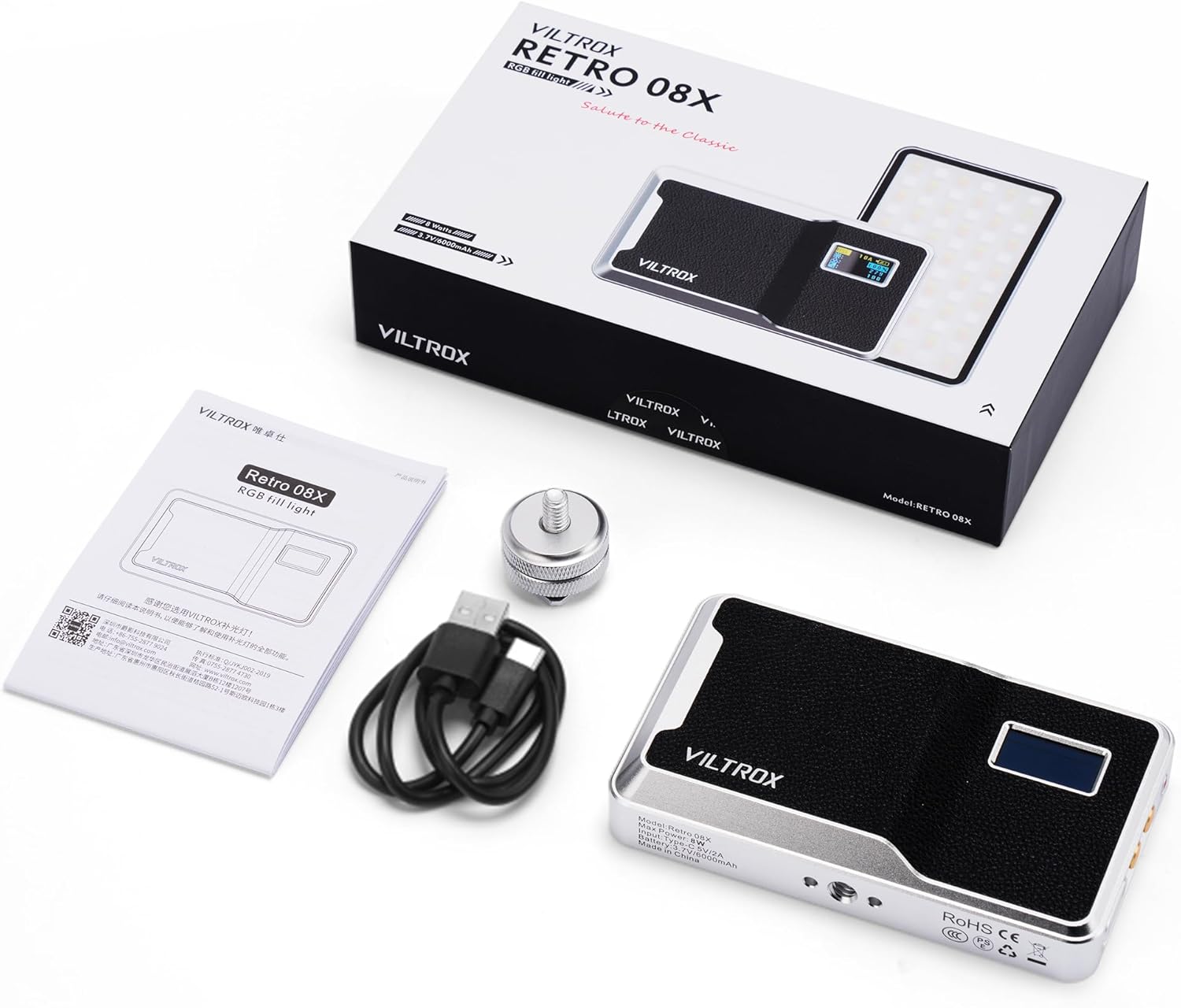
Image 2.1: All items included in the VILTROX Retro 08X product package.
3. Pwodwi souview
The Retro 08X features a durable all-metal construction with a leather-textured backing for enhanced grip and a classic aesthetic. It integrates a smart LCD screen for easy parameter adjustments and a USB-C port for charging.

Image 3.1: The VILTROX Retro 08X showcasing its metal construction and leather-textured back.
3.1. Kontwòl ak Ekspozisyon
The device is equipped with an intuitive LCD screen and physical buttons for direct control over its functions.

Imaj 3.2: Detaye view of the smart LCD screen displaying current settings.
- Ekran LCD: Displays brightness, color temperature, RGB values, battery status, and selected mode.
- Bouton kontwòl: Used to navigate menus, adjust parameters (brightness, color temperature, hue, saturation), and select modes.
- USB-C pò: Pou chaje batri entèn lan.

Image 3.3: USB-C charging port.

Image 3.4: Control buttons for adjustments.
4. Enstalasyon
4.1. Premye Chajman
Before first use, fully charge the device using the provided USB-C cable and a compatible 5V/2A power adapter (not included). The battery indicator on the LCD screen will show charging status.
4.2. Enstalasyon Limyè a
The Retro 08X can be mounted on cameras, tripods, or other accessories using the cold shoe adapter or the three 1/4"-20 screw holes located on its sides.
- Attach the cold shoe adapter to one of the 1/4"-20 screw holes on the light.
- Slide the cold shoe adapter into your camera's hot shoe mount or a compatible cold shoe accessory.
- Tighten the locking ring on the cold shoe adapter to secure the light in place.

Image 4.1: The Retro 08X light mounted on a camera using the cold shoe adapter.
5. Operasyon Enstriksyon
5.1. Power On/Off
Press and hold the power button (usually marked with a power symbol) for a few seconds to turn the light on or off.
5.2. Basic Adjustments (CCT Mode)
In CCT (Correlated Color Temperature) mode, you can adjust the brightness and color temperature.
- Use the mode button to select CCT mode.
- Use the adjustment buttons (e.g., '+' and '-') to change the brightness from 0% to 100%.
- Press the 'SET' button to switch to color temperature adjustment.
- Use the adjustment buttons to set the color temperature between 2500K (warm) and 8500K (cool).

Image 5.1: Adjusting light settings directly on the device's LCD screen.
5.3. RGB mòd
In RGB mode, you can select from millions of colors by adjusting Hue, Saturation, and Intensity (HSI).
- Use the mode button to select RGB mode.
- Use the adjustment buttons to cycle through Hue (0-360°), Saturation (0-100%), and Intensity (0-100%).
- Adjust each parameter to achieve the desired color.

Image 5.2: The Retro 08X capable of producing a wide spectrum of RGB colors.
5.4. Special Effects (FX Mode)
The light includes various built-in special effects to enhance creative shooting.
- Use the mode button to select FX mode.
- Use the adjustment buttons to browse and select different effects (e.g., Flash, Strobe, Fire, Ambulance, TV, Candle).
- Adjust the intensity or speed of the effect if applicable.

Image 5.3: Visual representation of the special effects modes.
5.5. Kontwòl Aplikasyon Bluetooth
For advanced control and convenience, download the "WeeylitePro" app on your smartphone.
- Asire w ke Bluetooth aktive sou smartphone ou.
- Open the "WeeylitePro" app.
- The app will automatically search for and connect to your Retro 08X light.
- Use the app interface to control all light parameters, including brightness, color temperature, RGB values, and special effects.

Image 5.4: Controlling the light wirelessly via the WeeylitePro mobile application.

Image 5.5: The app allows control of multiple VILTROX lights simultaneously.
6. Chaje ak Batri
The Retro 08X is equipped with a built-in 6000mAh lithium-ion battery, providing approximately 8 hours of operation at 50% brightness.

Image 6.1: The 6000mAh battery provides extended usage time.
6.1. Pwosedi Chaje
- Connect the provided USB-C cable to the light's USB-C port.
- Connect the other end of the USB-C cable to a 5V/2A power source (e.g., wall adapter, power bank, computer USB port).
- Ekran LCD a ap endike eta chaj la.

Image 6.2: Charging the Retro 08X using a USB-C cable.
6.2. Battery Life Indication
The LCD screen displays the current battery level. Recharge the device when the battery level is low to ensure uninterrupted operation.

Image 6.3: Battery endurance information for the Retro 08X.
7. Antretyen
- Kenbe aparèy la sèk. Pa ekspoze li nan imidite oswa lapli.
- Clean the light panel and body with a soft, dry cloth. Do not use harsh chemicals or abrasive materials.
- Sere aparèy la nan yon kote ki fre, sèk lè li pa itilize.
- Evite jete oswa sibi aparèy la nan gwo enpak.
NAN. Depanaj
8.1. Limyè a pa limen
- Check if the battery is charged. Connect the light to a power source using the USB-C cable.
- Asire w ke bouton pouvwa a peze epi kenbe l pandan kèk segonn.
8.2. Pwoblèm koneksyon Bluetooth
- Asire w ke Bluetooth aktive sou smartphone ou.
- Make sure the "WeeylitePro" app is installed and open.
- Restart both the light and your smartphone, then try connecting again.
- Ensure the light is within the Bluetooth range of your smartphone.
8.3. Inaccurate Color or Brightness
- Verify the selected mode (CCT, RGB, FX) matches your intended use.
- Check the brightness and color temperature/HSI settings on the LCD screen or via the app.
- Ensure the light panel is clean and free from obstructions.
9. Espesifikasyon
The following table details the technical specifications of the VILTROX Retro 08X RGB LED Video Light:
| Karakteristik | Spesifikasyon |
|---|---|
| Modèl | Retro 08X |
| Mak | VILTROX |
| Koneksyon | Bluetooth |
| Kalite batri | Lityòm-ion |
| Kapasite batri | 6000mAh |
| Max pouvwa | 8W |
| Antre | Kalite-C 5V/2A |
| Dirije nou konte ofri sèvis | 72 bi-color LEDs, 36 RGB LEDs (Total 108 LEDs) |
| Luminans | 650 lux (at 0.5m) |
| CRI/TLCI | 97+ |
| Ranje Tanperati Koulè | 2500K-8500K |
| Range klète | 0-100% |
| Dimansyon (L x W x H) | 14 cm x 8 cm x 1.85 cm (5.51 pous x 3.15 pous x 0.73 pous) |
| Pwa | 197.5g (0.43 lbs) |
| Opsyon Montaj | Cold shoe mount, 3x 1/4"-20 screw holes |

Image 9.1: Visual representation of the Retro 08X dimensions and weight.
10. Garanti ak sipò
VILTROX products are designed and manufactured to high-quality standards. For warranty information and technical support, please refer to the official VILTROX websit la oubyen kontakte distribitè lokal ou a. Kenbe resi acha ou kòm prèv acha pou reklamasyon garanti.


