AVer Avervision U50+ Document Camera User Manual
Model: U50+
Entwodiksyon
This manual provides comprehensive instructions for the setup, operation, and maintenance of your AVer Avervision U50+ Document Camera. Please read this manual thoroughly before using the device to ensure proper functionality and to maximize its capabilities. The AVer Avervision U50+ is a versatile document camera designed for educational and professional environments, offering high-quality image capture and ease of use.
Pwodwi souview
The AVer Avervision U50+ is a compact and portable document camera featuring a flexible gooseneck design and intuitive controls.
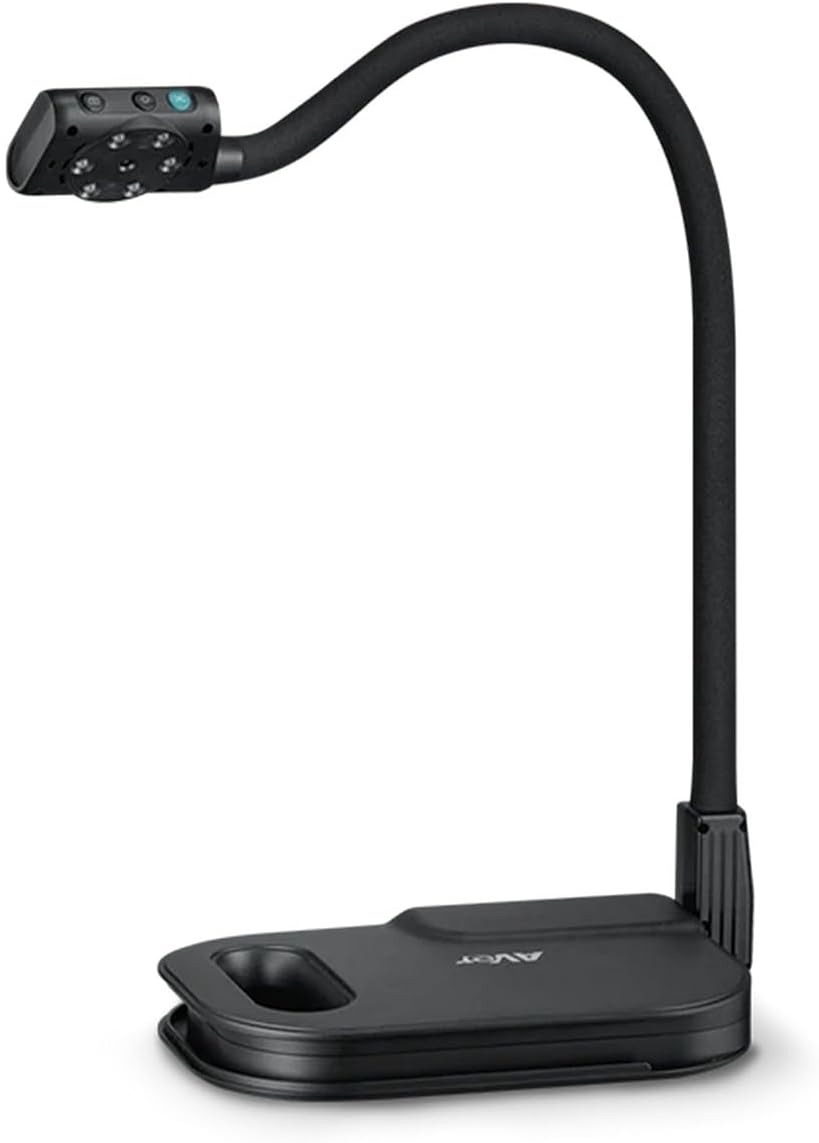
Figi 1: Devan view of the AVer Avervision U50+ Document Camera, showing the camera head, flexible arm, and base.
Konpozan kle:
- Tèt kamera: Contains the lens, image sensor, and control buttons.
- Flexible Gooseneck Arm: Allows for precise positioning of the camera head.
- Baz: Provides stability and houses the USB connection port.
- Limyè ki ap dirije ki entegre: Provides illumination for objects placed under the camera.
- Bouton kontwòl: Located on the camera head for functions like zoom and focus.

Figi 2: Close-up view of the base, highlighting the Mini USB Port for PC connection.
Kontni pake
While specific details were not provided, a typical package for the AVer Avervision U50+ Document Camera usually includes:
- AVer Avervision U50+ Document Camera unit
- USB cable for PC connection
- Quick Start Guide (digital or printed)
- Software CD/Download link (if applicable)
Enstalasyon
- Depake kamera a: Carefully remove the document camera and all accessories from its packaging.
- Pozisyon kamera a: Mete baz kamera a sou yon sifas ki plat e ki estab.
- Konekte ak PC: The AVer Avervision U50+ is USB Powered ak karakteristik yo Fonksyonalite Plug and Play. Connect the supplied USB cable from the Mini USB Port on the camera base to an available USB port on your computer.
- Software Installation (if required): For full functionality, you may need to install AVer's Sphere2 software or other compatible document camera software. Refer to the Quick Start Guide or AVer's official websit pou enstriksyon telechaje yo.
- Ajiste Gooseneck la: Gently bend the flexible gooseneck arm to position the camera head directly above the object or document you wish to display.
Enstriksyon Operasyon
1. Power On/Off
The camera powers on automatically when connected to a powered USB port. Disconnect the USB cable to power off.
2. Ajiste imaj la
- Konsantre: The camera features automatic and manual exposure control. Use the focus button on the camera head or software controls to achieve a clear image.
- Zoom: The U50+ features 16x Digital Zoom. Use the zoom buttons on the camera head (often marked with '+' and '-') or the software interface to zoom in or out on your subject.
- Limyè ki ap dirije: La Built-in Adjustable LED Light can be turned on or off, and its brightness adjusted, using the dedicated button on the camera head or through the software. This helps illuminate objects for better clarity.
- Ajisteman kou gwas: The flexible arm allows for dynamic positioning to capture various angles and sizes of objects.

Figure 3: Camera head showing controls and indicating 16x digital zoom capability.

Figure 4: Close-up of the camera head with the built-in LED light turned on, illuminating the area below.

Figure 5: Illustration of the flexible gooseneck arm's range of motion, showing how it can be adjusted.
3. Itilizasyon lojisyèl
Utilize the accompanying software (e.g., AVer Sphere2) to:
- Capture still images and record videos.
- Annotate live images.
- Access advanced camera settings.
- Integrate with interactive whiteboards or projectors.
Antretyen
- Netwayaj: Use a soft, dry cloth to clean the camera body. For the lens, use a specialized lens cleaning cloth and solution. Avoid abrasive cleaners or solvents.
- Depo: When not in use, store the camera in a cool, dry place, away from direct sunlight and extreme temperatures.
- Manyen: Handle the flexible arm gently. Avoid excessive force or twisting that could damage internal wiring.
Depanaj
| Pwoblèm | Kòz posib | Solisyon |
|---|---|---|
| Pa gen imaj ki parèt. | USB cable not properly connected; software not running or installed. | Ensure USB cable is securely connected to both the camera and the computer. Verify software is installed and running. Try a different USB port. |
| Imaj la twoub. | Incorrect focus; object too close/far; dirty lens. | Adjust focus using the camera buttons or software. Reposition the object. Clean the camera lens. |
| Dirije limyè pa travay. | Light turned off; insufficient power from USB port. | Press the LED light button on the camera head. Try connecting to a different USB port or a powered USB hub. |
| Lojisyèl la pa detekte kamera a. | Driver issue; conflicting software. | Reinstall camera drivers. Close other applications that might be using the camera. Restart your computer. |
Espesifikasyon
| Karakteristik | Detay |
|---|---|
| Nimewo Modèl | U50+ |
| Dimansyon pwodwi | 4.2 x 9.3 x 13.6 pous |
| Pwa atik | 4.6 liv |
| Rezolisyon Capture Videyo | 4K |
| Kalite Zoom | Zoom dijital (16x) |
| Kalite Kontwòl Ekspozisyon | Manyèl, otomatik |
| Sous pouvwa | USB Powered |
| Manifakti | AVer Information Inc |
Garanti ak sipò
Specific warranty details are not provided within this manual. For information regarding warranty coverage, technical support, driver downloads, and software updates, please visit the official AVer website or contact AVer customer support directly. Keep your purchase receipt as proof of purchase for warranty claims.
AVer Support Websit: https://www.averusa.com/education/support/


