Entwodiksyon
Thank you for choosing the Mars Gaming MS-H RGB Flow Gaming Speakers. These compact speakers are designed to provide an immersive audio experience with 3D Surround sound and dynamic RGB Flow lighting. This manual will guide you through the setup, operation, and maintenance of your new speakers.
Kontni pake
- Mars Gaming MS-H RGB Flow Gaming Speakers (2 units)
- Kab pouvwa USB entegre
- Kab odyo oksilyè 3.5mm entegre
- Manyèl itilizatè
Karakteristik
- Konsepsyon kontra enfòmèl ant: Space-saving design suitable for any desk setup.
- RGB Flow Lighting: Dynamic LED lighting for an enhanced visual experience.
- 10W Sorti pouvwa: Bay yon odyo klè e pwisan.
- 3D Surround Sound: Immersive audio experience with an innovative inverted driver system.
- Integrated Volume Control: Convenient inline control box for easy volume adjustment.
- Koneksyon inivèsèl: Powered via USB and connects to audio sources via a 3.5mm auxiliary jack.
Enstriksyon Enstalasyon
1. Plasman:
Place the two speakers on a stable, flat surface, ideally on either side of your monitor or listening area for optimal stereo separation.
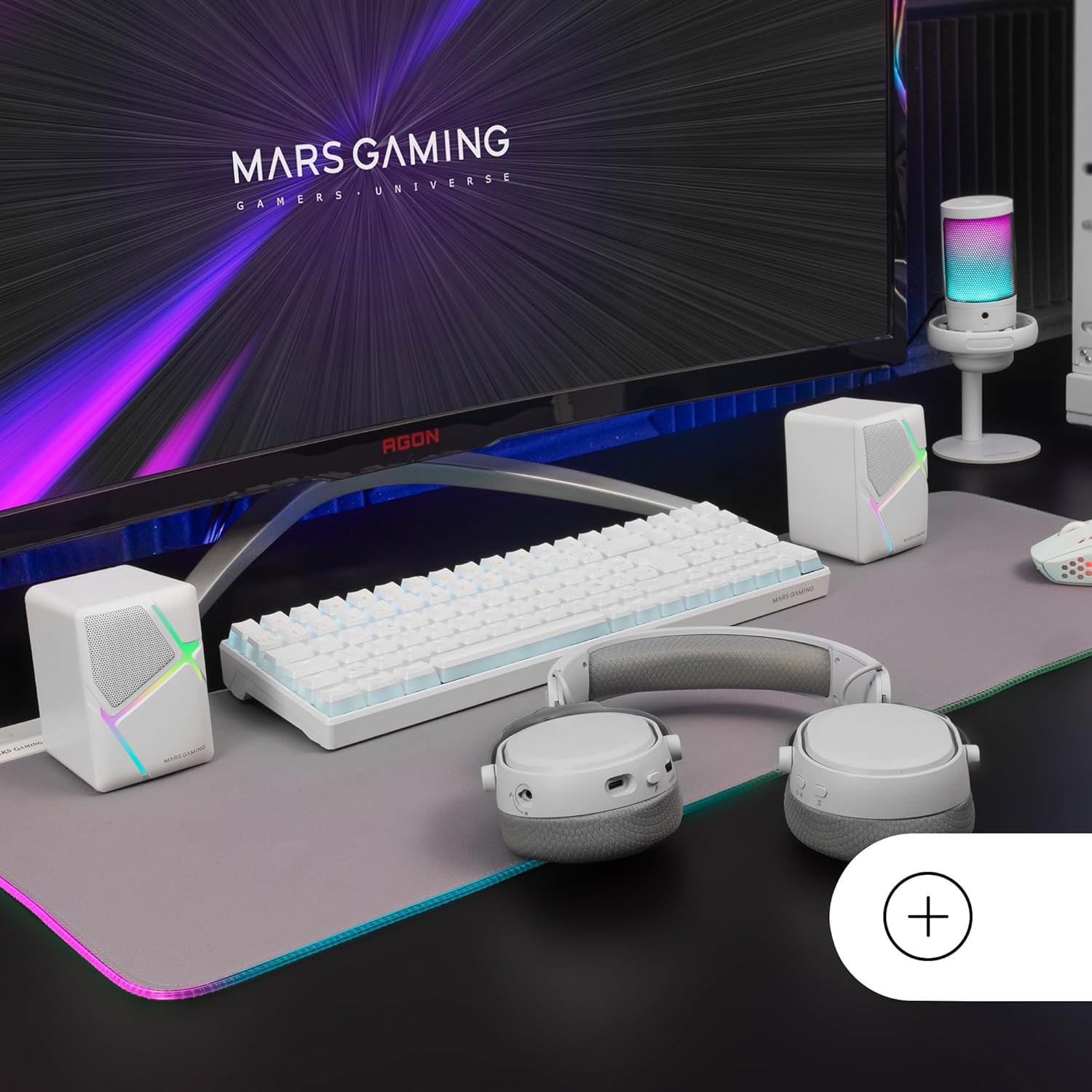
Image: Mars Gaming MS-H speakers set up on a desk with other gaming peripherals.
2. Connect Audio Cable:
Plug the 3.5mm auxiliary audio jack from the speakers into the audio output port of your computer, smartphone, tablet, or music player.

Image: Illustration showing the universal 3.5mm jack connection.
3. Connect USB Power:
Plug the USB-A connector into an available USB port on your computer, a USB wall adapter (not included), or any other compatible USB power source. The speakers will power on and the RGB lighting will activate.
Image: The Mars Gaming MS-H speakers showcasing their RGB Flow lighting feature.
Enstriksyon Operasyon
1. Power On/Off:
The speakers power on automatically when the USB cable is connected to a power source. Disconnect the USB cable to power off the speakers.
2. Ajiste Volim:
Use the inline volume control box to adjust the audio output level. Rotate the knob clockwise to increase volume and counter-clockwise to decrease it.

Image: The integrated volume control box with a rotary knob.
3. RGB ekleraj:
The RGB Flow lighting activates automatically when the speakers are powered on. The lighting pattern is pre-set and cannot be adjusted or turned off independently.
Antretyen
- Keep the speakers away from water, moisture, and direct sunlight.
- Clean the speaker surfaces with a soft, dry cloth. Do not use abrasive cleaners or solvents.
- Avoid placing heavy objects on the speakers or cables.
- Do not attempt to open or repair the speakers yourself. Contact qualified service personnel for assistance.
Depanaj
| Pwoblèm | Kòz posib | Solisyon |
|---|---|---|
| Pa gen son |
|
|
| Ekleraj RGB pa travay |
|
|
| Son defòme |
|
|
Espesifikasyon
| Modèl | MSHW |
| Sorti pouvwa | 10 Watts |
| Koneksyon Teknoloji | Auxiliary (3.5mm Jack), USB (for power) |
| Audio Sòti Mode | Antoure |
| Enpedans | 4 Ohms |
| Repons Frekans | Jiska 20 KHz |
| Metòd kontwòl | Rotary Knob (Inline Volume Control) |
| Karakteristik espesyal | RGB Flow LED Lighting |
| Itilizasyon Rekòmande | Music player, Computer, Smartphone or tablet |
| Aparèy konpatib | Smartphones, tablets, computers, music players |
| Koulè | Blan |
| Materyèl | Akrilonitrile butadien stirèn (ABS) |
| Dimansyon pwodwi (L x W x H) | 10 x 7.9 x 7 cm |
| Pwa atik | 375 gram |
| Kalite aliye | Tabletop |
| Peyi orijin | Espay |
Garanti ak sipò
Pou enfòmasyon sou garanti a ak sipò teknik, tanpri al gade nan adrès ofisyèl manifakti a. websit la oubyen kontakte revandè w la. Kenbe prèv acha w la pou nenpòt reklamasyon sou garanti a.
Manufacturer: Mars Gaming


