1. Entwodiksyon
Thank you for choosing the deli M124 Basic Desktop Calculator. This manual provides essential information for the proper setup, operation, and maintenance of your calculator. Designed for ease of use, the deli M124 features a 12-digit large LCD display and comfortable, rounded buttons, making it suitable for various environments including offices, schools, and homes.
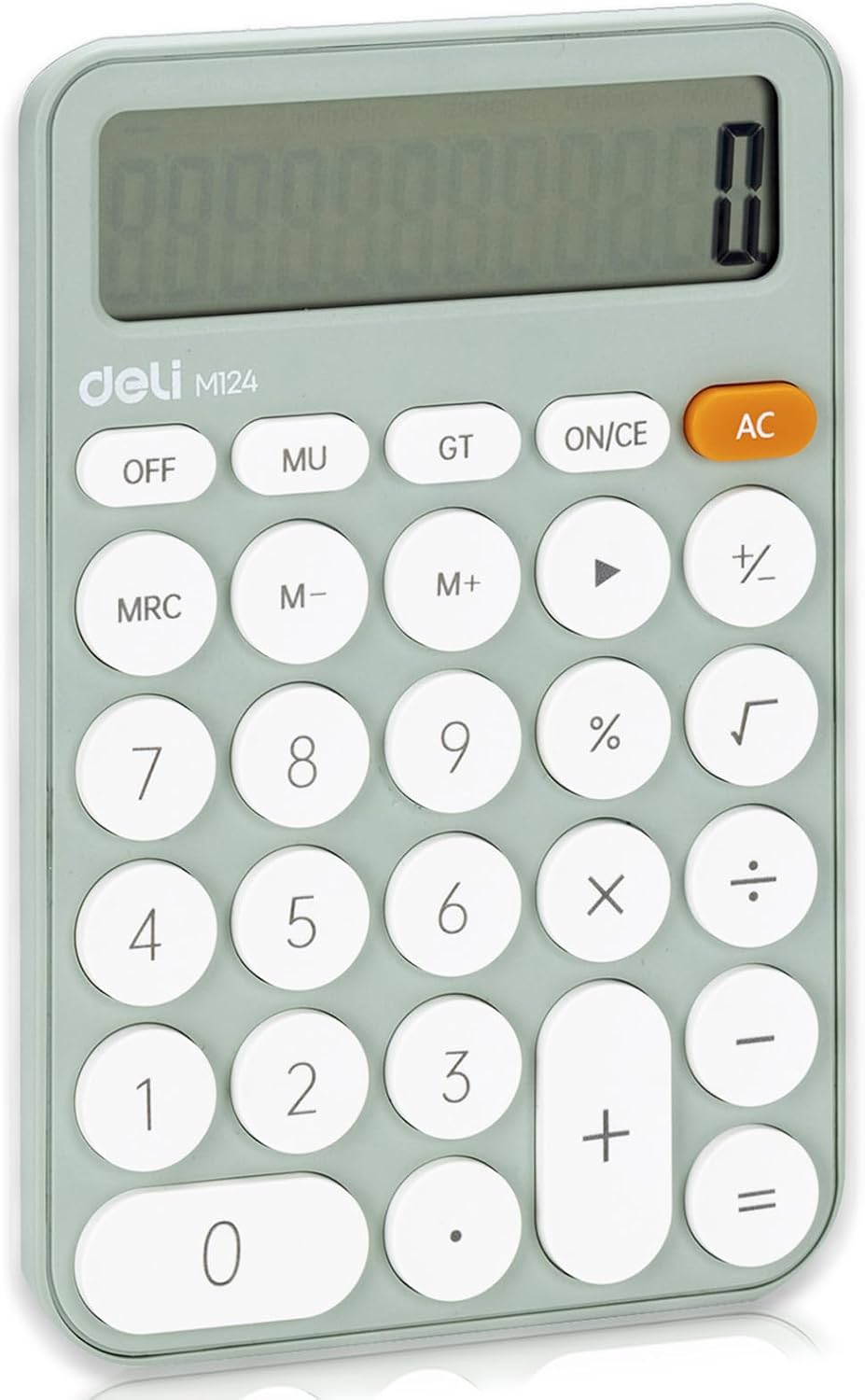
Imaj 1: Devan view of the deli M124 Basic Desktop Calculator.
2. Enstalasyon
2.1 Enstalasyon batri
The deli M124 calculator requires one AAA battery for operation. A battery is typically included with your purchase.
- Jwenn kouvèti konpatiman pil la sou dèyè kalkilatris la.
- Dousman glise oswa leve kouvèti a pou ouvri konpatiman an.
- Mete yon pil AAA ladan l, asire w ke tèminal pozitif (+) ak negatif (-) yo byen aliyen ak mak ki anndan konpatiman an.
- Ranplase kouvèti lòj batri a byen.

Image 2: Illustration of AAA battery insertion into the calculator.
Pou limen kalkilatris la, peze bouton an AC bouton. Pou etenn li, peze la OFF button. The calculator will not automatically turn off to conserve power.
3. Operasyon Enstriksyon
3.1 Fonksyon bouton yoview
Familiarize yourself with the calculator's key functions:

Image 3: Labeled diagram of deli M124 Calculator buttons.
- ON/CE: Turns the calculator on or clears the last entry.
- AC: All Clear. Clears all entries and calculations, resetting the calculator.
- OFF: Etenn kalkilatris la.
- MU: Mark-up and Mark-down function.
- GT: Grand Total. Displays the sum of all results from previous calculations.
- MRC: Memory Recall/Clear. Press once to recall memory, twice to clear memory.
- M+: Memory Plus. Adds the displayed value to the memory.
- M-: Memory Minus. Subtracts the displayed value from the memory.
- →: Backspace key. Deletes the last digit entered.
- %: Pousantage fonksyon.
- √: Square Root function.
- 0-9,.: Number keys and decimal point.
- +, -, ×, ÷, =: Basic arithmetic operators and equals key.
3.2 Kalkil debaz
Pou fè operasyon aritmetik debaz yo:
- Antre premye nimewo a.
- Press the desired operation key (+, -, ×, ÷).
- Antre dezyèm nimewo a.
- Peze a = key to display the result.
3.3 Fonksyon Memwa
The memory functions allow you to store and recall numbers for complex calculations:
- To add a number to memory: Enter the number, then press M+.
- To subtract a number from memory: Enter the number, then press M-.
- To recall the number stored in memory: Press MRC yon fwa.
- To clear the memory: Press MRC de fwa.
4. Karakteristik
4.1 Display and Ergonomics
- 12-Digit Large LCD Display: Provides clear and easy-to-read numbers.
- 15° Angled Screen: The display is designed with a 15-degree tilt for optimal viewing comfort, reducing eye strain during prolonged use.

Image 4: The 15-degree ergonomic design for improved visibility.
4.2 Design and Portability
- Anti-glise baz: Equipped with anti-slip pads on the bottom to ensure stability on various surfaces, preventing accidental movement during use.
- Comfortable Buttons: Features smooth, circular ABS plastic buttons that provide a good tactile response and operate silently.
- Kontra enfòmèl ant ak lejè: Measuring 6.1 x 4.1 inches and weighing 5 ounces (excluding battery), this calculator is highly portable and easy to carry.
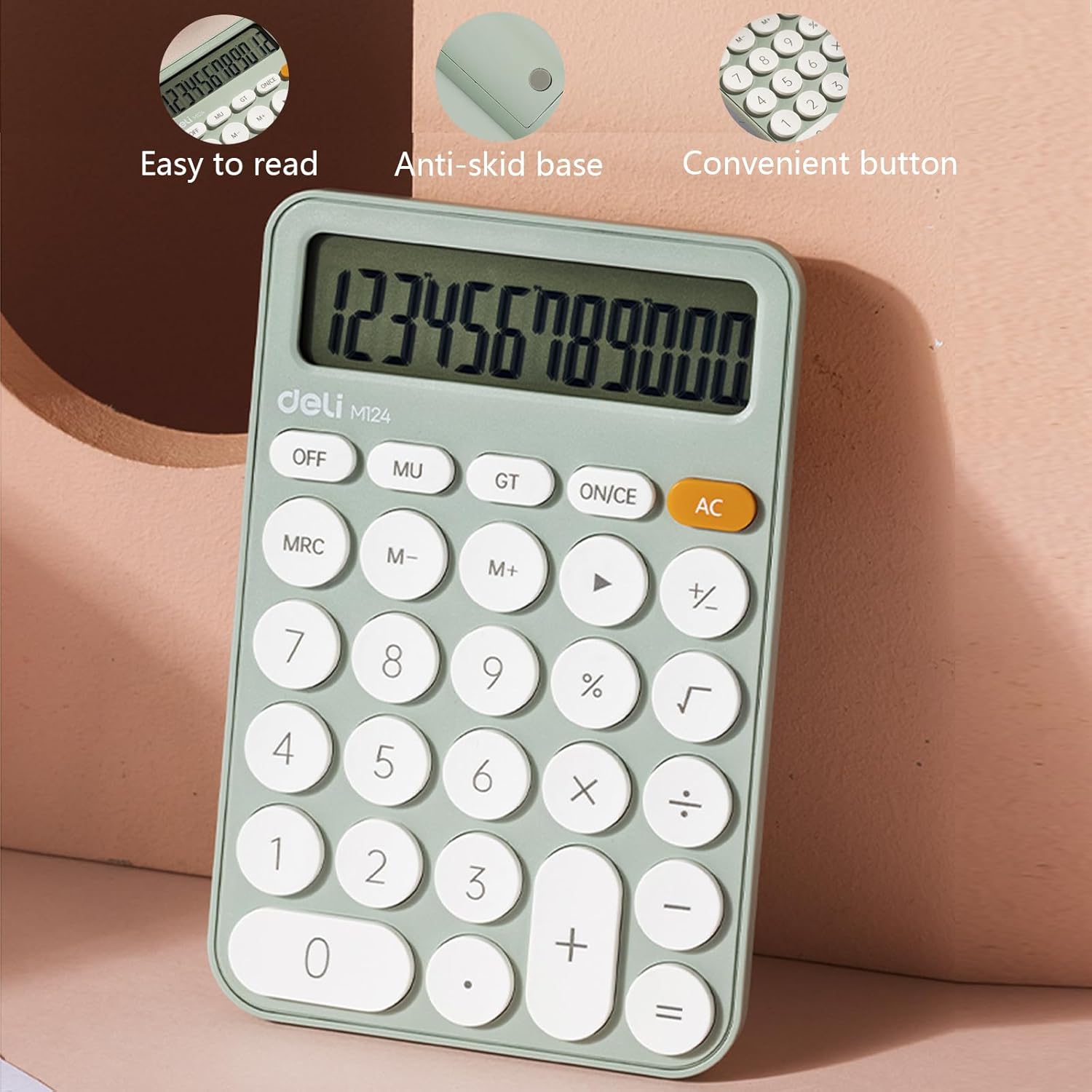
Image 5: Features such as easy-to-read display, anti-skid base, and convenient buttons.

Image 6: Detail of the lower anti-skid pads.

Image 7: The calculator's compact size for easy portability.
5. Senaryo aplikasyon
The deli M124 Basic Desktop Calculator is versatile and suitable for a wide range of users and environments:
- Sèvi ak biwo: Ideal for daily calculations, budgeting, and data entry.
- Biznis: Useful for financial workers, sales professionals, and inventory management.
- Lekòl: Perfect for students and teachers for math classes, homework, and administrative tasks.
- Itilizasyon lakay ou: Convenient for personal finance, bill paying, and general household calculations.

Image 8: The calculator in various usage scenarios.
6. Antretyen
6.1 Netwayaj
Pou kenbe aparans ak fonksyonalite kalkilatris la:
- Wipe the calculator with a soft, dry cloth.
- Pou pousyè tè ki difisil pou retire, yon ti kras dampRense twal la avèk dlo oswa yon solisyon netwayaj dou, apresa siye l sèk imedyatman.
- Avoid using abrasive cleaners, solvents, or harsh chemicals, as these can damage the display or casing.
6.2 Ranplasman batri
When the display becomes dim or the calculator functions erratically, it is time to replace the AAA battery. Follow the battery installation steps outlined in Section 2.1.
NAN. Depanaj
- Ekspozisyon vid: If the display is blank, ensure the calculator is turned on by pressing AC. Check if the battery is correctly installed and has sufficient power. Replace the battery if necessary.
- Kalkil ki pa kòrèk: Peze AC to clear any previous entries or memory contents that might be affecting current calculations. Ensure correct input of numbers and operations.
- Bouton ki pa reponn: If buttons are unresponsive, try pressing them firmly. If the issue persists, replace the battery. Avoid operating the calculator in extremely dusty or humid environments.
8. Espesifikasyon
| Karakteristik | Spesifikasyon |
|---|---|
| Mak | deli |
| Nimewo Modèl | 6921734944542 (M124) |
| Dimansyon pwodwi | 3.9 x 1.9 x 0.1 inches (Calculator body) |
| Pwa atik | 5 ons |
| Ekspozisyon | 12-Digit Large LCD |
| Gwosè ekran | 3 Inches (Visible diagonal) |
| Sous pouvwa | 1 x AAA Battery (required) |
| Kalite kalkilatris | Standard Basic Calculator |
| Koulè | Vèt |
9. Garanti ak sipò
9.1 Enfòmasyon sou Garanti
The deli M124 Basic Desktop Calculator comes with a 5-ane garanti apati dat acha a. Garanti sa a kouvri domaj fabrikasyon epi li asire pwodwi a satisfè estanda pèfòmans espesifye li yo nan itilizasyon nòmal. Tanpri konsève prèv acha ou pou reklamasyon garanti.
9.2 Sipò pou Kliyan
For any questions, technical assistance, or warranty claims, please contact deli customer support through the retailer where the product was purchased or visit the official deli websit pou enfòmasyon kontak.


