1. Entwodiksyon
The ekey sLine Fingerprint Scanner Set 204710 is a state-of-the-art biometric access solution designed for secure and convenient keyless entry to buildings. This system integrates seamlessly with intercom systems, providing touch-based operation for effortless access control. It eliminates the need for traditional keys, numeric codes, or cards, offering enhanced security and ease of use for all authorized individuals.
The system is managed via the intuitive ekey bionyx app, allowing for flexible user management and smart home integration. This manual provides detailed instructions for the installation, operation, and maintenance of your ekey sLine Fingerprint Scanner Set.
2. Enfòmasyon sou Sekirite
Please read all safety instructions carefully before installation and operation. Failure to follow these instructions may result in injury, damage to the device, or improper function.
- Asire w ke ekipman pou kouran an dekonekte anvan ou fè nenpòt travay enstalasyon oswa antretyen.
- Installation should only be performed by qualified personnel in accordance with local electrical codes and regulations.
- Do not expose the device to extreme temperatures, humidity, or direct sunlight beyond its specified operating conditions.
- Keep the fingerprint sensor clean and free from debris to ensure optimal performance.
- This device is designed for access control; it is not a substitute for other security measures.
3. Konpozan souview
The ekey sLine Fingerprint Scanner Set 204710 includes the following main components:
- ekey sLine Fingerprint Scanner (White)
- Gira Door Station Unit 106
- ekey Control Unit with two relays
The control unit's two relays allow for the control of two separate devices, such as a front door and a garage door, or integration with an alarm system.
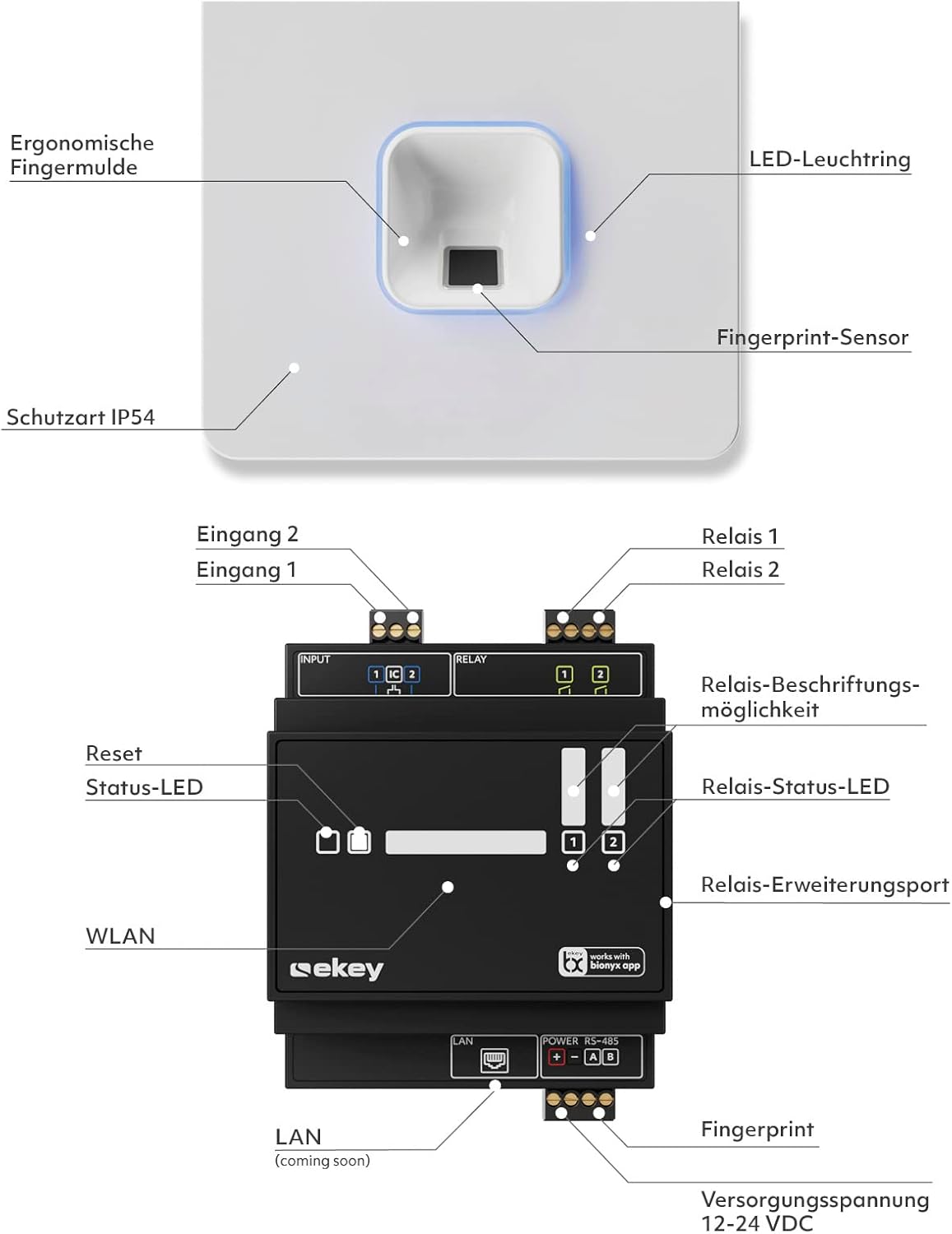
Figure 3.1: ekey sLine Fingerprint Scanner and Control Unit Diagram

Figure 3.2: ekey sLine Fingerprint Scanner
4. Enstalasyon ak Enstalasyon
The ekey sLine Fingerprint Scanner is designed for installation in the Gira door station 106. It is suitable for both outdoor and indoor use.
4.1 Recommended Installation Height
For optimal ergonomic use and reliable fingerprint scanning, the recommended installation height for the fingerprint scanner is between 105 cm and 155 cm from the ground.
4.2 Fil elektrik ak koneksyon
Connect the ekey sLine fingerprint scanner to the ekey control unit according to the wiring diagram provided with your product packaging. Ensure all connections are secure and correctly polarized. The system operates on 12-24 Volts DC.
4.3 Premye konfigirasyon sistèm
The system is managed via the ekey bionyx app. Download the app from your device's app store (Google Play Store or Apple App Store).

Figure 4.1: ekey bionyx App Interface
- Power on the ekey sLine system after completing all wiring.
- Open the ekey bionyx app on your smartphone or tablet.
- Follow the on-screen instructions within the app to connect to your ekey control unit and register your system.
- Begin enrolling fingerprints for authorized users. The system supports up to 20 users initially, expandable to 100 users.
5. Operasyon
Operating your ekey sLine Fingerprint Scanner is simple and intuitive.
5.1 Opening the Door with Fingerprint
To open the door, simply place your registered finger on the fingerprint sensor. The system will recognize your fingerprint and activate the connected door lock, granting access. This provides worry-free access, even for children (6 years and older).
5.2 User Management via ekey bionyx App
The ekey bionyx app allows for comprehensive management of your access system:
- Add/Remove Users: Easily enroll new fingerprints or delete existing ones.
- Remote Door Opening: Conveniently open your door remotely via the app.
- Access Logging: View a log of all access events for enhanced security monitoring.
- Pouse Notifikasyon: Receive push messages on demand when the door is opened.
- Entegrasyon kay entelijan: The system is prepared for connection to Amazon Alexa voice assistant and other smart home systems, allowing for flexible expansion with new features and devices.
6. Antretyen
To ensure the longevity and optimal performance of your ekey sLine Fingerprint Scanner, follow these maintenance guidelines:
- Netwayaj: Gently wipe the fingerprint sensor and surrounding surfaces with a soft, dry, lint-free cloth. Do not use abrasive cleaners, solvents, or excessive moisture.
- Mizajou lojisyèl: Regularly check the ekey bionyx app for available software or firmware updates for your system. Updates often include performance improvements and security enhancements.
- Pwoteksyon anviwònman: While suitable for outdoor use, protect the unit from direct, prolonged exposure to extreme weather conditions if possible.
NAN. Depanaj
If you encounter issues with your ekey sLine Fingerprint Scanner Set, refer to the following common problems and solutions:
| Pwoblèm | Kòz posib | Solisyon |
|---|---|---|
| Anprent pa rekonèt | Dirty sensor, incorrect finger placement, unregistered fingerprint, dry/wet finger. | Clean the sensor. Ensure full finger contact. Re-enroll fingerprint if necessary. Moisten or dry finger slightly. |
| Pòt pa louvri | No power, wiring issue, lock malfunction, control unit error. | Check power supply. Verify wiring connections. Test the door lock mechanism independently. Check control unit status lights. |
| App cannot connect to system | Bluetooth/Wi-Fi off, system not powered, app outdated, network issues. | Ensure Bluetooth/Wi-Fi is enabled. Verify system power. Update the ekey bionyx app. Check your local network connection. |
| Sistèm pa reponn | Power interruption, internal error. | Cycle power to the system (turn off, wait 30 seconds, turn on). If problem persists, contact support. |
For issues not listed here or if solutions do not resolve the problem, please contact ekey customer support.
8. Espesifikasyon
| Karakteristik | Spesifikasyon |
|---|---|
| Manifakti | ekey biometric systems GmbH |
| Nimewo Modèl | 204710 |
| Dimansyon pwodwi | 10.6 x 10.6 x 3.2 cm |
| Pwa atik | 570 g |
| Koulè | White Fingerprint Scanner |
| Voltage | 12 Vòlt (DC) |
| Number of Sub-Units | 1 |
| Konpozan ki enkli | Intercom unit + integrated ekey sLine fingerprint electronic key, ekey control unit |
| Batri obligatwa? | Non |
| Premye Dat ki disponib | 21 desanm 2023 |
9. Garanti ak sipò
For warranty information and technical support, please refer to the documentation included with your product or visit the official ekey websit la. Kenbe prèv acha ou pou reklamasyon garanti.
For further assistance, you may contact ekey customer service through their official channels.


